


 All CategoriesAll CategoriesAll Categories
Shipped by Newegg





Warranty Notice:
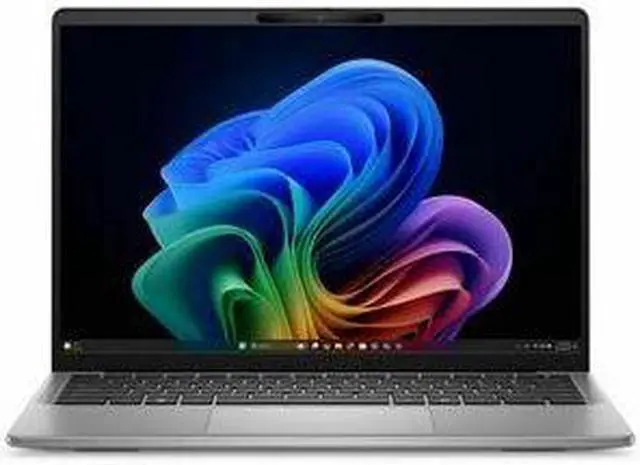
This product does not include manufacturer warranty when purchased or used outside of its designated sales region. By purchasing internationally, you acknowledge that warranty support from the manufacturer will not be available.The Dell Latitude 7000 7455 is a 14-inch QHD+ touchscreen laptop with Snapdragon X Plus, 16GB RAM, and a 512GB SSD, suited for professionals and students who want a portable everyday notebook for web work, documents, video calls, and on-the-go productivity.
| Attribute | Value |
|---|---|
| Best For | Business and everyday productivity on the go — 14-inch touchscreen Windows 11 Pro notebook with 16 GB RAM, 512 GB SSD and mobile/Wi‑Fi connectivity |
| Model Identifiers | Dell model DV9KG (Model Name DV9KG) — X1P-64-100 SKU within the Latitude 7000 (Edition 7000), 2024 model year |
| Display Spec | 14-inch LED IPS touchscreen, native/QHD+ 2560 x 1600, 60 Hz refresh, ComfortView Plus, up to 400 nit brightness and 100% sRGB color coverage (capacitive multi-touch) |
| Processor And Core Count | Qualcomm Snapdragon X Plus (X1P-64-100 / chipset X1P-64-100), 5th Gen processor configuration, single processor entry with maximum reported speed 3.4 GHz |
| Memory Configuration | 16 GB DDR5 memory (6000 MHz) installed; maximum stated memory size 16 GB |
| Storage And Expansion | 512 GB SSD in M.2 form factor (M.2 interface), flash storage listed as 512 GB |
| Graphics And Video | Integrated Qualcomm Adreno GPU (integrated graphics, GDDR5 listed) with video output options including HDMI, DisplayPort and Thunderbolt |
| Ports And Connectivity | 3 total USB ports (1 USB 3.0, 2 USB 2.0) plus additional connectivity via USB/Thunderbolt and video outputs |
| Wireless And Networking | Wi‑Fi (802.11ac), Bluetooth support present, and 5G cellular capability |
| Battery And Power | 54 Wh lithium-ion battery (3 cells, ~100 g); batteries contained in equipment; batteries required but listed as not included separately; battery installation type not installed |
| Webcam And Privacy | Built-in webcam capability |
| Keyboard And Control | Backlit keyboard plus capacitive multi-touch touchscreen input |
| Operating System And Software | Ships with Windows 11 Pro and includes Dell Copilot+ (listed also as included internet security/productivity title); other features listed include Copilot+ and enhanced graphics |
| Physical And Packaging | Notebook weight 3.17 lb; silver color; unit dimensions 12.36 L x 0.67 W x 8.81 TH inches; package dimensions 15.8 L x 13.8 W x 2.6 H inches; package weight 5.3 lb; ships as single unit |
| Form Factor And Target | Notebook form factor (Latitude 7455), silver finish, targeted for business/global markets |
Q: Should I choose the Dell Latitude 7455 or the Lenovo ThinkPad T14s Gen 6 Snapdragon?
A: Choose the Dell Latitude 7455 if you want a premium 14-inch business laptop with a sharper QHD+ touchscreen and Dell Latitude management and support options. Choose the ThinkPad T14s Gen 6 Snapdragon if your priority is the ThinkPad keyboard, a lighter travel-focused setup, or a lower-power display configuration aimed at longer battery life. Reviews and community feedback consistently place both models in the same category: ARM-based business laptops that emphasize battery life, instant-on behavior, and quiet everyday productivity, with app compatibility still worth checking for specialized Windows software.
Q: Is the Dell Latitude 7455 a better fit than an Intel Core Ultra business laptop?
A: The Latitude 7455 is the better fit when battery life, standby efficiency, low heat, and mobile office work matter more than maximum legacy Windows compatibility. An Intel Core Ultra business laptop is the safer choice if you rely on older x86 utilities, niche enterprise apps, or peripherals that are not well validated on Windows on Arm. External reviews commonly describe Snapdragon systems like the Latitude 7455 as strong for web, Office, video calls, and general multitasking, while Intel remains the lower-friction option for mixed or uncertain software environments.
Q: Should I get the Snapdragon X Plus version of the Latitude 7455 or move up to Snapdragon X Elite?
A: Choose the Snapdragon X Plus version if your workload is centered on browser-based work, Microsoft 365, meetings, remote desktop, and standard multitasking. Move up to a Snapdragon X Elite configuration if you expect heavier sustained multitasking, more demanding local workloads, or you want extra performance headroom over the life of the laptop. Official Dell materials and reviews show the Latitude 7455 is offered with both chips, and the usual trade-off is efficiency-focused value with X Plus versus more compute margin with X Elite.
Q: How does the Dell Latitude 7455 compare with the Dell Latitude 5455?
A: Choose the Latitude 7455 if you want the more premium tier in Dell's Snapdragon Latitude lineup, especially for display quality and a thinner upscale business design. Choose the Latitude 5455 if battery life and value matter more than a higher-resolution panel. Dell's own Snapdragon page highlights longer advertised battery life for a Latitude 5455 configuration with FHD+ display, while the Latitude 7455 is positioned as the premium ultra-thin model with QHD+ options. In practice, this is a classic trade-off between a richer screen and premium chassis versus a more efficiency-oriented configuration.
Q: Is the Dell Latitude 7455 a good travel work laptop?
A: Yes, it is a strong fit for travel-focused office work. The 14-inch chassis is relatively light at about 3.17 lb, it has a 54 Wh battery with ExpressCharge support, and its Snapdragon X Plus platform is built for low-power, always-mobile use. The main trade-off is ports and app compatibility: it relies mostly on USB-C/USB4, and some older Windows business apps or VPN tools may still be less reliable on Windows on Arm.
Q: Is it good for note-taking, meetings, web apps, and Microsoft Office work?
A: Yes. This configuration is well suited to everyday productivity tasks such as note-taking, video meetings, browser-based work, email, and Office apps. The 16 GB RAM and 512 GB SSD are appropriate for multitasking, and the QHD+ touch display is useful for reading, annotation, and general desk work. It is a better fit for productivity than for specialized x86-only software or heavier creator workflows.
Q: Who is the Latitude 7455 best for, and who should skip it?
A: It is best for mobile professionals who mainly use mainstream Windows apps, Microsoft 365, web tools, meetings, and cloud workflows. It is less suitable for buyers who depend on niche Windows software, older peripherals, or enterprise tools that still expect x86 hardware. If your workflow includes specialized apps, confirm Windows on Arm support before buying.
Q: What are the main trade-offs versus an Intel business laptop?
A: The Latitude 7455 is typically the better choice for battery-focused mobile work and quieter day-to-day productivity. An Intel business laptop is usually the safer choice for maximum software, driver, dock, and peripheral compatibility. In short: choose the Latitude 7455 if battery life and portability matter more; choose Intel if your job depends on legacy Windows tools or zero-compromise accessory support.
Q: Is the Latitude 7455 better than a similar Snapdragon alternative like Surface Laptop or HP OmniBook X?
A: It depends on the priority. The Latitude 7455 is the more business-oriented option, with Dell Latitude positioning, enterprise support, and practical features like USB-A plus USB4. Surface Laptop is often the better choice for buyers who want a more consumer-premium design, while HP OmniBook X is a closer match for general Copilot+ productivity. Choose the Latitude 7455 if you want a business laptop first; choose the alternatives if design preference, screen style, or consumer-oriented value matters more.
Q: Is the Dell Latitude 7455 a good fit for everyday work and travel?
A: Yes, if your work is mostly browser-based, Microsoft 365, meetings, documents, and general business apps. Reddit discussions around the Latitude 7455 repeatedly describe it as fast, stable, easy to carry, and strong on standby/sleep behavior. The main caveat is that app compatibility should be checked before buying because this Snapdragon X Plus model runs Windows on ARM.
Q: What is the main trade-off of buying the Latitude 7455 with Snapdragon X Plus?
A: The main trade-off is software and peripheral compatibility, not basic speed. Community discussion consistently centers on whether specific Windows tools, security software, VPN clients, drivers, and enterprise utilities work properly on ARM. For buyers who rely on standard productivity apps, the trade-off may be acceptable. For buyers with niche work software or corporate IT requirements, compatibility checks are essential before purchase.
Q: Is the Latitude 7455 worth buying if I need a business laptop with long battery life?
A: It can be worth buying for mobile business use, but battery expectations should stay moderate rather than absolute. Reddit feedback is mixed but generally positive: some owners praise battery life and efficient sleep behavior, while at least one owner of the X Plus configuration was underwhelmed. A reasonable buying decision is to treat battery life as a strength for light productivity and travel, but not assume class-leading results in every workload.
Q: Who should avoid the Dell Latitude 7455?
A: Buyers who depend on specific legacy Windows tools, enterprise security agents, uncommon peripherals, or ARM-unsupported workflow apps should be cautious. Reddit reports mention issues with certain VPN, endpoint security, cloud-drive, and admin tools. If your job depends on exact software compatibility, an x86 laptop is the safer choice unless you have already verified your required apps on Windows on ARM.
Q: Are there any practical downsides besides ARM app compatibility?
A: Yes. Reddit discussion also points to smaller practical trade-offs such as missing ports on some workflows and isolated complaints about fan behavior or tuning. That makes the Latitude 7455 better suited to buyers who prioritize portability and modern office use over maximum port selection or highly predictable behavior with specialized setups.