

  • AUD$631.40
  • GST-Inclusive Price
  • Free 30-day Returns
  • AUD$259.77 Shipping
Add to PC build list 
Ships from United States.
Sold by Newegg

Shipped by Newegg

Shop it at NeweggBusiness.
Get Educated

Make informed decisions with expert advice. Learn More

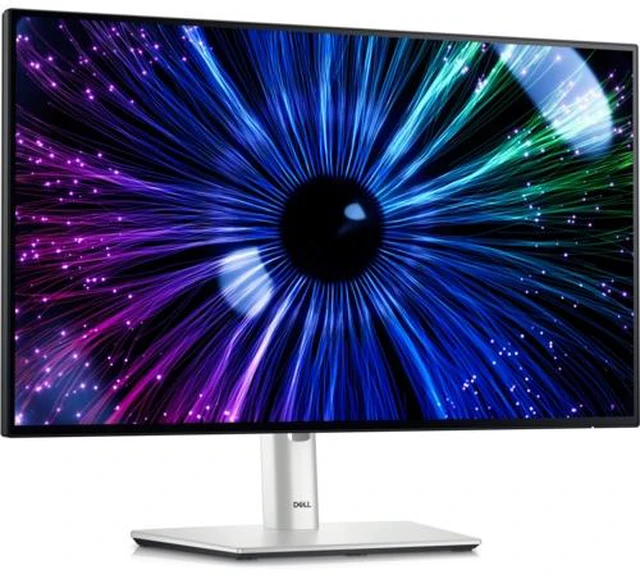
Dell UltraSharp 24 USB-C Hub Monitor - U2424HE

  • 24" / FHD' / 120Hz / IPS
  • 27" / UHD' / 120Hz / IPS
  • 34" / QHD' / 120Hz / IPS
  • Shop the Dell UltraSharp 24 USB-C Hub Monitor (U2424HE) certified by TUV for 4-star eye comfort with extensive connectivity.
+
+
Overview
Specs
Reviews
Dell U2424HE Monitor

Dell UltraSharp 24 USB-C® Hub Monitor - U2424HE

Experience improved visual comfort, peak productivity and extensive connectivity with this hub monitor certified by TÜV for 4-star eye comfort.

World’s first 4-star certified monitor for eye comfort*

Experience a new level of comfort and productivity.

* Based off TÜV Rheinland® Eye Comfort certification, August 2023.

Dell U2424HE Monitor

Unparalleled visual comfort

Ambient Light Sensor: A built-in Ambient light sensor intelligently optimizes brightness and color temperature based on your surroundings.

Improved ComfortView Plus: Reduces harmful blue light emissions to =35%, for all-day comfort without sacrificing color accuracy.

A smoother visual experience: A 120Hz refresh rate delivers less flicker, more seamless scrolling and smoother motion than 60Hz monitors.

Work vibrantly

Vivid color: Enjoy 1.07 billion colors and a wide color coverage across industry standards, including 85% DCI-P3, 100% sRGB and 100% BT.709. Get color calibration accuracy of Delta E < 2 (average) (sRGB, BT.709).

Dell U2424HE Monitor

Connect to productivity

Dell U2424HE Monitor

Stable connection: Enable fast Ethernet with speeds of up to 2.5GbE.

Streamline your workflow: A single USB-C cable transmits data and video signals while delivering up to 90W of power.

Dell U2424HE Monitor

Reach peak productivity: Connect to two PC sources and Auto KVM will seamlessly switch controls over to the second connected PC. Use KVM (keyboard, video and mouse) features to control both PCs with a single keyboard and mouse.

Dell U2424HE Monitor

Extend your connectivity: Connect to more with DisplayPort 1.4, HDMI (HDCP 1.4)(supports up to FHD 1920 x 1080 120Hz TMDS as specified in HDMI 1.4), USB-A and USB-C ports that provide speeds of up to 10Gbps.

Dell U2424HE Monitor

Connect with ease: Simply plug in accessories and devices with a quick access USB-A port and a USB-C port that delivers up to 15W of power.

Expand your perspective

Experience uncompromised picture quality by daisy chaining two monitors.

Dell U2424HE Monitor

Designed for comfort

Fit your work style: Tilt, swivel, pivot and adjust the height of your monitor to work your way.

Stay focused on your work: Our InfinityEdge screen provides a virtually borderless experience.

Work beautifully: A premium platinum silver finish enhances any workspace.

Dell U2424HE Monitor

Dell Display Manager

Easy management. Next-level productivity.

Improved multitasking: Organize your screen with Easy Arrange and save profiles with Easy Arrange Memory.

Easy navigation: Share a single keyboard, mouse and monitor between multiple PCs with USB KVM wizard*. Quickly switch between PCs with the quick-access menu or hot keys. (* KVM (keyboard, video, mouse) is available on select monitors only. For monitors that don’t support USB KVM, the input source feature is an alternative. You can share multiple input sources to one monitor, but you cannot share one keyboard and mouse.)

Smooth deployment: Manage your fleet of monitors with features that are automatic, comprehensive and compatible with several tools*. (* Tools including SCCM/Intune and Command Line Interface scripts.)

Convenient customization: Quickly access your favorite features and functions with the menu launcher and hot keys.

Green thinking for today and tomorrow

Environmental standards: This monitor uses 85% PCR (Post-consumer Recyclable) plastic (By weight of the total weight of plastic parts in product. Excludes printed circuit boards, labels, cables, connectors, electronic components, optical components, ESD components, EMI components adhesives, and coatings.) and 90% recycled aluminum in the design. It meets the latest environmental standards such as EnergyStar® and TCO Certified Edge and is EPEAT® Gold registered (EPEAT registered where applicable. EPEAT registration varies by country. See www.epeat.net for registration status by country.).

Eco-conscious packaging: Dell monitors ship in boxes made with 100% renewable content that is also 100% recyclable*. (* Applies to all Dell monitors launched since 2023. Made from FSC mix sources which is a mix of material from FSC certified forests, recycled content and/or FSC controlled wood. Based on internal analysis, August 2023.)

Energy conservation: Save energy with PowerNap*, a feature that dims or puts your monitor to sleep when not in use. (* Enabled by Dell Display Manager.)

Advanced sustainability: Dell Technologies is committed to reducing environmental impact throughout the product lifecycle.

Dell U2424HE Monitor

Works with devices on macOS®*

Tested with devices on macOS, this USB-C monitor is ready-to-work with Mac® devices.

* Based on internal testing of select Dell monitors with USB-C or HDMI connection to devices on macOS, June 2024. Requires USB-C or HDMI connectivity. Some features may not be supported.

Ports and Slots

Dell U2424HE Monitor

Bottom and rear view

1 Security lock slot (based on Kensington Security Slot™)

2 Power connector

3 HDMI (HDCP 1.4) (supports up to FHD 1920 x 1080 120Hz TMDS as specified in HDMI 1.4)

4 DisplayPort 1.4

5 Stand lock

6 USB Type-C upstream port (Video + Data). Alternate mode with DisplayPort 1.4, power delivery up to 90W.

7 DisplayPort 1.4 (out)

8 USB Type-C upstream port (SuperSpeed USB 10 Gbps, USB 3.2 Gen 2)

9 2x USB Type-A downstream port (SuperSpeed USB 10 Gbps, USB 3.2 Gen 2)

10 Audio line out

11 USB Type-A downstream port (SuperSpeed USB 10 Gbps, USB 3.2 Gen 2)

12 RJ45 Ethernet port, 2.5GbE

13 USB Type-A downstream port (SuperSpeed USB 10 Gbps, USB 3.2 Gen 2) with BC1.2 power charging

14 USB Type-C downstream port (SuperSpeed USB 10 Gbps, USB 3.2 Gen 2) with power charging (15W)

Cables Included

Power cable* | DisplayPort 1.4 cable - 1.8 m | USB Type-A to USB Type-C Gen 2 cable - 1.0 m | USB Type-C to USB Type-C Gen 2 cable - 1.0 m (* Varies by country.)

Experience improved visual comfort, peak productivity and extensive connectivity with this hub monitor certified by TÜV for 4-star eye comfort.

Warranty & Returns

Warranty, Returns, And Additional Information

Return Policies*

  • Return for refund within: 30 days
  • Returns are subject to restocking fees and return shipping fees. Please click here to learn more about restocking fees and return shipping fees.
  • This item is covered by Newegg.com's International Order Return Policy.
  • Read full return policy for details.
  • *Subject to applicable law
  • Warranty Notice:

    This product does not include manufacturer warranty when purchased or used outside of its designated sales region. By purchasing internationally, you acknowledge that warranty support from the manufacturer will not be available.
LOADING...
LOADING...

The Dell UltraSharp U2424HE is a 23.8-inch USB-C hub monitor with extensive connectivity and TÜV-certified 4-star eye comfort, suited to people who want a comfortable, well-connected display for everyday desk work.

Recommended For

  • Laptop-first hybrid workers who want one USB-C connection for display, up to 90 W laptop charging, Ethernet, and desk peripherals.
  • Desk-based workers switching between a work laptop and another computer who want the monitor’s built-in KVM to share a keyboard, mouse, and USB peripherals.
  • Office users who spend long sessions reading, writing, or working across documents and value an adjustable stand, eye-comfort features, and smoother 120 Hz scrolling on a compact 24-inch screen.
  • Web and general office-content creators who want factory color accuracy for sRGB and BT.709 work, without needing a larger or higher-resolution canvas.

Real-World Use Scenarios

  • For a laptop-based home or office desk, connect the laptop to the monitor by USB-C to use the screen, charge the laptop, and connect monitor-attached accessories through one cable; this can reduce the need for a separate dock.
  • For a desk shared between a work laptop and a personal desktop, connect both computers and use the monitor’s KVM to share one keyboard and mouse; switching computers can mean fewer separate desk peripherals.
  • For everyday office tasks such as reading documents, email, and spreadsheets, the 23.8-inch Full HD screen provides a straightforward desktop workspace, while the adjustable stand lets users change its height, tilt, swivel, or orientation to suit their desk.
  • For a laptop desk that needs wired networking and USB accessories, connect Ethernet and peripherals to the monitor and link the laptop over USB-C; this can consolidate common desk connections around the display.
  • For long work sessions involving frequent reading and scrolling, ComfortView Plus and the ambient-light sensor are intended to support viewing comfort, and the 120Hz refresh rate makes scrolling appear smoother than on a 60Hz display.

Spec Summary

AttributeValue
Best ForDesk setups needing a Full HD monitor with USB-C connectivity and a built-in USB hub
Panel And Resolution23.8-inch LCD with 1920 × 1080 resolution, 16:9 aspect ratio, 178° viewing angle, and 0.2745 pixel pitch; glossy finish with 100% sRGB, 85% DCI-P3, and 100% BT.709 color gamut
Refresh Rate And Response120 Hz refresh rate with a 5 ms response time
Ports And ConnectivityHDMI and USB-C connectivity with a four-port USB hub, including one USB 2.0 port and one USB 3.0 port
Stand And ErgonomicsWall-mountable and listed for vertical orientation
Model IdentifiersDell UltraSharp U2424HE (model number Dell-U2424HE)

Reference Q&A

Q: Dell U2424HE vs. U2424H: which is better for a USB-C laptop setup?

A: Choose the U2424HE for a one-cable laptop connection: its USB-C upstream port carries video and data and provides up to 90W of power. Both models are 23.8-inch Full HD monitors with a 120Hz refresh rate; the U2424H’s USB-C upstream port is for data, while the U2424HE adds video-over-USB-C and laptop charging.

Q: Dell U2424HE vs. U2724DE: which should I choose for a desk setup?

A: Choose the U2424HE for a compact 23.8-inch Full HD display with USB-C video, up to 90W laptop power delivery, and a built-in hub. Choose the U2724DE for a larger 27-inch QHD display, IPS Black panel, and Thunderbolt 4 connectivity; both models support 120Hz and up to 90W power delivery.

Q: Dell U2424HE vs. U2422HE: which offers a higher refresh rate?

A: Choose the U2424HE if you want a 120Hz refresh rate on a 23.8-inch Full HD USB-C hub monitor. The U2422HE is also a 23.8-inch Full HD monitor with USB-C video and up to 90W power delivery; Dell lists it at 60Hz. The U2424HE also includes 2.5GbE Ethernet.

Q: Can I connect and charge a laptop through USB-C while using the monitor’s USB ports?

A: Yes. The U2424HE’s USB-C connection carries video and data and supplies up to 90 W of power, so a compatible laptop can use one cable for display, charging, and connected peripherals. The laptop’s USB-C port must support video output; laptops requiring more than 90 W may need their own charger.

Q: Can I use one keyboard and mouse with two computers?

A: Yes. The U2424HE has a built-in KVM switch for sharing a keyboard and mouse between two connected computers. Each computer needs the appropriate video and USB connections for the setup.

Q: Is the U2424HE a good fit for everyday office work and video meetings?

A: It is suited to desk-based work such as documents, browsing, and video calls: it has a 23.8-inch Full HD screen, height and tilt adjustment, and USB-C hub connectivity. It has no built-in webcam or speakers, so plan to use external meeting audio and video equipment if needed.

Q: Does the monitor have built-in speakers or a webcam?

A: No. The U2424HE has neither built-in speakers nor a webcam. Use external audio equipment and a separate webcam for calls that need them.

Q: Is the Dell U2424HE worth buying for office work?

A: It may suit someone who values a USB-C hub-style setup and eye-comfort features, but Reddit discussions are divided on its value: some owners are pleased, while others consider it expensive for a 24-inch 1080p monitor. Whether it is worth the price depends on how useful its connectivity is in your setup.

Q: Is the U2424HE a good fit for a USB-C laptop desk setup?

A: It is worth considering if you want a monitor positioned as a USB-C hub and have a compatible laptop. Reddit users discuss using it in work-from-home setups with a laptop and peripherals; check the monitor’s detailed port and power-delivery specifications against your laptop before buying.

Q: Could text look blurry on a Mac connected to the U2424HE?

A: One MacBook Air user reported a fuzzy image and difficulty getting text to look sharp. That is an individual report, not proof of a general issue, but Mac users sensitive to text clarity should check scaling compatibility and test the display during the return period.

Q: Is the U2424HE a good choice if I need more screen detail for design or editing?

A: Reddit shoppers considering it for design and editing raised concerns about 1080p resolution and fine-detail clarity. If detailed images or dense on-screen work are priorities, compare its resolution with higher-resolution alternatives before deciding; the product information provided here confirms a 23.8-inch screen but does not specify resolution.