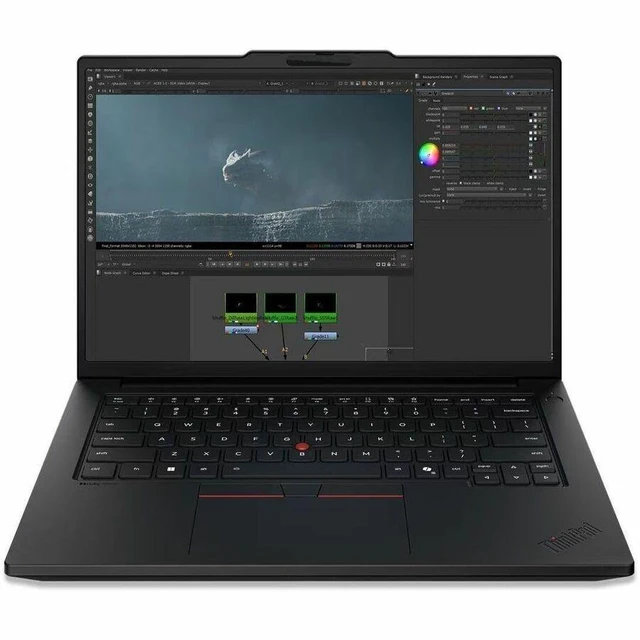
The Lenovo ThinkPad P14 G7 listing is a 14.5-inch mobile workstation with a Core UX9 Series 3 388H processor, 64GB of memory, a 1TB SSD, and Windows 11 Pro, suited to professionals who need substantial memory and storage for demanding work.
Recommended For
- Mobile engineers and technical professionals running CAD or other workstation software that fits an integrated-GPU workflow: the 14.5-inch mobile-workstation design and 64GB of memory suit demanding projects on the move, but this configuration has integrated graphics rather than a discrete GPU.
- Designers and media professionals who need a sharp, color-capable screen for reviewing and editing visual work: this configuration has a 14.5-inch 3K IPS display with 100% DCI-P3 coverage, though it is not the discrete-GPU version of the P14s Gen 7.
- Developers, analysts, and other users who keep many memory-intensive applications or large working sets open at once: the 64GB configuration is suited to heavy multitasking in a portable 14.5-inch system.
- Business and technical staff who move between offices, meetings, and work sites and want a portable workstation with a 14.5-inch display; the P14s Gen 7 starts at 3.59 lb, although this exact configuration may weigh more depending on options.
Real-World Use Scenarios
- For software developers switching between an IDE, browser tabs, meetings, and local development tools, the 64GB memory and 16-core processor should help keep a busy work session responsive; very GPU-dependent tasks are less suited to this integrated-graphics configuration.
- For engineers and technical staff moving between office desks and job sites, it can serve as one portable machine for reviewing drawings, updating project files, and handling everyday engineering applications. The integrated Arc graphics are a better fit for viewing and moderate visual work than sustained, GPU-heavy rendering.
- For analysts and office professionals working across spreadsheets, presentations, research, and video calls, the 14.5-inch screen provides a practical on-the-go workspace, while the memory capacity supports keeping several work applications open at once.
- For professionals who travel between meetings or work locations, it can handle document work and calls on the move, then connect to office equipment through its wired and wireless options. The 14.5-inch workstation format favors mobility over the larger display area of a full-size workstation.
- For designers preparing or reviewing visual assets while away from a studio, the high-resolution IPS display and integrated graphics suit detailed viewing and lighter creative tasks. Projects that depend on intensive GPU rendering may take longer than on a configuration with a discrete workstation GPU.
Spec Summary
| Attribute | Value |
|---|
| Best For | Mobile workstation use on a 14.5-inch laptop |
|---|
| Display Spec | 14.5-inch display |
|---|
| Brand | Lenovo |
|---|
Reference Q&A
Q: ThinkPad P14s Gen 7 or P14s Gen 6: which fits a new workstation purchase?
A: Choose the ThinkPad P14s Gen 7 21XJ003BUS for its newer Series 3 Intel Core Ultra X9 388H platform, 64GB of memory, and 1TB SSD. The P14s Gen 6 is the previous-generation option; Lenovo positions Gen 7 as a compact mobile workstation with configurations up to a Core Ultra X9 processor and 96GB of memory.
Q: Should I choose this P14s Gen 7 or a lower-memory configuration?
A: Choose the 21XJ003BUS when you want 64GB of memory for memory-intensive multitasking and professional applications. Lenovo lists P14s Gen 7 configurations with 16GB, 32GB, 64GB, and up to 96GB, so lower-memory versions suit buyers who prefer a smaller memory configuration, while this model provides 64GB alongside its Core Ultra X9 388H processor.
Q: P14s Gen 7 with Core Ultra X9 or one configured with NVIDIA RTX PRO graphics?
A: Choose the 21XJ003BUS for its listed Core Ultra X9 388H processor, 64GB memory, and 1TB SSD. For workflows centered on GPU-accelerated professional graphics, compare it with a P14s Gen 7 configuration that includes NVIDIA RTX PRO graphics; Lenovo offers the series with up to an RTX PRO 1000 Blackwell GPU.


 All Categories