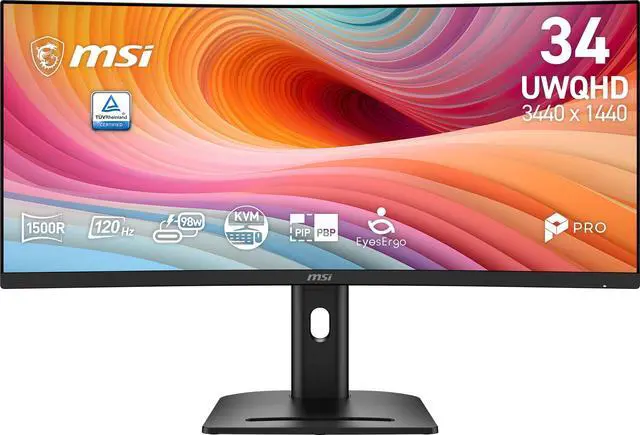
The MSI PRO MP341CQPHG E12 is a 34-inch 1500R curved ultrawide monitor with 3440 × 1440 resolution, a 120Hz refresh rate, and a height-, swivel-, pivot-, and tilt-adjustable stand, making it a strong fit for multitasking, office work, and smoother everyday gaming.
Recommended For
- People who keep several work windows open—such as spreadsheets beside email, documents, or a browser—and want one wide desktop display instead of a dual-monitor setup.
- Laptop-and-desktop users who switch between two computers at a shared desk; MSI positions the monitor for multi-device use with USB-C, KVM, and picture-by-picture features.
- Work-from-home users who want a large screen for productivity and occasional gaming, rather than a monitor dedicated to high-refresh competitive play; MSI positions it for both work and gaming, with a 120Hz refresh rate and Adaptive-Sync.
- Desk-based users who want a wide curved screen for everyday media viewing and adjustable positioning, and do not need a portable display.
Real-World Use Scenarios
- For home-office work, keep a document or spreadsheet open beside email, chat, or a browser; the wide desktop makes it easier to compare information without repeatedly switching windows.
- When working across two computers or input sources, use the monitor’s picture-by-picture or picture-in-picture modes to view both on screen at once, such as a work laptop beside a desktop reference.
- For coding or research, place an editor or document beside a browser, terminal, or reference material; the extra horizontal workspace helps keep related windows visible together.
- For casual PC gaming, play compatible games in a wider field of view and use the higher refresh rate for smoother-feeling motion; it is better suited to general gaming than to shoppers prioritizing competitive esports performance.
- For everyday video editing, keep a longer timeline and tool panels visible while reviewing footage; treat the display as a general editing workspace rather than relying on it alone for color-critical mastering.
Spec Summary
| Attribute | Value |
|---|
| Best For | Wide-screen gaming, multitasking, and media viewing with a curved 34-inch ultrawide display and 120Hz refresh rate |
|---|
| Panel And Resolution | 34-inch curved VA panel with 3440 × 1440 resolution, 21:9 aspect ratio, 1500R curvature, and anti-glare finish |
|---|
| Refresh Rate And Response | 120Hz refresh rate, 1ms MPRT / 4ms GtG response time, and FreeSync Premium adaptive sync |
|---|
| Image Quality | 3500:1 contrast ratio, 300 cd/m² brightness, 178° horizontal and vertical viewing angles, and 89% Adobe RGB / 91% DCI-P3 / 114% sRGB color gamut; supports HDR |
|---|
| Ports And Connectivity | 1 × DisplayPort 1.4a, 1 × HDMI 2.0b, 1 × USB-C with DisplayPort Alternate Mode, 4 × USB 5Gbps Type-A, 1 × USB 5Gbps Type-B, and 1 headphone jack |
|---|
| Stand And Ergonomics | Height, pivot, swivel, and tilt adjustments; VESA-compatible with a 100 × 100mm mounting pattern |
|---|
| Audio And Webcam | Built-in 2 × 2W speakers; no built-in webcam |
|---|
| Power | Internal power supply rated for 100–240V at 50/60Hz |
|---|
| Dimensions And Weight | With stand: 21.64 × 31.86 × 9.25 inches; without stand: 14.40 × 31.86 × 4.44 inches; weight: 19.84 lb |
|---|
| Model Identifiers | MSI PRO MP341CQPHG E12, black |
|---|
Reference Q&A
Q: MSI PRO MP341CQ or PRO MP341CQPHG E12: which gives a smoother 34-inch ultrawide display?
A: Choose the PRO MP341CQPHG E12 if you want the higher refresh rate: it supports 120Hz, compared with 100Hz on the PRO MP341CQ. Both are 34-inch, 3440 × 1440 curved VA monitors, so the key difference for this choice is the PHG E12’s faster refresh rate.
Q: Which MSI 34-inch ultrawide is a better fit for connecting a laptop with one USB-C cable?
A: The PRO MP341CQPHG E12 is the better fit for a USB-C laptop setup: its USB-C port carries DisplayPort video and provides up to 98W power delivery, and the monitor includes a KVM switch. The PRO MP341CQ is a 100Hz alternative with HDMI and DisplayPort connections.
Q: Is the MSI PRO MP341CQPHG E12 a better choice than the PRO MP341CQ for an adjustable desk setup?
A: Choose the PRO MP341CQPHG E12 if you want more stand positioning options: its stand supports height, tilt, swivel, and pivot adjustment. MSI lists tilt adjustment for the PRO MP341CQ. Both models have a 34-inch, 3440 × 1440 curved display.
Q: Is this monitor suitable for office work and viewing multiple documents at once?
A: Yes. Its 34-inch, 21:9 display has a 3440 × 1440 resolution, giving you room to arrange multiple documents or windows side by side. The curved screen and height-, swivel-, pivot-, and tilt-adjustable stand offer flexibility for a desk setup.
Q: Can I connect a laptop through USB-C, and will the monitor charge it?
A: The USB-C port supports DisplayPort Alt Mode for video. The provided specifications do not list USB-C Power Delivery, so do not assume the monitor will charge a connected laptop. Laptop video output must also support USB-C DisplayPort Alt Mode.
Q: Is this monitor suitable for gaming?
A: It can suit PC gaming if your computer can run games at 3440 × 1440. Its refresh rate is 120Hz; the listed response times are 1ms MPRT and 4ms GtG. The provided specifications do not identify adaptive-sync support, so check that separately if it is important to you.
Q: Does it have built-in speakers or a webcam?
A: It has two built-in 2W speakers, but no built-in webcam. You will need a separate webcam for video meetings; the monitor also has a headphone jack for audio.


 All Categories