


 All CategoriesAll CategoriesAll Categories
Shipped by Newegg





Warranty Notice:
This product does not include manufacturer warranty when purchased or used outside of its designated sales region. By purchasing internationally, you acknowledge that warranty support from the manufacturer will not be available.The Dell Pro Slim Desktop (W78W4) is a compact Windows 11 Pro business PC with an Intel Core Ultra 7 265 processor, 32GB DDR5 memory and a 512GB SSD, suited to office teams and professionals who need capable everyday computing in a space-saving form factor.
| Attribute | Value |
|---|---|
| Best For | Space-conscious business setups needing a desktop with an Intel Core Ultra 7 processor and 13-TOPS NPU |
| Processor And Core Count | Intel Core Ultra 7 265 with 20 cores and speeds up to 5.3 GHz |
| Graphics | Intel integrated graphics |
| Memory Configuration | 32 GB DDR5 memory in 1 × 32 GB configuration, up to 5600 MT/s, non-ECC |
| Storage | 512 GB TLC SSD |
| Operating System | Windows 11 Pro |
| Desktop Configuration | Slim/small form factor; no built-in screen or optical drive |
| Model Identifiers | Dell part number W78W4 |
Q: Dell Pro Slim vs Dell Pro Tower: which should I choose for a business PC?
A: Choose the Dell Pro Slim with Core Ultra 7 265 when you want a compact business desktop with a 20-core processor and room for expansion. Choose the Dell Pro Tower when you prioritize broader internal expansion: Dell lists up to three PCIe slots and two M.2 SSDs for the Pro Tower.
Q: Is the Dell Pro Slim with Core Ultra 7 265 worth choosing over the Core Ultra 5 235 configuration?
A: Choose the Core Ultra 7 265 configuration when your work benefits from more processor cores: it has 20 cores, compared with 14 cores in Dell’s listed Core Ultra 5 235 configuration. The Newegg listing also specifies 32 GB of memory, making this configuration a practical choice for users who want its listed memory capacity alongside the higher-tier processor.
Q: Dell Pro Slim vs Dell Pro Micro: which is better for a compact office setup?
A: Choose the Dell Pro Slim when you want a compact desktop with a Core Ultra 7 265 processor and internal expansion options. Choose the Dell Pro Micro when minimizing the desktop’s footprint is the priority; Dell describes it as an ultracompact desktop.
Q: Dell Pro Slim Core Ultra 7 265 vs Dell OptiPlex 7000 SFF: is it a meaningful upgrade?
A: The Dell Pro Slim is the newer platform, with a 20-core Core Ultra 7 265, DDR5 memory, and an NPU; the compared OptiPlex 7000 SFF used a 12-core Core i7-12700 and DDR4. It is a relevant upgrade to consider when refreshing that generation of business desktop, especially for teams seeking the newer processor and memory platform.
Q: Is this desktop suitable for office work and multitasking?
A: Yes. Its Intel Core Ultra 7 265 processor, 32 GB of DDR5 memory, 512 GB SSD, and Windows 11 Pro suit common business tasks such as office applications, browsing, and multitasking. It is a desktop, so you will need a separate display and suitable peripherals; a webcam or microphone may also be needed for video meetings.
Q: Does this desktop include a monitor?
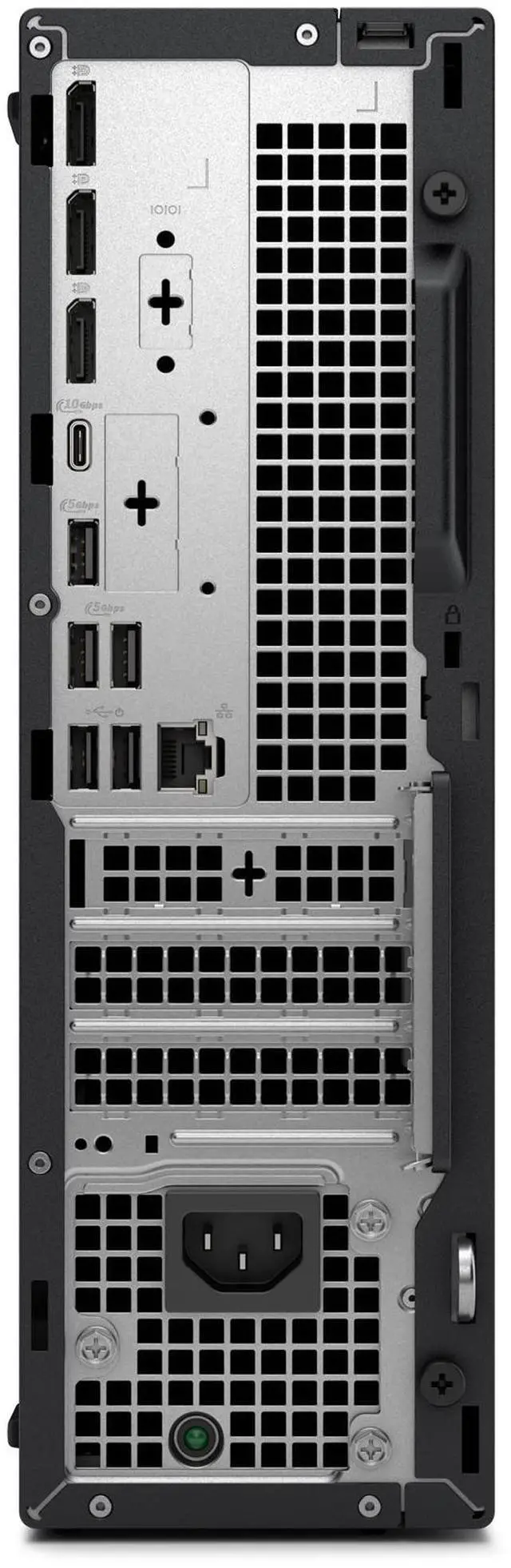
A: No. The listing specifies “No Screen,” so plan to connect a separate monitor. Check that your monitor and cable match the desktop’s available video outputs; the supplied listing does not specify those ports.
Q: Can I upgrade the memory or storage later?
A: The listing specifies one 32 GB DDR5 memory module and a 512 GB SSD, but it does not confirm available memory slots, maximum memory, or spare storage connections. Upgrade potential depends on the actual system configuration and component compatibility; check Dell’s documentation for this part number before buying upgrade parts. The listing notes that some component configurations may vary.
Q: Is this desktop a good choice for demanding games or graphics work?
A: It is not configured for demanding graphics workloads: the listed graphics are integrated Intel graphics, with no discrete graphics card specified. It is better suited to general business and everyday computing than to graphics-intensive gaming or professional GPU workloads.
Q: Is the Dell Pro Slim a suitable replacement for an older office PC?
A: It appears suited to typical office work such as browsing, email, and document editing: this configuration has a Core Ultra 7 processor, 32 GB of RAM, and a 512 GB SSD. A Reddit discussion about replacing older office PCs also considered the Pro Slim for that kind of workload. The discussion concerns a different configuration, so it does not establish performance for every task or guarantee longevity.
Q: Should I buy the Dell Pro Slim or build a similar office PC?
A: The Reddit discussion raises this comparison but does not establish a universal better choice. Compare the actual prices and configurations: this listing includes Windows 11 Pro, 32 GB of RAM, and a 512 GB SSD, while the product data says component configurations can vary. Without a price and confirmed configuration for the alternative, value cannot be determined.
Q: Is the Dell Pro Slim a good choice for graphics-heavy work or gaming?
A: This configuration lists Intel integrated graphics, not a discrete graphics card, so it is a less suitable starting point for graphics-intensive work or gaming than a configuration with a dedicated GPU. Reddit discussions of the Pro Slim line also raise GPU fit and upgrade considerations; confirm the exact system’s expansion options before relying on a future graphics-card upgrade.