


 All CategoriesAll CategoriesAll Categories







Warranty Notice:
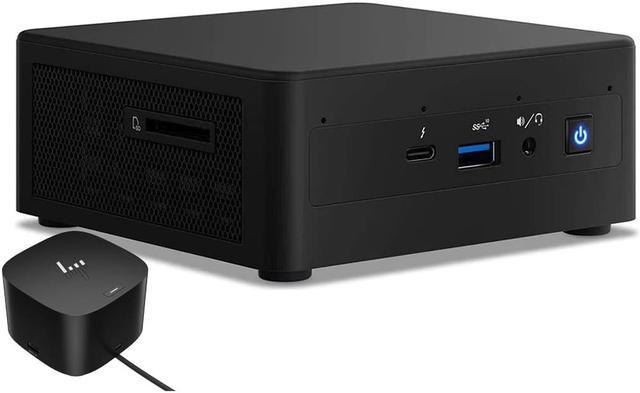
This product does not include manufacturer warranty when purchased or used outside of its designated sales region. By purchasing internationally, you acknowledge that warranty support from the manufacturer will not be available.The Intel NUC11PAHi5 is a compact mini desktop with an 11th Gen Intel Core i5-1135G7, 16GB RAM, a 1TB hard drive, and Windows 10 Pro, bundled with a Thunderbolt dock; it suits office work, business tasks, and everyday productivity with expanded peripheral and display connectivity.
| Attribute | Value |
|---|---|
| Best For | Home and business desktop use in a compact mini-PC form, with integrated graphics |
| Processor And Cache | 11th Gen Intel Core i5 quad-core processor with 8MB L3 cache |
| Graphics | Integrated graphics |
| Memory | 16GB DDR4 memory |
| Storage | 1TB HDD; no SSD |
| Connectivity And Expansion | Wi-Fi 6 AX201, Bluetooth 4.2, RJ45 Ethernet, and a card reader |
| Included Peripherals | No screen or monitor included, no optical drive, and no keyboard |
| Power | 120W power supply |
| Physical Design | Black mini PC |
| Operating System | Windows 10 Pro |
| Model Identifiers | Intel NUC11PAHi5 |
Q: Intel NUC11PAHi5 vs NUC11PAHi3: which is better for office multitasking?
A: Choose the NUC11PAHi5 when you regularly run several office apps or browser tabs at once. Its Core i5-1135G7 has 4 cores and 8 threads with Iris Xe graphics, compared with the NUC11PAHi3’s 2-core, 4-thread Core i3-1115G4 and Intel UHD graphics. This Newegg configuration also includes 16GB of RAM and a 1TB HDD.
Q: Should I get the NUC11PAHi5 or the NUC11PAHi7?
A: The NUC11PAHi5 is a practical fit for everyday productivity with its 4-core, 8-thread processor, Iris Xe graphics, and the included 16GB RAM and 1TB HDD configuration. Choose the NUC11PAHi7 if you want a higher maximum processor frequency and more Iris Xe graphics execution units; both models belong to Intel’s NUC 11 Performance family.
Q: NUC11PAHi5 vs NUC 12 Pro i5: which should I choose?
A: Choose the NUC 12 Pro i5 if your workloads can benefit from a newer 12th-generation Core i5 processor with 12 cores and 16 threads; professional testing of the NUC 12 Pro i5 reviewed that platform with the Core i5-1240P. Choose this NUC11PAHi5 configuration if you want the listed 16GB RAM, 1TB HDD, Windows 10 Pro, and included Thunderbolt dock as part of the package.
Q: Is this mini PC suitable for everyday office work and video meetings?
A: It is configured for everyday office tasks such as email, web browsing, and document work, with an 11th Gen Core i5 processor and 16GB of RAM. It has no built-in webcam, so video meetings require an external webcam; a monitor is also not included.
Q: Can it run more than one monitor?
A: The included Thunderbolt Dock G4 is listed as supporting up to three monitors and dual 4K UHD displays. The NUC also has HDMI, mini DisplayPort, and Thunderbolt ports. The exact display setup depends on the monitors, cables, and connections used.
Q: Is this a good choice if I want fast startup and app loading?
A: This configuration includes a 1TB 2.5-inch hard drive and lists no SSD. It provides 1TB of storage, but buyers prioritizing SSD storage should note that an SSD is not included.
Q: Does it include everything I need to start using it?
A: No. A monitor, keyboard, and mouse are not listed as included, and the computer has no built-in webcam. You will need a monitor and input devices, plus an external webcam if you plan to make video calls.
Q: Is the NUC11PAHi5 suitable for gaming?
A: It is better suited to casual or older games than to demanding gaming: this configuration has integrated graphics, not a dedicated GPU. A YouTube video discusses playing Valorant on the model, while a Reddit owner asking about retro gaming notes that thermal limits can constrain performance. Neither source establishes performance for every game, so check benchmarks for the specific games you play.
Q: Is the included 1TB HDD a drawback, and can I use an SSD instead?
A: The listing includes a 1TB HDD and no SSD, so it offers capacity but not SSD storage. Reddit users discuss swapping an SSD into this NUC model, and a YouTube build video shows SSD installation. If faster storage is important, confirm the exact installed-drive configuration and compatibility before buying or upgrading.
Q: Does the NUC11PAHi5 work well with Linux?
A: Linux may work, but the Reddit discussion reports mixed experiences: some users report successful use, while others describe audio or display issues on particular Ubuntu setups. Expect that the experience may depend on the distribution, kernel, and drivers; it may require troubleshooting.
Q: Can I use this NUC with multiple monitors?
A: The NUC11PAHi5 video discusses support for multiple displays, and the supplied product information says the included dock supports up to three monitors. The actual display setup depends on how the NUC and dock are connected, so verify that the monitor inputs and resolutions you need are supported.

