


 All CategoriesAll CategoriesAll Categories







Warranty Notice:
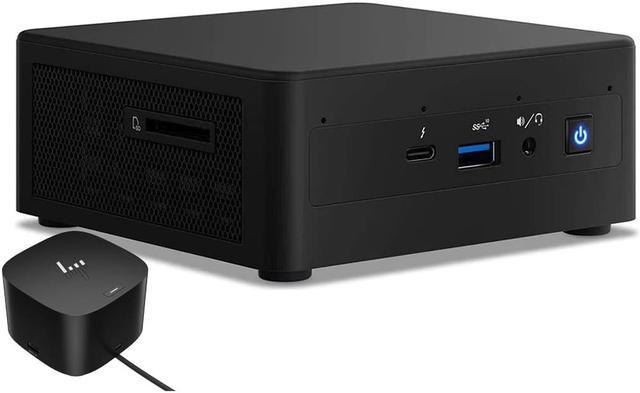
This product does not include manufacturer warranty when purchased or used outside of its designated sales region. By purchasing internationally, you acknowledge that warranty support from the manufacturer will not be available.The Intel NUC11PAHi5 is a compact Windows 10 Pro mini desktop with an 11th Gen Core i5-1135G7, 8GB RAM, a 512GB NVMe SSD, and a Thunderbolt 4 dock, suited to home and office users who want a small productivity PC with expanded connectivity.
| Attribute | Value |
|---|---|
| Best For | Business and home productivity in a compact mini PC form factor |
| Processor And Core Count | 11th Gen Intel Core i5 with a quad-core processor and 8MB L3 cache |
| Graphics | Integrated graphics |
| Memory | 8GB DDR4 memory |
| Storage | 512GB SSD; no HDD |
| Networking And Connectivity | Wi-Fi 6 AX201, Bluetooth 4.2, and RJ-45 connectivity |
| Card Reader | Card reader included |
| Operating System | Windows 10 Pro |
| Power And Color | 120W power supply in black |
| Display And Included Peripherals | No screen or monitor included; no keyboard |
| Optical Drive | No optical drive |
| Model Identifiers | Intel NUC11PAHi5 |
Q: Intel NUC11PAHi5 vs NUC 11 i3: which should I choose?
A: Choose the NUC11PAHi5 for multitasking and stronger integrated graphics: its Core i5-1135G7 has four cores and eight threads with Iris Xe graphics, while the NUC 11 i3 version uses a dual-core, four-thread Core i3-1115G4 with Intel UHD Graphics. The i3 configuration is a good match for lighter everyday computing; the listed i5 system adds 8GB RAM and a 512GB SSD.
Q: Should I choose the NUC11PAHi5 or the NUC11PAHi7?
A: Choose the NUC11PAHi5 for the listed 8GB RAM and 512GB SSD configuration and everyday productivity. Choose the NUC11PAHi7 if you prefer a higher CPU clock ceiling and more cache: both use four-core, eight-thread processors, while the i7-1165G7 is specified for up to 4.7 GHz and 12MB cache versus up to 4.2 GHz and 8MB on the i5-1135G7.
Q: Intel NUC11PAHi5 vs NUC 12 Pro i5: which is the better upgrade?
A: Choose the NUC11PAHi5 if you want this listed configuration with a Core i5-1135G7, 8GB RAM, and a 512GB SSD. Choose the NUC 12 Pro i5 for a newer processor platform: its Core i5-1240P has 12 cores in a 4-performance-core, 8-efficient-core design. A professional review of the NUC 12 Pro i5 configuration also reports strong multi-core benchmark results, making it the more performance-oriented option for CPU-heavy work.
Q: Is this mini PC suitable for everyday office work?
A: Yes. Its quad-core Core i5, 512GB NVMe SSD, and Windows 10 Pro suit common tasks such as email, browsing, documents, and spreadsheets. The 8GB of RAM may limit heavier multitasking, and integrated graphics are not intended for demanding graphics work.
Q: Does it include a monitor, keyboard, or webcam?
A: No. The product information lists no monitor, keyboard, or webcam. You will need to supply a display and input devices, and add an external webcam for video calls.
Q: Is it practical to take on work trips?
A: It is compact and can be moved between workspaces, but it is a desktop rather than a self-contained travel computer: it has no screen, battery, or webcam. It is most practical when you will have access to a display, power, keyboard, and mouse at your destination.
Q: Can I use the included dock for a multi-monitor setup?
A: The bundle lists HDMI and DisplayPort connections on the dock, which supports dual 4K UHD and up to three monitors according to the product information. Check your monitor connections, cables, and intended resolution before buying, since the listing does not specify every supported display arrangement.
Q: Is the NUC11PAHi5 suitable as an everyday work PC?
A: It can suit typical desktop work: the listed configuration includes an 11th Gen Core i5, a 512GB SSD, and Windows 10 Pro. The included 8GB of RAM may be a constraint for heavy multitasking. One Reddit user described using this model as a work PC but reported sluggish behavior after it had been idle; that is an individual report, not proof of a general issue.
Q: Is 8GB of RAM enough for virtual machines or heavy multitasking?
A: The listed 8GB is a modest starting point for workloads that use several virtual machines or many applications at once. Reddit users discussing this model describe using 64GB for development and virtual machines, and a YouTube build video shows a 32GB setup. Check the specific unit’s memory configuration and upgrade options before buying.
Q: Does the NUC11PAHi5 work well with Linux?
A: A Reddit user reported that Ubuntu 20.04 mostly worked on a related PAHi-series NUC but had problems with audio through the headphone jack and HDMI. Another user later described using Linux Mint on the NUC11PAHi5. These reports suggest Linux use is possible, but audio behavior may depend on the system and software configuration.
Q: Is the NUC11PAHi5 quiet?
A: Quiet operation is not guaranteed. One Reddit owner said the fan’s persistent hum bothered them during development use. That is a single user report, so it does not establish how loud every unit will be.

