


 All CategoriesAll CategoriesAll Categories
Shipped by Newegg



Warranty Notice:
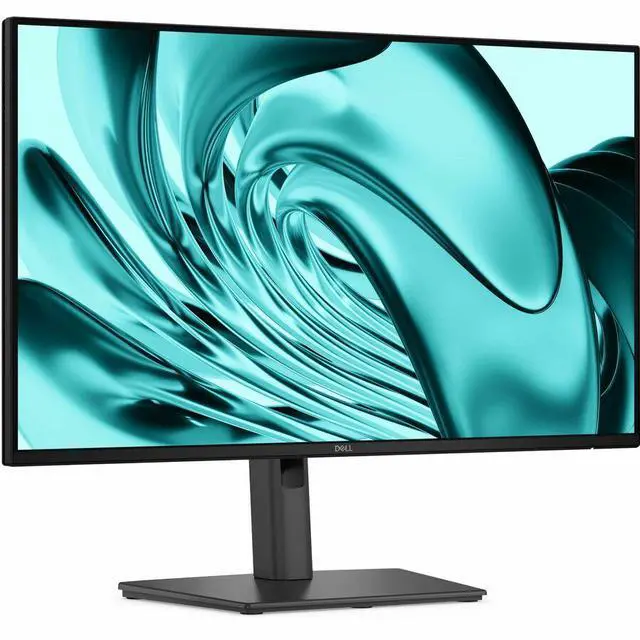
This product does not include manufacturer warranty when purchased or used outside of its designated sales region. By purchasing internationally, you acknowledge that warranty support from the manufacturer will not be available.The Dell Pro P 24 Monitor P2426H is a 23.8-inch Full HD IPS display with a 120Hz refresh rate, TÜV 4-Star eye comfort, and extensive connectivity, suited to professionals and home-office users seeking a comfortable screen for everyday work and smoother on-screen motion.
| Attribute | Value |
|---|---|
| Best For | Everyday desktop use with a 23.8-inch monitor |
| Display Size | 23.8 inches |
| Design | Black cabinet |
| Model Identifiers | Dell P series monitor, model P2426H |
Q: Dell P2426H vs. P2425H: which should I choose?
A: Choose the Dell P2426H if you want a 23.8-inch Full HD IPS monitor with a 120Hz refresh rate. The Dell P2425H is also a 23.8-inch Full HD IPS option, with a 100Hz refresh rate. Both offer an adjustable stand; the main listed difference is the P2426H’s higher refresh rate.
Q: Should I get the Dell P2426H or the P2425D for a sharper 24-inch display?
A: Choose the Dell P2425D for its 2560 × 1440 QHD resolution and 100Hz refresh rate. Choose the P2426H for 1920 × 1080 Full HD at 120Hz. The P2425D’s higher resolution provides more pixels on a similarly sized screen, while the P2426H offers the higher refresh rate.
Q: Dell P2426H vs. P2425: which gives me more vertical screen space?
A: Choose the Dell P2425 if you want a 16:10, 1920 × 1200 display, which has more vertical pixels than the P2426H’s 16:9, 1920 × 1080 display. The P2426H is the match for a 16:9 Full HD screen with a 120Hz refresh rate; the P2425 is 16:10 WUXGA at 100Hz.
Q: Is the Dell P2426H suitable for everyday office or home-office work?
A: Yes. Its 23.8-inch Full HD IPS screen, 120Hz refresh rate, and TÜV 4-Star eye-comfort rating suit common tasks such as documents, browsing, and presentations. Its Full HD resolution is a practical choice for general productivity, rather than a high-resolution workspace for users who need extra detail or screen space.
Q: Can I use the P2426H as a second screen for my laptop?
A: Yes, if the laptop has a compatible video output. The monitor accepts video through HDMI or DisplayPort; a laptop with a different output may need an adapter. It can serve as an external display, but the listed USB-C ports are downstream ports, not listed as video inputs.
Q: Does the P2426H have built-in speakers?
A: Built-in speakers are not listed for this model. Plan to use your computer’s audio or separate speakers if you need sound.
Q: Can I adjust the P2426H to a comfortable viewing position?
A: Yes. The stand supports height adjustment, tilt, swivel, and pivot, so you can change the viewing position and rotate the screen to portrait orientation.
Q: Does the P2426H fit a 1080p home-office monitor requirement?
A: It matches a 1080p requirement: the P2426H is a 23.8-inch Full HD monitor. In a Reddit discussion about choosing monitors for home-office use, it was suggested as a 24-inch, 120Hz option. That discussion is not a product test.
Q: Is a 24-inch P2426H a better fit than a 27-inch monitor for 1080p?
A: The P2426H’s 23.8-inch FHD size aligns with a Reddit commenter’s preference for 24-inch monitors when the resolution is limited to 1080p. That is one user’s recommendation, not a comparative test.
Q: Is the P2426H suitable for a dual-monitor work setup?
A: It may suit an office setup that needs two displays: a Reddit user reported using two P2426H monitors for a new job. The post is an individual account, not a general assessment of performance.
Q: Does the P2426H’s eye-comfort rating mean it will prevent eyestrain?
A: No. The product information lists TÜV 4-Star eye comfort, but one Reddit user reported blurry eyes, eyestrain, and migraines while using two P2426H monitors. That individual report does not establish the cause or predict how other users will feel.