
Your Browsing History


ERIC V.
Joined on 05/31/09
0
0
product reviews
- 14
Good product, very fast but annoying errors.
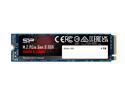
Silicon Power 1TB NVMe PCIe Gen3 x4 M.2 2280 TLC R/W up to 3,400/3,000 MB/s SSD (SP001TBP34A80M28)
Pros: Installed flawlessly on my AMD Ryzen 3600 / MSI Tomahawk Max system. Linux Udisks utility benchmark gave whole disk 3.4G read speed with 70 microseconds latency. On actual partitions with file system overhead this drops to 2.4G, still very respectable figure. as a NVME disk, regular SMART monitoring applications won't recognize it. On Linux Mint, I installed nvme-cli (in the software manager), then typed: 'sudo nvme list' to get the name of the drive then 'sudo nvme smart-log /dev/nvme0n1' to see the equivalent of SMART report.
Cons: The disk worked well but was showing lots of kernel errors in /var/log/syslog Oct 15 16:28:15 ******* kernel: [ 88.172669] nvme 0000:01:00.0: PCIe Bus Error: severity=Corrected, type=Data Link Layer, id=0100(Transmitter ID) Oct 15 16:28:15 ******* kernel: [ 88.172675] nvme 0000:01:00.0: device [1987:5012] error status/mask=00001000/00006000 Oct 15 16:28:15 ******* kernel: [ 88.172678] nvme 0000:01:00.0: [12] Replay Timer Timeout No one really likes hardware errors on their system even if that's just timeouts that are recovered from. The first thing I tried was to throttle PCI from Gen3 to Gen2. It worked but I lost more than a third of the speed (links in Gen3 are 8gbps, versus 5 in Gen2). To solve the problem for good, edit /etc/default/grub Replace the line GRUB_CMDLINE_LINUX_DEFAULT="quiet splash" with GRUB_CMDLINE_LINUX_DEFAULT="quiet splash pcie_aspm=off" then run 'update-grub' However, it removes the PCIe power saving feature (for all connected devices, including the GPU), leading to useless power consumption, even more so on a laptop. there are other workarounds but they all shut up the logs. That's wrong as it can also hide more serious problems. The same 'pcie_aspm' setting also can be found for Windows, you can google it. Firmware is ECFM22.4 and I can't upgrade it as Silicon Power website does not recognize it's own capcha ! does not look good. Also, they have no utilities for Linux.
Overall Review: The performance is there, for a lot less than the leading brand. Not sure if the timeout problem is firmware related, and can't find out now as the vendor website is broken and won't let me see / download a newer firmware version.
10/20/2019See more detail
Only 1 fan controller ...
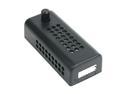
Fan Controller
Pros: Does what it's supposed to do. easy to attach anywhere in the case by drilling a hole for the knob. low cost.
Cons: It's called "ZALMAN FAN MATE 2 Fan Controller" but will only control 1 fan. If I did read better, I would have known, still this is a very deceptive name. The regulator is linear, so when the fan speed is lowered, energy is lost as heat. That's an inefficient design.
10/30/2009See more detail
A good little tiller
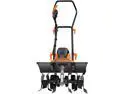
TACKLIFE Advanced Tiller, 18-Inch Electric Tiller, 13.5 Amp, Removable Blade, Adjustable Working Width(18''/12.5''), 8'' Tilling Depth, Foldable Handle, Adjustable Wheels, Tiller Cultivator - TGTL01A
Pros: - Seems to be good quality - Very easy to assemble (only need a Philips screwdriver) - The shroud over the tines is full metal - the removable tines means it can work both in sandy soils with 6 tines and heavier soil with only 4
Cons: - The handle assembly seems fragile - the plug is shrouded, so you need to use an extension cord with a single outlet
Overall Review: I bought it to use inside a commercial size greenhouse and with it's low weigh, maneuverability and absence of fumes, it seems perfect for that job, very easy to control even if the wheels only have 2 positions (till & transport), I might drill a middle position for low depth tiling. When dragging it toward me, it stays level and does not jump around as the tines speed is well adapted. Also, specifications say 93DB noise, and that would be extremely noisy, even for a gas tiller ! In reality, it does not scream, it's rather quiet, noise reminds me of a kitchen blender, and you clearly hear the motor tone change with load, making it easy to adjust the working speed. Build quality seems good, the shroud over the tines is full metal, the gearbox does have an opening for oil refill, even plastic parts seem strong, except the handle assembly that seems weak and the safety mechanism is not very ergonomic. Being corded, you need to keep an eye on the extension at all times, it would be trashed in a second. I might buy a short cheap one to prevent damaging the heavy duty one I'm using now as it costs more than the tiller ! I also tried it outside, it does well, but I have sandy loam. It should be able to work in heavier soil (without the 2 extra tines) but will probably not last if used on heavy/clay soil. It separates the soil in fine particles, way better than my gas tiller, so I might start to use it for finishing the direct seedling beds before using the seeder. Assembling it took less than 15mn. There is only one washer on the outside of each wheel. I added a second one on the inside to avoid damaging the wheels and reduce the mechanical play. Also, the cable ties are useless (too small and not rigid enough). Don't even try, just use tie wraps. Overall, I'm very satisfied with it, it's perfect for light work such as incorporating compost to the soil in greenhouses, I just hope it lasts, friends of mine will probably want one for their greenhouse too !
7/13/2022See more detail
Nice regular mouse.

Logitech M310 910-001675 Dark Gray 3 Buttons 1 x Wheel USB RF Wireless Laser Mouse - Recertified
Pros: I bought 3 of these refurbished, they all seemed brand new and work flawlessly
Cons: None.
Overall Review: Nothing fancy, but does the job. I would recommend it.
10/20/2019See more detail
Works well with AMD Ryzen
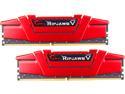
G.SKILL Ripjaws V Series 32GB (2 x 16GB) 288-Pin PC RAM DDR4 3600 (PC4 28800) Desktop Memory Model F4-3600C19D-32GVRB
Pros: I bought it knowing it's timing was optimized for Intel, but got very good results with my AMD Ryzen build, at a much lower cost than RAM that officially support AMD processors. My Motherboard (MSI Tomahawk Max) includes a feature called 'Memory try it!' that helped me find the best timings for it. at 1.39V it was stable at 3600Mhz with 1T 16-19-19-19-39 timing (Tested on Win10 with OCCT / Prime95, then on Linux with memtest86+ for 12H) Using the 'Advanced DRAM Configuration', I then throttled it back to 1T 17-20-20-20-40 as I would take stability over a little more speed anytime. 1.39V is slightly more than I expected, but both modules run cool to the touch.
Cons: None.
Overall Review: No need to buy more expensive memory when you can get these kind of speeds with those modules, unless you really 'need' a RGB DRAM ...
10/20/2019See more detail
Perfect with Ryzen 3600
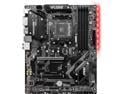
MSI B450 TOMAHAWK MAX II AM4 AMD B450 ATX AMD Motherboard
Pros: Very clean board I upgraded to the latest BIOS (as of now, 7C02v33 with AMD ComboPI1.0.0.3abba) using the flash BIOS button before inserting the processor. It failed at first, and needed to reformat the USB key and put only the binary file on it. The CPU voltage regulator heatsinks are barely warm, same for the chipset. The build went smoothly, the resulting system is very stable on heavy continuous load (crunching for World Community grid in the background 24/7) The feature called 'Memory try It!' made tweaking RAM settings easy.
Cons: I would have appreciated to get more USB ports, but I would certainly buy again, the predecessor (Tomahawk) is one of the most popular AMD 3000 MB for a reason
Overall Review: You can't go wrong with this board.
10/20/2019See more detail