
Your Browsing History
MXN$3,898.09
VAT-Inclusive Price
Ships from Hong Kong.
Most customers receive within 10-17 days.

Meet Your Seller

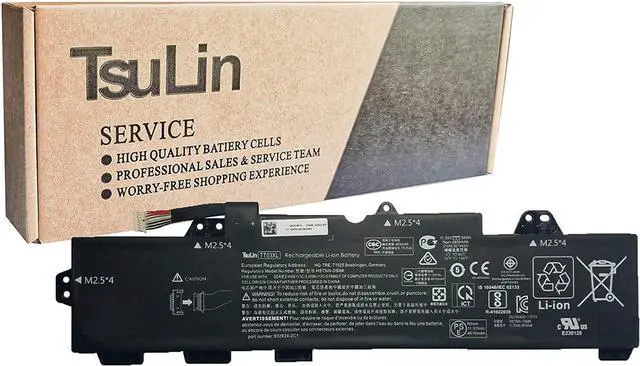
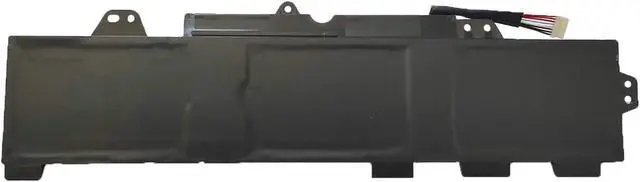


TsuLin TT03XL Laptop Battery Compatible with HP EliteBook 850 G5 ZBook 15U G5 Series HSTNN-DB8K 932824-2C1 933322-855 HSTNN-LB8H TTO3XL 11.55V 56Wh 4850mAh
- [Item Specification] Model: TT03XL . Color: Black . Voltage: 11.55V . Capacity: 56Wh 4850mAh
- [Compatible Part Number] TT03XL HSTNN-DB8K 932824-2C1 933322-855 HSTNN-LB8H TTO3XL
- [Replacement For Laptop] For HP EliteBook 850 G5 850 G6, ZBook 15U G5 15U G6 Series Notebook.
- [Note] Before installing and using the battery, please read the manual carefully after you receive the battery.
- [Important] Please check the part number of your laptop's original battery before placing order.
+
+
Overview
Specs
Reviews
About TsuLin:
We focus on high-quality laptop batteries and tablet batteries. We have a professional sales team. We are keen to provide customers with high-quality and valuable products and help your laptop regain a new life. Wish you have a pleasant shopping experience and thank you for your trust!
Important Note:
Please open the back cover of your laptop and check the exact part number and appearance of your laptop's original battery before place your order, Such as the length of the cable and the location of the connector.
Why should we choose this battery? 1. About battery safety: Compatible with laptop, safety and stability.
2. Regarding the capacity of the battery: The capacity of the new battery cell consumes power slowly and has little loss.
3. About battery life: The average life of a brand new battery is 2-4 years.
Specification: Battery Type: Rechargeable Li-ion Battery
Model: DYNR01
Voltage: 7.5V
Capatity: 38.2Wh/5087mAh
Connector: Please refer to the picture and check it.
Conditon: 100% New from Manufacturer, Grade-A Cell.
All Tsulin products have strict compatibility guidelines, and standards compliance for environment safety.
Replacement for Part Number: DYNR01
G3HTA027H
DYNRO1
Compatible Models (use "Ctrl+F to find your model quickly") for Microsoft Surface Pro 4 12.3 inch Series.
Easy to deal with various environments Office How to install a new battery: (Part 1)
1. You need to turn off the laptop and disconnect the power.
2. Disconnect the connection between the old battery and the motherboard to avoid unnecessary damage due to the removal of the battery. Then unscrew the old battery screws one by one, and carefully save each screw.
Study How to install a new battery: (Part 2)
3. Remove the old battery, carefully install the new battery on the battery box, tighten the screws, and then connect the wires of the new battery.
4. If you have questions about installing a new battery, you can search for the installation of laptop/tablet models on YouTube. This method may help you.
Outdoors For Optimal Use battery:(Part 1)
1.Discharge the new battery to 5% (not 0%), then charge and cycle 3-4 times to get the new battery a full capacity.
2.The important point is to perform a full discharge charge every other month to extend battery life.
Game & Movie For Optimal Use battery:(Part 2)
3.Don't connect adapter for a long time while using the battery. It may damage the battery.
4.Avoid artificial shocks, disassembly, crush or puncture. Do not dispose of in fire or water.
5.Avoid using the battery in an environment where the temperature is too high or too low.
We focus on high-quality laptop batteries and tablet batteries. We have a professional sales team. We are keen to provide customers with high-quality and valuable products and help your laptop regain a new life. Wish you have a pleasant shopping experience and thank you for your trust!
Important Note:
Please open the back cover of your laptop and check the exact part number and appearance of your laptop's original battery before place your order, Such as the length of the cable and the location of the connector.
Why should we choose this battery? 1. About battery safety: Compatible with laptop, safety and stability.
2. Regarding the capacity of the battery: The capacity of the new battery cell consumes power slowly and has little loss.
3. About battery life: The average life of a brand new battery is 2-4 years.
Specification: Battery Type: Rechargeable Li-ion Battery
Model: DYNR01
Voltage: 7.5V
Capatity: 38.2Wh/5087mAh
Connector: Please refer to the picture and check it.
Conditon: 100% New from Manufacturer, Grade-A Cell.
All Tsulin products have strict compatibility guidelines, and standards compliance for environment safety.
Replacement for Part Number: DYNR01
G3HTA027H
DYNRO1
Compatible Models (use "Ctrl+F to find your model quickly") for Microsoft Surface Pro 4 12.3 inch Series.
Easy to deal with various environments Office How to install a new battery: (Part 1)
1. You need to turn off the laptop and disconnect the power.
2. Disconnect the connection between the old battery and the motherboard to avoid unnecessary damage due to the removal of the battery. Then unscrew the old battery screws one by one, and carefully save each screw.
Study How to install a new battery: (Part 2)
3. Remove the old battery, carefully install the new battery on the battery box, tighten the screws, and then connect the wires of the new battery.
4. If you have questions about installing a new battery, you can search for the installation of laptop/tablet models on YouTube. This method may help you.
Outdoors For Optimal Use battery:(Part 1)
1.Discharge the new battery to 5% (not 0%), then charge and cycle 3-4 times to get the new battery a full capacity.
2.The important point is to perform a full discharge charge every other month to extend battery life.
Game & Movie For Optimal Use battery:(Part 2)
3.Don't connect adapter for a long time while using the battery. It may damage the battery.
4.Avoid artificial shocks, disassembly, crush or puncture. Do not dispose of in fire or water.
5.Avoid using the battery in an environment where the temperature is too high or too low.
Warranty & Returns
Warranty, Returns, And Additional Information
Return Policies*
- Return for refund within: 30 days
- Return for replacement within: non-replaceable
- This item is covered by haoyuzeshang Return Policy
- *Subject to applicable law
Warranty Notice:
This product does not include manufacturer warranty when purchased or used outside of its designated sales region. By purchasing internationally, you acknowledge that warranty support from the manufacturer will not be available.
Manufacturer Contact Info
- For a directory of all our manufacturers, please click below.
- Manufacturers Directory
LOADING...