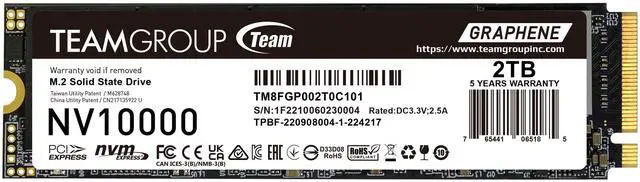
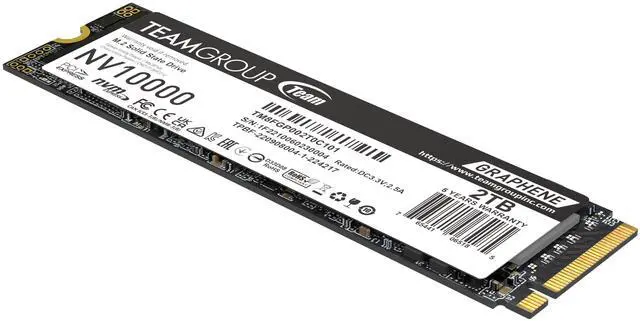
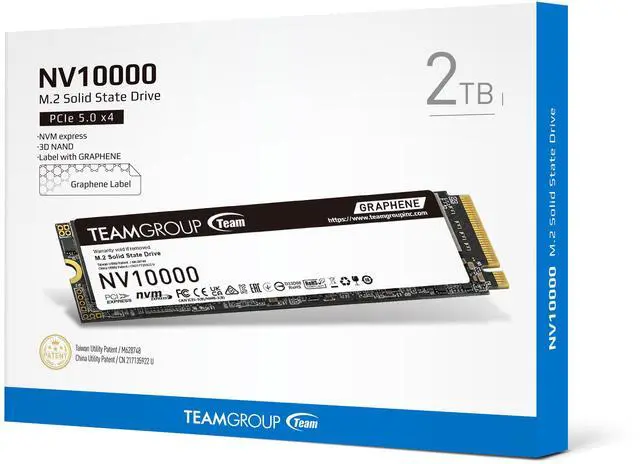
The TEAMGROUP NV10000 is a 2TB M.2 2280 NVMe SSD with a PCIe 5.0 x4 interface and sequential speeds up to 10,000 MB/s read and 8,500 MB/s write, suited to users moving large files or building a high-speed desktop with PCIe 5.0 storage support.
Recommended For
- Video editors and other content creators moving large project files or media between drives on a compatible PCIe 5.0 system; independent testing found the NV10000 handled a 16.5GB 4K Premiere Pro project quickly.
- PC builders with a PCIe 5.0 M.2 slot who frequently transfer large files or run data backups and want a 2TB internal drive; TEAMGROUP positions the NV10000 for these workloads, and its 2TB model is rated for up to 10,000 MB/s read and 8,500 MB/s write.
- Laptop or compact-PC owners upgrading a compatible system who need a slim, single-sided M.2 2280 drive; TEAMGROUP lists laptop compatibility, and the graphene heat spreader avoids a bulky attached heatsink.
- Enthusiasts building a quiet PCIe 5.0 PC who want Gen5 transfer speeds without an active SSD cooling fan; testing of the NV10000 1TB found it ran cool, though the review used a motherboard heatsink.
Real-World Use Scenarios
- When editing a large video project, a creator can keep project files on the NV10000 and reopen them for editing; a review’s Premiere Pro test found it loaded a 16GB 4K project quickly compared with other tested drives.
- When moving large media folders or making local backups, users can store the files on this drive and expect fast transfers, though actual speeds depend on the source drive, system, and workload.
- For a PC game library, users can install games on the NV10000 and get responsive loading; testing placed it near high-end Gen4 and Gen5 drives, so the main practical benefit is quick storage rather than a guaranteed major improvement over a good SSD.
- As a system drive for everyday work, it can hold Windows, applications, and frequently used files; tested everyday workloads were responsive, but routine tasks may feel only modestly different from using a quality Gen4 SSD.
- For a desktop build with a compatible M.2 PCIe 5.0 slot, the 2TB capacity can serve as a combined space for games, creative projects, and everyday files; confirm motherboard support and use any recommended M.2 cooling solution.
Spec Summary
| Attribute | Value |
|---|
| Best For | Consumer desktop and laptop systems with M.2 2280 PCIe 5.0 x4/NVMe support |
|---|
| Capacity | 2TB (2048GB) |
|---|
| Interface And Form Factor | Internal M.2 2280 SSD using PCIe 5.0 x4 with NVMe protocol |
|---|
| Read And Write Performance | Sequential read speeds up to 10,000 MB/s and sequential write speeds up to 8,500 MB/s |
|---|
| Memory And Cache | 3D NAND with 2GB DRAM cache |
|---|
| Endurance And Reliability | Rated for 1,200TB written and an MTBF of 1,500,000 hours |
|---|
| Physical And Operating Conditions | 22 × 80 × 3.70mm, weighs 7g, operates from 0°C to +70°C, and withstands up to 1,500G/0.5ms shock; no heatsink included |
|---|
| Model Identifiers | TEAMGROUP NV10000 M.2 PCIe 5.0 SSD, part/model number TM8FGP002T0C101 |
|---|
Reference Q&A
Q: TEAMGROUP NV10000 2TB or Crucial T705 2TB—which should I choose?
A: Choose the NV10000 for PCIe 5.0 performance with a graphene heat spreader and a 10,000 MB/s rated sequential read speed. Choose the T705 if you prioritize higher rated peak throughput: its 2TB model is rated up to 14,500 MB/s read and 12,700 MB/s write, and it has DRAM cache. The T705 needs adequate cooling to sustain performance under heavy workloads, so check your system’s M.2 cooling before choosing it.
Q: Is the NV10000 2TB worth choosing over the TEAMGROUP NV5000 2TB for gaming?
A: Choose the NV10000 if you need its higher rated sequential speeds for large file transfers or other storage-heavy work, and your system supports PCIe 5.0. The NV5000 is a PCIe 4.0 option rated up to 5,000 MB/s read and 3,000 MB/s write; independent game-load testing found that PCIe 5.0 often adds little or no in-game benefit over PCIe 4.0. For gaming alone, favor the NV5000 if it meets your capacity needs and costs less; consider the NV10000 when you also expect to benefit from faster sequential transfers.
Q: Should I get the NV10000 2TB or the 1TB version?
A: Choose the 2TB model if you need twice the storage capacity or expect more total writes: TEAMGROUP rates it for 1,200 TBW versus 600 TBW for the 1TB model. Both are rated for up to 10,000 MB/s sequential reads; the 2TB version is rated for up to 8,500 MB/s writes, compared with 8,200 MB/s for 1TB. Choose 1TB if that capacity is sufficient and its price better fits your budget.
Q: Should I choose the NV10000 or a PCIe 4.0 SSD for everyday use and games?
A: Choose the NV10000 if you have a PCIe 5.0-compatible system and regularly move large files or run storage-heavy workloads. For everyday computing and gaming, a suitable PCIe 4.0 SSD may be a more practical choice: testing across games found that moving from PCIe 4.0 to PCIe 5.0 often did not meaningfully improve gameplay or loading. Compare actual capacity, price, and workload needs before paying extra for Gen5 bandwidth.
Q: Will this SSD work in my PC or laptop?
A: It requires an M.2 2280 slot that supports PCIe NVMe. Check your device’s manual for slot size and interface support; a PCIe 5.0-capable slot is needed to approach the advertised maximum speeds.
Q: Does this SSD need a heatsink?
A: This model is listed without a heatsink. Check whether your motherboard or device has an M.2 heatsink; if not, consider a compatible one, especially for sustained demanding workloads. Confirm that any added heatsink fits your system.
Q: Will I notice the speed in everyday use or gaming?
A: The drive is rated for sequential reads up to 10,000 MB/s and writes up to 8,500 MB/s. Its speed is most relevant to large file transfers and storage-heavy tasks; everyday use or gaming may not make full use of those maximum sequential rates. Actual performance depends on the system and workload.
Q: Is the 2TB capacity suitable for frequent file writes?
A: The listed endurance rating is 1,200 TBW, meaning 1,200 terabytes written over the drive’s rated endurance. This provides a useful basis for estimating fit against your expected write workload, but it does not predict an exact service life.
Q: Is the TEAMGROUP NV10000 worth choosing for a gaming PC over a PCIe Gen4 SSD?
A: For gaming alone, the Reddit discussion suggests Gen5 may not provide a noticeable advantage over a good Gen4 SSD. The NV10000 is a better fit if you also need its higher sequential speeds for large file transfers or other storage-heavy work, or if its price is close to a comparable Gen4 drive.



 All Categories