
Your Browsing History
- Free 30-day Returns
- NZ$139.35 Shipping
NZ$10,368.40
GST-Inclusive Price
Ships from United States.
Sold by Newegg
Shipped by Newegg


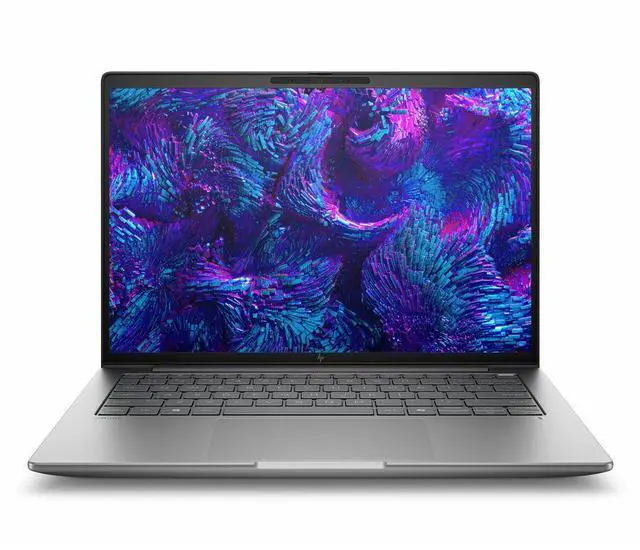




HP ZBook 8 G1i 14" Mobile Workstation - Intel Core Ultra 9 285H - vPro Technology - 64GB - 1TB SSD - Windows 11 Pro - Intel Arc Graphics - Webcam - IEEE 802.11be Wireless BP6Z4UT#ABA
- 2.5K
- Intel Core Ultra 9 285H
- vPro Technology
- 64 GB
- 1 TB SSD
- English Keyboard
- Meteor Silver
- Intel Chip
- 2560 x 1600
- Windows 11 Pro
- Intel Arc Graphics
- In-plane Switching (IPS) Technology
- Front Camera/Webcam
- IEEE 802.11be Wireless LAN Standard
+
+
Overview
Specs
Reviews
SMART BUY ZBOOK 8 G1I 14 U9 285H 14 64GB/1T PC
Warranty & Returns
Warranty, Returns, And Additional Information
Return Policies*
- Return for refund within: 30 days
- Returns are subject to restocking fees and return shipping fees. Please click here to learn more about restocking fees and return shipping fees.
- This item is covered by Newegg.com's International Order Return Policy.
- Read full return policy for details.
- *Subject to applicable law
Warranty Notice:
This product does not include manufacturer warranty when purchased or used outside of its designated sales region. By purchasing internationally, you acknowledge that warranty support from the manufacturer will not be available.
Manufacturer Contact Info
- Manufacturer Website
- Support Phone: 1-800-474-6836
- Support Website
- View other products from HP
LOADING...
Learn about this product
The HP ZBook 8 G1i is a 14-inch mobile workstation built for professionals who need strong everyday performance in a compact system, with an Intel Core Ultra 9 285H, 64GB RAM, 1TB SSD, 2560x1600 display, and Windows 11 Pro for business and technical workflows.
Recommended For
- Mobile engineers, product designers, and CAD users who need workstation certification and a compact 14-inch system for office, field, and client-site work.
- Corporate professionals and technical teams that want strong CPU performance, 64GB-class memory, Windows Pro, and vPro-style manageability for large spreadsheets, multitasking, analysis, and long work sessions away from a desk.
- Remote or hybrid workers who spend a lot of time on video calls and want a business-first laptop with a higher-quality webcam, strong microphones, and modern connectivity rather than a consumer-style entertainment machine.
- Students preparing for engineering, science, or creative careers who need a portable workstation-class laptop that aligns with pro software workflows better than a typical thin-and-light business notebook.
Real-World Use Scenarios
- Using multiple large spreadsheets, browser tabs, Teams/Zoom, and business apps at the same time is a realistic fit. In practice, this kind of workload should feel smooth and stay responsive through a full workday, with workstation features aimed at reliability and manageability rather than gaming-focused graphics.
- For engineering or technical students running CAD-adjacent coursework, coding tools, and virtual machines, this system makes sense when CPU performance, memory capacity, and durability matter more than heavy 3D graphics. Expect it to handle demanding class and lab workflows better than a mainstream ultrabook, but the integrated Intel Arc configuration is not the right choice for serious GPU-heavy CAD or rendering work.
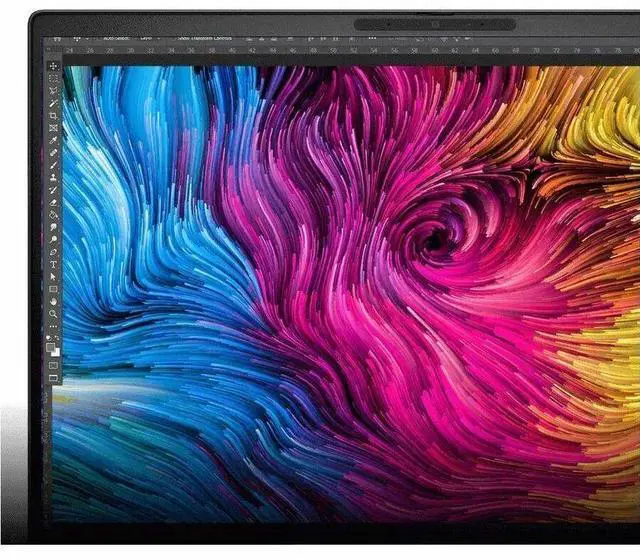
- Photo editing, design review, and color-sensitive office creative work are reasonable real-world uses, especially when paired with HP’s higher-gamut display options. Users working in Adobe-style workflows should get a better visual experience than on many basic business laptops, but export times and 3D effects will still depend heavily on whether the workload is CPU-led or needs stronger discrete graphics.
- Working away from a desk for meetings, travel days, or client-site visits is a realistic scenario. Reviews suggest the 14-inch model can last through much of a workday for lighter tasks, so it is suitable for note-taking, presentations, remote meetings, and document work, though sustained high-performance work will still drain the battery faster and is best done plugged in.
- If you need a compact workstation for code builds, data analysis, local AI-assisted productivity features, and other CPU-heavy professional tasks, this is a practical use case. Expect stronger results in compute-focused work than in graphics-heavy 3D workflows, making it better suited to analysts, developers, and technical professionals than to users expecting dedicated-GPU workstation behavior.
Spec Summary
| Attribute | Value |
|---|---|
| Best For | Business and professional users who need a 14-inch mobile workstation for AI and pro-level graphics workloads on a Windows 11 Pro platform |
| Processor And Core Count | Intel processor 285H (single CPU), up to 5.4 GHz maximum boost, 24 MB L3 cache |
| Memory Configuration | 64 GB installed (RAM memory installed), up to 64 GB maximum across 2 RAM slots; DDR5 SDRAM reported |
| GPU And VRAM | Integrated Intel Arc graphics (graphics memory type reported as DDR5 SDRAM) |
| Display Spec | 14.0-inch IPS LCD, native 2560 x 1600 resolution, 120 Hz refresh rate, maximum brightness reported as 400 nit |
| Storage And Expansion | 1 TB solid-state drive (M.2 form factor/interface) |
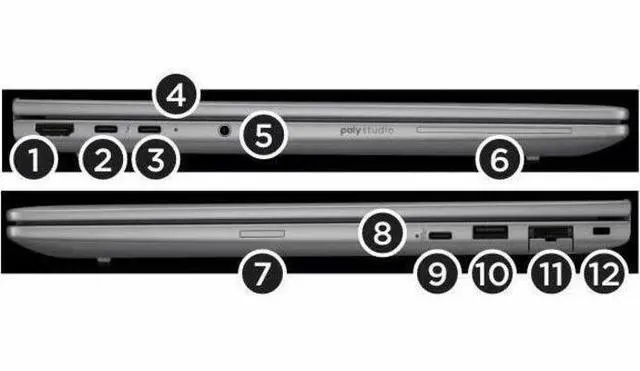
| Ports And Connectivity | Wireless: Wi‑Fi (802.11n/ac/ax) and Bluetooth; Wired ports: HDMI x1, Thunderbolt x2, USB x2, Ethernet; DisplayPort output reported |
| Webcam And Privacy | Built-in webcam/front camera included |
| Keyboard And Input | Standard QWERTY English keyboard with touch pad input |
| Battery And Power | Includes lithium polymer battery plus power adapter and power cord (batteries listed as not separately included/required) |
| Dimensions And Weight | Item dimensions listed as 18.5 x 3 x 10.75 inches (L x W x H); package weight 5.45 pounds |
| Operating System | Windows 11 Pro (Windows family) |
| Model Identifiers | HP ZBook 8 G1i model BP6Z4UT#ABA (Manufacturer: Hewlett Packard), Meteor Silver finish, mobile workstation form factor, unit/package quantity 1 |
| Other Features | Marketed as an AI workstation with pro-level graphics capabilities; business-use orientation |
Reference Q&A
Q: Should I choose the HP ZBook 8 G1i 14 over the HP ZBook Firefly 14 G11?
A: Choose the HP ZBook 8 G1i 14 if you want a newer 14-inch HP mobile workstation with higher-end Intel Core Ultra H-series options and a stronger focus on workstation positioning. External reviews consistently frame the ZBook 8 G1i 14 as the successor direction to the Firefly line, with newer platform options and better CPU headroom in tested configurations. The Firefly 14 G11 still makes sense if you prefer a lighter, more established model family or find a configuration with discrete RTX graphics at a better price. For this specific Newegg configuration, the ZBook 8 G1i 14 is the clearer fit for users prioritizing CPU capacity, 64GB memory, and current-generation platform features over choosing an older HP 14-inch workstation generation.
Q: Is this HP ZBook 8 G1i 14 a better choice than a Lenovo ThinkPad P14s for a 14-inch workstation?
A: Choose this HP ZBook 8 G1i 14 if your priority is HP's workstation ecosystem, Intel vPro, and a configuration that already includes 64GB RAM and 1TB storage in a compact 14-inch format. A ThinkPad P14s is the more direct cross-shop alternative, and review coverage shows it is also aimed at users who want workstation features in a thin 14-inch chassis. In practice, the decision usually comes down to platform preference: this ZBook configuration is a strong fit for business fleets standardized on HP and Intel, while the ThinkPad P14s can be the better path if you want Lenovo's keyboard and service ecosystem or are specifically targeting AMD-based P14s configurations. Neither is a universal winner; this HP model is the better choice when enterprise manageability and HP workstation continuity matter more than switching brands.
Q: Should I buy this Intel Arc version or move up to a ZBook 8 G1i with RTX graphics?
A: Buy this Intel Arc configuration if your work is centered on office productivity, coding, large spreadsheets, light photo work, and general workstation multitasking where 64GB RAM and a fast H-series CPU matter more than GPU acceleration. Move up to an RTX-equipped ZBook 8 G1i if your applications benefit from certified professional graphics, heavier 3D work, GPU-assisted rendering, CAD viewports, or more demanding visual workloads. Review coverage of RTX-based ZBook 8 G1i models shows that the platform scales meaningfully when paired with dedicated workstation graphics, so the upgrade is most justified by workflow needs rather than by general use.
Q: Is the Core Ultra 9 / 64GB configuration worth it over a lower-tier ZBook 8 G1i setup?
A: This Core Ultra 9 / 64GB configuration is worth choosing if you expect long device life, run multiple heavy applications at once, use local virtual machines, or work with large datasets where memory capacity matters every day. A lower-tier ZBook 8 G1i configuration is the better value if your workload is mostly browser-based business work, standard office apps, video calls, and occasional creative tasks. The practical trade-off is simple: lower-tier versions can cover mainstream professional use, while this configuration is the safer choice for users who want more CPU headroom and enough memory to avoid near-term upgrades.
Q: Should I pick this 14-inch ZBook 8 G1i or a larger performance-first workstation?
A: Pick this 14-inch ZBook 8 G1i if you want a mobile workstation that stays easier to carry while still offering a high-resolution 2560 x 1600 display, H-series Intel processor, and enterprise features. Step up to a larger workstation if your priority is sustained performance under heavier loads, more room for dedicated graphics, or a bigger thermal and battery envelope. The 14-inch ZBook 8 G1i is the better choice when portability is part of the job, while larger workstation models are the better fit when desk-side performance takes priority over travel convenience.
Q: Is this a good choice for travel, meetings, and office work if I also need workstation-class memory and business features?
A: Yes, if your work is mostly office apps, browser tabs, video meetings, and light-to-moderate professional workloads, this configuration fits well. It combines a 14-inch 2560 x 1600 display, 64GB RAM, 1TB SSD, webcam, Wi‑Fi 7, and Windows 11 Pro in a mobile workstation format. The main trade-off is that a workstation-class 14-inch laptop is usually less optimized for maximum battery life and lowest weight than a mainstream business ultrabook.
Q: Who is this laptop best suited for?
A: This model is best for professionals who want a compact 14-inch system but need more memory and a more workstation-oriented setup than a standard business laptop. It is a strong fit for engineering, analysis, development, large Office files, multitasking, and 2D or lighter 3D professional work. It is less ideal for buyers who only need email, documents, and web apps, because a lighter and less expensive business laptop would usually be the better value.
Q: Is Intel Arc integrated graphics enough, or should I choose a laptop with discrete RTX graphics instead?
A: Intel Arc integrated graphics are usually enough for office work, meetings, coding, media work, and lighter professional graphics workloads. The trade-off is that integrated graphics are not the best option for heavier 3D rendering, advanced CAD, large GPU-accelerated AI tasks, or demanding simulation work. If those are core workloads, a discrete RTX-based mobile workstation is the safer choice.
Q: Is this better than a premium 14-inch business laptop like a ThinkPad X1 Carbon for most buyers?
A: It is better only if you specifically need workstation-oriented capacity, such as 64GB memory, professional workflow headroom, and HP ZBook positioning. A premium business ultrabook like a ThinkPad X1 Carbon is usually the better pick for buyers who prioritize lower weight, simpler office use, and portability over workstation capability. In short: choose this ZBook for heavier multitasking and pro work; choose a business ultrabook for lighter everyday business use.
Q: Is this good for note-taking with a pen or tablet-style use?
A: No, not if pen input or tablet-style note-taking is a priority. This configuration is listed as a non-touch 14-inch clamshell laptop, so it is better suited to keyboard-based work, meetings, and desk or travel productivity than handwritten note-taking workflows.
Q: Is the HP ZBook 8 G1i 14 a good fit for office work, coding, and heavy multitasking?
A: Yes, if your workload benefits from 64GB of RAM and a high-resolution 14-inch display. Community discussion repeatedly frames the ZBook 8 G1i as a strong choice for coding, documentation, and multitasking, while the provided specs support that use case with a Core Ultra 9 285H, 64GB RAM, 1TB SSD, and 2560 x 1600 IPS display. It makes more sense for demanding professional use than for basic office tasks.
Q: Is the HP ZBook 8 G1i 14 worth buying if I mainly want portability and battery life?
A: Only if you still need workstation-class memory and CPU performance. Reddit discussion suggests the 14-inch ZBook 8 line can deliver usable battery life for light work, but buyers also describe it as heavier than expected for a 14-inch laptop and not ideal if portability is the top priority. This model is better suited to users who want a compact workstation, not an ultralight travel laptop.
Q: Who is the HP ZBook 8 G1i 14 best for?
A: It is best for buyers who want a smaller Windows workstation for professional workloads such as development, large spreadsheets, analysis, and general multitasking, and who do not need dedicated graphics. Based on the provided specs, the main strengths are CPU class, 64GB memory, 1TB SSD capacity, Wi‑Fi 7 support, and a 2.5K non-touch IPS display. It is less suitable for buyers who mainly want a thin everyday laptop or stronger GPU performance.
Q: What are the main trade-offs of buying the HP ZBook 8 G1i 14 with Intel Arc graphics?
A: The main trade-off is that this configuration prioritizes CPU performance, memory capacity, and workstation positioning over graphics performance. Reddit discussion around the ZBook 8 line repeatedly points to the integrated graphics setup as a weaker point versus models with dedicated GPUs. For buyers choosing this exact model, that means it is a better fit for productivity and professional multitasking than for GPU-heavy 3D, rendering, or gaming workloads.
Q: Should I buy the HP ZBook 8 G1i 14 instead of a mainstream business laptop?
A: Choose it if you specifically need more memory, a faster H-series processor, and workstation-oriented hardware in a 14-inch size. Community discussion compares the ZBook 8 G1i with lighter business laptops and suggests it can be overkill for routine office use. If your work does not need 64GB RAM or sustained heavier workloads, a mainstream business laptop may be the simpler and more portable choice.