- Free 30-day Returns
- ₱6,603.61 Shipping
₱227,028.47
VAT-Inclusive Price
Ships from United States.
Sold by Newegg
Shipped by Newegg
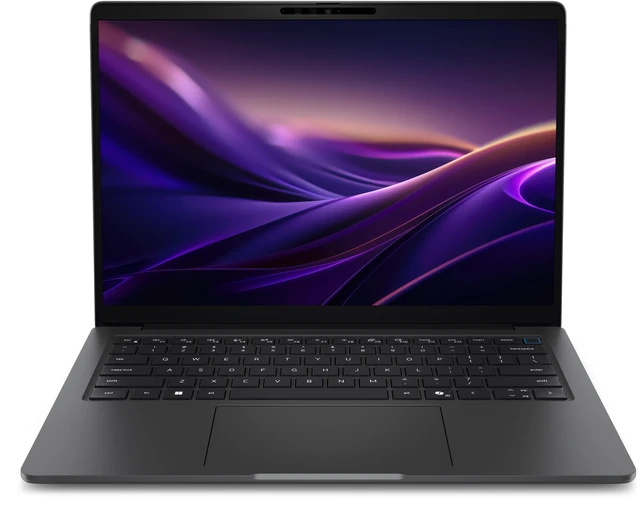
Dell Pro Precision 5 14S PW514260 Copilot+PC Notebook - Intel Core Ultra 5 336H - 16GB - 512GB SSD - Windows 11 Pro - Intel Arc Graphics - Webcam - PWD3X
- Core Ultra 5 336H
- 16 GB LPCAMM2 Memory / 512 GB (Gen 4) SSD
- Intel Arc / Arc Pro
- 1920 x 1200 (WUXGA)
- Windows 11 Pro, Copilot+ PC
+
+
Overview
Specs
Reviews
SPL DELL PRO PRECISION 5 14S PW514260 ULTRA 5 336HH 512GB SSD 14 FHD+NON-TOUCHIR
Warranty & Returns
Warranty, Returns, And Additional Information
Return Policies*
- Return for refund within: 30 days
- Returns are subject to restocking fees and return shipping fees. Please click here to learn more about restocking fees and return shipping fees.
- This item is covered by Newegg.com's International Order Return Policy.
- Read full return policy for details.
- *Subject to applicable law
Warranty Notice:
This product does not include manufacturer warranty when purchased or used outside of its designated sales region. By purchasing internationally, you acknowledge that warranty support from the manufacturer will not be available.
Manufacturer Contact Info
LOADING...
The Dell Pro Precision 5 14S PW514260 is a 14-inch mobile workstation with an Intel Core Ultra 5 336H, Intel Arc graphics, 16GB of LPCAMM2 memory, and a 512GB SSD. It suits professionals seeking a portable Windows 11 Pro laptop for everyday business work and productivity.
Recommended For
- Mobile business users who carry a 14-inch laptop between office, client, and home setups and value built-in Ethernet, HDMI, USB-A, and Thunderbolt ports for connecting without a dock.
- Organizations deploying Windows 11 Pro laptops that need business-oriented management and security options, such as vPro, smart-card or fingerprint authentication, and Dell fleet-management tools.
- Analysts, developers, and technical staff who need a portable Windows work machine for office applications, coding, data work, and moderate CPU-based tasks rather than graphics-heavy rendering.
- Professionals who run supported business or engineering applications and prioritize workstation-oriented deployment and portability; confirm the specific app’s certification and graphics requirements before purchase.
Real-World Use Scenarios
- For everyday office work—documents, spreadsheets, email, and many browser tabs—the 14S is positioned as a business productivity laptop and should handle these tasks comfortably. With 16GB of memory, very large projects or heavy multitasking may be more limiting than routine office work.
- For video calls and hybrid-work days, users can join meetings, share work, and move between business apps on a compact 14-inch system; the listed configuration includes an FHD IR webcam. Meeting quality will still depend on lighting, network conditions, and the conferencing app.
- For employees who carry one laptop between the office, home, and meetings, the 14-inch format and business-focused Windows 11 Pro setup suit a mobile-work routine. It can also connect to external displays and wired networks when back at a desk; actual battery time varies with workload and configuration.
- For programming and technical office tasks, users can work in an IDE, terminals, documentation, and business tools on the same machine. The 16GB configuration is better suited to typical development work than running several memory-heavy virtual machines or large local datasets at once.
- For supported on-device AI features in Windows, users can try eligible Copilot+ PC functions without treating the laptop as a general-purpose AI workstation. App support and results vary; Dell’s specifications identify the Core Ultra 5 336H configuration as using Intel Graphics, so Arc Pro graphics benchmark results from higher configurations should not be assumed for this model.
Spec Summary
| Attribute | Value |
|---|---|
| Best For | Mobile workstation use with a 12-core Intel Core Ultra processor, Intel Arc graphics, and 16 GB of memory |
| Processor And Core Count | Intel Core Ultra 5 336H with 12 cores, up to 4.6 GHz turbo, and 18 MB L3 cache |
| GPU And AI Processing | Intel Arc / Arc Pro graphics with a 47 TOPS NPU |
| Display Spec | 14-inch IPS display with 1920 × 1200 WUXGA resolution, 400-nit brightness, 45% NTSC color gamut, and anti-glare finish; non-touch |
| Memory Configuration | 16 GB LPCAMM2 dual-channel memory at 8533 MT/s |
| Storage And Expansion | 512 GB Gen 4 SSD |
| Operating System And AI Features | Windows 11 Pro with Copilot+ PC features |
| Webcam And Privacy | FHD IR camera |
| Model Identifiers | Dell Pro Precision 5 14S, model PW514260, part number PWD3X |
Reference Q&A
Q: Dell Pro Precision 5 14S vs. Dell Pro 5 14: which should I choose?
A: Choose the Pro Precision 5 14S when you want Dell’s 14-inch mobile-workstation positioning in a compact business laptop. Choose the Pro 5 14 for a standard business-laptop configuration. In StorageReview’s tested configurations, the Precision 5 14S scored higher in several CPU and content-creation benchmarks; those results apply to the review configurations, not necessarily this 336H listing.
Q: Should I get this Core Ultra 5 336H model or upgrade to a Core Ultra 7 368H Dell Pro Precision 5 14S?
A: Choose this Core Ultra 5 336H configuration for a 14-inch Pro Precision 5 14S with 16GB memory and a 512GB SSD. Choose a 368H configuration if you want the higher-tier processor and Intel Arc Pro B390 graphics listed for that processor in Dell’s specifications. Dell also lists the 368H with a 50-TOPS NPU, compared with 47 TOPS for the 336H.
Q: Is the 16GB/512GB Dell Pro Precision 5 14S enough, or should I choose 32GB/1TB?
A: Choose the listed 16GB/512GB configuration for a balanced starting setup. Choose a 32GB/1TB configuration if you want more memory capacity and local SSD space. Dell lists both memory and storage options for the Pro Precision 5 14S, so the choice can be based on how much working memory and file storage you want built in.