
Your Browsing History
- ₱1,504.97 Shipping
₱58,457.12
VAT-Inclusive Price
Ships from Canada.
Most customers receive within 6-11 days.

Best Sellers
 Top Rated
- ₱67,955.99
- + ₱5,819.59 Shipping

Meet Your Seller


LinkSprinter™ Network Tester MODEL 300
- Diagnose and test Power over Ethernet (PoE), Link to the switch, DHCP, Gateway, and Internet connection
- Get VLAN, switch name, and port information via CDP/LLDP/EDP for your managed switches
+
+
Overview
Specs
Reviews

Fluke Networks LinkSprinter Network Tester Series
Validate Network Connectivity in less than 10 seconds
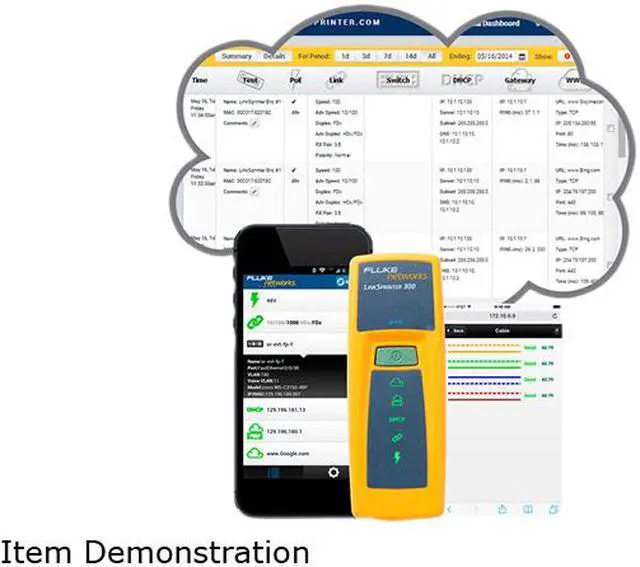
The LinkSprinter Network Tester provides quick, simple and affordable network connectivity testing and troubleshooting that solves problems fast, smartphone integration, and automated cloud based reporting at a price anyone can afford.
Features

- Diagnose and test Power over Ethernet (PoE), Link to the switch, DHCP, Gateway, and Internet connection
- Get VLAN, switch name, and port information via CDP/LLDP/EDP for your managed switches
- Expert network troubleshooting techniques delivered to color graded LEDs
- All test results from the LinkSprinter Network Tester are sent to the Link-Live Cloud Service
- Get detailed test results sent directly to your email

Five essential network tests in the palm of your hand
-
Power Over Ethernet (PoE) Tester
This network tester can become a PoE tester that checks to make sure you can power a phone, security camera or Access Point through a specific port. The LinkSprinter Network Tester can even run without batteries on PoE. -
Link to the Switch
Perform a switch test, which will indicate the switch name and port your cable connects to. Know your available speed and duplex settings. -
DHCP Connection
Confirm that the DHCP server is running and responsive. Request an IP address, get your subnet information, troubleshooting DNS, and identify the default gateway and DNS server. -
Gateway Connection
Verify the gateway/router address and reachability by pinging the device three times. -
Internet Connection
Confirm cloud connectivity or internal service reachability. Use for DNS server troubleshooting and verification and application port connectivity.

Link-Live Cloud Service
Link-Live Cloud Service is a centralized management, collaboration and archival dashboard for network connectivity test results from LinkSprinter and LinkRunner AT hand-held network testers. Results are automatically sent to Link-Live, providing organizations with the ability to quickly and easily document the network, provide proof of performance, and better manage jobs and staff efficiency.
Link-Live offers two levels, Essentials and Job Pro. Essentials comes standard with all models of LinkSprinter and LinkRunner AT, and provides important test results management and reporting capabilities. Job Pro expands Essentials into a more complete test results management platform providing greater job visibility, project control, tester and user management. Job Pro is available as a subscription based service with 1 and 3 year options through Fluke Networks directly.
Essentials (Complementary):
- Manage, sort and analyze network test results
- Filter results by time, user, network, errors
- Download firmware updates
- Annotate test results
- Generate reports in .pdf or .csv output
- Centralized multi-unit configuration

Job Pro (Requires subscription)
Includes all Essentials services listed and adds:
- Job folders (organize by site, job, technician, customer, etc.)
- Custom cover page and analytical summary report
- On-tester persistent comments
- Auto file into folders
- Attach photos
- Available in 1 year and 3 year paid subscription offerings
On your phone
Need more details? LinkSprinter 200 and 300 can deliver them in your mobile device browser with its built in Wi-Fi access point. These models allow troubleshooting of network problems using your phone or tablet as a user interface. Point your browser to your LinkSprinter and connect to it as a Wi-Fi access point, then pull up your web browser and type in address 172.16.9.9 to instantly see detailed results come up on your mobile device.

Cable Test and Blink Light on Switch Port
When you need to validate cable integrity, the LinkSprinter 300 allows you to run a cable test and displays any cable fault as well as distance to open or short.
If you need to verify the connection path between jack location and switch port, LinkSprinter 300 will blink the light on the switch port it is connected to, allow you to understand the full connection path. You can document this information in Link-Live Cloud Service.


| LinkSprinter Features by Model | 100 | 200 | 300 |
| Diagnose and test Power over Ethernet (PoE), Link to the switch, DHCP, Gateway, and Internet connection | X | X | X |
| Get VLAN, switch name, and port information via CDP/LLDP/EDP for your managed switches | X | X | X |
| Expert network troubleshooting techniques delivered to color graded LEDs | X | X | X |
| All test results are sent to the Link-Live Cloud Service | X | X | X |
| Get detailed test results sent directly to your email | X | X | X |
| Access your test results through your phone's browser by connecting to the built-in Wi-Fi access point | X | X | |
| See cable fault and distance to open or short | X | ||
| Blink light on switch port | X |
MAIN OVERVIEW FEATURES: Device Function: PoE TestingHDMI: NoDVI: NoVGA: NoUSB: NoSerial Port: NoSerial V.35 Interface: NoAudio Line Out: NoPoE (RJ-45) Port: YesNetwork (RJ-45): NoWireless LAN: YesMedia Type Supported: Twisted PairNumber of Batteries Supported: 2Battery Size Supported: AABattery Chemistry: AlkalineHeight: 4.36" (110.74 mm)Width: 1.60" (40.64 mm)Depth: 1.28" (32.51 mm)Weight (Approximate): 115.7 gPackage Contents: LinkSprinter Network TesterWrist StrapLimited Warranty: 1 Year
Warranty & Returns
Warranty, Returns, And Additional Information
Return Policies*
- Return for refund within: 30 days
- Return for replacement within: non-replaceable
- This item is covered by Deal Targets Return Policy
- *Subject to applicable law
Warranty Notice:
This product does not include manufacturer warranty when purchased or used outside of its designated sales region. By purchasing internationally, you acknowledge that warranty support from the manufacturer will not be available.
Manufacturer Contact Info
- For a directory of all our manufacturers, please click below.
- Manufacturers Directory
LOADING...
LOADING...