


 All CategoriesAll CategoriesAll Categories
Shipped by Newegg

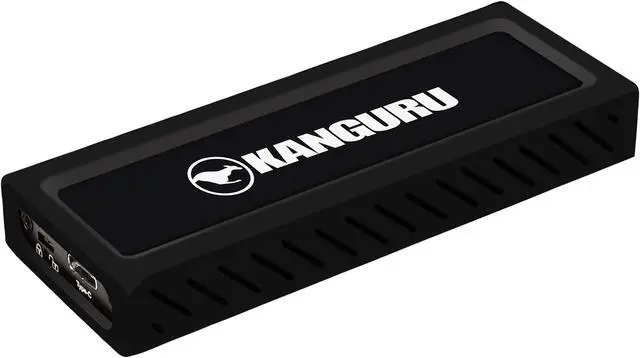

| Brand | Kanguru |
|---|---|
| Model | U3-NVMWP-1T |
| Capacity | 1TB |
|---|---|
| Interface | SuperSpeed+ USB 3.1 Gen 2 |
| Color | Black |
| Max Sequential Read | Up to 675 MB/s (USB3.1 Gen 2) 25 MB/s (USB2.0) |
|---|---|
| Max Sequential Write | Up to 575 MB/s (USB3.1 Gen 2) 25 MB/s (USB2.0) |
| System Requirements | Windows 10 Windows 8 Windows Vista Windows 7 (32 bit & 64-bit Compatible) Mac OSX 10.4 and later 1 GB RAM or above Pentium 4, 2GHz processor or equivalent Requires USB3.1 ports for SuperSpeed+ Performance |
|---|
| Operating Temperature | 41°F ~ 131°F (5°C ~ 55°C) |
|---|---|
| Storage Temperature | -40°F ~ 149°F (-40°C ~ 65°C) |
| Max Shock Resistance | 400G/2.0 ms |
| Max Vibration Resistance | 1G |
| Width | 5mm |
|---|---|
| Depth | 15mm |
| Height | 40mm |
| Package Content | Kanguru UltraLock USB-C M2 NVMe Rubber Case USB-C to USB-C Cable USB-C to USB-A Cable Quick Start Guide |
|---|
| First Listed on Newegg | December 21, 2020 |
|---|
Warranty Notice:
This product does not include manufacturer warranty when purchased or used outside of its designated sales region. By purchasing internationally, you acknowledge that warranty support from the manufacturer will not be available.The Kanguru U3-NVMWP-1T is a 1TB external SSD for users who want portable storage with sequential speeds up to 675 MB/s read and 575 MB/s write over USB 3.1 Gen 2. It includes USB-C to USB-C and USB-C to USB-A cables for connecting to compatible devices.
| Attribute | Value |
|---|---|
| Best For | Portable 1TB storage and file transfers with compatible Windows or Mac computers, using USB 3.1 Gen 2 for the listed SuperSpeed+ performance |
| Capacity | 1TB |
| Interface And Compatibility | SuperSpeed+ USB 3.1 Gen 2; requires a USB 3.1 port for SuperSpeed+ performance |
| Read Write Performance | Sequential speeds up to 675 MB/s read and 575 MB/s write over USB 3.1 Gen 2; up to 25 MB/s read and write over USB 2.0 |
| System Requirements | Windows 10, 8, 7 (32-bit or 64-bit), or Vista; Mac OS X 10.4 or later; 1 GB RAM or more and a Pentium 4 2 GHz processor or equivalent |
| Physical Design And Durability | Black; 5 × 15 × 40 mm (width × depth × height); maximum shock resistance 400G/2.0 ms and vibration resistance 1G |
| Operating And Storage Conditions | Operating temperature: 5°C to 55°C (41°F to 131°F); storage temperature: -40°C to 65°C (-40°F to 149°F) |
| Included Accessories | Kanguru UltraLock USB-C M2 NVMe, rubber case, USB-C-to-USB-C cable, USB-C-to-USB-A cable, and quick start guide |
| Model Identifiers | Kanguru U3-NVMWP-1T |
Q: Is the Kanguru UltraLock faster than the Samsung T7?
A: No, not according to their published maximum sequential speeds. The 1TB Kanguru UltraLock is rated for up to 675 MB/s read and 575 MB/s write, while the Samsung T7 is rated for up to 1,050 MB/s read. Choose the T7 when higher advertised transfer speeds are the priority; choose the UltraLock when its physical write-protect switch and secure firmware better fit your workflow. Actual speeds depend on the host, connection, and workload.
Q: Kanguru UltraLock or Samsung T7 Shield for outdoor use?
A: The Samsung T7 Shield is the more clearly specified choice for outdoor conditions: Samsung rates it IP65 for dust and water resistance and for drops of up to 3 meters. Its advertised speeds are also higher—up to 1,050 MB/s read and 1,000 MB/s write, versus the UltraLock’s 675 MB/s read and 575 MB/s write. Choose the Kanguru when its physical write-protect switch and secure firmware are more important than the Shield’s stated environmental protection and higher maximum speeds.
Q: Should I choose the Kanguru UltraLock or a standard portable SSD for sensitive files?
A: Choose the Kanguru UltraLock if you want a physical switch that can put the drive in read-only mode, or secure firmware intended to protect against device tampering. A standard portable SSD may be a better fit when you prioritize higher advertised speeds or features such as hardware encryption; compare the specific model’s security options, since they vary. The UltraLock’s listed maximum speeds are 675 MB/s read and 575 MB/s write.
Q: Will this SSD work with both Windows and Mac computers?
A: The listed system requirements include Windows 7, 8, and 10, and Mac OS X 10.4 or later. Check that your computer has a compatible USB port; the drive requires USB 3.1 Gen 2 to reach its stated maximum speeds.
Q: What speeds can I expect, and does the USB port matter?
A: With a USB 3.1 Gen 2 port, the drive is rated for sequential speeds up to 675 MB/s read and 575 MB/s write. With USB 2.0, the listed maximum is 25 MB/s for both read and write, so the host port affects performance.
Q: Can I connect it to a computer with a USB-A port?
A: Yes. The package includes a USB-C to USB-A cable as well as a USB-C to USB-C cable. A USB-A connection may not provide the USB 3.1 Gen 2 performance needed for the drive’s highest listed speeds.
Q: Is this SSD suitable for carrying with a laptop?
A: It may suit portable file storage: it is an external SSD, includes a rubber case, and is rated for up to 400G shock resistance. The product information does not list water or dust resistance, so do not assume it is protected against those conditions.