


 All CategoriesAll CategoriesAll Categories
Shipped by Newegg


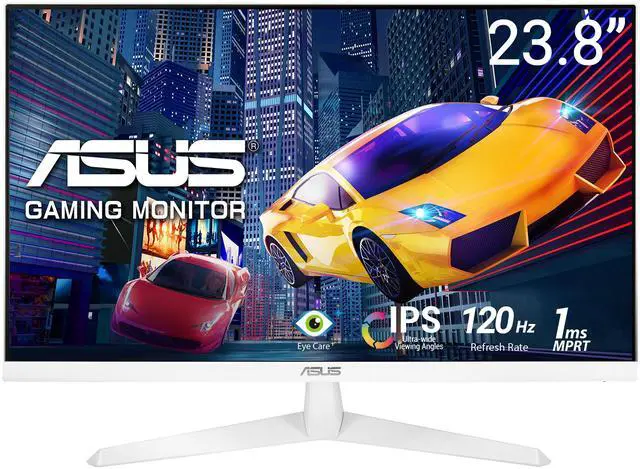

| Brand | ASUS |
|---|---|
| Model | VY249HGR-W |
| Cabinet Color | White |
| Screen Size | 23.8" |
|---|---|
| Widescreen | Yes |
| Glare Screen | Anti-glare |
| Panel | IPS |
| Adaptive Sync Technology | Adaptive Sync |
| Resolution | 1920 x 1080 |
| Viewing Angle | 178° (H) / 178° (V) |
| Aspect Ratio | 16:9 |
| Brightness | 250 cd/m2 |
| Contrast Ratio | 1,500:1 |
| Response Time | 1 ms |
| Display Colors | 16.7 Million |
| Monitor Pixel Density | 0.2745mm |
| Refresh Rate | 120Hz |
| Curved Surface Screen | Flat Panel |
| Video Ports | 1 x D-Sub / 1 x HDMI 1.4 |
|---|---|
| Headphone | Yes |
| Power Supply | 100-240V, 50/60Hz |
|---|---|
| Power Consumption | Power Consumption : <20W Power Saving Mode : <0.5W Power Off Mode : <0.3W |
| Stand Adjustments | Tilt |
|---|---|
| Built-in Speakers | No |
| Built-in Webcam | No |
| VESA Compatibility - Mountable | 100 x 100mm |
| Features | Trace Free Technology SPLENDID Technology Color Temp. Selection (4 modes) GamePlus QuickFit HDCP, 1.4 VRR Technology (Adaptive-Sync) GameFast Input technology Shadow Boost Motion Sync Low Blue Light Eye Care+ Technology |
| Dimensions | 15.55" x 21.3" x 7.28" with stand 12.72" x 21.3" x 1.89" without stand |
|---|---|
| Weight | 7.5 lbs. with stand 6.39 lbs. without stand |
| Package Contents | HDMI cable L-shaped Screwdriver Power cord Quick start guide Warranty Card |
|---|
| First Listed on Newegg | August 07, 2026 |
|---|
Warranty Notice:
This product does not include manufacturer warranty when purchased or used outside of its designated sales region. By purchasing internationally, you acknowledge that warranty support from the manufacturer will not be available.The ASUS VY249HGR-W is a 23.8-inch 1080p IPS monitor with a 120Hz refresh rate, Adaptive Sync, and 1ms MPRT, suited to home-office users and casual gamers who want smooth, clear visuals in a compact display.
| Attribute | Value |
|---|---|
| Best For | Home-office work, gaming, and entertainment with desktop, laptop, or gaming-console setups |
| Panel And Resolution | 23.8-inch flat IPS LED panel with 1920 × 1080 resolution, 16:9 aspect ratio, 178° horizontal and vertical viewing angles, anti-glare matte finish, and 0.2745 mm pixel pitch |
| Refresh Rate And Response | 120Hz refresh rate, 1ms response time, and Adaptive Sync/VRR with G-Sync compatibility for supported variable-refresh setups |
| Image Quality And Enhancements | 250 cd/m² brightness, 1,500:1 contrast ratio, and 16.7 million display colors, with Splendid, Trace Free, Shadow Boost, GamePlus, QuickFit, GameFast Input, and Motion Sync technologies |
| Eye Care | Eye Care+ Technology and Low Blue Light |
| Ports And Connectivity | One HDMI 1.4 input, one D-Sub/VGA input, and a headphone connection |
| Stand And Mounting | Tilt-adjustable stand with 100 × 100 mm VESA mounting compatibility for desk or wall-mount setups |
| Physical Design And Dimensions | White cabinet; 21.3 × 15.55 × 7.28 inches with stand and 21.3 × 12.72 × 1.89 inches without stand; weighs 7.5 lb with stand and 6.39 lb without stand |
| Power And Energy | 100–240V, 50/60Hz power supply; power consumption under 20W, under 0.5W in power-saving mode, and under 0.3W when off |
| Integrated Audio And Camera | No built-in speakers or webcam |
| Included In The Box | HDMI cable, L-shaped screwdriver, power cord, and quick-start guide |
| Model Identifiers | ASUS VY249HGR-W, VY Series |
Q: ASUS VY249HGR-W or ASUS VY249HE for a 24-inch 1080p monitor?
A: Choose the VY249HGR-W if you want a higher refresh rate for smoother everyday motion and casual gaming: it supports up to 120Hz, compared with 75Hz on the VY249HE. Both are 23.8-inch Full HD IPS monitors with ASUS Eye Care features, so the VY249HE may suit you if its lower refresh rate meets your needs and it costs less.
Q: Should I get the ASUS VY249HGR-W or ASUS TUF VG249Q3A for gaming?
A: Choose the TUF VG249Q3A if competitive gaming and higher refresh rates are priorities: it supports up to 180Hz and has DisplayPort plus two HDMI ports. The VY249HGR-W supports up to 120Hz and offers an IPS Full HD screen with Adaptive-Sync, Eye Care Plus features, and HDMI and VGA inputs, making it a fit for casual gaming and mixed home-office use.
Q: ASUS VY249HGR-W or LG 24MP400-B for work and casual gaming?
A: The ASUS VY249HGR-W is the stronger fit if smoother scrolling or casual gaming matters: it supports 120Hz and Adaptive-Sync. The LG 24MP400-B supports 75Hz, so it can suit basic office use if that refresh rate is sufficient and its price is lower. Both are Full HD IPS monitors; compare current prices and input needs before choosing.
Q: Does this monitor have built-in speakers or a webcam?
A: No. The VY249HGR-W has neither built-in speakers nor a webcam, so plan to use your computer’s audio and camera or connect separate peripherals for meetings and sound.
Q: Can I connect a laptop or game console to this monitor?
A: Yes, if the device provides HDMI output; the monitor has an HDMI 1.4 input and includes an HDMI cable. It also has VGA for compatible older devices. A device with a different output may need an adapter. The monitor displays the connected device’s picture; it is not a computer.
Q: Can I mount it on a monitor arm or wall mount?
A: Yes. The monitor supports 100 × 100 mm VESA mounting. Check that your arm or wall mount supports this VESA pattern and the monitor’s weight.
Q: Is this monitor suitable for home-office work and video meetings?
A: It is suitable for everyday office tasks: it has a 23.8-inch 1080p IPS screen, wide viewing angles, and flicker-free and low-blue-light features. It can display video meetings, but it has no built-in webcam or speakers, so use your computer’s or separate peripherals. The stand offers tilt adjustment only.
Q: Will this monitor actually run at 120Hz?
A: The product is specified for 120Hz, but one VY249HGR owner reported that their PC initially showed only 100Hz; they later said a custom resolution in NVIDIA settings resolved it. Check that your system detects the 120Hz mode before assuming it is active.
Q: Is this a good choice for color-sensitive work?
A: The IPS panel has wide viewing angles, but the supplied specifications do not state color-gamut coverage or factory color accuracy. A Reddit discussion also raises concerns about color quality, so consider a monitor with verified color-accuracy data if accurate color is essential.
Q: Does Adaptive Sync guarantee tear-free gaming?
A: No. The monitor lists Adaptive Sync, but that does not guarantee tear-free results in every setup. A Reddit user reported persistent tearing while trying to use it, so treat the feature as a compatibility benefit rather than a guarantee.