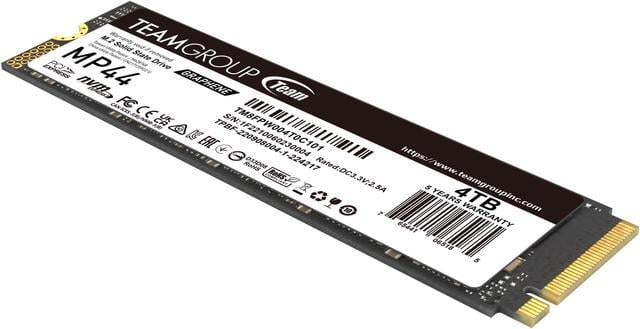
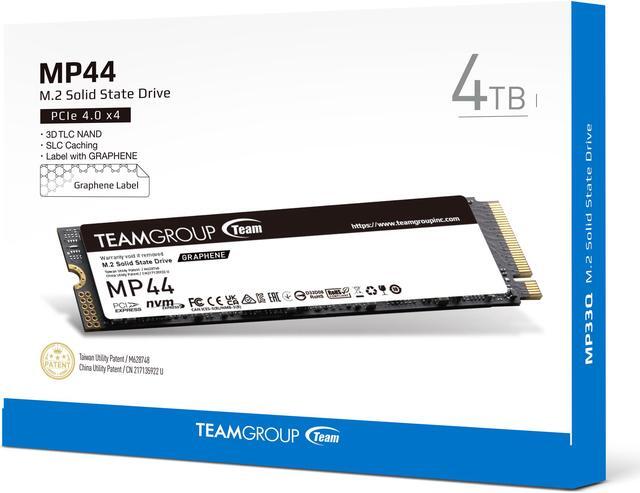
The Team Group MP44 is a 4TB M.2 2280 PCIe 4.0 x4 NVMe SSD for users who want fast, high-capacity storage in a compatible laptop, desktop, NUC, NAS, or PS5, with sequential speeds up to 7,400 MB/s read and 6,900 MB/s write.
Recommended For
- PC gamers who want one large drive for a substantial game library and everyday play; reviewers found the MP44 well suited to gaming and everyday use, where its lack of onboard DRAM is less of a concern than for heavy sustained writes.
- Desktop builders adding a roomy secondary game or file drive, especially when the M.2 slot has a motherboard heatsink and airflow; PC Gamer identified a cooled secondary slot as a particularly suitable installation.
- Laptop owners with a compatible M.2 2280 slot who need to consolidate a large collection of games, videos, or other files; the MP44 is a compact, power-efficient PCIe 4.0 drive, though device compatibility should be checked before purchase.
Real-World Use Scenarios
- PS5 game-library expansion: Install the MP44 in the console’s M.2 slot, with a compatible heatsink, to keep more games installed and reduce the need to delete and reinstall titles. Game-loading performance is still limited by the console and game, not just the SSD’s advertised PC speed.
- Gaming desktop storage: Use the 4TB drive for a large PC game library so more titles can stay installed at once. It offers PCIe 4.0 NVMe storage, while the practical benefit is mainly capacity and responsive game access—not a guaranteed improvement to frame rates.
- Large project and media files: Keep video, photo, and other sizable files on the MP44 in a compatible desktop or laptop, with room for active projects and working data. Reviews find good overall performance, but transfer times can vary by workload and may not match peak sequential-speed claims.
- Laptop storage upgrade: Add the MP44 to a laptop with an available M.2 2280 PCIe NVMe slot to expand space for games, apps, and personal files. Check the laptop’s supported drive size and thermal-clearance requirements before installation.
- Everyday PC system drive: Use it for the operating system and frequently used applications when building or upgrading a compatible PC. It provides quick NVMe storage, though reviews note that the difference between SSDs may be hard to notice in routine everyday use.
Spec Summary
| Attribute | Value |
|---|
| Best For | Consumer internal storage for PCs and compatible PlayStation 5 systems |
|---|
| Capacity | 4TB for storing games, files, and other data |
|---|
| Interface And Form Factor | M.2 2280 SSD with a PCIe 4.0 x4 NVMe interface |
|---|
| Memory And Cache | 3D NAND flash with no DRAM and HMB cache |
|---|
| Read Write Performance | Sequential speeds up to 7,400 MB/s read and 6,900 MB/s write; random 4KB performance up to 650,000 IOPS read and 660,000 IOPS write |
|---|
| Endurance And Reliability | 2,000TBW endurance rating and 1,600,000-hour MTBF |
|---|
| Thermal Design | Less-than-1mm graphene heat-dissipating label compatible with onboard M.2 heatsinks |
|---|
| Operating Conditions And Durability | Operating temperature: 0°C to +70°C; storage temperature: -40°C to +85°C; operating humidity: 90% RH under 40°C; shock resistance: 1,500G / 0.5 ms; vibration resistance: 80–2,000 Hz / 20G |
|---|
| Physical Specifications | 80 × 22 × 3.70 mm; weighs 7 g |
|---|
| Model Identifiers | Team Group MP44, model TM8FPW004T0C101 |
|---|
Reference Q&A
Q: TEAMGROUP MP44 4TB or WD_BLACK SN850X 4TB for a gaming PC?
A: Choose the MP44 if you want 4TB of PCIe 4.0 storage and its price is meaningfully lower; its high advertised sequential speeds suit game libraries and everyday PC use. Choose the SN850X if you prioritize its gaming-focused features and thermal management, particularly for sustained workloads or a system with limited SSD cooling. The MP44’s 4TB model has no dedicated DRAM and should be installed with adequate M.2 cooling.
Q: Is the MP44 4TB a better choice than the MP44L 2TB?
A: Choose the MP44 4TB if you need more room for games or large files, or want higher advertised sequential speeds: TEAMGROUP lists up to 7,000/6,000 MB/s for the MP44 4TB, versus 4,800/4,400 MB/s for the MP44L 2TB. Choose the MP44L if 2TB is enough and a lower-speed PCIe 4.0 drive meets your needs. Both models are DRAM-less.
Q: Should I buy the MP44 4TB or the MP44 2TB?
A: Choose the 4TB version if you expect to keep a large game library or other bulky files installed at once. Choose the 2TB version if that capacity is sufficient and you would rather spend less upfront. Both are M.2 2280 PCIe 4.0 MP44 drives; the larger model’s main advantage is capacity, not a different interface generation.
Q: Can I use the MP44 4TB in a PS5, or should I get a heatsink-equipped SSD?
A: The MP44’s M.2 2280 PCIe 4.0 format is suitable for a PS5 expansion slot, but the drive itself does not include a full heatsink. Choose it if you can add a compatible heatsink or use one that meets the console’s installation requirements. A heatsink-equipped alternative is more convenient if you want the cooling hardware included; confirm the exact model’s dimensions and PS5 compatibility before buying.
Q: Will this SSD work in my desktop or laptop?
A: It can work in a system with an available M.2 2280 slot that supports PCIe NVMe. Check your device’s specifications first; laptop slot compatibility and physical clearance can vary.
Q: Can I install this SSD in a PS5, and does it need a heatsink?
A: The MP44 is listed as PS5-compatible, but its thin graphene label is not a conventional heatsink. PS5 M.2 drives require effective heat dissipation, so plan to use a suitable heatsink and confirm the drive-plus-heatsink dimensions meet the console’s requirements.
Q: Is 4TB a good choice for a large game or file library?
A: Yes, 4TB provides substantial room for games and other files. It is most suitable if you expect to keep a large library installed or stored; a smaller capacity may be enough if you regularly remove or move files.
Q: Is this SSD suitable for gaming and everyday file storage?
A: It is a PCIe 4.0 x4 NVMe SSD with up to 7,400 MB/s sequential read and 6,900 MB/s sequential write speeds, making it suitable for compatible systems used for games and file storage. Its design has no onboard DRAM and uses HMB cache, which buyers should consider if their workload depends on a DRAM-equipped drive.
Q: Is the MP44 4TB a good choice for a game library?
A: It is a reasonable fit for a large game library: Reddit users recommended the 4TB MP44 for game storage, and one reported using it as a game and media drive. Its 4TB capacity and PCIe 4.0 interface suit that use; actual speeds depend on the system and workload.
Q: Does the MP44’s lack of DRAM make it a poor choice?
A: Not necessarily for ordinary gaming or general storage. This model uses HMB rather than onboard DRAM, and Reddit discussions describe DRAM-less NVMe drives as suitable for many consumer uses. If you regularly write very large amounts of data at once, compare sustained-write performance before buying.
Q: Is the MP44 4TB worth buying?
A: It may be a good value if you need 4TB of TLC storage and its price is competitive. Reddit buyers have recommended it for capacity and game storage, but those discussions do not establish its value at today’s price; compare current alternatives before deciding.
Q: Should I use the MP44 as the only copy of important files?
A: No. Reddit reports include both a 4TB MP44 failing and users reporting trouble-free operation, so community anecdotes do not establish failure rates. Keep a separate backup of important data, as with any SSD.


 All Categories