


 All CategoriesAll CategoriesAll Categories
Shipped by Newegg
 Top Rated

Make informed decisions with expert advice. Learn More



Warranty Notice:
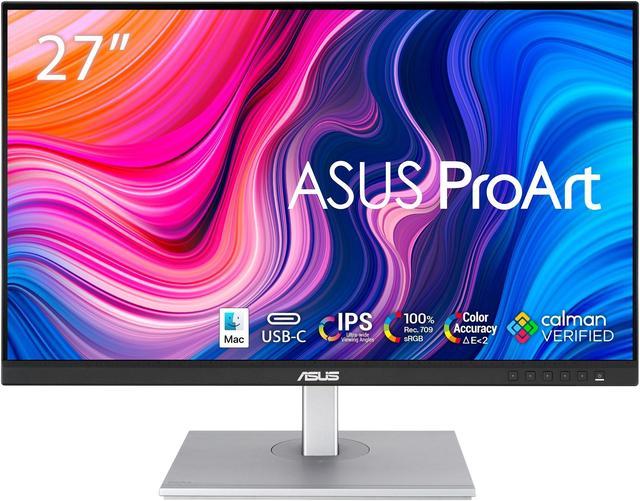
This product does not include manufacturer warranty when purchased or used outside of its designated sales region. By purchasing internationally, you acknowledge that warranty support from the manufacturer will not be available.The ASUS ProArt PA278CV is a 27-inch QHD IPS monitor suited to photographers, video editors, and designers who need factory-calibrated color, with 100% sRGB and Rec. 709 coverage and Delta E<2 accuracy.
| Attribute | Value |
|---|---|
| Best For | Photo and video editing, design work, and general desktop entertainment or gaming |
| Panel And Resolution | 27-inch flat IPS display with a 2560 × 1440 QHD resolution, 16:9 aspect ratio, anti-glare finish, and 178° horizontal and vertical viewing angles |
| Color And Image Calibration | 100% sRGB and Rec. 709 coverage, 16.7 million display colors, 350 cd/m² brightness, 1,000:1 contrast, and Delta E < 2 color accuracy; includes ProArt color and calibration controls |
| Refresh Rate And Response | 75 Hz refresh rate, 5 ms GTG response time, and Adaptive-Sync support |
| Ports And Connectivity | One HDMI 1.4 port, two DisplayPort 1.2 connections (including MST), USB-C with DisplayPort Alt Mode, and four USB-A USB 3.2 Gen 1 ports; also lists a 3.5 mm audio connection |
| Stand And Ergonomics | Adjustable tilt (+35° to −5°), swivel (±45°), pivot (±90°), and height (up to 150 mm) for flexible positioning |
| Mounting And Dimensions | Supports 100 × 100 mm VESA mounting; measures 24.21 × 14.72–20.63 × 8.98 inches with stand and 24.21 × 14.65 × 2.13 inches without |
| Audio | Built-in stereo speakers rated at 2 W each |
| Power And Efficiency | 100–240 VAC, 50/60 Hz power supply; typical power consumption under 21.28 W and under 0.5 W in power-saving mode; ENERGY STAR compliant |
| Model Identifiers | ASUS ProArt PA278CV |
Q: ASUS ProArt PA278CV vs PA278QV: what changes?
A: Both are 27-inch QHD, 75Hz ProArt monitors. The PA278CV adds USB-C with 65W power delivery and DisplayPort output for daisy-chaining, making it a practical fit for a laptop-centered or multi-monitor setup while retaining the PA278QV’s core screen format. ([asus.com](https://www.asus.com/us/displays-desktops/monitors/eye-care/proart-display-pa278cv/?utm_source=openai))
Q: Should I get the PA278CV or the 4K ASUS ProArt PA279CRV?
A: Choose the PA279CRV when you want a 27-inch 4K workspace and wider color coverage, including 99% Adobe RGB and 99% DCI-P3. The PA278CV is a QHD option for workflows centered on 100% sRGB and Rec. 709 color, with a 75Hz refresh rate and 65W USB-C power delivery. ([asus.com](https://www.asus.com/us/displays-desktops/monitors/eye-care/proart-display-pa278cv/?utm_source=openai))
Q: PA278CV vs PA278CGV: which ASUS ProArt is better for mixed creative work and gaming?
A: The PA278CGV keeps the 27-inch QHD format and adds a 144Hz refresh rate, 95% DCI-P3 coverage, and 90W USB-C power delivery, making it the more feature-focused choice for creative work alongside high-refresh-rate use. The PA278CV offers 75Hz and 65W USB-C power delivery for a color-focused sRGB/Rec. 709 workflow. ([asus.com](https://www.asus.com/us/displays-desktops/monitors/eye-care/proart-display-pa278cv/?utm_source=openai))
Q: Is this monitor suitable for photo editing, design, and video work?
A: It is suited to color-focused photo, design, and standard-gamut video workflows: the 27-inch IPS display has 2560 × 1440 resolution, 100% sRGB and Rec. 709 coverage, and factory calibration rated at Delta E < 2. It is not a 4K display.
Q: Can I connect a laptop with one USB-C cable and charge it?
A: Yes, if the laptop’s USB-C port supports DisplayPort video output. The monitor’s USB-C connection carries video and data, provides up to 65W of power, and connects the laptop to the monitor’s USB hub. Check that 65W meets your laptop’s charging needs.
Q: Does it work with a MacBook, and is the display 4K?
A: It can work with a compatible MacBook using USB-C, DisplayPort, or HDMI video output. The display is QHD at 2560 × 1440, not 4K; an Abt answer also confirms MacBook Air compatibility.
Q: Does the monitor have built-in speakers?
A: Yes. It has two built-in 2W speakers, which can handle basic audio playback. The product information does not specify a built-in webcam.
Q: Is the PA278CV suitable for photo and video editing?
A: It is a reasonable fit for standard sRGB photo work and Rec.709 video work: it is a 27-inch QHD IPS display with stated 100% sRGB and Rec.709 coverage and factory calibration. If your workflow requires HDR or a wider color gamut, check those requirements carefully; the supplied specifications do not list HDR support or guarantee coverage beyond sRGB/Rec.709.
Q: Can I connect a laptop with one USB-C cable?
A: Yes, if the laptop’s USB-C port supports DisplayPort video output. The monitor can carry video and provide up to 65W of power over USB-C, while its USB hub can connect peripherals. Check whether 65W meets your laptop’s charging needs.
Q: Is the PA278CV good for gaming as well as work?
A: It can handle casual gaming, but its 75Hz refresh rate and Adaptive-Sync are modest compared with gaming-focused monitors. It is a better fit when color-focused work and general use matter more than high refresh rates or competitive gaming.


