


 All CategoriesAll CategoriesAll Categories
Shipped by Newegg
 Top Rated









Warranty Notice:
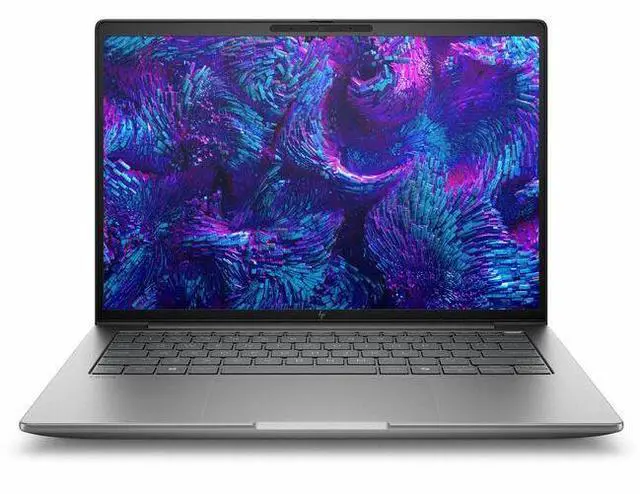
This product does not include manufacturer warranty when purchased or used outside of its designated sales region. By purchasing internationally, you acknowledge that warranty support from the manufacturer will not be available.The HP ZBook 8 G1i is a 14-inch mobile workstation for professionals who need a compact business laptop for office productivity, remote collaboration, and everyday workstation-class workflows, with an Intel Core Ultra 7 265U, 16GB RAM, 512GB SSD, Windows 11 Pro, and Wi‑Fi 7.
| Attribute | Value |
|---|---|
| Best For | Mobile 14-inch workstation for business and professional users who need a portable, secure laptop for productivity and business workflows |
| Processor And Core Count | Intel Core Ultra 7 (model 265U) single-processor configuration, up to 5.3 GHz turbo boost with 12 MB L3 cache |
| GPU And VRAM | Integrated Intel graphics (integrated/video processor: Intel), uses DDR5 system memory as listed |
| Display Spec | 14.0-inch IPS LCD, native/WUXGA 1920 x 1200 resolution, 60 Hz refresh, ~300 nit maximum brightness, ~62% sRGB color gamut with anti-glare coating |
| Memory Configuration | 16 GB DDR5 SDRAM installed (two RAM slots), supports up to 64 GB maximum |
| Storage And Expansion | 512 GB solid-state drive (M.2 interface and M.2 form factor) |
| High Speed I O | Includes 2 Thunderbolt ports, 2 total USB ports, 1 HDMI output and 1 Gigabit Ethernet port; hardware interfaces listed include USB, HDMI, Ethernet, USB-C and Bluetooth |
| Wired And Wireless Networking | Wi‑Fi 802.11be and Bluetooth wireless; Gigabit Ethernet LAN |
| Webcam And Privacy | Front-facing webcam (built-in) |
| Keyboard And Control | Spill-resistant keyboard with fingerprint recognition biometric security |
| Battery And Power | Built-in lithium-ion battery (3 cells) with 4000 mAh energy rating; one battery included and installed, battery weight ~300 g, batteries packed with equipment, battery type lithium-ion |
| Portability | Approximately 3.1–3.15 lb shipped/item weight; reported chassis dimensions include 0.74" x 12.4" x 8.7" (alternate dimension listing 17.5 x 10.5 x 3 inches available in sources) |
| External Display And Docking Fit | External displays supported via HDMI output and two Thunderbolt (USB-C) ports for docking or external monitors |
| Model Identifiers | HP ZBook 8 G1i (Model BP6K8UT#ABA), 2025 model year, Meteor Silver color, manufacturer Hewlett Packard |
| Other Features | Business-oriented features include Miracast support, anti‑glare display, spill-resistant keyboard, front camera and built-in media package; listed color gamut ~62% sRGB |
| Operating System And Security | Windows 11 Pro operating system (Windows family) with listed biometric fingerprint recognition |
Q: Should I buy this HP ZBook 8 G1i 14 or a Dell Precision 5490?
A: Choose the HP ZBook 8 G1i 14 if you want a 14-inch workstation that is easier to configure from very efficient integrated-graphics models up to higher workstation GPU trims in the same product family. Choose the Dell Precision 5490 if you prefer a premium 14-inch Precision design and are comparing against higher-end H-class configurations. For this specific Newegg configuration, the HP model is the better fit when battery life, lower heat, and business-focused everyday workstation use matter more than maximum CPU or GPU throughput, because it uses a Core Ultra 7 265U with integrated graphics rather than the higher-power chips commonly reviewed in performance-focused 14-inch workstations.
Q: Is this ZBook 8 G1i 14 better than a lower-tier business laptop for the same office workload?
A: Yes, if you specifically want workstation positioning, vPro manageability, Windows 11 Pro, and the option to stay within a certified ZBook platform. For general office work, web apps, video calls, and light multitasking, a lower-tier business laptop can feel similar day to day. This ZBook 8 G1i 14 becomes the better choice when you need the support, security, and product-class expectations of a mobile workstation, even in a lighter U-series configuration.
Q: Should I get this configuration or a higher-tier ZBook 8 G1i with H-series CPU and RTX graphics?
A: Get this configuration if portability, lower power draw, and mainstream professional use are the priority. Move to a higher-tier ZBook 8 G1i if your workload includes CAD with heavier 3D views, GPU-accelerated creation, simulation, or other tasks that benefit from H-series processors and discrete RTX workstation graphics. Reviews of higher-end ZBook 8 G1i trims show that the platform scales well upward, but that extra performance is tied to larger budgets and more demanding thermal and battery trade-offs.
Q: Is this HP ZBook 8 G1i 14 a good upgrade from an older HP ZBook Firefly 14?
A: Usually yes, especially if you want to stay with HP's thin-and-light workstation concept. Community discussion and review coverage consistently treat the ZBook 8 line as the successor path for buyers who previously looked at the Firefly 14 class. This specific configuration is the more natural upgrade if your current Firefly use is centered on office productivity, remote work, and light professional apps. If your older Firefly had discrete Nvidia graphics and you still rely on that GPU capability, you may want a higher ZBook 8 trim instead of this integrated-graphics version.
Q: Should I choose this 14-inch ZBook for portability or a larger performance-first workstation instead?
A: Choose this 14-inch ZBook if you carry your laptop often, work between meetings or client sites, and want workstation branding in a more travel-friendly form factor. Choose a larger performance-first workstation if you spend more time in CAD, rendering, engineering simulation, or sustained heavy compute work. HP's own workstation positioning separates lighter entry models from higher-performance ZBook tiers, so this configuration makes the most sense when mobility and manageability matter more than peak graphics performance.
Q: Is this a good laptop for office work, meetings, and everyday business tasks?
A: Yes. This configuration is well suited to productivity work such as email, documents, spreadsheets, web apps, video meetings, and general multitasking. The 14-inch 1920 x 1200 display, Windows 11 Pro, webcam, Bluetooth, HDMI, and Wi-Fi 7 all fit typical hybrid-work needs. The main limitation is that this model uses integrated graphics, so it is a better fit for business productivity than for GPU-heavy creative or engineering workloads.
Q: Is it worth buying as a travel work device?
A: Yes, if your priority is a compact business laptop for commuting, meetings, and desk-to-desk mobility. A 14-inch chassis, webcam, HDMI, wireless connectivity, and Windows 11 Pro make it practical for travel-heavy office use. The trade-off is that this is a mobile workstation-style system with integrated graphics, so buyers focused on maximum battery life or ultra-light design may also want to compare it with mainstream business laptops such as ThinkPad T14 or Dell Latitude models.
Q: Who is this laptop most suitable for?
A: It is most suitable for business users who want a premium 14-inch Windows laptop for office productivity, conferencing, secure enterprise use, and light professional workloads. Good fits include managers, consultants, analysts, IT staff, and users who value vPro, Windows 11 Pro, HDMI, webcam, and modern wireless features. It is less suitable for buyers who need dedicated graphics for 3D rendering, heavy CAD, advanced video editing, or gaming.
Q: Is this better than a similar ThinkPad T14 or Dell Latitude for most buyers?
A: Not necessarily. This HP ZBook 8 G1i is the better choice if you specifically want HP’s ZBook line, enterprise features such as vPro, and a 14-inch professional laptop with modern connectivity. A ThinkPad T14 or Dell Latitude may be the better value for buyers who mainly need standard office productivity and want a more conventional business-laptop alternative. For most buyers, the decision comes down to whether they prefer ZBook branding and workstation positioning versus a mainstream corporate notebook.
Q: Can this handle creative work or engineering software?
A: It can handle light to moderate professional workloads, but this specific configuration is not the strongest choice for graphics-heavy work because it lists integrated graphics rather than a dedicated GPU. That makes it fine for documents, browser-based tools, meetings, and some lighter professional apps, but a different workstation configuration would be better for heavier CAD, 3D, rendering, or video-editing tasks.
Q: Is the HP ZBook 8 G1i 14 a good fit for office work, coding, and travel?
A: Yes, if your work is mostly office apps, meetings, web work, and coding. The 14-inch size, 1920 x 1200 IPS display, integrated graphics, and business features make it a practical mobile work laptop. The main trade-off is that this configuration is not aimed at heavy GPU workloads or high-end 3D work.
Q: Is this configuration worth buying if I need a real workstation?
A: Only if your definition of workstation is business reliability and portability, not GPU-heavy professional work. This specific model uses integrated graphics, 16GB RAM, and a 512GB SSD, so it fits lighter professional workloads better than CAD, rendering, or other graphics-intensive tasks. Buyers who need more headroom should look for higher-memory or discrete-GPU ZBook variants.
Q: Who is the HP ZBook 8 G1i 14 best suited for?
A: It is best suited for business users who want a compact 14-inch Windows workstation-class laptop for general productivity, remote work, and light professional tasks. It makes more sense for users who prioritize portability, webcam, Windows 11 Pro, and modern wireless features than for users who need maximum graphics performance.
Q: What are the main trade-offs of this ZBook 8 G1i 14 configuration?
A: The main trade-offs are performance ceiling and upgrade headroom versus portability. This model gives you a 14-inch WUXGA IPS screen, Windows 11 Pro, and integrated graphics in a compact format, but the 16GB RAM and integrated GPU make it a weaker choice for demanding visual workloads, large local datasets, or long-term use as a high-end workstation replacement.
Q: Should I buy this model if I am sensitive to hardware noise or docked setup issues?
A: Buy with caution if quiet operation and hassle-free external display use are critical. Reddit discussion around the ZBook 8 G1i family includes user questions about power-related noise and display behavior in docked or USB-C monitor setups. That does not prove a general defect, but it does suggest checking return policy, docking compatibility, and charger setup before committing.