


 All CategoriesAll CategoriesAll Categories
Shipped by Newegg
 Top Rated


Warranty Notice:
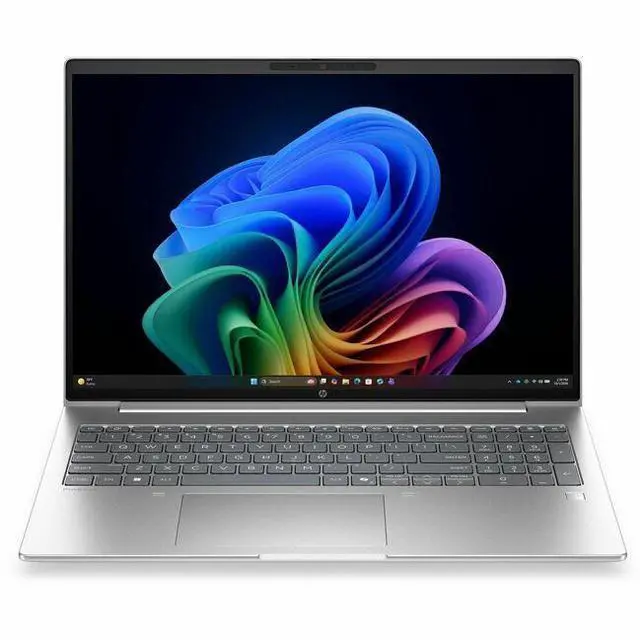
This product does not include manufacturer warranty when purchased or used outside of its designated sales region. By purchasing internationally, you acknowledge that warranty support from the manufacturer will not be available.The HP ProBook 4 G2i is a 16-inch touchscreen Windows 11 Pro laptop with an Intel Core Ultra 7 355, 16GB memory, and a 512GB SSD, making it a practical fit for professionals, students, and home users who want a large WUXGA display for everyday productivity, web work, and video calls.
| Attribute | Value |
|---|---|
| Best For | Home/personal, business, and student everyday computing on a 16-inch touchscreen notebook with focus on productivity and general use |
| Processor And Core Count | Intel Core Ultra 7 (model 355) — 8 cores, up to 4.7 GHz peak, 12 MB L3 cache |
| GPU And VRAM | Integrated Intel graphics (system-shared graphics using DDR5 SDRAM) |
| Display Spec | 16.0-inch WUXGA (1920 x 1200) IPS LCD touchscreen, up to 300 nits brightness, 62% sRGB, anti-glare and low blue light features |
| Memory Configuration | 16 GB DDR5 installed (two RAM slots, upgradable to 64 GB) |
| Storage And Expansion | 512 GB M.2 solid-state drive (M.2 form factor, SSD) |
| High Speed I O | 4 total USB ports (includes USB-C), 1 HDMI output, no Thunderbolt ports reported |
| Battery And Power | Integrated lithium polymer battery, 3 cells, 4000 mAh, one installed and included |
| Wired And Wireless Networking | Wi‑Fi 7 and Bluetooth wireless connectivity |
| Webcam And Privacy | Front-facing webcam |
| Keyboard And Control | Touchscreen input (touch control method) |
| Portability | Approximately 3.8–3.81 lb device weight (package ~5.4 lb); device footprint about 14.1 x 9.9 x 0.69 inches and package dimensions about 20 x 11.8 x 2.5 inches |
| External Display And Docking Fit | Single external display output via HDMI (1 port); no Thunderbolt ports for native docking over TB |
| Model Identifiers | HP ProBook 4 G2i model DG5J8UT#ABA (2026), manufacturer Hewlett Packard |
| Other Features | Pike Silver color; includes power adapter in package; built for everyday computing with notebook form factor |
Q: Should I choose the HP ProBook 4 G2i 16 over a Core Ultra 5 ProBook configuration?
A: Choose the HP ProBook 4 G2i 16 with Core Ultra 7 355 if you want more headroom for heavier multitasking, longer device lifespan, and access to HP's newer Copilot+ positioning with a higher-capability NPU. A lower-tier Core Ultra 5 ProBook is the better fit when your work is mainly web apps, documents, video calls, and standard business software. The trade-off is simple: this Core Ultra 7 model is the stronger choice for demanding office workloads, while Core Ultra 5 usually offers better value for lighter use.
Q: Is the HP ProBook 4 G2i 16 a better choice than the previous ProBook 4 G1i 16?
A: Choose the ProBook 4 G2i 16 if you specifically want the newer platform generation and a Copilot+ class NPU. HP's G2i model moves to Intel Core Ultra 7 355 with Intel AI Boost rated at 49 NPU TOPS, while the earlier G1i generation commonly shipped with lower AI throughput. If your priority is everyday business work rather than on-device AI features, a well-priced G1i can still make sense because the chassis class, screen size, and business-oriented positioning remain similar.
Q: Should I buy this HP ProBook 4 G2i 16 or move up to a higher-tier Core Ultra X7 or H-series laptop?
A: Buy the ProBook 4 G2i 16 if your priority is mainstream business productivity, a large 16-inch workspace, integrated graphics, and commercial features without paying for a more performance-focused platform. Move up to a Core Ultra X7 or H-series system if your work includes heavier creative apps, sustained multicore loads, or more graphics-dependent tasks. External testing on Intel's Core Ultra 7 355 shows it is positioned below the higher-tier X7 class, so the upgrade mainly makes sense for users who can actually use the extra CPU and GPU performance.
Q: Is the HP ProBook 4 G2i 16 better for portability or should I choose a smaller 14-inch laptop instead?
A: Choose the ProBook 4 G2i 16 if screen space, easier side-by-side work, and a full-size business laptop feel matter more than carrying comfort. Choose a 14-inch laptop if you travel often, work in tight spaces, or want a lighter daily carry. The trade-off is straightforward: this 16-inch ProBook is better for desk-first productivity, while a 14-inch model is usually the better fit for mobility-first use.
Q: Should I choose this HP ProBook 4 G2i 16 or a battery-first Copilot+ laptop with Intel Lunar Lake or Snapdragon X?
A: Choose the ProBook 4 G2i 16 if you want a conventional business laptop design with broad Windows software compatibility, upgrade-oriented ProBook positioning, and a larger 16-inch display. Choose a battery-first Copilot+ system built around lower-power Intel Lunar Lake or Snapdragon X if your top priorities are lighter travel and longer unplugged use. Community and review patterns around Core Ultra 7 355 suggest it is a balanced mainstream chip rather than the battery-maximizing option, so this HP fits better as a practical office notebook than as an ultra-mobile machine.
Q: Is this a good fit for office work, meetings, and everyday productivity?
A: Yes. Based on the listed specs, this HP ProBook configuration is a practical choice for office work, web apps, video meetings, note-taking, and general multitasking. The 16 GB memory and 512 GB SSD are a common baseline shoppers ask for on retail laptop pages because they are usually enough for Microsoft 365, browser-heavy workflows, and everyday business use. Its integrated graphics and business-oriented ProBook positioning make it better suited to productivity than gaming or heavy creative workloads.
Q: Is it worth buying as a travel work laptop?
A: It can work well for travel if your priority is screen space and business usability, but it is not the most travel-first option. A 16-inch touchscreen display is useful for spreadsheets, multitasking, and presentations, yet larger laptops are usually less portable than 13-inch or 14-inch alternatives. This model makes more sense for users who travel occasionally and want a bigger work screen, rather than buyers who want the lightest commuter laptop.
Q: Who is this laptop most suitable for?
A: This laptop is best suited to professionals, students in business-style workflows, and home users who mainly need productivity, meetings, document work, and light multitasking. It is a stronger fit for Excel, browsing, video calls, and day-to-day Windows use than for high-end gaming, 3D work, or demanding media production. Buyers who want a business laptop with a larger screen and Windows 11 Pro are the clearest match.
Q: What are the main trade-offs versus a 2-in-1 touchscreen laptop like a Lenovo Yoga or HP OmniBook X Flip?
A: The main trade-off is flexibility versus business simplicity. This ProBook appears to be a standard clamshell touchscreen laptop, so it should be better for straightforward work use, but less versatile than a 2-in-1 for tablet-style note-taking or drawing. If you mainly type, join meetings, and work in desktop apps, the ProBook style is usually the simpler choice. If you want to fold the screen back for handwriting, sketching, or couch use, a 2-in-1 alternative is the better fit.
Q: Is 16 GB RAM and 512 GB SSD enough, or should I look for an upgradeable alternative?
A: For most buyers, 16 GB RAM and a 512 GB SSD are enough for office work, remote meetings, schoolwork, and everyday multitasking. However, if you expect heavier browser use, larger local files, virtual machines, or longer ownership with fewer compromises, an upgradeable model can be the safer choice. Retail laptop Q&A pages frequently show shoppers asking about future RAM and SSD upgrades, so this is an important decision point if you plan to keep the laptop for many years.
Q: Is this HP ProBook 4 G2i 16 a good buy for office work and everyday productivity?
A: Yes for general work. The listed configuration is best suited to office apps, web use, video calls, multitasking, and other everyday productivity tasks. Its 16-inch 1920x1200 touchscreen, 16GB RAM, 512GB SSD, webcam, HDMI, Bluetooth, and Windows 11 Pro make it a practical fit for business-style use. The main limit is that it uses integrated graphics, so it is not the right choice for gaming or heavier graphics workloads.
Q: Who is this laptop most suitable for?
A: It is most suitable for users who want a large-screen business or home laptop for writing, spreadsheets, browsing, meetings, and general multitasking. It makes more sense for buyers who value screen size, Windows 11 Pro, and standard business features than for users who need strong graphics performance, a creator-focused display, or a gaming machine.
Q: What are the main trade-offs of buying this ProBook instead of a gaming or higher-end consumer laptop?
A: The trade-off is priorities. This ProBook is aimed more at work-focused, business-style use than at maximum performance per dollar. You get a 16-inch WUXGA IPS touchscreen, integrated graphics, and standard business features, but not a dedicated GPU or clear signs of being optimized for gaming or heavy creative workloads. If your priority is gaming, 3D work, or the strongest raw hardware value, other laptop categories will usually fit better.
Q: Is 16GB RAM and 512GB SSD enough for most buyers of this model?
A: For typical productivity use, yes. 16GB RAM is enough for common multitasking, office work, browser-heavy use, and video meetings. A 512GB SSD is workable for most users, but buyers with large local files, media libraries, or heavier app installs may want more storage. Storage capacity is more likely to feel limiting than the memory in this configuration.
Q: Is this a good choice if long-term value is the main concern?
A: It can be, but only if the price is competitive. Reddit discussion around recent ProBook 4 G2i listings shows buyers questioning retail pricing and comparing it against stronger-value alternatives. For long-term value, this model makes the most sense when discounted and when your needs are mainly productivity-focused rather than graphics-heavy.