


 All CategoriesAll CategoriesAll Categories
Shipped by Newegg
 Top Rated


Warranty Notice:
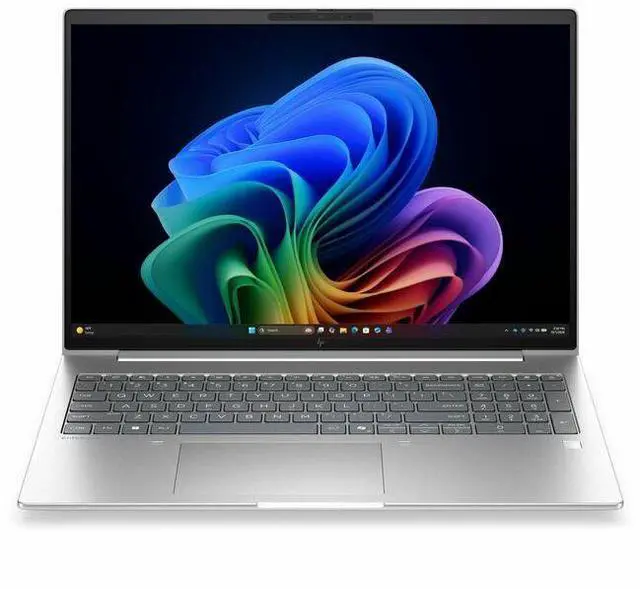
This product does not include manufacturer warranty when purchased or used outside of its designated sales region. By purchasing internationally, you acknowledge that warranty support from the manufacturer will not be available.The HP EliteBook 6 G2i is a 16-inch business laptop with a 1920x1200 IPS display, Intel Core Ultra 5 processor, 16GB memory, and 512GB SSD, making it a strong fit for professionals, students, and home users who want a roomy screen and everyday productivity in a Windows 11 Pro system.
| Attribute | Value |
|---|---|
| Best For | Business and student users needing a 16-inch Windows 11 Pro notebook with Intel Core Ultra 5 performance, integrated Intel graphics, 16 GB RAM and a 512 GB M.2 SSD |
| Processor And Core Count | Intel Core Ultra 5 (model 335) with 4 processor cores, up to 4.6 GHz maximum frequency and 12 MB L3 cache |
| GPU And VRAM | Integrated Intel graphics (integrated interface) with graphics RAM type listed as DDR5 SDRAM |
| Display Spec | 16.0-inch LCD (IPS) display, native 1920 x 1200 (WUXGA) resolution, anti‑glare coating with low blue light treatment and up to 300 nit brightness; not a touchscreen |
| Memory Configuration | 16 GB DDR5 SDRAM installed, 2 RAM slots, supports up to 64 GB |
| Storage And Expansion | 512 GB SSD (M.2 form factor / M.2 interface) |
| High Speed I O | 1× HDMI port, 2× Thunderbolt ports, 2 total USB ports, Ethernet and Bluetooth connectivity listed; hardware interfaces reported as USB, HDMI, Ethernet and Bluetooth |
| External Display And Docking Fit | External displays supported via the single HDMI output and two Thunderbolt ports for docking or multi-monitor setups |
| Battery And Power | Integrated lithium polymer battery (3 cells), 4000 mAh energy content, batteries included and installed; listed battery weight 250 g and packaged with equipment |
| Wired And Wireless Networking | Wi‑Fi 7 and Bluetooth connectivity, plus an Ethernet port; connectivity technologies listed as Wi‑Fi, Bluetooth, HDMI, USB, Thunderbolt and Ethernet |
| Webcam And Privacy | Front-facing webcam present and webcam capability confirmed; includes fingerprint recognition for biometric sign-in |
| Portability | Approximate system dimensions 14.1 x 9.9 x 0.69 inches and listed item weight about 3.8–3.81 pounds (package weight 5.45 lb) |
| Model Identifiers | HP EliteBook 6 G2i (model D9FP1UT#ABA), 2024 model year, Pike Silver Aluminum color, manufacturer Hewlett Packard, ships with power adapter and listed as Wolf Pro Security Edition |
Q: Should I buy the HP EliteBook 6 G2i 16 or move up to the EliteBook 8 G2i 16?
A: Choose the HP EliteBook 6 G2i 16 if you want a 16-inch business laptop for office work, web apps, video calls, and local AI features without moving into a thinner, more premium tier. Choose the EliteBook 8 G2i 16 if portability and a slimmer chassis matter more. HP positions the EliteBook 8 line above the EliteBook 6 line, and available spec listings show the EliteBook 8 G2i 16 starts lighter at about 1.69 kg, while HP documentation for the EliteBook 6 G2i 16 lists about 1.895 kg. If your priority is mainstream business use with upgradeable memory, the EliteBook 6 G2i 16 is the more practical fit; if your priority is a more premium 16-inch design to carry more often, the EliteBook 8 G2i 16 is the better step-up choice.
Q: Is the HP EliteBook 6 G2i 16 worth it over a ThinkPad E16?
A: The HP EliteBook 6 G2i 16 makes more sense if you want a business-focused 16-inch laptop with stronger enterprise positioning, Windows 11 Pro, HP Wolf security features, Thunderbolt 4, RJ-45, and upgradeable DDR5 memory. A ThinkPad E16 is usually the better fit when value matters more than premium business features. Lenovo positions the ThinkPad E16 as an SMB-oriented model, while HP places the EliteBook line higher in its commercial portfolio. In practice, the EliteBook 6 G2i 16 is the better choice for IT-managed deployment and broader business security needs; the ThinkPad E16 is the better choice for buyers focused on budget-conscious productivity.
Q: Should I get this EliteBook 6 G2i 16 with Core Ultra 5 and 16GB, or pay more for a higher-tier CPU and RAM configuration?
A: This Core Ultra 5, 16GB, 512GB configuration is the right choice for standard business workloads: Microsoft 365, browser-heavy multitasking, meetings, remote work, and general productivity. Move up to a higher-tier configuration if you expect heavier multitasking, larger datasets, longer device life in a demanding role, or more dependence on local compute. HP documentation shows the EliteBook 6 G2i 16 can be configured with more memory, and Notebookcheck lists the Core Ultra 7 355 as a step above the Core Ultra 5 335 in the same family. The practical trade-off is simple: this configuration is the sensible fit for mainstream office use, while higher-end options are more appropriate for heavier professional workloads and longer headroom.
Q: Is the HP EliteBook 6 G2i 16 better than a lower-tier 16-inch business laptop for everyday work?
A: The EliteBook 6 G2i 16 is the better choice when you want a business laptop with a stronger commercial feature set rather than the lowest purchase price. Compared with lower-tier 16-inch business models, this EliteBook configuration adds business-oriented software and security positioning, Windows 11 Pro, a 16:10 WUXGA IPS display, HDMI, integrated graphics for efficient daily use, and enterprise-style connectivity that includes Thunderbolt 4 and wired Ethernet in HP's official spec materials. A lower-tier model is a better fit if basic productivity at the lowest cost is the goal. The EliteBook 6 G2i 16 is the better fit when manageability, ports, and business features matter more than minimizing upfront cost.
Q: Should I choose the HP EliteBook 6 G2i 16 for portability or pick a different laptop for performance-first use?
A: Choose the EliteBook 6 G2i 16 if you want a larger-screen business laptop that balances workspace, connectivity, and everyday efficiency. Its 16-inch 1920 x 1200 display and integrated graphics make it a practical choice for spreadsheets, multitasking, conferencing, and general office work. Pick a performance-first laptop instead if your workload includes sustained creative applications, heavier GPU use, or more demanding compute. Available CPU references show the Core Ultra 5 335 is a mid-range business processor, which fits productivity use better than workstation-class or creator-focused workloads. In short, the EliteBook 6 G2i 16 suits users who prioritize screen space and business practicality over maximum performance.
Q: Is this a good laptop for office work, note-taking, email, and video meetings?
A: Yes. This configuration is well suited to mainstream business and productivity use: document work, web apps, spreadsheets, email, and regular Zoom or Teams meetings. The fit is strong because it combines 16GB of memory, a 512GB SSD, a 16-inch 1920 x 1200 IPS display, Windows 11 Pro, Bluetooth, and a built-in webcam. The main limitation is that it is not aimed at gaming or heavy GPU-dependent creative workloads because it uses integrated graphics.
Q: Is it worth buying as a travel work device?
A: It can work well for travel if your priority is screen space for spreadsheets, multitasking, and presentations, but it is not the most travel-friendly form factor. A 16-inch business laptop is usually better for desk-to-desk mobility than for frequent flying or ultra-light carry. In short: good for mobile office work, less ideal if your top priority is minimum size and weight.
Q: Can it handle external monitors and meeting-room setups?
A: Yes for basic business setups. This model includes an HDMI port, so it should connect directly to a monitor or projector without requiring a dock for one display. That makes it a practical choice for conference rooms, home-office monitors, and presentation use. If you need a more complex multi-monitor setup, you should still confirm the exact USB-C display capabilities on the final seller spec page.
Q: Who is this laptop most suitable for?
A: It is most suitable for professionals, students in business-style workflows, and home-office users who want a larger non-touch display, webcam, Windows 11 Pro, and enough memory and storage for everyday multitasking. It is a better fit for productivity, browser-based work, meetings, and general administration than for creators who need dedicated graphics or buyers who specifically want a touchscreen for handwriting.
Q: What are the main trade-offs versus a 2-in-1 or touchscreen alternative?
A: The key trade-off is practicality versus flexibility. This HP configuration gives you a large 16-inch WUXGA business display and standard clamshell design for typing and multitasking, but it does not include a touchscreen. A 2-in-1 or touchscreen model is the better choice for handwritten notes, tablet-style use, or direct on-screen interaction. This model is the better choice if you mainly want a traditional work laptop for keyboard-first productivity.
Q: Is this HP EliteBook 6 G2i a good fit for office work and everyday business use?
A: Yes, it looks well suited to office work, web apps, video calls, and general multitasking. The listed configuration has a 16-inch 1920x1200 display, 16GB RAM, 512GB SSD, integrated graphics, webcam, Bluetooth, HDMI, and Windows 11 Pro, which aligns with the kind of workloads EliteBook users on Reddit describe for business fleets and school or productivity use. It is a stronger fit for productivity than for graphics-heavy or gaming-focused workloads.
Q: Who is this laptop best suited for?
A: This model is best suited for users who want a large-screen business laptop for work, documents, browsing, meetings, and typical day-to-day productivity. It makes the most sense for professionals, students, and home users who value screen space and Windows Pro features more than touchscreen input or dedicated graphics. It is less suitable for users who specifically need a 2-in-1, touch support, or strong GPU performance.
Q: What are the main trade-offs of buying this configuration?
A: The main trade-offs are that it is clearly configured for productivity rather than specialized performance. You get a large WUXGA IPS display, 16GB RAM, and 512GB SSD, but only integrated graphics and no touchscreen. That means it should handle mainstream work well, but buyers wanting gaming, 3D workloads, pen input, or a more flexible 2-in-1 design may want a different class of laptop.
Q: Is 16GB RAM and a 512GB SSD enough for most buyers considering this laptop?
A: For most office, school, and general-use buyers, yes. Community discussion around nearby EliteBook configurations commonly treats 16GB RAM and a 512GB-class SSD as workable for productivity and multitasking, especially when the workload is mainly Office apps, browsers, SaaS tools, and video meetings. Buyers with heavier local workloads, large media files, or long-term storage needs may prefer more memory or storage.
Q: Is this a good choice if portability matters as much as screen size?
A: It depends. This 16-inch model is likely better for users who want more workspace on screen than for buyers prioritizing maximum portability. In Reddit discussions, EliteBook buyers often compare these systems with smaller 14-inch business laptops when deciding between travel convenience and a larger display. If you mainly work at desks or want a roomier screen, this configuration makes more sense; if you travel constantly, a smaller EliteBook may be easier to carry.