


 All CategoriesAll CategoriesAll Categories
Shipped by Newegg




Warranty Notice:
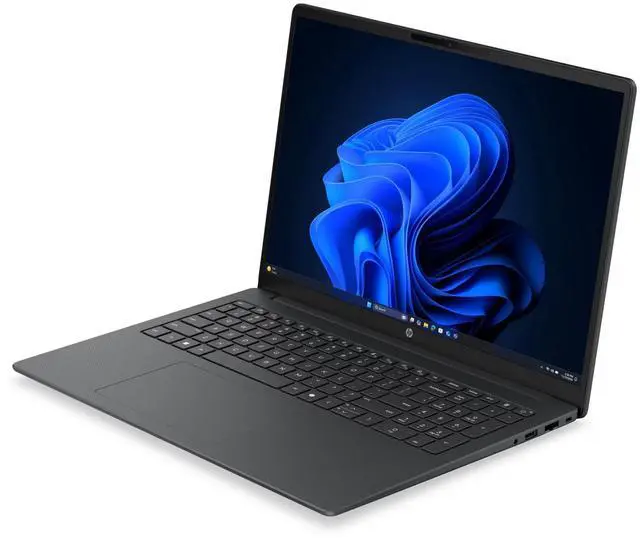
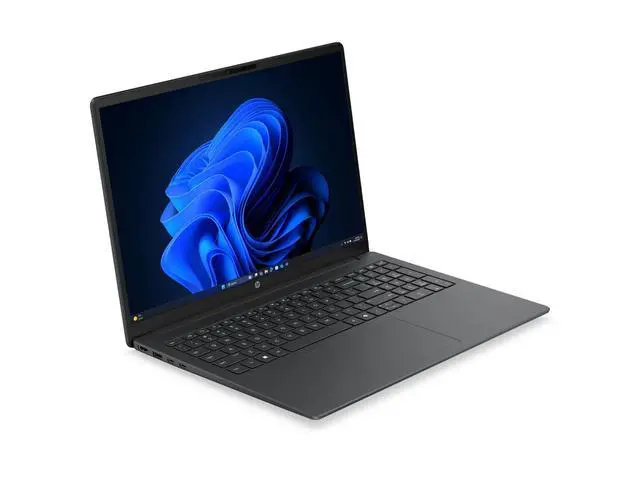
This product does not include manufacturer warranty when purchased or used outside of its designated sales region. By purchasing internationally, you acknowledge that warranty support from the manufacturer will not be available.The HP 200 G2a is a 16-inch home and personal laptop with 16GB memory, a 256GB SSD, integrated graphics, and a 1920 x 1200 display, making it a practical fit for everyday productivity, web use, video calls, and school or office tasks.
| Attribute | Value |
|---|---|
| Best For | Everyday home, student and business use on a 16-inch laptop with a 1920×1200 IPS display, integrated AMD Radeon 740M graphics, 16 GB DDR5 memory and a 256 GB M.2 SSD running Windows 11 Pro |
| Processor And Core Count | AMD Ryzen 5 (model 220) single-processor configuration, base 3.2 GHz with up to 4.9 GHz boost and on-chip caches of 3 MB (L1) and 16 MB (L3) |
| Memory Configuration | 16 GB DDR5 installed (2 RAM slots, user-upgradeable to a 32 GB maximum) |
| Storage And Expansion | 256 GB solid-state drive in M.2 form factor/interface (no additional flash storage reported) |
| GPU And VRAM | Integrated AMD Radeon 740M graphics (integrated GPU) using DDR5 SDRAM for graphics memory |
| Display Spec | 16.0-inch IPS LCD, native 1920 x 1200 (WUXGA+), up to 300 nits brightness, ~62% sRGB color gamut, non-touch |
| High Speed I O | Includes 1 HDMI output and a total of 4 USB ports (USB-C reported among interfaces); no Thunderbolt ports reported |
| Wired And Wireless Networking | Wi‑Fi 7 and Bluetooth wireless; 1× Gigabit Ethernet port for wired networking |
| Battery And Power | Built-in lithium polymer battery, 4000 mAh capacity and 4 cells reported; batteries included |
| Audio Setup | Stereo audio |
| Webcam And Privacy | Front-facing webcam included |
| Portability | Approximately 3.75 lb and measures about 0.60 x 14.1 x 9.9 inches in device dimensions; Gray color |
| In The Box | Includes the 200 G2a 16 inch notebook PC, AC adapter and power cord |
| Model Identifiers | Manufacturer Hewlett Packard / HP, Model Number D83PDUT#ABA (Model Name D83PDUT#ABA), Edition 200 G2a, Model Year 2026 |
| Operating System | Windows 11 Pro |
Q: Should I choose this HP 200 G2a 16 over an 8GB version of the same laptop?
A: Choose this 16GB configuration if you expect to keep many browser tabs open, work in Office apps while on video calls, or want more headroom for light photo editing and multitasking. The Ryzen 5 220 is paired with integrated Radeon 740M graphics, so system memory also matters for graphics performance. An 8GB version can still fit basic web and document use, but 16GB is the more practical choice for longer-term everyday use.
Q: Is this HP 200 G2a 16 a better fit than a 14-inch productivity laptop?
A: Choose this HP 200 G2a 16 if screen space and a roomier keyboard matter more than minimum carry weight. A 16-inch 1920 x 1200 display is typically the better fit for spreadsheets, side-by-side documents, and home-office use. A 14-inch alternative is usually easier to carry and better for frequent travel, but this model makes more sense when productivity comfort is the priority.
Q: Should I buy this HP 200 G2a 16 or move up to a Ryzen 7 version?
A: Buy this Ryzen 5 220 model if your workload is mainly web, Office, streaming, meetings, and light creative work. Move up to a Ryzen 7 configuration if you regularly run heavier multitasking, code builds, larger photo batches, or other CPU-intensive tasks. The Ryzen 5 220 already provides 6 cores and 12 threads, so the Ryzen 7 upgrade is most useful when you know your software can use the extra processor headroom.
Q: Is this HP 200 G2a 16 enough, or should I get a laptop with dedicated graphics?
A: Choose this HP 200 G2a 16 if your priority is general productivity with occasional light gaming or GPU-accelerated everyday tasks. Its integrated Radeon 740M is suitable for lighter esports and older games at modest settings, but a laptop with dedicated graphics is the better fit for newer AAA gaming, heavier video work, or 3D applications. This model is the better choice when battery, heat, simplicity, and office-focused use matter more than graphics performance.
Q: How does this HP 200 G2a 16 compare with a lower-tier Ryzen 3 laptop?
A: This HP 200 G2a 16 is the better choice if you want more performance margin for multitasking and longer useful life. The Ryzen 5 220 sits above Ryzen 3 210 in AMD's lineup, and both can use Radeon 740M graphics depending on configuration, so the main benefit is stronger CPU headroom rather than a completely different use case. A Ryzen 3 model can still be reasonable for basic browsing and document work, but this Ryzen 5 version is the safer choice for mixed everyday workloads.
Q: Is this a good laptop for note-taking, meetings, and everyday office work?
A: Yes. Based on the listed specs, this HP is well suited to note-taking, web apps, video meetings, documents, spreadsheets, and general office multitasking. The 16GB RAM is the key advantage here because it gives more headroom for many browser tabs and Office apps than entry-level 8GB laptops. Its integrated graphics and 256GB SSD suggest it is aimed at productivity rather than gaming or heavy creative workloads.
Q: Is it worth buying as a travel work laptop?
A: It can work well for travel if your priority is a larger screen for documents, spreadsheets, and remote work, but it is not the most travel-friendly format. A 16-inch laptop is usually better for desk or hotel use than for frequent flying or very light carry. The trade-off is simple: you get more screen space and likely a full-size keyboard layout, but less portability than a 13- or 14-inch model.
Q: Who is this laptop most suitable for?
A: It is most suitable for home users, students, and office users who want a large 16-inch display, Windows 11 Pro, a webcam, Bluetooth, and enough memory for everyday productivity. It is a better fit for document work, browsing, meetings, and media playback than for gaming, 3D work, or demanding video-editing projects.
Q: What are the main trade-offs of 256GB storage on this model?
A: The main trade-off is capacity, not speed. A 256GB SSD is usually fast enough for normal startup and app loading, but it can fill up quickly if you keep large photo libraries, many offline files, or large applications. For a buyer focused on web, Office, and school or work documents, 256GB is often acceptable. For heavier local storage needs, a 512GB or 1TB model is the safer choice.
Q: Is this a better choice than a similar 16GB/256GB laptop with a smaller screen?
A: It is better if you value screen space, side-by-side documents, and a more comfortable work layout. A smaller 14- or 15-inch alternative is usually the better choice if you care more about portability and lighter daily carry. In other words, this HP makes more sense as a value productivity laptop than as the most compact travel laptop.
Q: Is the HP 200 G2a a good fit for everyday work and study?
A: Yes for basic productivity. With a Ryzen 5 220, 16GB memory, a 256GB SSD, a 16-inch 1920x1200 display, webcam, Bluetooth, HDMI, and Windows 11 Pro, it is suited to web use, documents, video calls, and school or office tasks. The main limitation is that it uses integrated graphics, so it is better as a general-use laptop than as a performance or gaming machine.
Q: Is 16GB RAM enough, or is this configuration too basic for Windows 11?
A: 16GB is a practical amount for this class of Windows 11 laptop and is a safer choice than 8GB for multitasking, browser-heavy use, and longer-term everyday use. The weaker point in this configuration is more likely storage capacity than memory, since 256GB can fill quickly once apps, files, and updates are added.
Q: Can the HP 200 G2a handle gaming or graphics-heavy work?
A: Only light gaming and light graphics work. This model is listed with integrated graphics, so it is not the right choice for buyers who need stronger gaming performance, 3D work, or GPU-accelerated creative workloads. It should be viewed as a productivity laptop first, with casual gaming as a secondary use at best.
Q: What are the main trade-offs of this HP 200 G2a configuration?
A: The main strengths are usable memory, a large 16-inch 1920x1200 display, and business-friendly basics like webcam, Bluetooth, HDMI, and Windows 11 Pro. The main trade-offs are integrated graphics and a 256GB SSD, which is enough for everyday use but modest if you store a lot of files, games, or media locally.