


 All CategoriesAll CategoriesAll Categories
Shipped by Newegg



Warranty Notice:
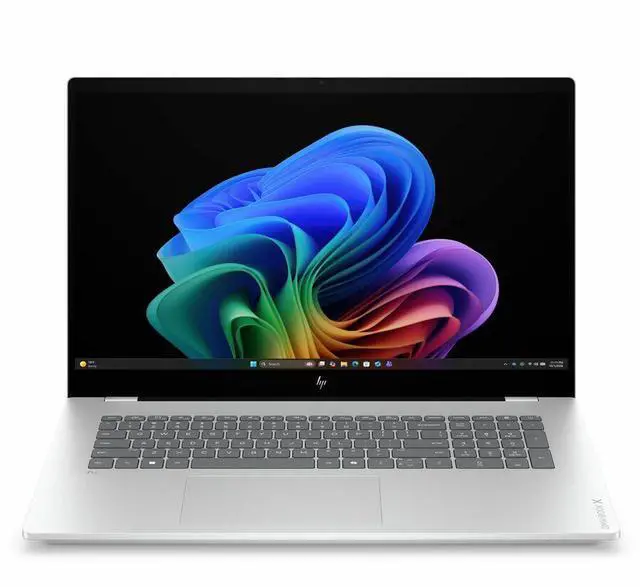
This product does not include manufacturer warranty when purchased or used outside of its designated sales region. By purchasing internationally, you acknowledge that warranty support from the manufacturer will not be available.The HP OmniBook X 17-dd1015nr is a 17.3-inch touchscreen laptop with an Intel U7 356H processor, 16GB memory, and a 1TB SSD, making it a strong fit for users who want a large-screen everyday PC for productivity, multitasking, streaming, and general home or office use.
| Attribute | Value |
|---|---|
| Best For | Users who want a large 17-inch HP laptop for general-purpose computing and media viewing |
| Display Spec | 17-inch display |
| Model Identifiers | HP |
Q: Should I buy the HP OmniBook X 17 or a 14-inch Snapdragon X laptop?
A: Choose the HP OmniBook X 17 if you want a larger 17.3-inch touchscreen, full Windows x86 compatibility, and more comfortable everyday use for spreadsheets, multitasking, and desktop-style work. Choose a 14-inch Snapdragon X laptop if battery life and lighter travel weight matter more than screen size. Across reviews and community discussions, Snapdragon X systems are usually favored for long unplugged use, while Intel Core Ultra systems remain the safer choice for app compatibility and mixed software workloads.
Q: Is the HP OmniBook X 17 worth it over a Core Ultra 5 17-inch laptop?
A: The HP OmniBook X 17 is the better fit if you expect heavier multitasking, larger projects, or more demanding office and creator workloads. Core Ultra 7 H-series chips generally offer more CPU headroom than Core Ultra 5 H-series options, while the day-to-day experience for web, documents, and streaming can be similar on both. If your use is mostly basic productivity, a Core Ultra 5 model is the value-focused alternative; if you want more performance margin without moving into gaming-class laptops, this Core Ultra 7 configuration makes more sense.
Q: Should I choose this HP OmniBook X 17 or a higher-tier 16-inch performance laptop with discrete graphics?
A: Choose the HP OmniBook X 17 if your priority is a large display, quiet everyday productivity, and integrated-graphics simplicity. Choose a higher-tier 16-inch laptop with discrete graphics if you plan to do GPU-accelerated creative work, regular gaming, 3D tasks, or heavier sustained workloads. Review coverage of Intel Core Ultra H laptops shows that integrated Arc graphics are useful for light creative work and casual gaming, but they are not a replacement for a dedicated GPU when performance is the main goal.
Q: Is the HP OmniBook X 17 a good upgrade from an older 12th- or 13th-gen Intel 17-inch laptop?
A: It is a practical upgrade if you want newer AI-PC features, updated integrated graphics, and better efficiency than many older mainstream 17-inch Intel laptops. The biggest gains are usually in platform efficiency, media engine features, and iGPU capability rather than a dramatic jump in every CPU task. If your current laptop already handles your workload well and you mainly want the same large-screen experience, the upgrade is easier to justify when you also want improved battery behavior, quieter operation, or newer connectivity.
Q: Is this a good laptop for office work, meetings, and everyday productivity?
A: Yes. A 17.3-inch display, 16GB RAM, 1TB SSD, and Windows 11 make it well-suited for email, web apps, documents, spreadsheets, video meetings, and general multitasking. It is a better fit for desk-based productivity than for heavy creative or gaming workloads.
Q: Is it worth buying as a travel work device?
A: Usually no, unless you specifically want a large-screen laptop on the go. A 17.3-inch model is better for comfort and visibility than portability, so it suits home, office, and occasional transport more than frequent travel or daily commuting.
Q: Who is this laptop best suited for?
A: It is best for users who want a large screen for spreadsheets, documents, web browsing, meetings, and general home or office use. It fits buyers who value screen space and included storage more than upgrade flexibility or compact size.
Q: What are the main trade-offs versus a smaller 14-inch or 15.6-inch laptop?
A: The main advantage is workspace: the 17.3-inch screen is more comfortable for multitasking and long work sessions. The trade-offs are lower portability and less convenience for travel. Buyers choosing between this and a smaller laptop are usually deciding between screen comfort and mobility.
Q: Is this a better choice than a similar model if I want future RAM upgrades?
A: No, not if RAM upgradeability is a priority. Comparable HP OmniBook X retail Q&A indicates the memory is soldered on at least closely related 17-inch OmniBook X configurations, so buyers who expect to upgrade memory later should prefer a model that clearly lists user-upgradable RAM.
Q: Is the HP OmniBook X 17 a good buy for general work and home use?
A: Yes, if you want a large-screen Windows laptop for everyday productivity. Based on the product data, this model combines a 17.3-inch touch display, Intel Core Ultra 7 356H, 16GB RAM, and a 1TB SSD, which fits typical work, browsing, media, and multitasking needs. The main trade-off is portability: discussion around the OmniBook X 17 consistently frames it as a larger, heavier machine that makes more sense as a desk-first laptop than a travel-first laptop.
Q: Who is the HP OmniBook X 17 best suited for?
A: It is best suited for buyers who prioritize screen size, comfortable everyday use, and mainstream Windows productivity over portability. The 17.3-inch format is a better fit for home office use, spreadsheets, multitasking, and users replacing an older large laptop. It is less suitable for people who carry a laptop daily and want something compact or lightweight.
Q: Is the HP OmniBook X 17 a good choice for students or frequent travel?
A: Usually not, unless screen size matters more than portability. For student use, the core specs are adequate for coursework and general productivity, but a 17.3-inch chassis is typically less convenient for daily campus carry, small desks, and travel. Buyers who commute often will usually be better served by a smaller 14-inch or 16-inch model.
Q: What are the main trade-offs of the HP OmniBook X 17?
A: The main trade-offs are portability and graphics capability. The laptop offers a large touch display, 16GB memory, and 1TB storage, which are practical for productivity, but community discussion around OmniBook X systems repeatedly points to weight and modest graphics performance as limitations. That makes it a better fit for office work and media use than for gaming, GPU-heavy creative work, or local AI workloads.
Q: Is the HP OmniBook X 17 worth considering over other consumer HP laptops?
A: Yes, if you specifically want HP's larger-screen consumer lineup and value a more premium positioning within that range. Reddit discussion about the OmniBook family tends to place OmniBook X above lower OmniBook tiers in perceived build and overall positioning. The decision still depends on whether you want a large 17-inch laptop, because that size brings clear comfort benefits but also a portability penalty.