


 All CategoriesAll CategoriesAll Categories
Shipped by Newegg



Overview
Key Features
Performance
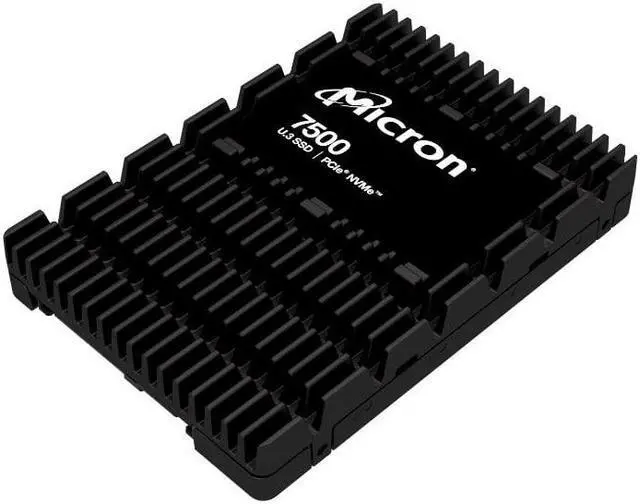
The drive provides 7.68TB of storage capacity through NVMe solid state drive technology.
Connectivity & Compatibility
The drive uses a U.3 format and PCIe 4.0 interface.
Specifications
Warranty Notice:
This product does not include manufacturer warranty when purchased or used outside of its designated sales region. By purchasing internationally, you acknowledge that warranty support from the manufacturer will not be available.The Micron 7500 Pro is a 7.68TB internal U.3 NVMe SSD with a PCIe 4.0 x4 interface, suited to users who need high-capacity storage in a system that supports U.3 and PCIe 4.0.
| Attribute | Value |
|---|---|
| Best For | Consumer internal storage in compatible laptops or desktops, with a read-intensive drive profile |
| Capacity | 7.68 TB (also listed as 7,600 GB and 7,680 GB) |
| Interface And Form Factor | Internal NVMe SSD with PCIe 4.0 x4 connectivity and a 2.5-inch form factor; external attributes also list a 15 mm form factor |
| Model Identifiers | Micron 7500 PRO; model/part number MTFDKCC7T6TGP-1BK1DABYYR |
Q: Micron 7500 Pro or 7500 Max for a write-heavy server?
A: Choose the 7500 Pro for read-intensive workloads; choose the 7500 Max when frequent writes or higher endurance matter more. Micron rates the Pro at 1 drive write per day and the Max at 3, with higher published random-write and mixed-workload performance for the Max. The 7.68TB Pro and 6.4TB Max are different capacities, so compare the capacities that fit your system and workload.
Q: Is the 7.68TB Micron 7500 Pro faster than the 7450 Pro?
A: The 7500 Pro has higher published sequential speeds at 7.68TB: up to 7,000 MB/s read and 5,900 MB/s write, compared with 6,800 MB/s read and 5,600 MB/s write for the 7450 Pro. Consider the 7500 for a new build when those published gains matter; the 7450 can remain suitable when it is already qualified for your server and meets your workload needs.
Q: Should I buy the 3.84TB or 7.68TB Micron 7500 Pro?
A: Choose the 7.68TB model when you need more capacity per drive and its higher published peak speeds: up to 7,000 MB/s read and 5,900 MB/s write, versus 6,800 MB/s and 5,300 MB/s for the 3.84TB model. The 3.84TB version is the capacity-fit choice if it meets your storage needs; both are read-intensive 7500 Pro drives rated at 1 drive write per day.
Q: Will this SSD work in a standard 2.5-inch SATA drive bay?
A: Not by appearance alone. Although it has a 2.5-inch form factor, this is a U.3 PCIe 4.0 x4 NVMe drive, not a SATA SSD. Check that your system has a compatible U.3 connection and NVMe support before buying.
Q: Is this SSD suitable for frequent, write-heavy workloads?
A: It is identified as a read-intensive 7500 PRO model, so it is best suited to workloads with substantial reading and comparatively fewer writes. For write-heavy use, check that its endurance rating meets your workload requirements before choosing it.
Q: Will this SSD reach its listed speeds in a PCIe 3.0 system?
A: No. The listed peak speeds are for a PCIe 4.0 connection; a PCIe 3.0 connection can reduce transfer rates. Actual performance also depends on the system, workload, and compatible U.3 connection.
Q: Can I use the Micron 7500 Pro in an external Thunderbolt enclosure?
A: Potentially, but enclosure compatibility matters. A Reddit user reported using a 7.68TB Micron 7500 Pro in an OWC Helios enclosure, while an Acasis enclosure did not recognize it. Check that the enclosure supports U.2/U.3 NVMe drives and the drive’s capacity before buying.
Q: Is the Micron 7500 Pro a reasonable choice for a homelab or storage server?
A: It may suit a server with a compatible U.3 NVMe connection: Reddit users describe using 7500 Pro drives in a Proxmox server and planning them for a TrueNAS storage build. Those posts show intended use, not independently verified performance results.
Q: Will the Micron 7500 Pro work properly in a Dell R7715 server?
A: The Reddit discussion does not confirm compatibility for the 7500 Pro in a Dell R7715. It reports that drive firmware can affect server recognition and management behavior, and asks whether the 7500 Pro integrates cleanly. Confirm compatibility for the exact drive and server configuration before purchasing.