


 All CategoriesAll CategoriesAll Categories
Shipped by Newegg






Warranty Notice:
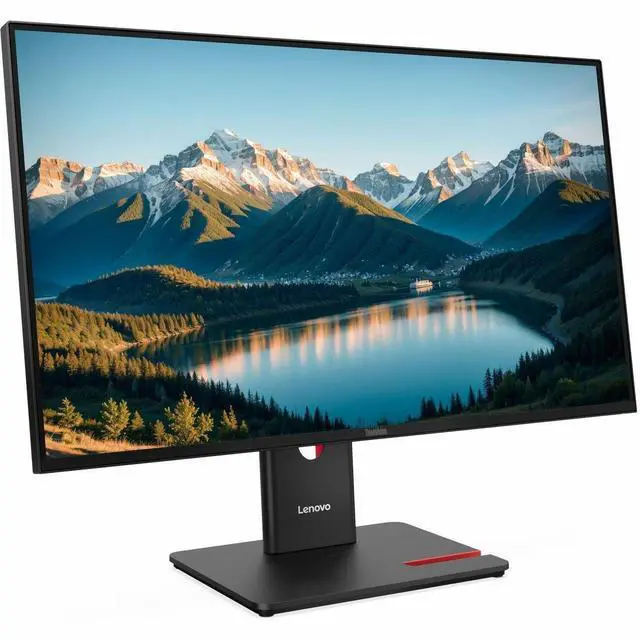
This product does not include manufacturer warranty when purchased or used outside of its designated sales region. By purchasing internationally, you acknowledge that warranty support from the manufacturer will not be available.The Lenovo ThinkVision T27Q-40 is a 27-inch QHD IPS monitor with a 120Hz refresh rate, suited to office users who want a sharp, smooth display for everyday work, multitasking, and general media viewing.
| Attribute | Value |
|---|---|
| Best For | Desktop setups needing a 27-inch QHD IPS display with a 120 Hz refresh rate |
| Panel And Resolution | 27-inch flat IPS LED display with 2560 × 1440 resolution, 16:9 aspect ratio, 0.2331 mm pixel pitch, 178°/178° viewing angles, 350-nit brightness, 1500:1 contrast, 99% sRGB gamut and anti-glare finish |
| Refresh Rate And Response | 120 Hz refresh rate with 4 ms response time |
| Ports And Connectivity | HDMI, DisplayPort, USB and USB-C connectivity, with one HDMI port and five USB ports |
| Stand And Ergonomics | Ergonomic design with 100 × 100 mm VESA mounting compatibility |
| Power | 17 W power consumption |
| Model Identifiers | Lenovo ThinkVision T27Q-40, model/part number 64A6GAR6UZ |
Q: Lenovo ThinkVision T27Q-40 vs. T27-40: which should I choose for a 27-inch desk monitor?
A: Choose the ThinkVision T27Q-40 for QHD detail and more screen workspace: it has a 2560 × 1440 resolution and a 120Hz refresh rate. The T27-40 is a Full HD 1920 × 1080 option with a 120Hz refresh rate. Both are 27-inch IPS monitors, so the main choice is higher resolution with the T27Q-40 versus Full HD with the T27-40.
Q: ThinkVision T27Q-40 vs. T27h-30: which is better for a laptop desk setup?
A: Choose the T27Q-40 if a 120Hz refresh rate is the priority. Choose the T27h-30 if you want a QHD monitor that can also serve as a laptop dock: Lenovo lists USB-C with up to 90W power delivery, Ethernet, USB ports, and DisplayPort output for the T27h-30. Both are 27-inch QHD IPS monitors.
Q: Is the ThinkVision T27Q-40 a worthwhile step up from the P27q-30?
A: The T27Q-40 is the stronger fit if you want a higher refresh rate: Lenovo specifies up to 120Hz, compared with up to 75Hz for the P27q-30. Both are 27-inch QHD monitors with 350-nit brightness and 99% sRGB coverage, so the upgrade primarily adds refresh-rate headroom while retaining those core display specifications.
Q: Is this monitor suitable for office work, note-taking, and video meetings?
A: It is well suited to screen-based office tasks: its 27-inch QHD IPS display provides workspace for documents and side-by-side windows, and its stand supports height, tilt, swivel, and pivot adjustments. The listed product information does not specify a built-in webcam, microphone, or speakers, so plan to use separate meeting equipment if needed.
Q: Can I connect a laptop to this monitor with one USB-C cable and charge it?
A: Do not assume it supports a one-cable laptop connection. The product specifications list HDMI and DisplayPort for video; the USB-C port is a 15W downstream data port, not a listed video input or laptop-charging connection. Use a compatible HDMI or DisplayPort connection for the display.
Q: Can the screen rotate to portrait mode and adjust to different desk heights?
A: Yes. The included stand supports height adjustment, tilt, swivel, and 90-degree pivot for portrait orientation. It also supports a 100 × 100 mm VESA mount.
Q: Is this a good choice for gaming as well as everyday work?
A: It can suit everyday gaming and work if you want a 27-inch 1440p screen with a refresh rate up to 120 Hz. The listed 4 ms response time and lack of a listed HDR standard are trade-offs for buyers prioritizing gaming-specific features or HDR.

