


 All CategoriesAll CategoriesAll Categories
Shipped by Newegg




Warranty Notice:
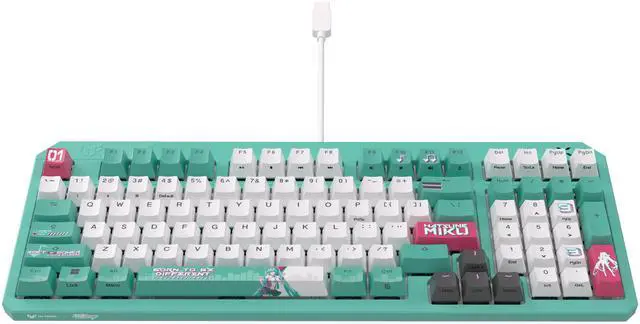
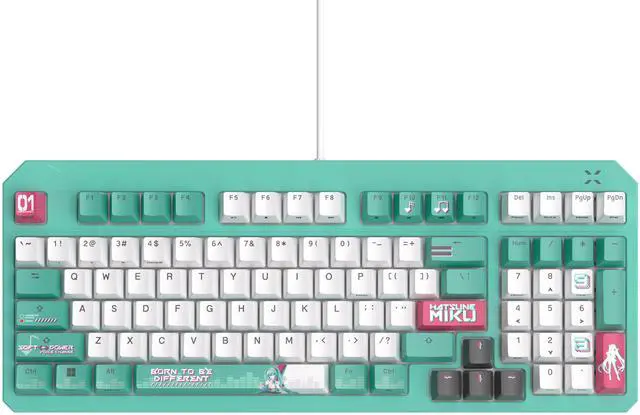
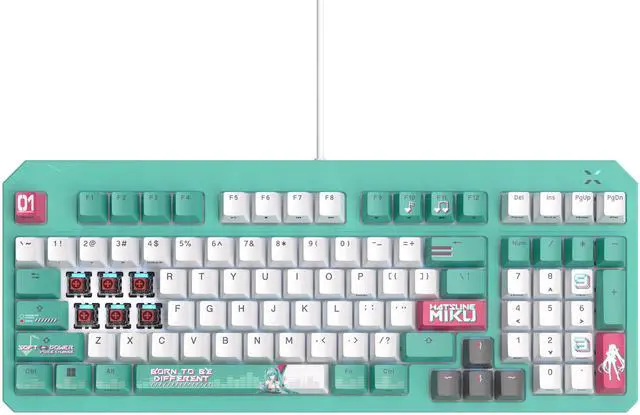
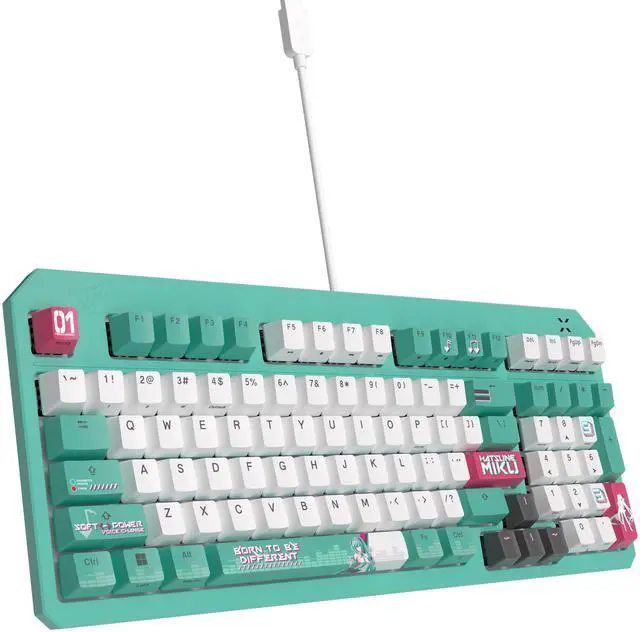
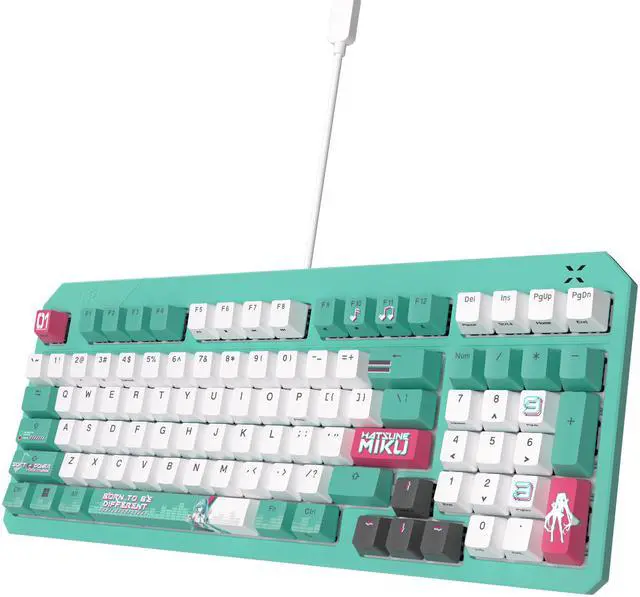
This product does not include manufacturer warranty when purchased or used outside of its designated sales region. By purchasing internationally, you acknowledge that warranty support from the manufacturer will not be available.The ASUS TUF Gaming K3 Gen II Hatsune Miku Edition is a compact 96% optical-mechanical RGB gaming keyboard built for players and collectors who want fast linear switches, quieter acoustics, and durable IP57 water and dust resistance in a themed design.
| Attribute | Value |
|---|---|
| Best For | PC and laptop gamers and multimedia users who want a compact, themed wired mechanical keyboard (96% QWERTY) with RGB lighting for Windows-based systems |
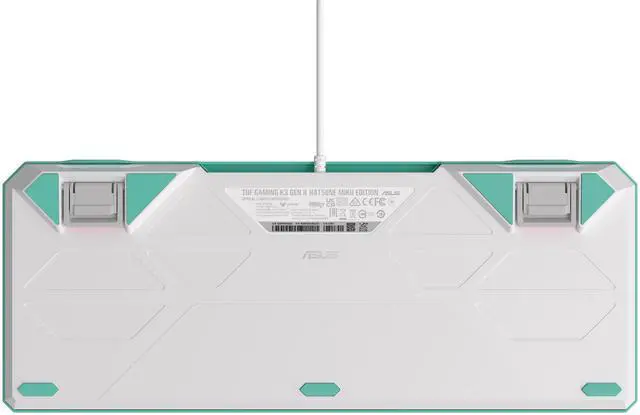
| Design And Layout | Compact 96% QWERTY layout with 98 buttons, ambidextrous orientation and standard design; no palm rest; keyboard color listed as Green; physical size ~15.16 x 6.02 x 1.5 inches and item weight 2.22 pounds |
| Switches And Keycaps | Optical-mechanical RGB switches with linear actuation on a mechanical keyboard paired with UV-coated dye-sub PBT keycaps |
| Lighting And Software | RGB backlighting with Aura Sync support for lighting customization and syncing with Aura-enabled products |
| Durability And Build | Waterproof construction with a detachable top cover and an enclosure made of plastic and polybutylene terephthalate |
| Connectivity And Power | Wired USB 2.0 connection (1 USB 2.0 port); powered via the cable, no batteries required |
| Compatibility And Platform | Designed for Windows PCs and compatible with laptops and desktops running Windows |
| Package Contents | Includes TUF Gaming K3 Gen II Hatsune Miku Edition keyboard, quick start guide, warranty card, TUF x Hatsune Miku sticker, TUF x Hatsune Miku poster, and two Hatsune Miku limited-edition keycaps |
| Additional Features | 100% anti-ghosting reported among listed features |
| Model Identifiers | ASUS model RA09 TG K3 GEN II MIKU EDITION/RD/CA/PBT (Manufacturer: ASUS); single-unit package |
| Regulatory | California Proposition 65 warning indicated on product |
Q: Is the ASUS TUF Gaming K3 Gen II better for desk setups than compact travel keyboards?
A: Yes, if your main use is a fixed desktop setup. The TUF Gaming K3 Gen II is better suited to desk gaming because it keeps a 96% layout with arrow and navigation keys, uses a wired USB connection, and emphasizes stable performance and durability. A smaller travel keyboard is the better choice when bag space, wireless pairing, and minimal footprint matter more than having a near-full layout. This makes the TUF model more practical for home setups than for mobile use.
Q: Should I choose the ASUS TUF Gaming K3 Gen II over a typical budget 96% mechanical keyboard?
A: Choose the TUF Gaming K3 Gen II if you specifically want durability and gaming-focused features that are not common on entry-level 96% boards, such as IP57 protection, optical-mechanical switches, gasket-style sound damping, per-key RGB sync, and ASUS software integration. A lower-tier 96% board can still be the practical choice if your main goal is reducing cost and you do not need spill resistance or optical switch behavior. The value decision depends on whether you care more about durability and gaming features than baseline mechanical typing.
Q: Is the ASUS TUF Gaming K3 Gen II a better choice than a Keychron K3 for gaming?
A: The TUF Gaming K3 Gen II is the better fit if gaming is the priority and you want a wired setup with full N-key rollover, a 1000 Hz report rate, and a standard-height 96% layout with dedicated navigation keys. A Keychron K3 makes more sense if you want a thinner low-profile keyboard for mixed work and travel, especially with Bluetooth support. In practice, this is a gaming-first wired board versus a portability-first wireless board.
Q: Should I buy the ASUS TUF Gaming K3 Gen II Hatsune Miku Edition or a wireless low-profile keyboard like the ASUS ROG Falchion RX Low Profile?
A: Choose the TUF Gaming K3 Gen II if you want a wired 96% keyboard with more keys, a more traditional typing height, IP57 water and dust resistance, and optical-mechanical switches aimed at stable desktop gaming. Choose the ROG Falchion RX Low Profile if portability, wireless use, and a smaller low-profile layout matter more. The main trade-off is that the TUF model gives you a fuller layout and durability features, while the Falchion focuses more on compact travel and cable-free convenience.
Q: Is it suitable for office or shared-room use, or will it be too noisy?
A: It is more office-friendly than many gaming keyboards, but it is not the quietest option. The linear optical switches, gasket mount, and dampening foam should reduce sharp click noise and case ping compared with louder clicky boards. However, it is still a mechanical keyboard, so buyers in very quiet offices or frequent meeting environments may prefer an explicitly silent or low-profile model.
Q: Is it a good choice for travel or moving between setups?
A: It is more portable than a full-size keyboard, but it is still a wired desktop mechanical keyboard. The compact 96% layout makes it easier to pack and gives more desk space than a 100% board, so it works well for users who move between home and office setups. It is less ideal for true mobile use because it needs a USB connection and is larger than ultra-compact travel keyboards.
Q: Is the 96% layout good for office work, spreadsheets, and note-taking?
A: Yes, if you want a smaller desk footprint without giving up the number pad. A 96% layout keeps most full-size functionality, which helps for spreadsheets and work tasks, while saving desk space for mouse movement. The trade-off is adjustment time: buyers used to a standard 104-key layout may need time to adapt to the tighter key placement.
Q: Is this keyboard a good fit for gaming and everyday typing, or is it mainly for collectors?
A: It fits both use cases. The keyboard is not just a themed collector item: it uses optical-mechanical linear switches, supports n-key rollover and anti-ghosting, and has sound-dampening features that make it usable for both gaming and regular typing. The main caveat is preference: the Hatsune Miku design is visually distinctive, so it suits buyers who want performance plus themed styling more than buyers who want a plain office look.
Q: What are the main trade-offs of this keyboard?
A: The main trade-offs are layout preference, platform fit, and feature scope. It is compact for a numpad board, but a 96% layout can take adjustment if you prefer a standard full-size layout. It is wired only, has no palm rest, and uses linear switches only. Community discussion also suggests some layout and key-behavior expectations may be less ideal for users who need region-specific input behavior or Linux-friendly convenience out of the box.
Q: Is it worth buying if I mainly want the Hatsune Miku design?
A: Usually yes, if the visual theme is a primary buying reason and you also want a usable mid-size gaming keyboard. The product includes Miku-specific styling, extra themed keycaps, a sticker, and a poster. If you do not care much about the collab design, the value case becomes weaker because the decision then depends mostly on whether this fixed 96% wired linear keyboard matches your practical needs.
Q: Is it a good choice for both gaming and everyday typing?
A: Yes, if you want a single wired keyboard for gaming and general desktop use. The 96% layout keeps the numpad while saving space, and the linear optical-mechanical switches are aimed at fast, consistent keypresses. The trade-off is that it is still a gaming-style board, so buyers who want very quiet office use or a highly specialized typing layout may prefer something else.
Q: Who is this keyboard best suited for?
A: It is best suited for buyers who want a compact wired gaming keyboard with a numpad, linear optical-mechanical switches, and a strong Hatsune Miku theme. It makes more sense for users who value desk-space savings and the collab design than for shoppers looking for broad switch options, wireless use, or enthusiast-level customization.
Q: What features contribute to the durability of the ASUS TUF Gaming K3 Gen II Hatsune Miku Edition keyboard?
A: The keyboard features IP57 waterproofing and dust resistance for easy cleaning and long-lasting durability.
Q: What is the layout and design style of the ASUS TUF Gaming K3 Gen II Hatsune Miku Edition keyboard?
A: The keyboard has a 96% layout and is designed for gaming, making it compact and portable.
Q: Is the ASUS TUF Gaming K3 Gen II a better choice than a Keychron K3 for gaming?
A: The TUF Gaming K3 Gen II is the better fit if gaming is the priority and you want a wired setup with full N-key rollover, a 1000 Hz report rate, and a standard-height 96% layout with dedicated navigation keys. A Keychron K3 makes more sense if you want a thinner low-profile keyboard for mixed work and travel, especially with Bluetooth support. In practice, this is a gaming-first wired board versus a portability-first wireless board.
Q: Should I buy the ASUS TUF Gaming K3 Gen II Hatsune Miku Edition or a wireless low-profile keyboard like the ASUS ROG Falchion RX Low Profile?
A: Choose the TUF Gaming K3 Gen II if you want a wired 96% keyboard with more keys, a more traditional typing height, IP57 water and dust resistance, and optical-mechanical switches aimed at stable desktop gaming. Choose the ROG Falchion RX Low Profile if portability, wireless use, and a smaller low-profile layout matter more. The main trade-off is that the TUF model gives you a fuller layout and durability features, while the Falchion focuses more on compact travel and cable-free convenience.
Q: Should I choose the ASUS TUF Gaming K3 Gen II over a typical budget 96% mechanical keyboard?
A: Choose the TUF Gaming K3 Gen II if you specifically want durability and gaming-focused features that are not common on entry-level 96% boards, such as IP57 protection, optical-mechanical switches, gasket-style sound damping, per-key RGB sync, and ASUS software integration. A lower-tier 96% board can still be the practical choice if your main goal is reducing cost and you do not need spill resistance or optical switch behavior. The value decision depends on whether you care more about durability and gaming features than baseline mechanical typing.
Q: Is the ASUS TUF Gaming K3 Gen II better for desk setups than compact travel keyboards?
A: Yes, if your main use is a fixed desktop setup. The TUF Gaming K3 Gen II is better suited to desk gaming because it keeps a 96% layout with arrow and navigation keys, uses a wired USB connection, and emphasizes stable performance and durability. A smaller travel keyboard is the better choice when bag space, wireless pairing, and minimal footprint matter more than having a near-full layout. This makes the TUF model more practical for home setups than for mobile use.