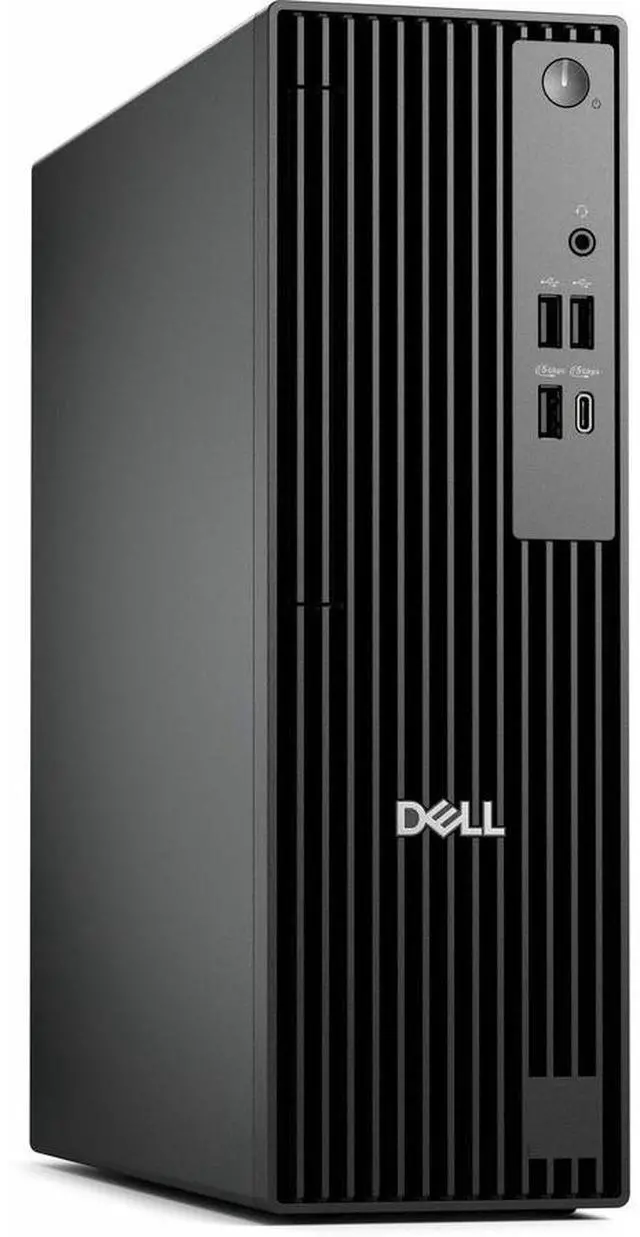
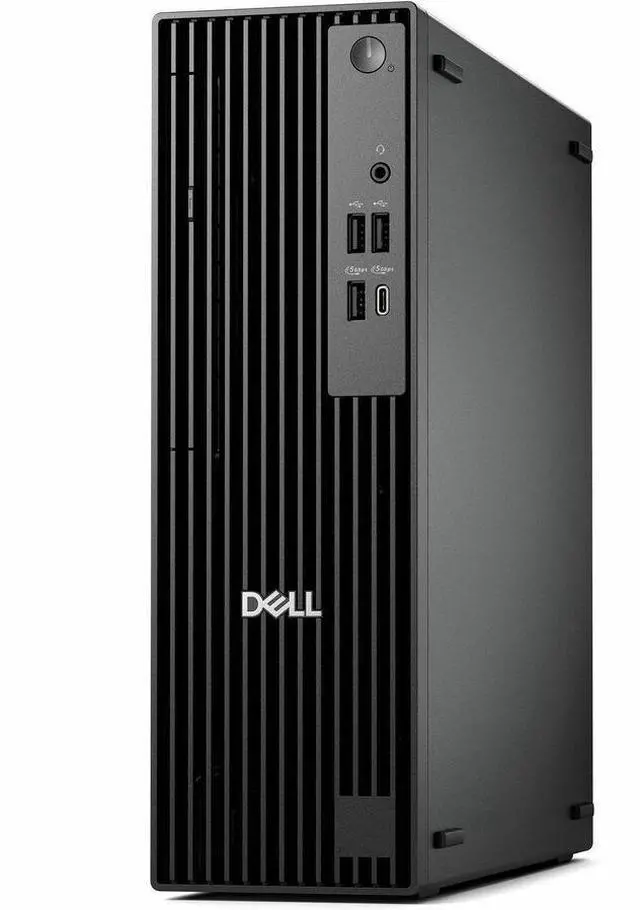
Dell Pro QCS1250 Slim PC - Intel Core i5 14th Gen i5-14500 - 16 GB - 512 GB SSD - Windows 11 Pro - Intel DDR5 SDRAM - 180W M1XXF
- Intel Core i5-14500
- 16GB DDR5
- 512GB SSD
- Windows 11 Pro
- No Screen
- Intel Graphics
- Components brands may vary
+
+
Overview
Specs
Reviews (1)
Accelerate business success with Copilot and Windows 11 Pro
Industry-leading AI. Powerful cybersecurity. Designed for business.AI-powered multi-tasking mastery for a new way of working with Windows 11 Pro. With features like Copilot in Windows, get better answers, grow your skills, and effortlessly optimize workflows. Windows 11 Pro on Dell PCs come with the latest advances in security and AI delivered conveniently to your PCs. Benefit from AI-enhanced efficiency, performance, and security today, and innovate to take on new challenges tomorrow.
Performance and expandability in a space-saving design.
A compact, high-performance PC built for heavy workloads and tight spaces, with exceptional security and manageability for businesses.Big performance in a compact frameForm meets function with this high-performance space-saving desktop. Sporting a sleek design with enhanced thermals.Dell Pro SlimCompact, high-performance expandable PC, powered by Intel Core i5-14500 to accelerate work efficiency. Features up to 16GB DDR5, two slots, one M.2 SSD slot (expandable to two via Zoom card), DisplayPort and HDMI ports.Purposeful designA stylish, elevated design combining sustainability, functionality and powerful performance. Built for durability, all Dell Pro desktops undergo rigorous military-grade testing to deliver reliable performance you can count on.Advanced thermals
Re-engineered, it features an enhanced thermal design to optimize airflow, resulting in up to 57% quieter operation.
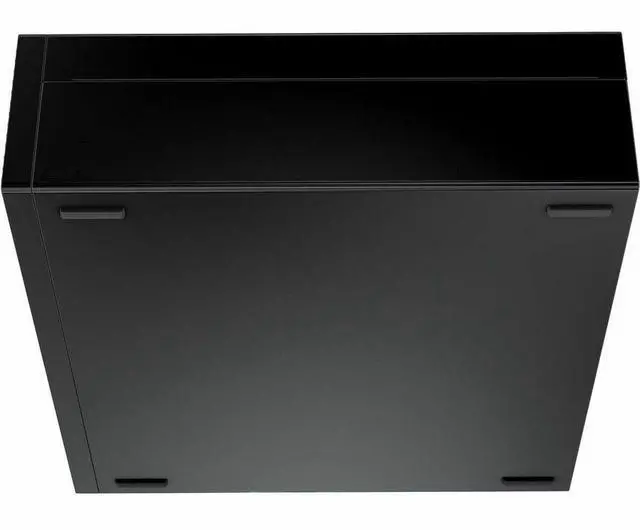
Tidy and organizedSet it upright on a desk, or horizontally to support a monitor and save valuable desk space.Expand further
Easily upgrade your desktop's internal components with a tool-less chassis and three PCIe expandable slots.Efficiency meets power
High-speed productivity
Tackle heavy workloads efficiently with 16GB DDR5 memory across 2 slots, one M.2 SSD, plus a second M.2 SSD via Zoom expansion card.
Expand your viewExpand your screen setup with integrated graphics, allowing you to use up to 4 displays at once.
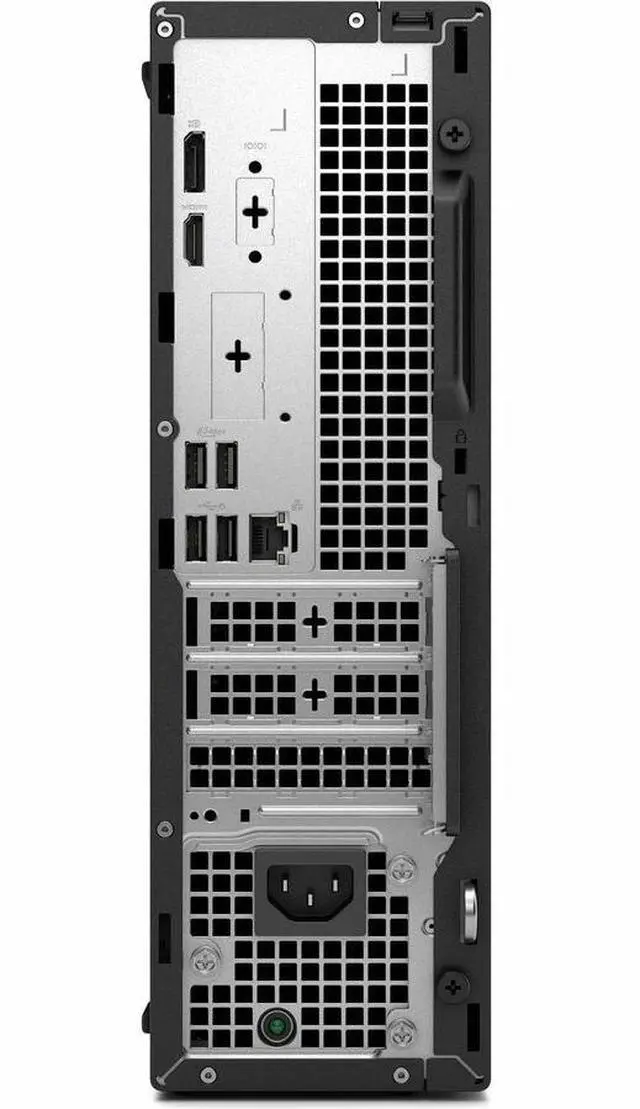
Comprehensive connectivityIncluding USB-C, USB-A, DP and HDMI ports.
Modern device management
Single BIOS strategy
Streamline PC deployment and simplify fleet management with one unified BIOS.Built to performDell Pro desktops are built for reliability and durability, with less than 1% requiring service in their first year.
Dell Trusted Update Experience
We package the latest BIOS, drivers and firmware versions for our customers - with Dell-exclusive capabilities to simplify PC management.
Simplify IT
We offer the most secure and manageable commercial PCs, along with modern lifecycle services and solutions to make IT management a breeze. Begin your PC refresh with ProDeploy for systems that are ready to use on day one, and ensure they continue working without interruption with our ProSupport solutions.Dell Security
Reduce the attack surface and improve cyber resilience with Dell Trusted Workspace. Supply chain security and BIOS-level tamper detections help maintain device trust while partner software provides advanced threat protection for endpoints, network and the cloud.
Dell Management
Manage your PCs over the cloud, in conjunction with Microsoft Intune, via the Dell Management Portal.Dell APEX
Experience the world's first and most comprehensive as-a-service portfolio with Dell APEX. Spanning from multi-cloud to client devices, APEX PC-as-a-Service unlocks capital so you can invest in AI-ready PCs with no upfront investment. Seamlessly deploy, secure, manage, support and responsibly retire devices as part of your subscription.
Advancing sustainability
This compact and modern desktop is designed for sustainability with recycled materials while meeting key environmental standards
Industry-leading AI. Powerful cybersecurity. Designed for business.AI-powered multi-tasking mastery for a new way of working with Windows 11 Pro. With features like Copilot in Windows, get better answers, grow your skills, and effortlessly optimize workflows. Windows 11 Pro on Dell PCs come with the latest advances in security and AI delivered conveniently to your PCs. Benefit from AI-enhanced efficiency, performance, and security today, and innovate to take on new challenges tomorrow.
Performance and expandability in a space-saving design.
A compact, high-performance PC built for heavy workloads and tight spaces, with exceptional security and manageability for businesses.Big performance in a compact frameForm meets function with this high-performance space-saving desktop. Sporting a sleek design with enhanced thermals.Dell Pro SlimCompact, high-performance expandable PC, powered by Intel Core i5-14500 to accelerate work efficiency. Features up to 16GB DDR5, two slots, one M.2 SSD slot (expandable to two via Zoom card), DisplayPort and HDMI ports.Purposeful designA stylish, elevated design combining sustainability, functionality and powerful performance. Built for durability, all Dell Pro desktops undergo rigorous military-grade testing to deliver reliable performance you can count on.Advanced thermals
Re-engineered, it features an enhanced thermal design to optimize airflow, resulting in up to 57% quieter operation.
Tidy and organizedSet it upright on a desk, or horizontally to support a monitor and save valuable desk space.Expand further
Easily upgrade your desktop's internal components with a tool-less chassis and three PCIe expandable slots.Efficiency meets power
High-speed productivity
Tackle heavy workloads efficiently with 16GB DDR5 memory across 2 slots, one M.2 SSD, plus a second M.2 SSD via Zoom expansion card.
Expand your viewExpand your screen setup with integrated graphics, allowing you to use up to 4 displays at once.
Comprehensive connectivityIncluding USB-C, USB-A, DP and HDMI ports.
Modern device management
Single BIOS strategy
Streamline PC deployment and simplify fleet management with one unified BIOS.Built to performDell Pro desktops are built for reliability and durability, with less than 1% requiring service in their first year.
Dell Trusted Update Experience
We package the latest BIOS, drivers and firmware versions for our customers - with Dell-exclusive capabilities to simplify PC management.
Simplify IT
We offer the most secure and manageable commercial PCs, along with modern lifecycle services and solutions to make IT management a breeze. Begin your PC refresh with ProDeploy for systems that are ready to use on day one, and ensure they continue working without interruption with our ProSupport solutions.Dell Security
Reduce the attack surface and improve cyber resilience with Dell Trusted Workspace. Supply chain security and BIOS-level tamper detections help maintain device trust while partner software provides advanced threat protection for endpoints, network and the cloud.
Dell Management
Manage your PCs over the cloud, in conjunction with Microsoft Intune, via the Dell Management Portal.Dell APEX
Experience the world's first and most comprehensive as-a-service portfolio with Dell APEX. Spanning from multi-cloud to client devices, APEX PC-as-a-Service unlocks capital so you can invest in AI-ready PCs with no upfront investment. Seamlessly deploy, secure, manage, support and responsibly retire devices as part of your subscription.
Advancing sustainability
This compact and modern desktop is designed for sustainability with recycled materials while meeting key environmental standards
Warranty & Returns
Warranty, Returns, And Additional Information
Return Policies*
- Return for refund within: 30 days
- Returns are subject to restocking fees and return shipping fees. Please click here to learn more about restocking fees and return shipping fees.
- This item is covered by Newegg.com's International Return Policy.
- Read full return policy for details.
- *Subject to applicable law
Warranty Notice:
This product does not include manufacturer warranty when purchased or used outside of its designated sales region. By purchasing internationally, you acknowledge that warranty support from the manufacturer will not be available.
Manufacturer Contact Info
LOADING...
LOADING...
The Dell Pro QCS1250 Slim PC is a compact business and home-office desktop with an Intel Core i5-14500 processor, 16GB DDR5 memory, a 512GB SSD, and Windows 11 Pro. It suits users who need responsive everyday productivity, multitasking, web work, and professional applications in a space-saving system.
Recommended For
- Office professionals who run Microsoft 365, browsers, communication tools, spreadsheets, and other business applications from a fixed desk; the 14-core Core i5-14500, 16GB DDR5 memory, SSD storage, and Windows 11 Pro configuration are aligned with multitasking and mainstream business workloads.
- Small businesses, schools, clinics, and offices standardizing compact Windows workstations; Dell positions the Pro Slim for business environments that need security, manageability, and performance while using minimal desk space.
- Home-office users who want a compact desktop for document work, online research, email, accounting, and everyday Windows applications, provided the computer will stay connected to a desk and wired Ethernet or an added wireless adapter is acceptable.
- Desk-based multitaskers who need two-monitor productivity for spreadsheets, dashboards, coding, research, or customer-service work; the configuration provides DisplayPort and HDMI outputs and is built around integrated graphics rather than a discrete GPU.
- Buyers replacing older office PCs who value a slim chassis, straightforward setup, quiet everyday operation, and included keyboard and mouse more than gaming-focused graphics or extensive expansion.
Real-World Use Scenarios
- An office worker can run a browser with many tabs, email, Microsoft 365 apps, video meetings, and large spreadsheets at the same time; the 14-core Core i5 and 16GB of RAM are suited to responsive everyday multitasking.
- A user setting up a two-screen workstation for documents, spreadsheets, research, or customer-service software can connect one monitor through HDMI and another through DisplayPort, reducing the need to constantly switch between windows.
- Someone building a home-office or student workstation with limited desk space can place the slim tower beside or under a desk while still having enough performance for web research, online classes, office documents, coding practice, and video calls.
- A small business or department using a wired network can deploy the PC for accounting, scheduling, point-of-sale administration, records management, or shared-office applications; Windows 11 Pro and Gigabit Ethernet fit this type of managed desktop environment, but the listed configuration requires a wired connection unless Wi-Fi is added separately.
- A user can handle streaming video, photo organization, light image editing, and casual or older games, but the integrated graphics and 180W slim-PC power design make it a poor fit for modern high-end gaming, intensive 3D work, or GPU-heavy video production.
Spec Summary
| Attribute | Value |
|---|---|
| Best For | Student, home-office, business, and mainstream work requiring a compact desktop with integrated graphics, 16GB DDR5 memory, and 512GB SSD storage |
| Processor And Core Count | 14th Gen Intel Core i5-14500 processor with a 2.60 GHz base frequency and up to 5 GHz turbo frequency |
| Graphics And Display Output | Integrated Intel graphics with HDMI 2.1 and DisplayPort 1.4a outputs, supporting up to 7680 × 4320 resolution; no monitor is included |
| Memory Configuration | 16GB DDR5 memory running at 4800 MHz |
| Storage And Expansion | 512GB SSD storage with no hard disk drive or optical drive |
| Ports And Connectivity | Eight USB ports comprising four USB 2.0 and four USB 3.0 ports, plus Gigabit Ethernet and a 3.5 mm headphone/microphone input/output; wireless networking is not included |
| Operating System | Windows 11 Pro |
| Peripherals And Included Items | Includes a standard keyboard, mouse, system power cord, quick start guide, and documentation |
| Chassis And Power | Black Dell Pro Slim chassis measuring 12 × 3.7 × 11.5 inches and weighing 12.99 lb, with a 180W power supply |
| Model Identifiers | Dell Pro QCS1250 desktop, model M1XXF, part number M1XXF, released in 2025 |
Reference Q&A
Q: Should I choose the Dell Pro QCS1250 with the Core i5-14500 or the same PC with a Core i3-14100?
A: Choose the QCS1250 with the Core i5-14500 for heavier multitasking, spreadsheets, business applications, light content creation, and longer-term headroom. The i5-14500 has 14 cores and 20 threads, compared with 4 cores and 8 threads for the i3-14100. Choose the i3 version when the system will mainly handle web browsing, email, office documents, video calls, and other basic workloads.
Q: Is the Dell Pro QCS1250 with the Core i5-14500 better than the Core i7-14700 configuration?
A: The Core i5-14500 configuration is the more balanced choice for mainstream business, home-office, and student use. Choose the Core i7-14700 configuration when sustained CPU-heavy work, large multitasking sessions, code compilation, or frequent media-processing workloads justify the higher tier. The i7-14700 provides 20 cores and 28 threads versus 14 cores and 20 threads for the i5-14500, while both are offered in the QCS1250 platform.
Q: Should I buy the Dell Pro QCS1250 or a smaller Dell Pro Micro QCM1250?
A: Choose the QCS1250 when desktop performance, easier access to standard ports, and a larger slim-desktop chassis are more important than minimum size. Choose the QCM1250 when desk space, monitor mounting, or moving the computer between locations is the priority. The QCS1250 configuration listed here measures 12 x 3.7 x 11.5 inches and weighs about 13 pounds, while the QCM1250 measures about 7.17 x 1.42 x 7.01 inches and weighs approximately 2.56 to 3.09 pounds, depending on configuration.
Q: Is the Dell Pro QCS1250 a worthwhile upgrade from an older OptiPlex 7020?
A: The QCS1250 is a substantial platform upgrade from the older OptiPlex 7020 generation for modern office and productivity use. The QCS1250 uses a 14th-generation Core i5-14500 with 14 cores and 20 threads, DDR5 memory, an SSD, and Windows 11 Pro, while the older OptiPlex 7020 platform used 4th-generation Core processors, DDR3 memory, and older integrated graphics. The upgrade is most relevant when the existing system struggles with current applications, multitasking, storage speed, or operating-system requirements.
Q: Is the Dell Pro QCS1250 suitable for gaming or graphics-intensive work compared with a desktop that has a dedicated GPU?
A: Choose the QCS1250 for office applications, web use, media playback, and general productivity when integrated Intel graphics are sufficient. Choose a desktop with a dedicated graphics card for modern gaming, 3D rendering, GPU-accelerated editing, or other graphics-heavy workloads. The listed QCS1250 uses integrated Intel graphics and a 180W slim-desktop power supply, so its compact business design favors low-complexity graphics workloads rather than high-power GPU expansion.
Q: Is this desktop suitable for office work, studying, and everyday home use?
A: Yes. The Intel Core i5-14500, 16GB of DDR5 memory, 512GB SSD, and Windows 11 Pro make it suitable for web browsing, Microsoft Office, email, online learning, multitasking, and typical business applications. A monitor is required because one is not included.
Q: Does it support two monitors?
A: Yes. It has one HDMI 2.1 output and one DisplayPort 1.4a output, so it can connect to two compatible monitors simultaneously. The monitors and video cables are not included.
Q: Does this PC have built-in Wi-Fi?
A: No. The listed configuration includes Gigabit Ethernet but does not include WLAN or built-in Wi-Fi. For wireless networking, add a compatible USB Wi-Fi adapter or use a wired Ethernet connection.
Q: Is it a good choice for video meetings and remote work?
A: It is suitable for remote-work applications and video meetings, but it does not include a monitor, webcam, or wireless networking. You will need a monitor and a webcam, plus either a wired Ethernet connection or a USB Wi-Fi adapter. A headset can connect through the 3.5 mm audio port.
Q: Is this desktop good for gaming or demanding graphics work?
A: It is designed primarily for office, school, and general-purpose computing. Its integrated Intel graphics can handle everyday display tasks and video playback, but it is not the best choice for demanding modern gaming, advanced 3D work, or intensive video production that benefits from a dedicated graphics card.
Q: Is the Dell Pro QCS1250 a good choice for office work and business use?
A: Yes. The Core i5-14500, 16GB DDR5 RAM, 512GB SSD, Windows 11 Pro, and compact chassis are well suited to web apps, email, documents, multitasking, and standard business software. It is less suitable if you need built-in Wi-Fi, extensive local storage, or high-end graphics.
Q: Can the Dell Pro QCS1250 be upgraded with more RAM?
A: RAM expansion appears to be a practical upgrade path for this model. The supplied configuration includes 16GB DDR5, while community upgrade discussions show the QCS1250 being opened and fitted with additional memory. Confirm the exact number of available slots and supported capacity for the specific configuration before purchasing RAM.
Q: Is the Dell Pro QCS1250 suitable for gaming or adding a graphics card?
A: It is not a strong gaming system in its listed configuration because it uses integrated Intel graphics and a 180W power supply. A compatible low-power, low-profile graphics card may be possible, but community reports describe power, PCIe, fit, and stability concerns. Choose it primarily for productivity unless you have verified the exact GPU and power requirements.
Q: Can the Dell Pro QCS1250 work as a home server, Plex box, or always-on PC?
A: It can be considered for light home-server, Plex, or homelab use because it combines a high-core-count i5 processor, SSD storage, Gigabit Ethernet, and a compact chassis. However, the listed unit has no Wi-Fi, only 512GB of storage, integrated graphics, and a 180W PSU, so storage expansion, networking, and media-transcoding requirements should be checked carefully.