By Dylan Cross|September 16, 2026|Updated October 7, 2026
Most prebuilt listings are written so the graphics card is the loudest thing on the page. That is not unreasonable, since it is the part that decides most of what you will see. But the model name on its own tells you less than people assume, and two builds carrying the same card can behave differently depending on what sits around it.
Here is the order I go through when someone sends me a link and asks whether it is a good machine. It takes about five minutes and it has saved me from a few bad recommendations.
Step 1: Read the Memory Number Before the Model Name
Video memory is the spec that ages worst. A card with too little of it does not gradually slow down — it hits a wall, drops texture quality or starts stuttering, and no amount of settings tweaking fully hides it.
The current NVIDIA desktop line runs 8GB on the RTX 5060, 8GB or 16GB on the 5060 Ti depending on the version, 12GB on the 5070, and 16GB on both the 5070 Ti and the 5080. AMD's RX 9060 XT also comes in 8GB and 16GB forms, and the RX 9070 XT is 16GB. When the same card exists in two memory sizes, that is the first thing I check, and it is the one place I would happily spend more.
Step 2: Look at the Bus Width Nobody Quotes
Memory bandwidth is the quiet reason tiers feel different. The RTX 5060 and 5060 Ti both sit on a 128-bit bus. The 5070 moves to 192-bit, and the 5070 Ti and 5080 to 256-bit. That widening is a large part of why the gap between a 5060 Ti and a 5070 feels bigger than the CUDA core counts alone suggest — 4,608 against 6,144.
Bus width also explains why a 16GB 5060 Ti is not simply "half a 5080". It has the memory capacity to hold big textures, but not the bandwidth to move them as fast. For 1080p and moderate 1440p that is a fine trade. For 4K it is not.
Step 3: Decide How Much You Care About Upscaling and Ray Tracing
This is where the NVIDIA and AMD decision usually gets made, and I think people overstate it in both directions. If you play a lot of titles with heavy ray tracing, or you lean on DLSS to hold a frame rate target, the GeForce side has the more mature answer. If you mostly play rasterised games and want the most raw performance per tier, Radeon is competitive and sometimes gives you more memory for the same class of card.
What I would not do is pick a card on feature checklists alone. Look at the three or four games you actually put hours into and find out what each card does in them.
Step 4: Check What the Build Does With the Card
A graphics card is only as good as the machine feeding it. The things I look for:
Power supply. Board power runs 145W for the RTX 5060, 180W for the 5060 Ti, 250W for the 5070, 300W for the 5070 Ti and 360W for the 5080. A 650W unit is right for the first two tiers. By the time you reach a 5070 Ti I want to see 850W, and a 5080 build should have 1000W.
Memory type and quantity. DDR5 is the current standard, but a well-configured 32GB DDR4 build with a strong card is not a mistake; a 16GB build is the one I would plan to add to.
CPU balance. At 1080p the processor matters a great deal. At 4K it barely does. Buying a very fast CPU for a 4K-only machine is spending in the wrong place.
Where the ABS Tiers Land
The 16GB version of the RTX 5060 Ti is the one worth seeking out.
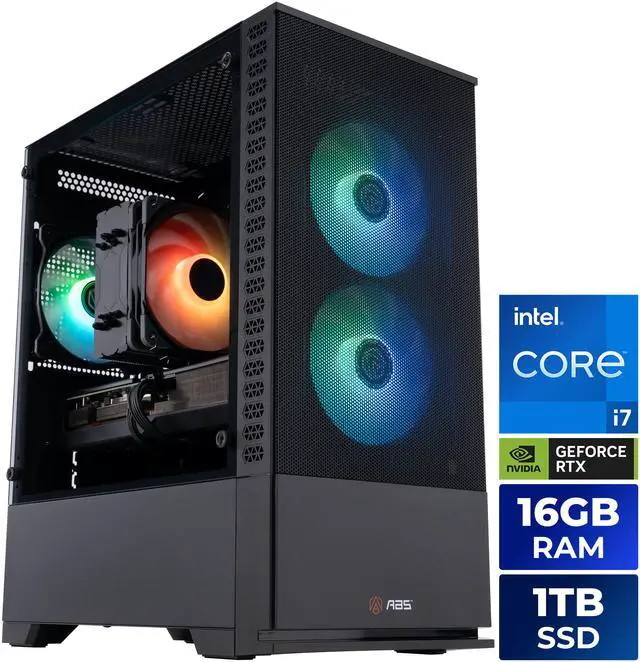
The ABS Cyclone Aqua with the Core i7-14700F and RTX 5060 Ti 16GB is the machine that illustrates step one best. Same 4,608 CUDA cores as the 8GB version, twice the memory, and that is what keeps it usable at 1440p with high textures. The i7-14700F behind it brings twenty cores and 33MB of L3, which is more processor than this card needs — useful if you later move up a GPU tier. It ships with 16GB of DDR5, so a memory upgrade is the obvious first thing to do.
A 6-core Ryzen with a 16GB Radeon. An unfashionable pairing that works.
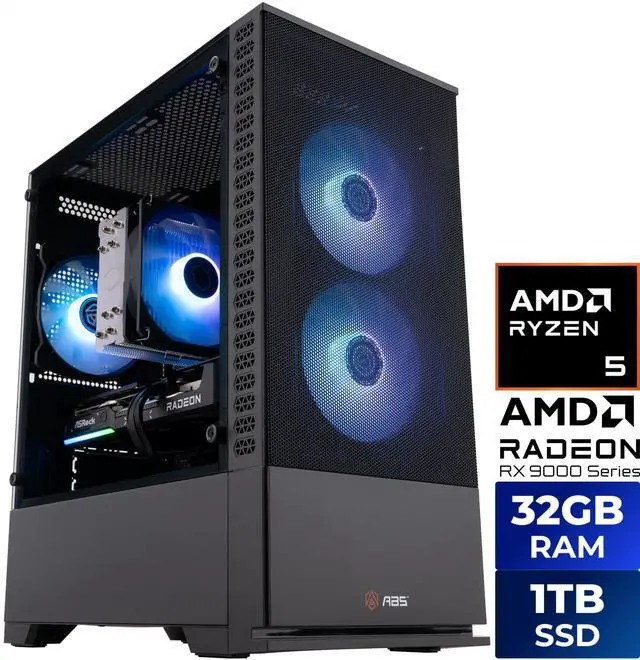
On the Radeon side, the ABS Cyclone Ruby with the Ryzen 5 9600X and RX 9060 XT 16GB is the clearest example of buying memory rather than badge. The 9060 XT is 32 compute units and 2,048 stream processors with 16GB of GDDR6, and the Ryzen 5 9600X is six Zen 5 cores at 65W with a 5.4GHz ceiling. Because it is on Socket AM5 with a B850M board, the processor is the easy upgrade later — you are not locked into six cores forever.
An 850W supply and a 240mm AIO, because a 300W card and a 125W i9 both want headroom.
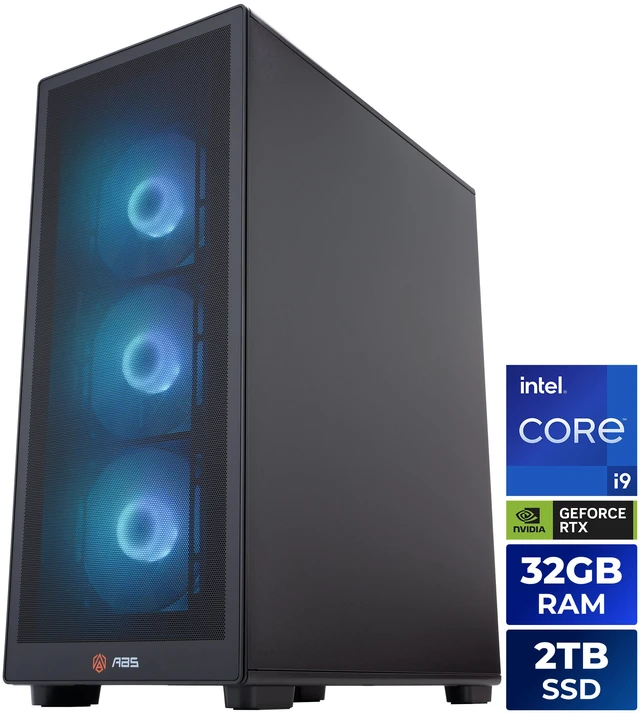
A tier up, the ABS Stratos II Aqua with the Core i9-14900KF and RTX 5070 Ti shows what step four looks like when a builder gets it right. The 5070 Ti is 8,960 CUDA cores and 16GB on a 256-bit bus, and the build gives it an 850W ATX 3.1 supply, a Z790 board, 32GB of DDR5, 2TB of NVMe storage and a 240mm liquid cooler for a 24-core processor that peaks at 6.0GHz. Nothing in that list is fighting anything else.
The Short Version
Start with memory, then bandwidth, then the power supply, and only then argue about brands. If a build gives you more video memory in the same tier, take it. If it pairs a 300W card with a 650W supply, keep looking. The rest of the range is on Newegg's ABS gaming desktop listings.
Frequently Asked Questions
Is a 16GB card always better than an 8GB one? When it is the same GPU in two memory configurations, the 16GB version is the one that ages better, especially at 1440p and above. Between different GPUs it is not that simple — a 12GB RTX 5070 on a 192-bit bus will generally outperform a 16GB RTX 5060 Ti on a 128-bit bus, because bandwidth and core count matter too.
How much does memory bus width actually matter? It sets how quickly the card can move data in and out of its own memory. The RTX 5060 and 5060 Ti use a 128-bit bus, the 5070 uses 192-bit, and the 5070 Ti and 5080 use 256-bit. Wider buses matter most at higher resolutions and with large textures, which is why the tier gaps widen as you move from 1080p to 4K.
Should I choose GeForce or Radeon? It depends on what you play. GeForce cards have the more established upscaling and ray tracing ecosystem, while Radeon often offers more memory at a given tier. Look up the specific games you spend time in rather than deciding on feature lists, since the ranking changes from title to title.
Does the CPU limit the graphics card? It can, mostly at lower resolutions where frames are produced quickly enough that the processor becomes the constraint. At 4K the graphics card is almost always the limit. A useful check on a system you already own is to watch GPU utilisation while playing: if it sits near full, the card is the bottleneck.
Can I add a bigger graphics card to a prebuilt later? Usually, provided the power supply and case allow it. Check the wattage rating and connectors on the existing supply against the new card's board power, and confirm the card's physical length fits the chassis. ABS builds use standard ATX components, so these are ordinary compatibility checks rather than proprietary ones.
Read More
Wikipedia: GeForce RTX 50 Series — Full specification table with CUDA counts, memory size, bus width and board power for every desktop model.
AMD: Radeon RX 9000 Series — The manufacturer's overview of the current Radeon desktop lineup and its feature set.
Tom's Hardware: GPU Hierarchy — Measured performance rankings that let you compare across brands rather than within one.
NVIDIA: DLSS — What the upscaling and frame generation features actually do, from the company that builds them.