Shopping for desktop memory can quickly turn into a numbers game: DDR4-3200, DDR5-6000, CL36, 32GB, and more. RAM speed matters for gaming, everyday responsiveness, creative workloads, and multitasking, but the fastest kit is not automatically the best upgrade. The right choice balances data rate, latency, capacity, memory generation, and compatibility with your processor and motherboard.
Why RAM Speed Matters
DDR memory is commonly listed by its transfer rate, with examples including DDR4-3200, DDR5-6000, and DDR5-6400. Retail listings may refer to this number as frequency, but MT/s more precisely describes the data-transfer rate. A higher rate increases theoretical memory bandwidth, giving the processor more data to work with efficiently.
That number is only one part of the buying decision. More capacity helps prevent slow disk-based paging, while latency influences how quickly memory responds to requests. Installing two matched modules in a dual-channel configuration can also deliver more bandwidth than using a single module. For many new gaming and productivity desktops, 32GB is a practical starting point.
What to Look For in RAM Speed
Before comparing performance ratings, confirm which memory standard your motherboard and processor support. DDR4 and DDR5 are separate generations and cannot be used interchangeably, even though desktop modules from both generations commonly have 288 pins.
- Generation: Match DDR4 memory to a compatible DDR4 platform and DDR5 memory to a compatible DDR5 platform.
- Data rate: DDR4-3200 is a sensible baseline for established systems, while DDR5-6000 and DDR5-6400 are aimed at newer performance-focused builds.
- Latency: Look at CAS latency and the complete timing set instead of judging speed alone. For example, CL36 at DDR5-6000 is not the same specification as CL38 at DDR5-6400.
- Profile support: Intel XMP and AMD EXPO can load tested performance settings through the BIOS.
- Kit configuration: A 2 x 16GB kit is built for dual-channel operation when the modules are installed in the motherboard slots recommended by the manufacturer.
RAM Speed Comparison for Beginners
These examples make it easier to see how data rate, timings, voltage, and platform support work together when you compare memory kits.
- DDR4-3200: The Gigastone GST Game Pro includes 32GB across two 16GB modules, with CL16 timings of 16-18-18-38, 1.35V operation, and Intel XMP 2.0.
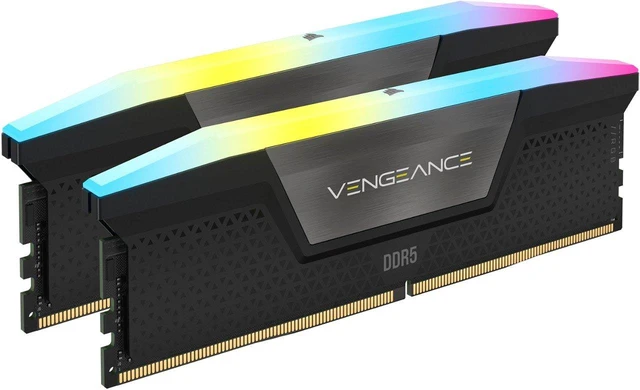
- DDR5-6000: The CORSAIR Vengeance RGB CMH32GX5M2E6000C36 delivers 32GB with CL36 timings of 36-44-44-96, 1.40V, and Intel XMP 3.0.
- DDR5-6000 without RGB: The CORSAIR Vengeance CMK32GX5M2E6000C36 matches that 32GB capacity and 36-44-44-96 timing set, while using a non-RGB design and listing 1.40V operation.
- DDR5-6400: The Team T-Force Vulcan ECO offers 32GB at CL38 with 38-46-46-84 timings and 1.35V, plus support for both Intel XMP 3.0 and AMD EXPO.
Top RAM Speed Picks
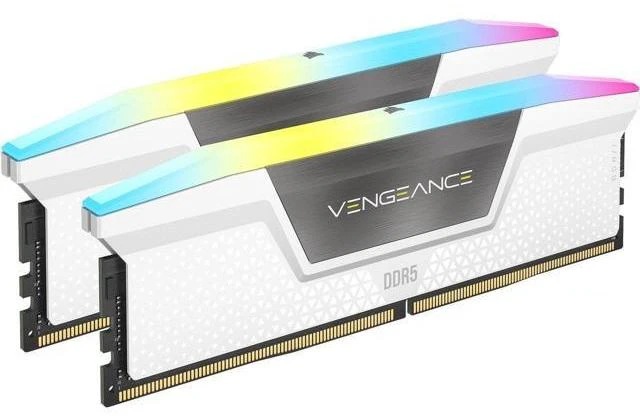
Building an Intel DDR5 system? The CORSAIR Vengeance RGB DDR5-6000 is a well-equipped option with 32GB capacity, Intel XMP 3.0, aluminum heat spreaders, and ten individually addressable RGB LEDs per module. If you prefer a white finish, the CORSAIR Vengeance RGB CMH32GX5M2E6000C36W keeps the same core speed and timings.
For shoppers who want a higher-rate kit with support for both major performance profiles, the Team T-Force Vulcan ECO DDR5-6400 is worth a look. Upgrading an established DDR4 platform? The Gigastone GST Game Pro DDR4-3200 fits that category. The CORSAIR Vengeance DDR5-6000 rounds out the selection with a low-clearance, non-RGB design.
Final Verdict: Choosing the Right RAM Speed
The smartest way to shop is to confirm compatibility first, then evaluate capacity, speed, and latency together. DDR4-3200 continues to make sense for compatible platforms, while DDR5-6000 is a balanced target for many DDR5 desktops. DDR5-6400 can provide additional bandwidth, but actual operation depends on the processor, motherboard, BIOS, and selected memory profile.
For most PC builders, a matched 32GB kit with XMP or EXPO support is a better buy than simply selecting the highest advertised speed. After installation, enable the appropriate profile, check system stability, and make sure the kit’s generation and specifications align with your platform.
Frequently Asked Questions
Can DDR4 and DDR5 RAM work in the same motherboard?
No. DDR4 and DDR5 use different electrical specifications, key notches, and platform support, so they cannot be mixed in the same motherboard. Check your motherboard manual and processor specifications before buying memory, because some platforms are available in separate DDR4 and DDR5 versions.
Is DDR5-6000 worth buying for a gaming PC?
DDR5-6000 is a balanced target for many newer gaming systems, especially when the processor and motherboard can run it reliably. It may deliver better bandwidth than lower-rated kits, but the real-world benefit depends on the game, CPU, graphics card, memory timings, and whether the system is memory-limited.
How much RAM does a modern PC need?
A matched 32GB kit, typically configured as 2 x 16GB, is a practical starting point for modern gaming, productivity, and multitasking. Consider 64GB or more if you regularly edit high-resolution video, create 3D content, run virtual machines, or work with large datasets.
Do XMP and EXPO make RAM run faster automatically?
XMP and EXPO provide tested performance profiles that can configure higher memory speeds, timings, and voltage through the BIOS. You normally need to enable the appropriate profile manually, and stability still depends on the processor's memory controller, motherboard, BIOS version, and the specific memory kit.
Does enabling a RAM performance profile affect warranty coverage?
Warranty treatment can vary by the memory, motherboard, processor, and manufacturer, so review the current warranty terms before enabling a profile. If a system becomes unstable, return the memory to default settings, update the BIOS if appropriate, and test the modules individually or with a memory diagnostic tool.
Read More
- Intel XMP: Extreme Memory Profile RAM Overclocking — Intel explains how XMP profiles can simplify the process of running compatible DDR4 and DDR5 memory at tested performance settings.
- AMD EXPO Technology for Ryzen Processors — AMD’s official EXPO page explains Ryzen-optimized DDR5 memory profiles and provides information about tested memory compatibility.
- DDR4 vs DDR5 DRAM: Performance and Compatibility — Kingston compares DDR4 and DDR5 architecture, speed ranges, power requirements, capacity, and platform compatibility.
- What Is CAS Latency? DDR5 Latencies Explained — CORSAIR provides a beginner-friendly explanation of CAS latency and how memory timings relate to DDR5 performance.
- Memory Population Rules for DDR4 and DDR5 Systems — This Kingston reference covers dual-channel configurations and memory installation rules for compatible desktop platforms.