




 here!
here!
I’m your shopping assistant for PC builds, upgrades, and everything tech.
Got questions? Ask away!
Start a conversation
here!
I’m your shopping assistant for PC builds, upgrades, and everything tech.
Got questions? Ask away!
Start a conversation
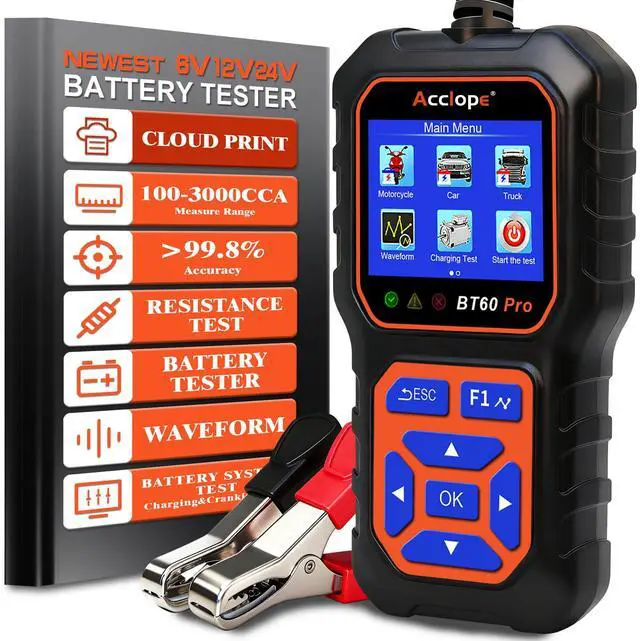
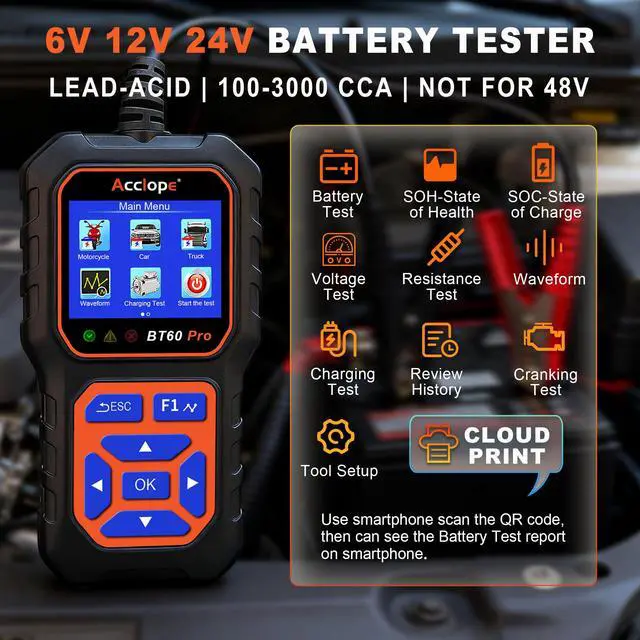
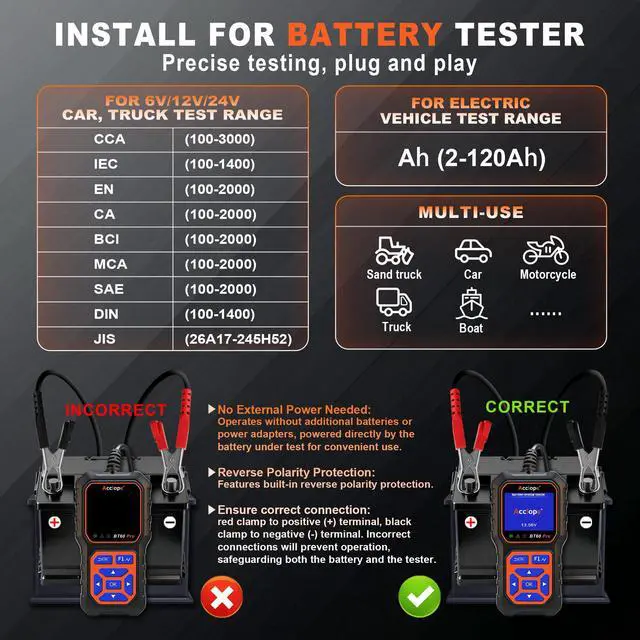
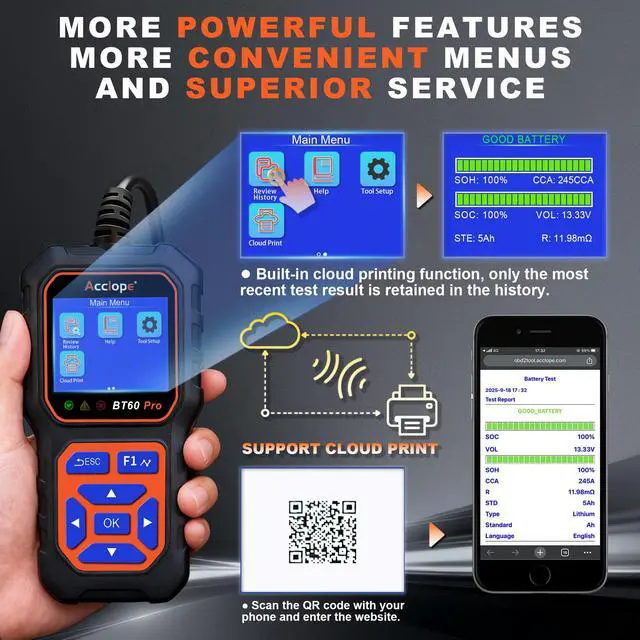



Any questions? Ask CelesteSM will help you find out quickly.
Why Choose Acclope BT60 Pro? Is its display easily visible in bright sunlight?
Acclope BT60 Pro offers advanced battery testing, reverse polarity protection, and non-destructive testing. Its high-contrast LCD ensures clear visibility, even in bright sunlight, making it reliable for all environments.
I get “won’t work” or no reading. What should I check?
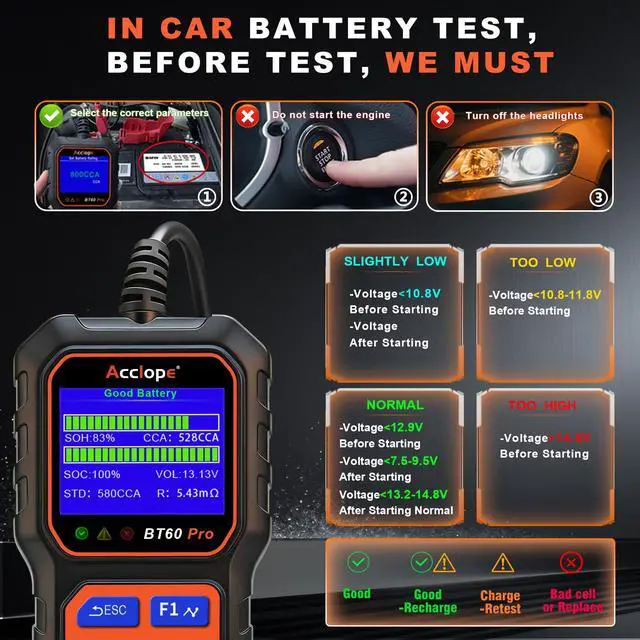
1. Clean terminals, ensure firm clamp contact (red to +, black to -). 2.Select correct battery type and standard. 3.Enter the rated CCA value printed on the battery label.
4. Ensure resting voltage is =12.6V (for a fully charged 12V battery).
Does it support LiFePO4 lithium batteries? Can it test CCA?
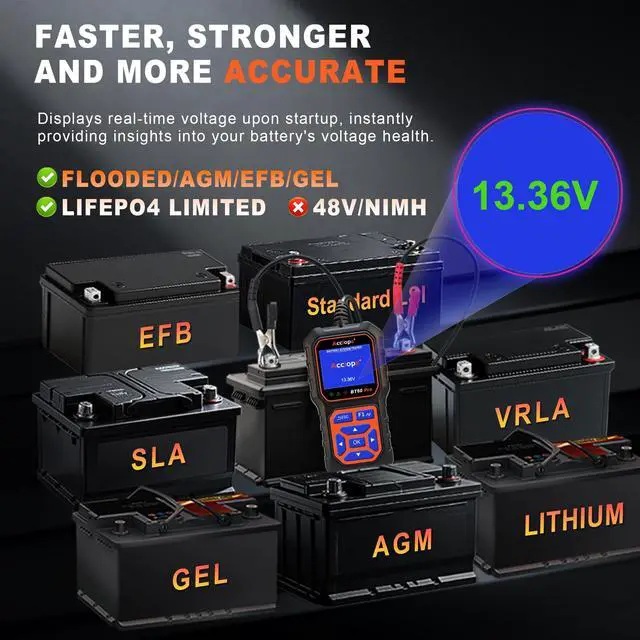
BT60 Pro supports lithium voltage/health checks. For LiFePO4, CCA results are not guaranteed. Full testing is for 6V/12V/24V lead-acid (Flooded/AGM/EFB/GEL). Not for 48V systems.
How does the BT60 Pro help maintain lithium batteries?
It monitors battery health, voltage, and charging systems for 6V and 12V lithium batteries, helping users maintain optimal performance. For LiFePO4,is limited to voltage/health checks, not indicate precise CCA measurement,not for 48V systems.
Does it read codes? How do you use the cloud printing feature on the BT60 Pro?
NO, it can't read codes. To use cloud printing, complete the battery test, scan the generated Q-R code with your smartphone, and print the results via a compatible printer. This feature makes the BT60 Pro ideal for professional diagnostics.
6V 12V 24V | Testing Voltage | 6V 12V 24V |
100-3000 | Testing CCA Rang | 30-3800 |
True Color Screen | Screen Display | FHD Color Screen |
Non, but cloud print | Built in Printer | Non, but cloud print |
Battery test | Sys-Testing&History | Battery+Cha/Cranking |
NO | Real-time Ambient T° | YES, On-boot display |
On-boot display | Real-time Voltage | On-boot display |
6V 12V 24V | Testing Voltage | 6V 12V 24V |
100-3000 | Testing CCA Rang | 30-3800 |
True Color Screen | Screen Display | FHD Color Screen |
Non, but cloud print | Built in Printer | Non, but cloud print |
Battery test | Sys-Testing&History | Battery+Cha/Cranking |
NO | Real-time Ambient T° | YES, On-boot display |
On-boot display | Real-time Voltage | On-boot display |
6V 12V 24V | Testing Voltage | 6V 12V 24V |
100-3000 | Testing CCA Rang | 100-3000 |
True Color Screen | Screen Display | True Color Screen |
Non, but cloud print | Built in Printer | Non, but cloud print |
Battery test | Sys-Testing&History | Battery test |
NO | Real-time Ambient T° | NO |
On-boot display | Real-time Voltage | On-boot display |
6V 12V 24V | Testing Voltage | 6V 12V 24V |
100-3000 | Testing CCA Rang | 100-3000 |
True Color Screen | Screen Display | True Color Screen |
Non, but cloud print | Built in Printer | Non, but cloud print |
Battery test | Sys-Testing&History | Battery test |
NO | Real-time Ambient T° | NO |
On-boot display | Real-time Voltage | On-boot display |


Why Choose Acclope BT60 Pro? Is its display easily visible in bright sunlight?
Acclope BT60 Pro offers advanced battery testing, reverse polarity protection, and non-destructive testing. Its high-contrast LCD ensures clear visibility, even in bright sunlight, making it reliable for all environments.
I get “won’t work” or no reading. What should I check?
1. Clean terminals, ensure firm clamp contact (red to +, black to -). 2.Select correct battery type and standard. 3.Enter the rated CCA value printed on the battery label.
4. Ensure resting voltage is =12.6V (for a fully charged 12V battery).
Does it support LiFePO4 lithium batteries? Can it test CCA?
BT60 Pro supports lithium voltage/health checks. For LiFePO4, CCA results are not guaranteed. Full testing is for 6V/12V/24V lead-acid (Flooded/AGM/EFB/GEL). Not for 48V systems.
How does the BT60 Pro help maintain lithium batteries?
It monitors battery health, voltage, and charging systems for 6V and 12V lithium batteries, helping users maintain optimal performance. For LiFePO4,is limited to voltage/health checks, not indicate precise CCA measurement,not for 48V systems.
Does it read codes? How do you use the cloud printing feature on the BT60 Pro?
NO, it can't read codes. To use cloud printing, complete the battery test, scan the generated Q-R code with your smartphone, and print the results via a compatible printer. This feature makes the BT60 Pro ideal for professional diagnostics.

Testing Voltage | 6V 12V 24V |
Testing CCA Rang | 100-3000 |
Screen Display | True Color Screen |
Built in Printer | Non, but cloud print |
Sys-Testing&History | Battery test |
Real-time Ambient T° | NO |
Real-time Voltage | On-boot display |

Testing Voltage | 6V 12V 24V |
Testing CCA Rang | 30-3800 |
Screen Display | FHD Color Screen |
Built in Printer | Non, but cloud print |
Sys-Testing&History | Battery+Cha/Cranking |
Real-time Ambient T° | YES, On-boot display |
Real-time Voltage | On-boot display |

Testing Voltage | 6V 12V 24V |
Testing CCA Rang | 30-3800 |
Screen Display | FHD Color Screen |
Built in Printer | Non, but cloud print |
Sys-Testing&History | Battery+Cha/Cranking |
Real-time Ambient T° | YES, On-boot display |
Real-time Voltage | On-boot display |

Testing Voltage | 6V 12V 24V |
Testing CCA Rang | 100-3000 |
Screen Display | True Color Screen |
Built in Printer | Non, but cloud print |
Sys-Testing&History | Battery test |
Real-time Ambient T° | NO |
Real-time Voltage | On-boot display |

Testing Voltage | 6V 12V 24V |
Testing CCA Rang | 100-3000 |
Screen Display | True Color Screen |
Built in Printer | Non, but cloud print |
Sys-Testing&History | Battery test |
Real-time Ambient T° | NO |
Real-time Voltage | On-boot display |





