Your Browsing History
- Free 30-day Returns
$289.99
Meet Your Seller
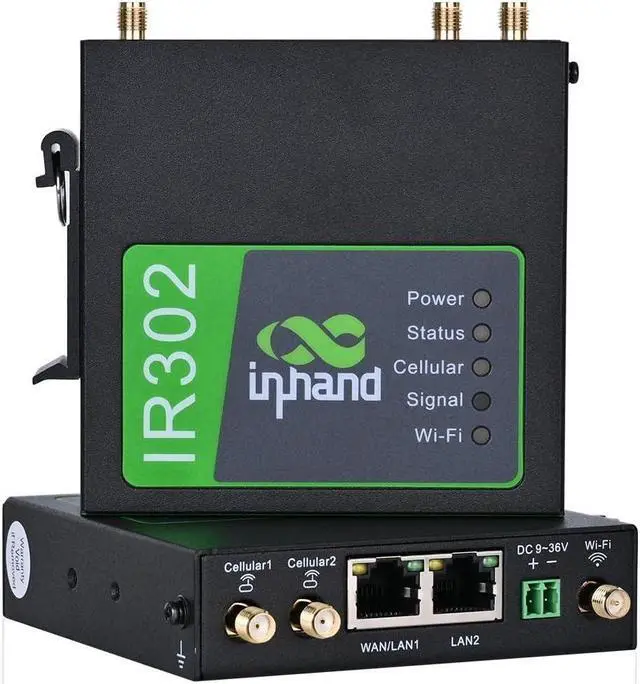
InHand Networks IR302 Industrial IoT LTE 4G VPN Router,LTE Cat 1+ Wi-Fi, Dual sim Card Slots, Management by Cloud Platform, DI/DO Port, Support T-Mobile, AT&T & Verizon, UL Certification
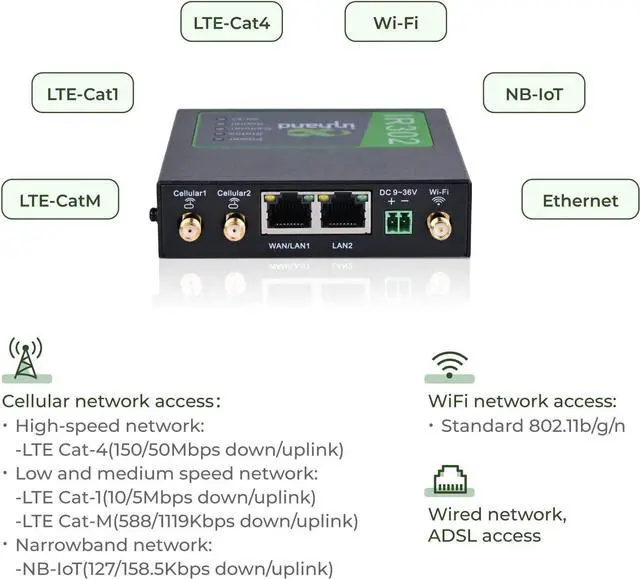
- 4G LTE Router: working band: LTE CAT4, FDD: B2/ B4/ B5/ B12/ B13/ B14/ B66/ B71, WCDMA: B2/ B4/ B5; Dual sim card slot, use it with any mobile carriers that using the same frequency bands; Equipped with complete functions, it is applied in various industries and applications.
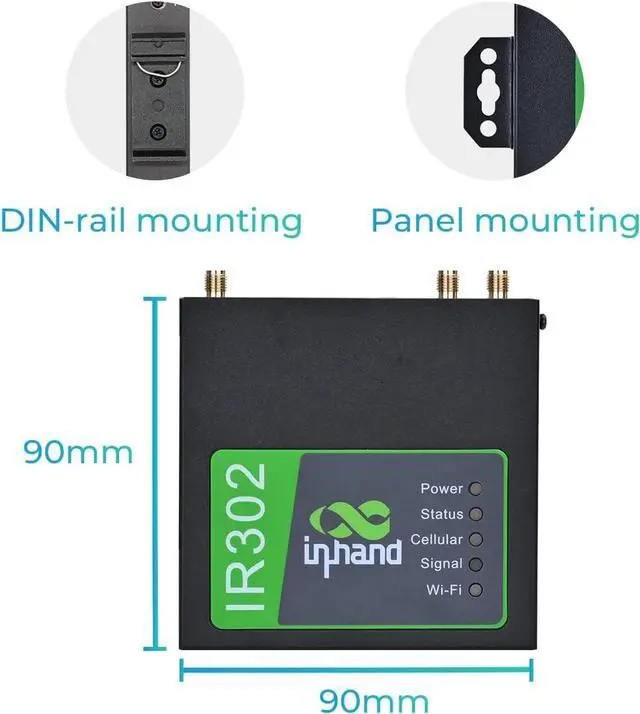
- Industrial Design & Wide Coverage: Industrial rugged metal casing, compact size for mass deployment; Transmission Distance can reach to 80 meters; Featuring both panel and DIN-rail installation.
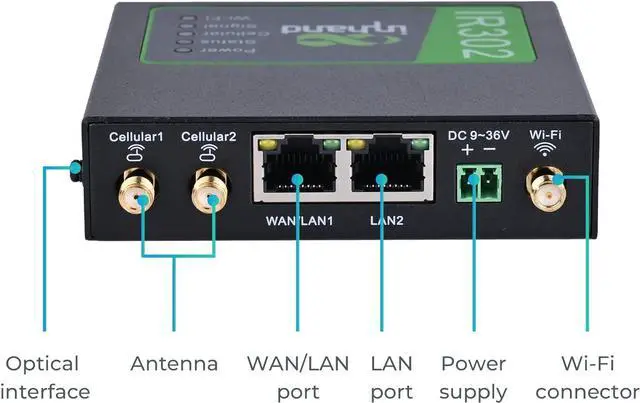
- Multiple Means for Internet Access: Available with wired network access, high speed LTE CAT4 and Wi-Fi connection. One LAN port, one WAN/LAN switchable port and Wi-Fi access. The IR302 is a compact M2M LTE router integrating 4G LTE, Wi-Fi, and VPN technologies.
+
+
Overview
Specs
Reviews
Any questions? Our AI beta will help you find out quickly.
Try me now
Strong Security Protection: Supports VPN, firewall and user authorization management. Strong security measures for data transmission, network and device access. -Firewall
Protections: Stateful Packet Inspection (SPI), DoS attack defense; Multicast filter/Ping probe packet, Access Control List (ACL); Content URL filter, port mapping, virtual IP mapping, IP-MAC binding; - Data Security, OPENVPN protocols, Supports CA digital certificate.
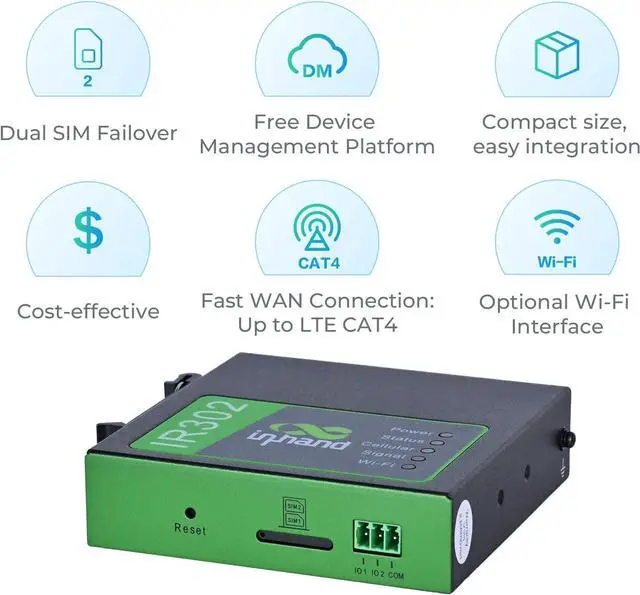
High Reliability & Efficient Remote management: Watchdog and multi-layer link detection mechanisms, automatic redial and recovery; Dual-SIM failover; VRRP mechanism for backup; Failover between wired, cellular LTE networks and Wi-Fi.
How to use the router with SIM card?
Notice: If you are not sure which model you want to order, if you were encounterd trouble using the device, please tell us. We will try our best to solve the problem for you
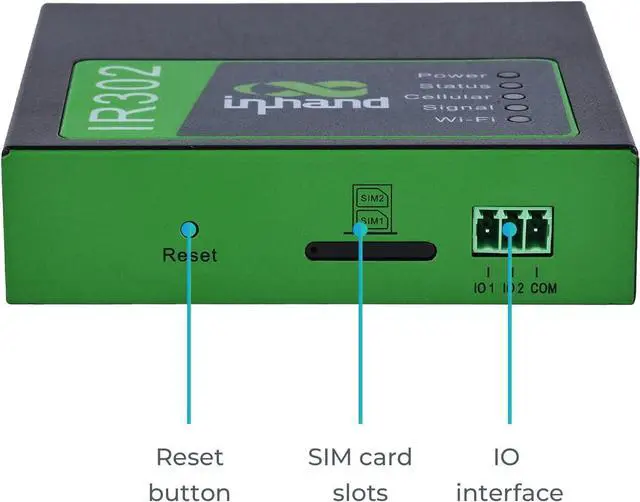
1. Insert the SIM card into the slot 1 and attach 4G antennas to the Main and AUX connectors; then power cycle the device. To replace or insert SIM Card, the device must be powered off to avoid data loss or equipment damage.
2. Connect the LAN2 port with your PC.
3. Fill in the IP of the router on the browser (you could find the IP on the label of router).
IP: 192.168. 2.1
User name/password: adm/123456
4. Go to 'network >>Cellular', select 'profile 1' under the network provider, fill in the SIM card information in the
Profiles table down below: APN, User Name, Password, (User Name and Password are not mandatory), hit 'ok' and 'Apply'.
Notice: Please make sure the APN is correct. If you are not sure, please confirmwith ISP or search it on Google.
Below are the example of APN information
AT &T's APN: broadband
Verizons APN: vzwinternet
Some sim cards can get a static IP and require some specific APNs, please confirm with your Carrier.
InRouter300 Hardware
CPU Platform 580MHz
RAM 128MB DDR2
Flash 32MB SPI
Ethernet Ports 2*10/100Mbps fast Ethernet port, LAN/WAN port 1.5KV network isolation transformer protection
Power Supply DC9-36V, over-current protection, anti-reverse connection, 2 PIN industrial terminal block
SIM Card Dual drawer-type SIM card slots. 2FF SIM
Wi-Fi IEEE 802.11 b/g/n, 150Mbps
Antenna Connector 3G/4G: SMA x 1;
Wi-Fi: RP-SMA x 1
Note: North America models (FQ38, FQ33): 2 x SMA 4G antenna connectors.
Reset Button Pinhole reset button
Installation Method Panel mounting, DIN-rail mounting
Storage Temperature -40 ~ 85
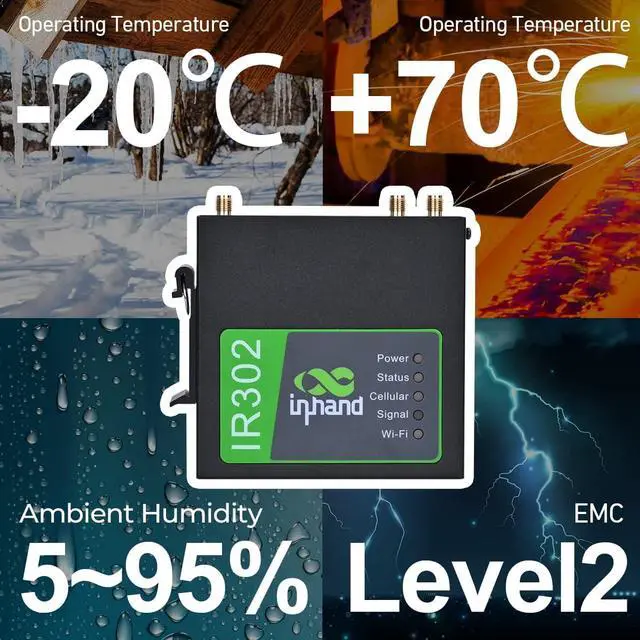
Operating Temperature -20 ~ 70
Humidity 5 ~ 95% (non-condensing)
InRouter300 Software
Network Access APN, VPDN, Private Network
Access Authentication CHAP/PAP
WAN Protocol PPP, PPPoE, DHCP
Network Type GSM/GPRS/EDGE, UMTS/HSPA+/EVDO/TD-SCDMA, TDD LTE/FDD LTE (Please refer to the Ordering Guide for frequencies. )
IP Application Ping, RouteTrace, DHCP Server, DHCP Relay, DHCP Client, DNS relay, DDNS, Telnet
IP Routing Static routing
NAT Supports network address translation
Network Security Stateful Packet Inspection (SPI), DoS attack defense; Multicast filter/Ping probe packet, Access Control List (ACL); Content URL filter, port mapping, virtual IP mapping, IP-MAC binding
WLAN Protocol IEEE 802.11 b/g/n
Transmission Distance 80 meters by line of sight (Actual transmission distance depends on environment of the site.
QoS Management Bandwidth limit, IP speed limit
Configuration Telnet, web, ssh and console
Upgrade Web, Device Manager
Log Local system log, remote log, and serial export of log. Power down saving of important logs.

Protections: Stateful Packet Inspection (SPI), DoS attack defense; Multicast filter/Ping probe packet, Access Control List (ACL); Content URL filter, port mapping, virtual IP mapping, IP-MAC binding; - Data Security, OPENVPN protocols, Supports CA digital certificate.
High Reliability & Efficient Remote management: Watchdog and multi-layer link detection mechanisms, automatic redial and recovery; Dual-SIM failover; VRRP mechanism for backup; Failover between wired, cellular LTE networks and Wi-Fi.
How to use the router with SIM card?
Notice: If you are not sure which model you want to order, if you were encounterd trouble using the device, please tell us. We will try our best to solve the problem for you
1. Insert the SIM card into the slot 1 and attach 4G antennas to the Main and AUX connectors; then power cycle the device. To replace or insert SIM Card, the device must be powered off to avoid data loss or equipment damage.
2. Connect the LAN2 port with your PC.
3. Fill in the IP of the router on the browser (you could find the IP on the label of router).
IP: 192.168. 2.1
User name/password: adm/123456
4. Go to 'network >>Cellular', select 'profile 1' under the network provider, fill in the SIM card information in the
Profiles table down below: APN, User Name, Password, (User Name and Password are not mandatory), hit 'ok' and 'Apply'.
Notice: Please make sure the APN is correct. If you are not sure, please confirmwith ISP or search it on Google.
Below are the example of APN information
AT &T's APN: broadband
Verizons APN: vzwinternet
Some sim cards can get a static IP and require some specific APNs, please confirm with your Carrier.
InRouter300 Hardware
Specifications
CPU Platform 580MHz
RAM 128MB DDR2
Flash 32MB SPI
Ethernet Ports 2*10/100Mbps fast Ethernet port, LAN/WAN port 1.5KV network isolation transformer protection
Power Supply DC9-36V, over-current protection, anti-reverse connection, 2 PIN industrial terminal block
SIM Card Dual drawer-type SIM card slots. 2FF SIM
Wi-Fi IEEE 802.11 b/g/n, 150Mbps
Antenna Connector 3G/4G: SMA x 1;
Wi-Fi: RP-SMA x 1
Note: North America models (FQ38, FQ33): 2 x SMA 4G antenna connectors.
Reset Button Pinhole reset button
Installation Method Panel mounting, DIN-rail mounting
Storage Temperature -40 ~ 85
Operating Temperature -20 ~ 70
Humidity 5 ~ 95% (non-condensing)
InRouter300 Software
Specifications
Network Access APN, VPDN, Private Network
Access Authentication CHAP/PAP
WAN Protocol PPP, PPPoE, DHCP
Network Type GSM/GPRS/EDGE, UMTS/HSPA+/EVDO/TD-SCDMA, TDD LTE/FDD LTE (Please refer to the Ordering Guide for frequencies. )
IP Application Ping, RouteTrace, DHCP Server, DHCP Relay, DHCP Client, DNS relay, DDNS, Telnet
IP Routing Static routing
NAT Supports network address translation
Network Security Stateful Packet Inspection (SPI), DoS attack defense; Multicast filter/Ping probe packet, Access Control List (ACL); Content URL filter, port mapping, virtual IP mapping, IP-MAC binding
WLAN Protocol IEEE 802.11 b/g/n
Transmission Distance 80 meters by line of sight (Actual transmission distance depends on environment of the site.
QoS Management Bandwidth limit, IP speed limit
Configuration Telnet, web, ssh and console
Upgrade Web, Device Manager
Log Local system log, remote log, and serial export of log. Power down saving of important logs.
Warranty & Returns
Warranty, Returns, And Additional Information
Warranty
- Please contact the Seller directly for warranty information. Warranty information may also be found on the Manufacturer's website.
- CONTACT
Return Policies
- Return for refund within: 30 days
- Return for replacement within: 30 days
- This item is covered by B-IN Electronics Return Policy
Manufacturer Contact Info
- For a directory of all our manufacturers, please click below.
- Manufacturers Directory
LOADING...