Your Browsing History
- Free 30-day Returns
$195.01
Ships from China.
Sold by SpringEssence Store
Shipped by SpringEssence Store
Meet Your Seller
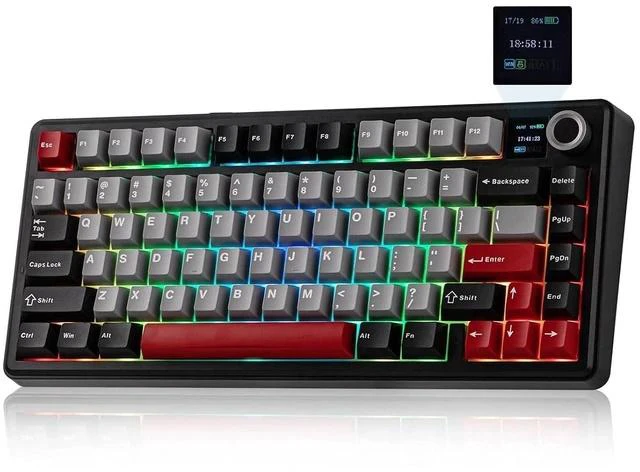
Aula F75 MAX Wireless Gaming Keyboard with Screen & Knob, 75% Hot Swappable Mechanical Keyboard with
- FN+Knob to Swap Volume & Screen Control
- Customizable with AULA Driver Dynamic RGB Lights Adjust the Ba
- FN+\|: Toggle Backlight Effect
+
+
Overview
Specs
Reviews
Any questions? Ask CelesteSM will help you find out quickly.
Try me now
QIAN Aula F75 MAX Wireless Gaming Keyboard with Screen & Knob, 75% Hot Swappable
Mechanical Keyboard with Brand: QIAN |
MPN: LHXJU20-C731-1112 FN+Knob to Swap Volume & Screen Control Customizable with AULA Driver Dynamic RGB Lights Adjust the Backlights by Knob or
Shortcut Keys:
FN+\|: Toggle Backlight Effect FN+??: Backlight Brightness, FN+??: Backlight
Speed,
FN+TAB: Backlight
Color FN+X: Turn On/Off
Backlight FN+\|: Toggle Backlight Effect FN+??: Backlight Brightness, FN+??: Backlight
Speed,
FN+TAB: Backlight
Color FN+X: Turn On/Off Backlight What is the polling rate of this gaming keyboard?
The polling rate: 1000Hz (USB Wired & 2.4G Wireless), 125Hz (BT) What is the battery capacity of the F75 MAX mechanical keyboard? The battery capacity is 4000mAh. Which can be used for 30H (RGB light on) / 80H (RGB light off). Is the F75 MAX keyboard compatible with mac OS? Does it include Mac keycaps? Yes, this wireless keyboard supports BT/ 2.4GH z/USB wired connections and is compatible with multiple systems, including Windows, Mac, iOS, Android, etc. But the Mac keycaps are not included. How to change screen settings?
FN+Knob: Enter settings? Rotate to navigate, press to confirm? FN+Knob to exit Where can I download the software? You can download the software from Mechlands website.

Mechanical Keyboard with Brand: QIAN |
MPN: LHXJU20-C731-1112 FN+Knob to Swap Volume & Screen Control Customizable with AULA Driver Dynamic RGB Lights Adjust the Backlights by Knob or
Shortcut Keys:
FN+\|: Toggle Backlight Effect FN+??: Backlight Brightness, FN+??: Backlight
Speed,
FN+TAB: Backlight
Color FN+X: Turn On/Off
Backlight FN+\|: Toggle Backlight Effect FN+??: Backlight Brightness, FN+??: Backlight
Speed,
FN+TAB: Backlight
Color FN+X: Turn On/Off Backlight What is the polling rate of this gaming keyboard?
The polling rate: 1000Hz (USB Wired & 2.4G Wireless), 125Hz (BT) What is the battery capacity of the F75 MAX mechanical keyboard? The battery capacity is 4000mAh. Which can be used for 30H (RGB light on) / 80H (RGB light off). Is the F75 MAX keyboard compatible with mac OS? Does it include Mac keycaps? Yes, this wireless keyboard supports BT/ 2.4GH z/USB wired connections and is compatible with multiple systems, including Windows, Mac, iOS, Android, etc. But the Mac keycaps are not included. How to change screen settings?
FN+Knob: Enter settings? Rotate to navigate, press to confirm? FN+Knob to exit Where can I download the software? You can download the software from Mechlands website.
Warranty & Returns
Warranty, Returns, And Additional Information
Warranty
- Please contact the Seller directly for warranty information. Warranty information may also be found on the Manufacturer's website.
- CONTACT
Return Policies
- Return for refund within: 30 days
- Return for replacement within: 30 days
- This item is covered by SpringEssence Store Return Policy
Manufacturer Contact Info
- For a directory of all our manufacturers, please click below.
- Manufacturers Directory
LOADING...