Your Browsing History
- Free 30-day Returns
$55.00
Meet Your Seller
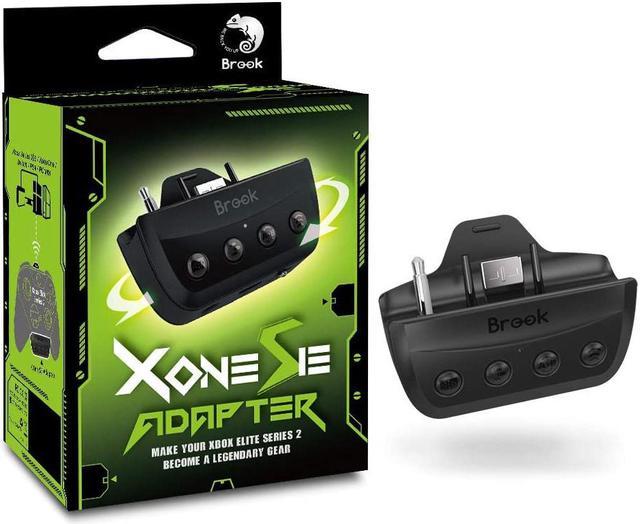
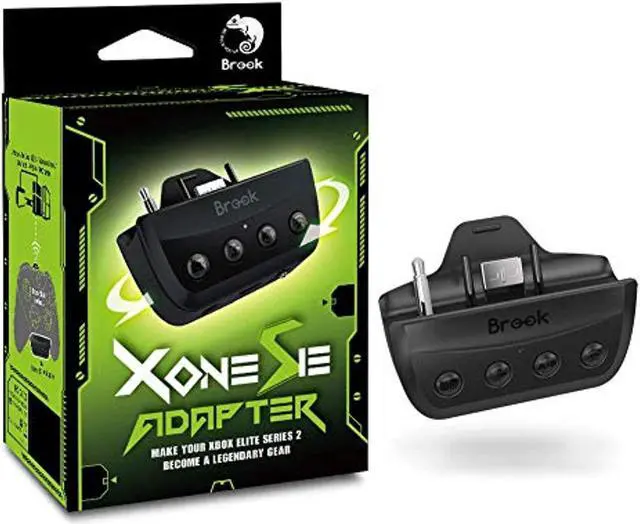
Brook Xbox One Adapter SE for Xbox Elite Series 2 Wireless Controller Support Xbox Series X/S Switch PS4 Xbox PC(XID) Motion Control Turbo Remap Audio Function
- COMPITABLE with NEW XBOX SERIES X/S CONSOLES !With the X One SE, the Xbox One Elite Series 2 controller can connect to Switch, PlayStation 4, PC and Xbox One consoles.
- Functions upgrade and easy to use ! Just switch the button to change the console mode for PS4 and Switch. Just press the turbo and remap button to set up functions easily!
- Support Turbo and Remap (for PS4/ SW/ PC)
- Emulate PS4 touch Pad Via Function Key
- Supports motion control for PS4 and Switch. 3.5mm microphone headset for PS4 and Xbox One. Please visit Brook website to check whether there is firmware update before using.
+
+
Overview
Specs
Reviews
Any questions? Our AI beta will help you find out quickly.
Try me now
How to use on PS4
How to use on Xbox Series X/Xbox Series S/Xbox One/PC
How to use on Switch
- Toggle the ""PS4/Xbox One/Switch slide switch"" to where it is labeled ""PS"".
- Wired Connection: Simply connect the controller to console via X One Adapter SE's ""Upgrade/Charge port"".
- Wireless Connection: The first time you use the X One Adapter SE, you need to pair it with the wireless controller: go to the ""Bluetooth Device"" screen and select ""Wireless Controller"" on your console setting. After waking up the controller, press and hold the ""Hold/Wireless pairing button"" of X One Adapter SE for 2 seconds to make the LED of X One Adapter SE blink red and blue alternately, and wait for a few seconds until the LED of X One Adapter SE shows a constant blue light. After that, you only need to wake up the controller every time you use the X One Adapter SE.
How to use on Xbox Series X/Xbox Series S/Xbox One/PC
- Toggle the ""PS4/Xbox One/Switch slide switch"" to the bar labeled between ""PS"" and ""NS"".
- In this mode, the X One Adapter SE is set to off, please use the controller as a normal connection.
- Note: If you need to use Remap/Turbo/Hold function when connecting to a PC, it is recommended that you connect in PS4 simulation mode.
How to use on Switch
- Toggle the ""PS4/Xbox One/Switch slide switch"" to where it is labeled ""NS"".
- Wired Connection: Simply connect the controller to console via X One Adapter SE's ""Upgrade/Charge port"".
- Wireless Connection:The first time you use the X One Adapter SE, you need to pair it with the wireless controller: go to the ""Controller"" screen on your console. After waking up the controller, press and hold the ""Hold/Wireless pairing button"" of X One Adapter SE for 2 seconds to make the LED of X One Adapter SE blink red and blue alternately, and wait for a few seconds until the LED of X One Adapter SE shows a constant blue light. After that, you only need to wake up the controller every time you use the X One Adapter SE.
Warranty & Returns
Warranty, Returns, And Additional Information
Warranty
- Please contact the Seller directly for warranty information. Warranty information may also be found on the Manufacturer's website.
- CONTACT
Return Policies
- Return for refund within: 30 days
- Return for replacement within: 30 days
- This item is covered by Flashback Limited Return Policy
Manufacturer Contact Info
- For a directory of all our manufacturers, please click below.
- Manufacturers Directory
LOADING...