Your Browsing History
- Free 30-day Returns
$255.99
Meet Your Seller
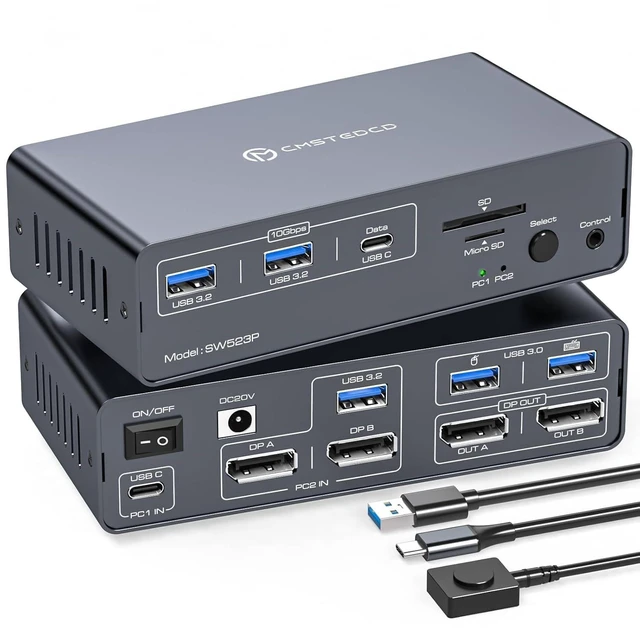
USB C & Displayport KVM Switch 2 Monitors Laptop & Desktop Docking Station
- USB C Dual Monitor Docking Station: The docking station allows USB C laptops and desktop computers to share a 14-in-1 multi-port docking station; you can share two monitors, a mouse, and a keyboard and switch seamlessly between your work laptops and personal computers, saving space and keeping your desktop neat and tidy, eliminating the need for repeated plugging and unplugging and improving work efficiency. Note: USB-C input port on the Rear panel, connected to the computer'sThunderbolt port. (Supports simultaneous PD charging of laptops, MAX 100W)
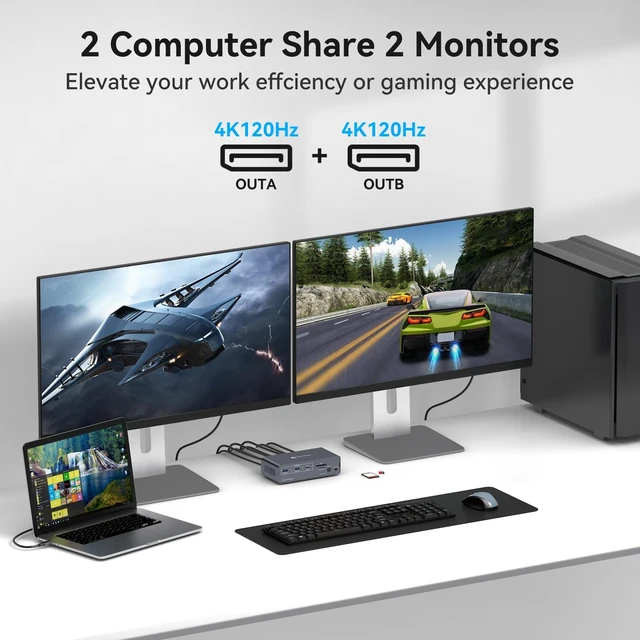
- Dual Mode Docking Station: This docking station supports dual monitor resolutions up to 4K120Hz for a stunning visual experience with sharp, clear and vibrant colors that make every task a pleasure. Supports dual-screen docking mode and dual-screen mirroring mode; a feature that dramatically improves productivity for professionals who rely on multiple screens for multitasking, graphic design, video editing or data analysis. Note: MacOS o
+
+
Overview
Specs
Reviews
Any questions? Our AI mode will help you find out quickly.
Try me now
USB C Dual
Monitor Docking Station: The docking station allows USB C laptops and desktop computers to share a 14-in-1 multi-port docking station; you can share two monitors, a mouse, and a keyboard and switch seamlessly between your work laptops and personal computers, saving space and keeping your desktop neat and tidy, eliminating the need for repeated plugging and unplugging and improving work efficiency.
Note: USB-C input port on the Rear panel, connected to the computer'sThunderbolt port. (Supports simultaneous PD charging of laptops, MAX 100W) ^^
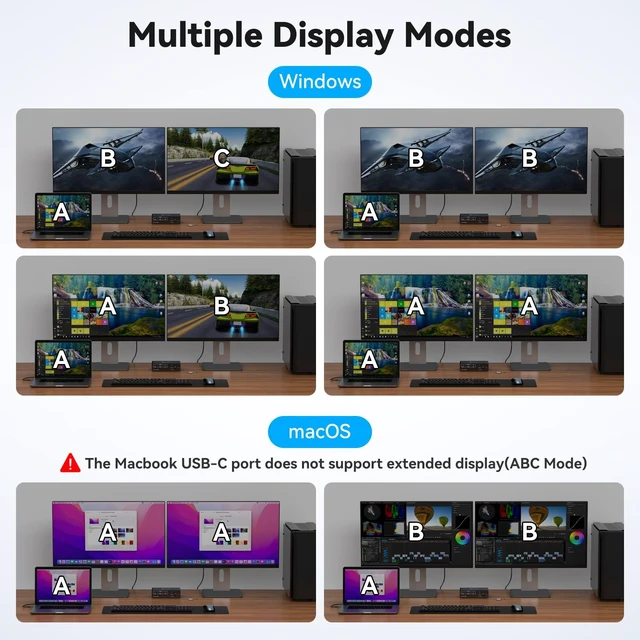
Dual Mode Docking Station: This docking station supports dual monitor resolutions up to 4K120Hz for a stunning visual experience with sharp, clear and vibrant colors that make every task a pleasure. Supports dual-screen docking mode and dual-screen mirroring mode; a feature that dramatically improves productivity for professionals who rely on multiple screens for multitasking, graphic design, video editing or data analysis.
Note: MacOS only supports mirroring mode ^^ 100W
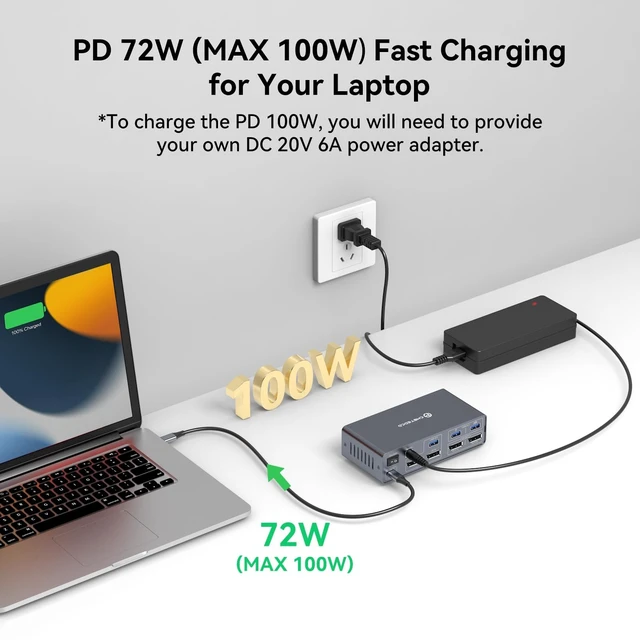
KVM Switch: Supports PD pass-through charging for laptops (up to 100W), providing a stable power supply to all connected devices to ensure they remain fully charged at all times.
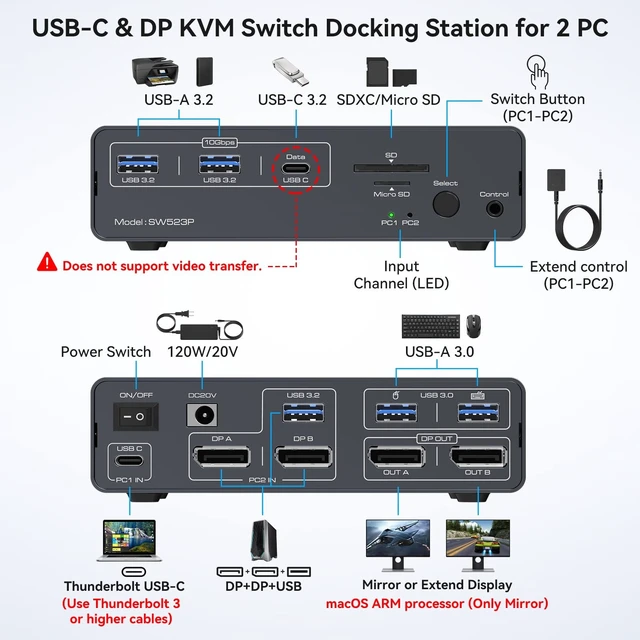
Note: The included DC 20V 3.6A power adapter supports up to 72W charging. If you require PD 100W charging, you will need to purchase a DC 20V 6A power adapter separately.
^^ Multi-Function Docking Station: The combination of multifunctional ports of the KVM docking station simplifies complex tasks to a great extent. USB 3.0 ports for mouse and keyboard; 10Gbps USB 3.2 and USB-C data transfer ports on the front panel for more high-speed usb devices; The SD card slot and Micro SD card slot provide faster data transfer methods.
Note: The USB-C port on the front panel only supports data transfer ^^
Two Switching Modes: Switch by pressing the select button on the docking station; switch by using the desktop expansion button, which allows you to place the docking station under the desktop or outside of the work area for a cleaner desktop. Supports smooth and easy switching between entertainment and work modes, allowing you to maximize your work efficiency without compromising your gaming experience.
Note: Keyboard shortcuts (hotkeys) switching is not supported ^^ What will
You Get: Package
Included: DC20V Power Adapter X1; USB-C-C Cable X1; UAB 3.0 A-A Cable X1; Desktop Controller X1; User's Manual X1, We will deliver the product to you in a short time, and within 24 months after purchase if there is any problem, please contact us, we provide technical support and product replacement or refund service

Monitor Docking Station: The docking station allows USB C laptops and desktop computers to share a 14-in-1 multi-port docking station; you can share two monitors, a mouse, and a keyboard and switch seamlessly between your work laptops and personal computers, saving space and keeping your desktop neat and tidy, eliminating the need for repeated plugging and unplugging and improving work efficiency.
Note: USB-C input port on the Rear panel, connected to the computer'sThunderbolt port. (Supports simultaneous PD charging of laptops, MAX 100W) ^^
Dual Mode Docking Station: This docking station supports dual monitor resolutions up to 4K120Hz for a stunning visual experience with sharp, clear and vibrant colors that make every task a pleasure. Supports dual-screen docking mode and dual-screen mirroring mode; a feature that dramatically improves productivity for professionals who rely on multiple screens for multitasking, graphic design, video editing or data analysis.
Note: MacOS only supports mirroring mode ^^ 100W
KVM Switch: Supports PD pass-through charging for laptops (up to 100W), providing a stable power supply to all connected devices to ensure they remain fully charged at all times.
Note: The included DC 20V 3.6A power adapter supports up to 72W charging. If you require PD 100W charging, you will need to purchase a DC 20V 6A power adapter separately.
^^ Multi-Function Docking Station: The combination of multifunctional ports of the KVM docking station simplifies complex tasks to a great extent. USB 3.0 ports for mouse and keyboard; 10Gbps USB 3.2 and USB-C data transfer ports on the front panel for more high-speed usb devices; The SD card slot and Micro SD card slot provide faster data transfer methods.
Note: The USB-C port on the front panel only supports data transfer ^^
Two Switching Modes: Switch by pressing the select button on the docking station; switch by using the desktop expansion button, which allows you to place the docking station under the desktop or outside of the work area for a cleaner desktop. Supports smooth and easy switching between entertainment and work modes, allowing you to maximize your work efficiency without compromising your gaming experience.
Note: Keyboard shortcuts (hotkeys) switching is not supported ^^ What will
You Get: Package
Included: DC20V Power Adapter X1; USB-C-C Cable X1; UAB 3.0 A-A Cable X1; Desktop Controller X1; User's Manual X1, We will deliver the product to you in a short time, and within 24 months after purchase if there is any problem, please contact us, we provide technical support and product replacement or refund service
Warranty & Returns
Warranty, Returns, And Additional Information
Warranty
- Please contact the Seller directly for warranty information. Warranty information may also be found on the Manufacturer's website.
- CONTACT
Return Policies
- Return for refund within: 30 days
- Return for replacement within: 30 days
- This item is covered by HyperCore Return Policy
Manufacturer Contact Info
- For a directory of all our manufacturers, please click below.
- Manufacturers Directory
LOADING...