Your Browsing History
Meet Your Seller
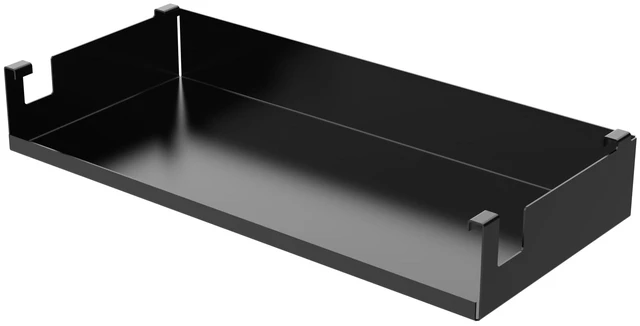
Extreme Simracing Wire Management Box Shelf for FX1, AX80, AX160 Simulator TV/Monitor Stand Rear Tray, Carbon Steel
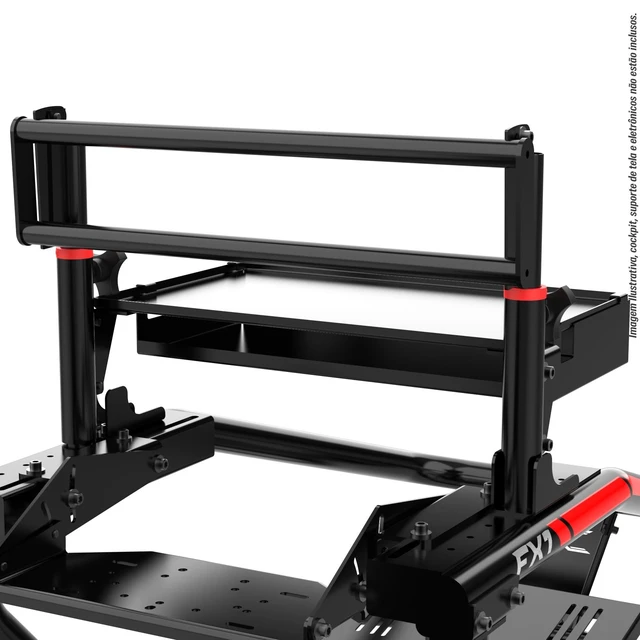
- COMPATIBILITY: Specifically designed to work with Cockpit FX1 Screen Stand PC/Console base and Universal PC/Desktop rear tray for TV stands with aluminum profile
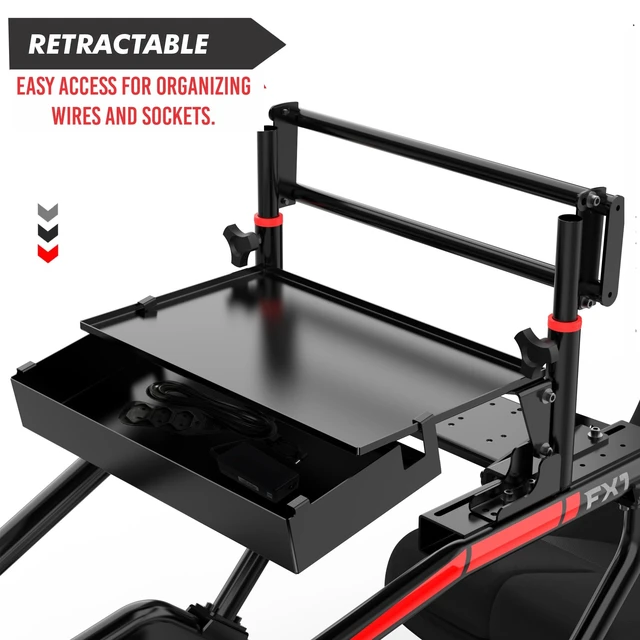
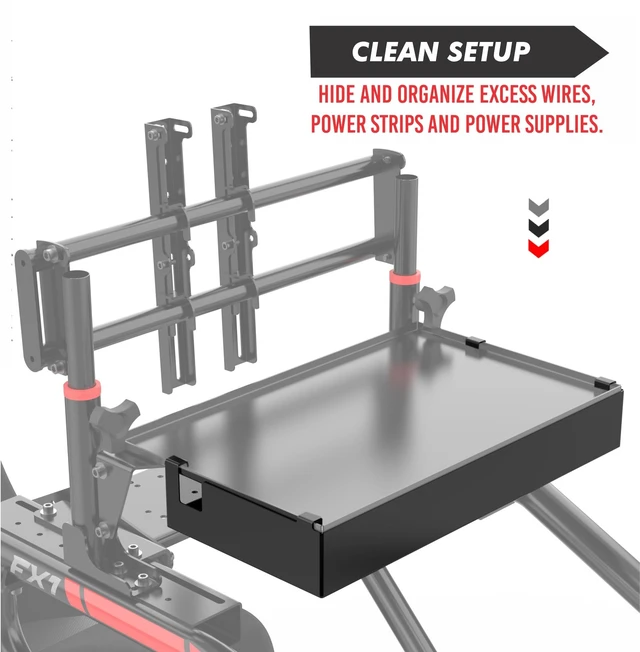
- ORGANIZATION: Provides dedicated space for managing excess cables, power strips, and power sources, keeping your simulator setup tidy
- CONSTRUCTION: Built with durable carbon steel material for long-lasting performance and reliable support
- FUNCTIONALITY: Serves as a box shelf attachment for the rear tray, enhancing the overall utility of your simulator setup
- DESIGN PURPOSE: Elevates organization capabilities of FX1, AX80, or AX160 simulator systems with efficient cable management solution
+
+
Overview
Specs
Reviews
Any questions? Our AI mode will help you find out quickly.
Try me now
BOX SHELF FOR REAR TRAY
Maximize Efficiency and Organization for Your Simulator Setup! Upgrade your FX1, AX80, or AX160 simulator with this premium Box Shelf for Rear Tray. Perfect for taming excess cables, power strips, and power sources, this wire holder is essential for a cleaner and more professional setup.
Key Features: Enhanced
Compatibility: Specially crafted for the Cockpit FX1 Screen Stand PC/Console Base and the Universal PC/Desktop Rear Tray for aluminum profile TV stands.
Robust Build: Made from high-quality carbon steel sheets with electrostatic painting, offering a durable, sleek, and long-lasting finish.
Accessible Design: Securely mounts to the support while allowing easy access for cable management, socket adjustments, or maintenance.
Spacious Capacity: With a height of 5060 mm, it easily accommodates cables, power strips, and power sources.
Efficient Layout: Features rear accessibility and side wire exits to maintain a streamlined and organized appearance.
Optimal Fit: Ideal for rulers with diagonal sockets up to 5 cm, ensuring a snug and secure fit.
Whats Included: 1 x Wire Holder TrayOrganize smarter with this must-have accessory, and elevate your simulator setup to a new level of convenience and efficiency!
Keywords: Simulator rear tray, cable organizer, wire holder tray, FX1 screen stand accessory, AX80 cable management, AX160 power strip holder, aluminum profile TV stand shelf.

Maximize Efficiency and Organization for Your Simulator Setup! Upgrade your FX1, AX80, or AX160 simulator with this premium Box Shelf for Rear Tray. Perfect for taming excess cables, power strips, and power sources, this wire holder is essential for a cleaner and more professional setup.
Key Features: Enhanced
Compatibility: Specially crafted for the Cockpit FX1 Screen Stand PC/Console Base and the Universal PC/Desktop Rear Tray for aluminum profile TV stands.
Robust Build: Made from high-quality carbon steel sheets with electrostatic painting, offering a durable, sleek, and long-lasting finish.
Accessible Design: Securely mounts to the support while allowing easy access for cable management, socket adjustments, or maintenance.
Spacious Capacity: With a height of 5060 mm, it easily accommodates cables, power strips, and power sources.
Efficient Layout: Features rear accessibility and side wire exits to maintain a streamlined and organized appearance.
Optimal Fit: Ideal for rulers with diagonal sockets up to 5 cm, ensuring a snug and secure fit.
Whats Included: 1 x Wire Holder TrayOrganize smarter with this must-have accessory, and elevate your simulator setup to a new level of convenience and efficiency!
Keywords: Simulator rear tray, cable organizer, wire holder tray, FX1 screen stand accessory, AX80 cable management, AX160 power strip holder, aluminum profile TV stand shelf.
Warranty & Returns
Warranty, Returns, And Additional Information
Warranty
- Please contact the Seller directly for warranty information. Warranty information may also be found on the Manufacturer's website.
- CONTACT
Return Policies
- Return for refund within: 30 days
- Return for replacement within: 30 days
- This item is covered by LingGo Return Policy
Manufacturer Contact Info
- For a directory of all our manufacturers, please click below.
- Manufacturers Directory
LOADING...