




 here!
here!
I’m your shopping assistant for PC builds, upgrades, and everything tech.
Got questions? Ask away!
Start a conversation
here!
I’m your shopping assistant for PC builds, upgrades, and everything tech.
Got questions? Ask away!
Start a conversationShipped by Newegg




Any questions? Ask CelesteSM will help you find out quickly.


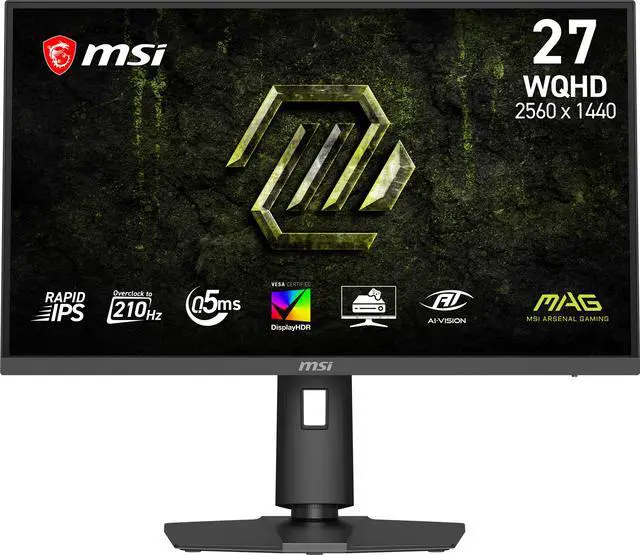
Equipped with a 27" WQHD (2560 x 1440) Rapid IPS Panel with a 210Hz(OC) refresh rate & 0.5ms (GtG, Min.) response time, the MAG 275QPF E21 provides a competitive edge & outstanding image quality. The MAG 275QPF E21 features adaptive sync technology, which matches the display & GPU refresh rates for ultra-smooth gameplay.

Features a 27 inch WQHD (2560 x 1440) Rapid IPS panel with 178° wide viewing angles with minimal color shift when viewed from different angles.
Rapid IPS panel offers deep blacks and high contrast ratios, which is excellent for game dark scenes.

Experience smoother movement with a high 210 Hz(OC) refresh rate, and unlock the full potential of premium GPU & memory hardware.
A low 0.5ms (GtG, Min.) response time dramatically reduces monitor blurring, and is essential for fast-paced games.

MSI AI Vision enriches details in dark areas and optimizes brightness and colors.
HDMI™ CEC Profile Sync supports multiple devices and can automatically detect device settings.

The aim dot automatically changes color, making it visible at any time. If the color of the aim dot overlaps with the background color, it will be problematic for aiming.

MSI monitors are optimized with Less Blue Light* technology to provide a superior viewing experience. Anti-Flicker technology** provides a superior viewing experience by reducing the amount of flicker, unlike generic monitors that typically display with a flicker-rate of about 200-times*** per second.
* TÜV Rheinland Low Blue Light (Software Solution) Certificate Q 50690822 2025-08-14
** TÜV Rheinland Flicker Free Certificate Q 50690822 2025-08-14
*** Although unnoticeable to the naked eye, this can cause fatigue over time.

VESA certified DisplayHDR 400 monitors produce superior detail in darker regions with realistic dynamic contrast that mimics the human eye in the real world.
* sRGB and DCI-P3 follow CIE1976 standard

The monitor frame features a 4-way adjustable Stand:
The MAG 275QPF E21 supports a standard 100mm VESA-mount*
* Enjoy a cleaner desktop and superior cable management with the MSI VESA Arm MAG MT101G (not included).

PC console & laptop interface options include:
The MSI MAG 275QPF E21 is a 27-inch WQHD (2560 × 1440) Rapid IPS gaming monitor with up to a 210Hz refresh rate, Adaptive Sync, and a 0.5ms minimum GtG response time, suited to PC gamers who want sharp detail and smooth, responsive gameplay.
| Attribute | Value |
|---|---|
| Best For | High-refresh gaming on a 27-inch WQHD display with Adaptive Sync |
| Panel And Resolution | 27-inch flat Rapid IPS panel with 2560 × 1440 WQHD resolution, 16:9 aspect ratio, anti-glare finish, 178° horizontal and vertical viewing angles, 300 cd/m² brightness, 1200:1 contrast, DisplayHDR 400, and 94% Adobe RGB, 95% DCI-P3, and 121% sRGB color gamut; displays 1.07 billion colors with 0.2331 mm pixel density |
| Refresh Rate And Response | 210Hz refresh rate, 0.5ms minimum GtG response time, and Adaptive Sync with FreeSync Premium Pro and G-SYNC Compatible listed |
| Ports And Connectivity | 1 DisplayPort 1.4a (HBR3), 2 HDMI 2.0b ports supporting WQHD at up to 144Hz, and a headphone output |
| Stand And Ergonomics | Stand adjusts for height, pivot, swivel, and tilt; 100 × 100 mm VESA mounting compatibility |
| Physical Dimensions And Weight | With stand: 15.94 × 24.15 × 8.97 inches; without stand: 14.27 × 24.15 × 2.44 inches; 9.7 lb without stand |
| Power | Internal power board; 100–240 VAC, 50/60Hz |
| Built-In Features | No built-in speakers or webcam |
| Model Identifiers | MSI MAG 275QPF E21; black |
Q: MSI MAG 275QPF E21 or Gigabyte G27Q3 for competitive gaming?
A: Choose the Gigabyte G27Q3 if you want the higher listed refresh rate: it supports up to 320Hz overclocked, compared with the MSI’s 210Hz overclocked. Choose the MSI MAG 275QPF E21 if 210Hz is sufficient and you want a stand with height, swivel, pivot, and tilt adjustment. Both are 27-inch QHD gaming monitors.
Q: Is the MSI MAG 275QPF E21 worth choosing over the MAG 275QF?
A: The MAG 275QPF E21 is the better fit if you want up to 210Hz over DisplayPort and a fully adjustable stand with height, swivel, pivot, and tilt. The MAG 275QF reaches 180Hz and lists tilt adjustment, so it may suit you if that refresh rate and basic stand adjustment are enough—especially if it costs less.
Q: Should I get the MSI MAG 275QPF E21 or MAG 275QF E20?
A: Both are 27-inch QHD Rapid IPS monitors. Choose the MAG 275QPF E21 for its listed 210Hz refresh rate, VESA DisplayHDR 400 support, and height-, swivel-, and pivot-adjustable stand. The MAG 275QF E20 reaches 200Hz and is listed as HDR Ready; it can make sense if its lower price matters more than those differences.
Q: Can this monitor run at 210Hz over HDMI?
A: No. The listed HDMI 2.0b inputs support WQHD up to 144Hz. The monitor’s 210Hz maximum is available through its DisplayPort 1.4a connection, with the actual refresh rate also depending on the connected device and settings.
Q: Can I use this monitor with a console?
A: Yes, it has two HDMI 2.0b inputs. They support WQHD up to 144Hz; the resolution and refresh rate you can use depend on the console and its settings. The listed specs do not identify HDMI 2.1 support.
Q: Does this monitor have built-in speakers?
A: No. It has no built-in speakers, but it does have a headphone connection. Plan to use headphones or separate speakers for audio.
Q: Can I mount this monitor on a monitor arm?
A: Yes. It supports 100 × 100mm VESA mounting, so it can be attached to a compatible monitor arm. The monitor also includes a stand with height, pivot, swivel, and tilt adjustments.


