




 here!
here!
I’m your shopping assistant for PC builds, upgrades, and everything tech.
Got questions? Ask away!
Start a conversation
here!
I’m your shopping assistant for PC builds, upgrades, and everything tech.
Got questions? Ask away!
Start a conversation

Joined on 02/08/05


So far so good...
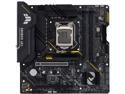
Pros: As always, Newegg slam dunks the delivery; got it 3 days earlier than expected.B560M chipset, can go 11th gen.PCIE 4.0 (11th gen only)ASUS quality; I've used them for over 20 years now with no issueClean minimalistic look..Full Featured BIOS
Cons: The only gripes I have are as follows:1) If you're not using the NVMe SSD PCIe 4.0 slot(#1) in 4.0 mode (11th gen processor only) then it is disabled, leaving you only 1 NVMe.. Not a huge deal for me, but still don't like it.2) The NVMe PCIe 3.0 x4 slot(#2) shares bandwidth with SATA2.. so if you have it configured as SATA you cannot use the #2 SATA port... Also not huge for me; there are 5 other SATA channels to use, and I only have the NVMe installed.
Overall Review: I bought this board as a replacement for an old P877v-Deluxe w/an i7-2600k on it.. Still ran like a top but it was time. This TUF B560M will do all I need for a very long time, and it was an easy install putting a micro ATX board in a regular ATX tower. Plenty of room to work. I was not worried about expansion slots because I won't need them. If you need more then perhaps one of the regular ATX boards will be what you need.I would definitely recommend this for a friend. Great little board so far.One issue that I had though it's totally not ASUS' fault, as I've seen many with this complaint across Intel and AMD platforms.. The issue is, that if you put a certain cards (a MSI RX580 in my case) on this board, it may not have video on boot. The board doesn't detect that card as UEFI, or at least has trouble resolving that at post so it stays in CSM (Legacy) mode.. The RX580 is not compatible with CSM mode, so there is no video output when you power up. Not even to post. In lieu of this, you will need to use either integrated graphics or another graphics card to boot into the BIOS and switch it from CSM to UEFI when you first boot.. Once you do, save changes and shut down. Then hook the RX580 back up and it will work from there. Shouldn't have to do that on any board, but seems to happen a good bit with these AMD cards (Rx400 series and Rx500 series)... Once you get past that though, it's solid as can be. Would buy another if needed for sure..
Great entry-level device!

Pros: I like the feel of it. It was a breeze to install and start creating right away! The display looks great, even though it's not 4k...
Cons: I wish the stand were adjustable. I'm not crazy about the angle that it sits, but not a big deal. Also, the cable needs to be updated. Get with it XP-Pen!! USB-C is the way.
Overall Review: Overall I am happy with it. The tablet offers plenty of function, style, and ease of use. I would buy again if I lost it today.
Great Case
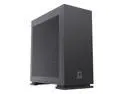
Pros: - Minimalist design looks great anywhere - Easy to work on, wire management is a breeze - Price is fantastic for the quality you get
Cons: None
Overall Review: I would absolutely recommend this to anyone that is looking for a good looking, yet functional and practical case for their computer.
Great looking key caps!!
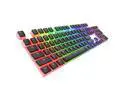
Pros: I like the pudding keycaps and how they disperse the light. Feels nice, not much different from the OEM keycaps I had.
Cons: None!!
Overall Review: I like the keycaps overall, easy to install, and they look fantastic! Would recommend to a friend!
Just wat I was looking for!
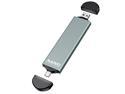
Pros: Lightweight, fits m2 2280 modules perfectly, USB 3.2 interface for fast data transfer.
Cons: No cons.
Overall Review: Overall I would suggest to a friend. The only thing I would add is some selection of colors. Other than that it's fine. I'll probably order another today.
Great deal for the money!!
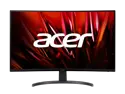
Pros: Let me start off with the one "weak" point. It is only 1920 x 1080 rather than being a 2k or 4k monitor. This is how the price is so low. With that said, I received my monitor within 3 days of ordering it. When it arrived, the UPS guy showed me there was a big hole in the front of the box. It looked like something hit it hard enough to go through the packing and hit the panel itself.. However, upon further inspection, it was just fine (thankfully). I set it up and all I can say is wow. I made a good purchase. The monitor does 240Hz as advertised and produces very little in the way of jitter or tearing. Some folks have been getting this model mixed up with the "R" model that only does 165Hz refresh. This one (according to Acer) is actually ED320QX if you decide to go looking for drivers for it. The 1ms response time is great and provides smooth motion with minimal blurring. Anyway, this has a very nice, bright screen that is great for gaming, surfing, whatever you choose to do. This 32" is taking the place of two 27" monitors I had on my desk. It is plenty big enough to do the job and also eased up some clutter on my desk.
Cons: 1920 x 1080 is the native resolution, not 2k or 4k, so it's not quite as sharp as some other models. I knew this going in and bought it anyway; 1080 is fine with me. It actually is easier for me to read than the 27" at the same resolution. So anyway, not a show stopper.
Overall Review: I not only would recommend this to a friend, I recommended it to a few friends and sold 4 more of them the day I bought mine. They were just as happy as I was to get such a great deal. You can't beat this monitor for the money and for the features it offers. My only problem is my desk isn't quite big enough to use two of them, or I'd buy another for good measure.. Get it! You know you want to...
It Does The Job Well
Not much to say. I needed a M.2 enclosure that was USB and that's what I got. Works as advertised! Delivery was late, but it wasn't because of the seller. All in all. good purchase for what I needed. I'm sure I will use it for years.
A Pleasure to Do Business With
Installed in a PC that runs 24x7x365.. Never skips a beat. Don't need the on-board video, so no worries with that.


