

Your Browsing History


Kevin A.
Joined on 11/25/03
0
0
product reviews
- 6
Looks Sharp; Still Some Room for Improvement
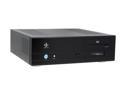
nMEDIAPC Black Aluminum Panel/ 0.8 mm SECC body HTPC 500BA ATX Media Center / HTPC Case
Pros: This case has a nice, understated look. The black, brushed aluminum front face blends well with modern HT equipment. The case seems to be reasonably sturdy in its construction (except for the panel cross-support located above the expansion backplane). The USB fluorescent display is based upon a Future Technology HD44780; it should be possible to get it working with LCDproc/MythTV under Linux. The hard drive carrier is mounted inline with a rear case exhaust fan; this should help somewhat with drive temperatures. (Drive cooling might be improved a bit more by bridging the gap between the drive carrier and rear exhaust fan with a small, lightweight "shroud," made from paper cardstock, cereal box cardboard, or similar material.) The space under the optical drive can be used to route power supply cables or mount a low-profile 12 volt pump (for water cooling enthusiasts). Most standard ATX motherboard should fit.
Cons: The optical drive "stealth" bezel/plate takes a bit too much force to open; a slightly weaker tension spring would help matters. The holes in the bottom power supply intake vent and the side power supply exhaust vent are too small; standard wire fan grills would do much to help airflow. The cable to the included coax (S/PDIF) RCA jack is unshielded and seems to be of mediocre quality; an upgrade is probably in order.
Overall Review: Space is tight, but this is to be expected for an HTPC enclosure. The use of a power supply with modular cables is *strongly* recommended. Also, the case has only 4.25 inches to 4.50 inches (108 mm to 114 mm) of usable space between the CPU heat spreader and the top cover panel; keep the cooler height under 3.75 inches (95 mm) and you should be okay. (Note: This may be a limiting factor with Intel Core2 Quad Extreme processors, since the lack of space essentially demands one use a *very* efficient all-copper or copper/aluminum extruded cooler; most vertical heatpipe designs won't fit, and the stock cooler supplied with a retail-box Intel C2QE CPU isn't efficient enough for a case of this size.) Also, the "front" USB ports are side-mounted; this may be a problem if used in an audio rack. Even with these considerations, and the "Cons" discussed above, I would still recommend this enclosure for someone needing a unit that blends nicely with stereo equipment.
1/15/2008See more detail
Update from Post on 01/09/2008: Was Great Until...
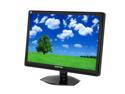
SCEPTRE X24WG-1080P Black 24" 2ms Widescreen LCD Monitor 300 cd/m2 4000:1 w/ Built in Speakers & HDCP Support, US Warranty
Pros: Seems to be very well built structurally. Very fast response and no ghosting. Clarity of analog signal looks great even at an unscaled 1024x768 and 1600x1200 (I tested the unit on a run-of-the-mill desktop at work). DVI clarity is excellent. Ability to tweak just about every setting, **including sharpness (focus)**. Good potential color accuracy (see "other thoughts" section) and very little jitter. No dead pixels.
Cons: Worked great for two weeks, then died completely; requested RMA for replacement. No height and limited tilt adjustment. Under-panel menu buttons could be a bit more intuitive; took a while to get used to the Menu/Enter button being located in between the Previous/Up and Next/Down buttons. Default settings on first power-up out of the box may scare you; be sure to read Malt's review on 01/09/2007 and my "other thoughts" below. Blue power LED in the middle of the lower frame has retina-frying potential. (Off-topic observation: Why do manufacturers insist on cranking the brightness of blue LEDs off the charts?)
Overall Review: Still believe that this monitor has great potential, if I can get a brand-new replacement with no dead pixels and that will provide good service life. We'll see how well NewEgg handles things...
1/26/2008See more detail
Good Performance Upgrade Board

MSI P55-GD65 LGA 1156 Intel P55 ATX Intel Motherboard
Pros: The motherboard is solidly constructed and (mostly) well laid-out. The chipset and voltage regulator heatsinks surrounding the CPU socket are low enough that wide, low-profile "inverted pyramid" coolers like the Scythe "Big Shuriken" should fit without too many problems (from a component clearance perspective). The most recent available BIOS revision (version 1.9 as of this writing) has a multitude of overclocking options, including Turbo Boost overrides, for the brave soul looking to push an unlocked Intel i7-875K processor to its absolute limit. The motherboard's PCI-E expansion bus contains a true x4 slot for those looking to use the motherboard as a "poor man's workstation" by adding a true hardware RAID-5 controller like the 3ware "9650SE-4LPML." The x4 slot is positioned in a way that should allow one to use a low-profile RAID controller even if both physical x16 slots are populated with double-wide graphics cards.
Cons: The bank of 6 SATA-II connectors are mounted at right-angles along one edge. This can make cable management in smaller cases somewhat difficult, but can be easily overcome through the use of right-angle SATA cables. The RAM interface slots are positioned fairly close to the CPU socket, which can make installing a DIMM in the 4th slot difficult if a low-profile heatsink with a fair amount of overhang has already been mounted to the motherboard.
Overall Review: The BIOS that comes with the motherboard (version 1.3 at the time of purchase) theoretically does not recognise unlocked i7-875K processors. Even so, my unit booted without issue with an i7-875K installed and allowed me to successfully flash the BIOS. Before flashing the BIOS, make sure that you go into the BIOS Setup and select "Load Fail-Safe Defaults." This will help ensure stability, and will minimize the chances of bricking the mainboard during the flash procedure. If you choose to boot into a DOS environment in order to flash the BIOS, you need to use the version of MS-DOS that comes with Windows 98SE (preferred) or Windows ME. MS-DOS from Windows 98 Original Edition, Windows 95, MS-DOS 6.22, and earlier versions will not work, and could cause the flash process to abort and brick the board. PC-DOS, DR-DOS, FreeDOS, and other alternative 16-bit DOS operating systems should also not be used to flash the BIOS.
8/15/2010See more detail
Looks Sharp, but Room for Improvement
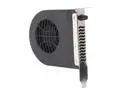
Dynatron BT-SB80SBK 80mm Adjustable Slot Cooling Fan
Pros: This case has a very nice, understated look. The black, brushed aluminum face blends well with HT components. It seems to have a good overall internal layout. It is also reasonably sturdy in its construction (except for the rear panel cross support above expansion backplane). The USB fluorescent display is based upon a Future Technology HD44780 controller; it should be possible to get the display working with LCDproc/MythTV under Linux. The removable hard drive carrier is mounted inline with a rear case exhaust fan; this should help somewhat with drive cooling. (Drive cooling may improve if one bridges the gap between the drive carrier and the rear case fan with a small, lightweight "shroud" constructed from paper cardstock, cereal box cardboard, or similar material.)
Cons: The optical drive "stealth" plate/bezel takes a bit too much force to open; it could use a slightly weaker tension spring. The power supply intake holes on the bottom of the case and the exhaust holes on the side are too small; it would have been better if the case used standard wire fan grills instead.
Overall Review: Space is tight, but this is to be expected for an HTPC enclosure; the use of a power supply with modular cables is *strongly* recommended. Also, the case has only 4.25 inches to 4.50 inches (108 mm to 114 mm) of useable space between the cpu heat spreader and the top cover panel; plan your CPU cooler purchase accordingly. Even with these considerations, and the "cons" discussed above, I would still recommend this case for someone needing a unit that blends well with stereo equipment.
1/15/2008See more detail
Excellent Build Quality
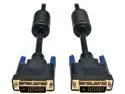
Tripp Lite P560-010 Black DVI Dual Link TMDS cable
Pros: Very good build quality. Well shielded. Neither too stiff nor too flexible; uncoils and routes around/behind/under desk without too much "coil memory" getting in the way (if you have an old desktop telephone with a cord that always kinks and tangles, you know what I mean). Excellent signal transmission. Dual link; supports very high resolution monitors.
Cons: Connectors are a bit oversized; make sure there is enough room behind your computer or around the DVI connector on your monitor.
1/9/2008See more detail
Good First Impressions
SCEPTRE X24WG-1080P Black 24" 2ms Widescreen LCD Monitor 300 cd/m2 4000:1 w/ Built in Speakers & HDCP Support, US Warranty
Pros: Seems to be very well built structurally. Very fast response and no ghosting. Clarity of analog signal looks great even at an unscaled 1024x768 and 1600x1200 (I tested the unit on a run-of-the-mill desktop at work). DVI clarity is excellent. Ability to tweak just about every setting, **including sharpness (focus)**. Good potential color accuracy (see "other thoughts" section) and very little jitter. No dead pixels.
Cons: Under-panel menu buttons could be a bit more intuitive; took a while to get used to the Menu/Enter button being located in between the Previous/Up and Next/Down buttons. Default settings on first power-up out of the box may scare you; be sure to read Malt's review on 01/09/2007 and my "other thoughts" below. Blue power LED in the middle of the lower frame has retina-frying potential. (Off-topic observation: Why do manufacturers insist on cranking the brightness of blue LEDs off the charts?)
Overall Review: On first power-up the unit had discouragingly low contrast and colors appeared to be washed out. For my unit, I enabled DCR (Dynamic Contrast) under the Miscellaneous settings category, increased Contrast to 62%, dropped Red to 42% under Color, and increased Blue to 52%. Things improved dramatically. I am currently quite pleased with the unit. Updates to follow if anything eventful happens.
1/9/2008See more detail