

Your Browsing History


Nathan S.
Joined on 12/27/09
0
0
product reviews
- 12
Huge storage, nice performance, amazing price
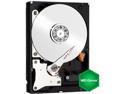
WD Green WD30EZRX 3TB IntelliPower 64MB Cache SATA 6.0Gb/s 3.5" Internal Hard Drive Bare Drive
Pros: This drive is made for storage, which is what I assume anyone in need of a 3tb hard drive is looking for. Plenty of performance for playing 1080p HD content too. Made with storage in mind as its a green drive that is designed to sit unused most of the time holding data for the system, as opposed to being an actively running drive.
Cons: Just make sure you format GPT (GUID partition table) in order to use all 3tb, and make sure, if you are using a PCI expansion card host for SATA drives, that it can support GPT drives, as most can't.
9/9/2011See more detail
Fast, light, and cheap
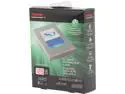
Toshiba Q Series 128GB SATA III Internal Solid State Drive (SSD) HDTS212XZSTA
Pros: Great storage/price, got 3 of these when they were on sale at $79.99 (free shipping) so that's about 1.5gbs per dollar, which is something I have been waiting for quite some time with SSDs. I already had SSDs in all the newer computers around the house, but I had been waiting for the price to come down to upgrade some older HDD based systems main drives while still having enough capacity for some programs/games. Exceedingly light, even lighter than a 7mm laptop hdd (look at the product description for the exact weight). Weighs considerably less than both my 480gb SSD from mushkin and my 512gb OCZ Vertex 4 SSD, although that makes sense with less memory onboard and the lightweight aluminum casing looks nice and sturdy. Delivers on speed almost to the T. 2 computers had only SATA 3gbps ports on, and they both maxed the ports, not the drive. On the one system with a SATA 6gbps port, sequential read/writes clocked at 496Mbps and 467Mbps, respectively, which isn't too far off the stated speed. I didn't benchmark the iOPS yet, but I can report boots of windows 7 in around 18 seconds bios included on the SATA 2 boards, and windows 8 over SATA 3 launches almost immediately (so quickly the spinning circle doesn't get to come up, the blue windows 8 logo comes up for approximately 2-3 seconds, and then disappears to the logon screen before ever having the spinning circles come up). I won't report cold boot times on that system as there is quite a bit on board that puts the bios time alone over 30 seconds, but that is no fault of the SSD. Can't report Win7 boots over SATA 3 as my SATA 3 system has 8 on it and the two these went into with 7 both use SATA 2, so sorry about that.
Cons: Lower capacity than I really want for my main systems from an SSD, but these went into my non main systems where that wasn't an issue. You may want to consider how many programs are key programs for you and how much room you would need for all of them, and buy an SSD accordingly (if you can afford it). Does not come with a 2.5->3.5 enclosure for use in desktops, so I bought a few for $6. Not a big deal, this is just the first SSD I have personally bought that didn't come with one (although I had already guessed it didn't by the lack of any mention of 3.5" brackets anywhere in the description).
9/25/2013See more detail
What a steal (when I bought it)
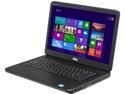
DELL Inspiron 15.6" Intel Core i3-2370M 4GB Memory Windows 8 i15-1821BK
Pros: I got this laptop at $300, and it delivered its money's worth and more. Did a fresh install of windows 8 right off the bat, instead of going through manually uninstalling individual crapware items and it really moves. For having a HDD, I'm impressed with the startup speeds (I did just replace it with an SSD but even before that it was booting impressively, this just sped it up even more). Clocked around 34-36 seconds on average to boot into the windows 8 start screen with the password off, from the HDD which is not bad at all for a cold boot. Easy to access and work on system, I work on a lot and this was refreshing to see the newer dell laptops getting easier to work on (even to get to the processor and heatsink to change out thermal paste was under 20 minutes to take apart, change, and put back together). Respectable integrated graphics. Processing performance works well even for real time video editing, as long as you aren't working with large HD files, so its got some reasonable horsepower under the hood. Easy to get 4-5 hours of battery life out of it, under basic web browsing (more intense use will drain it faster)
Cons: None of these are things I would knock an egg off for, at $300 anyway, but they are good to note: No backlit keyboard, and there is none available for this model unfortunately Screen is not bad, but not the best. Colors could be a little more saturated, and the resolution could be higher, but its a respectable 720p display at this price. The glossy plastic back of the screen sucks up dirt and fingerprints very greedily and needs to be wiped down fairly often if you want your laptop looking the best. A bit weighty, but not too bad, and expected from an inexpensive machine delivering some solid performance.
Overall Review: I would highly recommend (if you don't need all the storage it comes with) an inexpensive 128gb SSD. The hard drive is this laptops most lacking piece, and it really moves with an SSD onboard. Also, if you have the know how, REPLACE THE THERMAL PASTE. You will get a notable performance increase. Running intel burntest before and after replacement (first thing I did after running the test for 10 loops) showed a 7gflop increase before and after thermal paste replacement, going from ~22gflops to ~29.6gflops (I used mx-4 thermal paste just FYI). This is because all of the intel processors use TDP, and won't make use of the turboboost speeds when they feel they are running low on thermal headroom, which can be easily fixed by using a better thermal paste than the stock paste (in any laptop)
9/25/2013See more detail
Whether you unlock the fourth core or run only 3 cores, its a fast CPU.
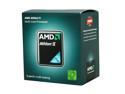
AMD Athlon II X3 445 - Athlon II X3 Triple-Core 3.1 GHz Socket AM3 95W Desktop Processor - ADX445WFGMBOX
Pros: For the price, this is a beast of a CPU. Whether the fourth core is unlocked or not, this CPU rocks. It runs on par with my other systems running an AMD Phenom X6 1090T (3.2ghz), my Intel core i7-2630 (2.0ghz) and my Intel Core 2 Quad Q6600 (2.4ghz) under almost all loads, without the fourth core unlocked, except some of the very rare pure CPU applications out there... for gaming, there isn't a need for anything more powerful than this as long as you've got a gaming GPU and good RAM to run alongside this puppy, unless of course you just need to be the big man on the block who runs those extra overpowered cores ;)
Cons: Nothing! If you don't get one that has the extra core to unlock, don't worry about it, it is still WELL worth the price because it is a great little CPU!
9/9/2011See more detail
Does its job while looking good
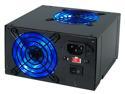
Rosewill Stallion Series 500W ATX12V Gaming Power Supply - RD500-2DB
Pros: One of the few power supplies to have a nice design to it, with the two very good looking blue LED fans that actively cool the power supply meshing well with the current trend for blue LED's in most case fans. The power supply is also mainly translucent, and therefore the blue LED's make it a very good looking PSU. It does a great job as far as PSU's go, and it runs cool.
Cons: No Complaints!
9/9/2011See more detail
Cool, Loud, Beautiful, and easy to work on
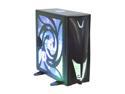
Sunbeam Transformer IC-TR-US-BA-WOPSU Black Steel ATX Full Tower Computer Case
Pros: Incredibly cool case... you can feel the airflow that this baby pushes. Every vent has a fan effect that if aimed properly can even cool you off after it runs through the system ;). Looks great, although I dislike the white on the front... don't know who thought of that, but I repainted the white part at the bottom of the front silver to match the rest of the color scheme. Easy to work on, biggest thing that made it a little tough to work on is that there are two fans on the side panel to plug in or unplug when taking off/putting on the side panel. Can't complain though because that's what gives the case its impressive airflow.
Cons: This case is LOUD. Idling, this case will overpower a small set of desktop speakers easily if they aren't turned up. All the fans on the case are small and run at high RPM's, hence creating great airflow, but a lot of noise. I almost wanted to dock a star for the loudness, and the lack of a hard drive cooling fan (there is space for one, but its not there..... come on now, its not that tough to add a hard drive cooling fan and charge an extra $5 i would have gladly paid for a hard drive fan). The case has such good airflow and the other fans pull enough air that the drives manage to stay cooled (and unless you use the system as a server it wouldn't generally need that much hard drive cooling anyway) but i feel that's a lacking feature in the design. Also, as stated above, the white grill at the bottom of the front just DOES NOT match the color scheme and detracts from the beauty of the system.
9/9/2011See more detail