

Your Browsing History


Edwin S.
Joined on 08/09/06
0
0
product reviews
- 8
Sleek and quiet, but a few flaws
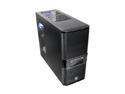
Thermaltake V3 Black Edition VL80001W2Z Black SECC / Plastic ATX Mid Tower Computer Case
Pros: Amazing price at the time of this writing. This thing looks great, and so far, the black paint seems scratch-resistant. I like the no-screw drive installation. If you're motivated, you can do some rudimentary cable management. Despite being steel, this case is super light. This thing is QUIET! The provided fan is large and spins at low RPM (~1300 or so), and the case has rubber bottom feet. When I touch my hand to the top of the case during normal load, I hardly feel any vibration at all. Most of the noise comes from my aftermarket CPU cooler, not the supplied case fan.
Cons: You have to take off the front panel to install 5.25" drives and a front intake fan. This wouldn't be a big deal, but the front panel is held on by four-pronged thin metal washers. The prongs of the washers are bent inward. The screws to hold the front panel are run through the prongs. I can see no engineering benefit to having the prongs there, and they get in the way if you're trying to put the screw back in. A much better solution would be thin rubber washers, but that would have added a whole FIFTY CENTS to the manufacturing cost. For an otherwise stellar case to have such a silly front panel mount confuses me. The LED cords were mis-wired ("positive" was negative and "negative" was positive). Thanks, guys. The bottom PSU mount actually makes cable management more difficult, particularly the 4-pin 12v. I wish they had provided more more of the quick drive mounts. The case only came with one 3.5", yet I have two HDDs. Luckily, I had an old one from another case.
Overall Review: The case only comes with one exhaust fan. There are plenty of options for mounting more fans, and the mounts accept multiple sizes. I had an old 92mm that fit just fine in the front intake position. When you have a fan in the front intake position, the air is actually blown over your hard drives before making it to your interior. I'd suggest mounting your hard drives such that there's a large gap in the middle for good airflow to the interior. The window is tiny and mostly pointless. You can see into your case better through the top grille than you can through the window. The window wasn't a big concern from me, so no eggs lost for that.
3/11/2010See more detail
Beware
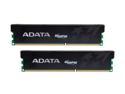
XPG 4GB (2 x 2GB) DDR3 1600 (PC3 12800) Desktop Memory Model AX3U1600GB2G9-2G
Pros: Good capacity DDR3 at an almost irresistible price! ($100 as of this writing.)
Cons: Ordered two pair, one for my roommate and another for myself. One of my roommate's sticks behaved for a week, then died a horrible death. We're in the process of RMAing them.
Overall Review: If one of my sticks dies, I'm going back to Corsair. Sure it costs a little extra, but RMAs get old quickly.
2/26/2010See more detail
Good, inexpensive laptop
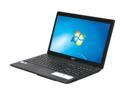
Acer Aspire 15.6" Intel Pentium P6100 4GB Memory Windows 7 Home Premium 64-bit AS5742Z-4685
Pros: - Fantastic ratio of features to price...if you snatched up the laptop when it was on sale. - Everything works on Ubuntu 10.10 AMD64 after one minor hack. That makes this laptop an excellent inexpensive Linux laptop for those who may wish to do so.
Cons: - Embarrassingly awful mono speaker. I mean, it is absolutely terrible. Would it really have been difficult to find space for a second channel speaker, and to use speakers that weren't so awful? I have a ten-year-old laptop with better speakers than the one included on this machine. - Windows install is absolutely loaded with "crapware". I hadn't expected anything else (and I hadn't even intended on using Windows much), but it's something to be aware of. I understand the monetary incentive for manufacturers to pre-load garbage software, but it still angers me every time.
Overall Review: No restore discs come in the box, but you are immediately prompted to create them when you boot into Windows. Have three DVD-Rs handy for the task. I was grateful for this, as the first thing I did after removing crapware and installing Windows updates was to shrink the NTFS partition and install Ubuntu. Speaking of Ubuntu, the wireless driver isn't included on the install image, but is available as a so-called "restricted driver" once you boot into your new install. Also, brightness adjustment didn't work out of the box, but a bit of googling led me to a simple change in the GRUB configuration that fixed that.
1/10/2011See more detail
I love Asus
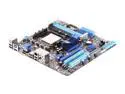
ASUS M4A785T-M AM3 AMD 785G HDMI Micro ATX AMD Motherboard
Pros: Good features for the price. POSTed on the first try, unlike the Gigabyte it replaced. Simple BIOS overclocking and 4th-core unlocking (if you're lucky).
Cons: Firewire would have been nice, but it's not 100% necessary for me. Q Connector was not included in the box. Luckily, I had an old one lying around. These make front panel hookups a no-brainer. They can't cost much to manufacture, so it confuses me when ASUS doesn't include them with all new motherboards.
Overall Review: When POSTing, the BIOS is "smart" enough to switch video to the PCIe slot if you plug in a card. If you're like me and you assume every board will be "dumb", this can lead to a few seconds of confusion. I'll never cheat on you again, ASUS! <3
3/1/2010See more detail
Great, but couldn't unlock
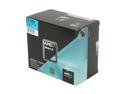
AMD Athlon II X3 425 - Athlon II X3 Triple-Core 2.7 GHz Socket AM3 95W Processor - ADX425WFGIBOX
Pros: Good price/performance ratio. Stable overclocked. However, I'm using an aftermarket cooler. You may be able to unlock the fourth core if you are lucky.
Cons: I could not keep a stable system with the fourth core unlocked, so I'm stuck at the advertised three. The stock thermal compound is difficult to clean off the stock cooler if you want to use Arctic Silver, etc. I'm no longer using the stock cooler, so this isn't a big concern for me.
Overall Review: I probably should have gone ahead and paid for a real quad-core version. I was hoping to get the same performance and save a few bucks, but no dice.
2/26/2010See more detail
Did not POST
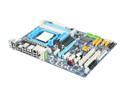
GIGABYTE GA-MA770T-UD3P AM3 AMD 770 ATX AMD Motherboard
Pros: Lots of great features for a great price. This earned it one egg. Tech support was knowledgeable, despite their slightly broken English. (What do you expect?) This earned it another egg.
Cons: Motherboard would not post. Gigabyte online tech support was as helpful as they could be, but I couldn't get so much as a single beep from this thing. I narrowed it down to the processor or mobo, and decided to order a new mobo to see for sure. As I am currently posting this review from the Asus replacement, you can gather that I have since RMA'ed the mobo. Motherboard has an 8-pin 12v connector. The manual says it will work fine if you put a standard 4-pin in the right four pins, but it would have been nice if Newegg had listed this under the specifications.
Overall Review: Asus, I'll never cheat on you again!
2/26/2010See more detail