

Your Browsing History


Jesse B.
Joined on 11/20/05
0
0
product reviews
- 7
Great waterproof shaver with a charging/cleaning cradle
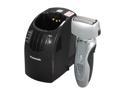
Panasonic Vortex Wet/Dry Shaver with Nanotech Blades, HydraClean System, Pivot Action Selector and Turbo Cleaning Mode ES8109S
Pros: - Close shave - Fold-out trimmer - Waterproof operation - Elegant charging/drying/cleaning system - Charge cord can optionally be connected directly to the shaver. This is nice for travelling where you might not want to bring the cradle (filled with cleaning solution and water). - Small travel pouch for the shaver.
Cons: - Must use every day or every other day for shaving to be effective (this may be characteristic of electric shavers in general; most of my experience is with razor-type shavers)
Overall Review: The price of some razor cartridges became (still is) prohibitive, so I wanted to try an electric shaver. The waterproof operation is great - use it in the shower and shave lotion is no longer necessary. The shaver works very well, but as I mentioned you must use it every day or at least every other day. With more than two days' hair growth, it will leave many behind because the hair simply doesn't stand up straight enough to be caught by the blades. As I also mentioned, however, this may just be characteristic of electric shavers in general (this is my first experience with an electric). I generally don't shave every day because my skin becomes too irritated.
11/19/2011See more detail
Fantastic everyday usage laptop (using Linux)
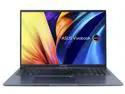
ASUS VivoBook 16X OLED Laptop, 16" 4K OLED 16:10 Display, AMD Ryzen 7 5800H CPU, AMD Radeon Graphics, 16GB RAM, 512GB SSD, Fingerprint Sensor, Windows 11 Home, Quiet Blue, M1603QA-NS77
Pros: (For reference, this perspective is coming from previous ownership of a low-end $300-$400 AMD Carrizo-based laptop from 2016) - Beautiful high-resolution OLED - _Nearly_ everything (including WiFi and Bluetooth/BLE, the CPU temperature sensor, fan speed, software control of screen and keyboard brightness) works out of the box using Linux, as of KUbuntu 22.04 (see Cons) - Exceptional battery life (easily lasts more than an 8-hour day of mixed programming, compiling, web browsing, occasional YouTube watching) and decently fast charging (approx. 2hrs from < 5%) - Fantastic performance: nvme-based storage and
Cons: - Some parts of the keyboard have odd feeling placement, especially the arrow keys (they're placed below the right-hand Shift). A design without the numpad (a user could always buy a dedicated USB numpad if they really needed one) might've made room for more normally-sized and placed arrow keys. The up and down arrow keys specifically are difficult to use by "muscle memory" alone because of their half-height. - The fingerprint reader isn't supported out of the box by Linux (at least not KUbuntu 22.04), though this isn't strictly a fault of the hardware itself. - Webcam framerate and latency aren't that great using default settings (using mpv or vlc to test: 720p@10fps, with about 1sec delay). If MJPG format is used, the framerate improves dramatically, though the latency doesn't.
Overall Review: Despite the small, oddly-placed arrow keys, I'd absolutely recommend buying this if you're an everyday Linux user. It has plenty of horsepower for use as a daily driver, or heavier usage like compiling software from source (though as with any laptop, you'd probably want to be cautious you don't over-exert it, constantly stressing its thermal limits), and should be fine for light to medium-level gaming (720 or 1080). It has a beautiful display, especially if you're coming from a 1080p or lower res LCD.
11/26/2022See more detail
Excellent cooling capacity
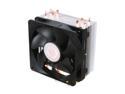
Cooler Master Hyper 212 Plus - CPU Cooler with 4 Direct Contact Heatpipes
Pros: - Maintains low temperatures even at the hottest times of the year
Cons: - Cooling capacity comes at (an obvious) price: it is very large - Not a quick snap-on job to install - requires replacement of stock motherboard cooler bracket, which may require more work depending on your motherboard and case combination.
Overall Review: Bought this to replace the stock Phenom II X4 cooler which worked fine during the colder times of year, but tax the processor during the summer and I could easily see 65+ deg Celsius temps. With this cooler, the hottest temp I've seen recorded is 52 C (again heavily taxed, over the summer). When buying anything like this, be wary of its dimensions - don't be stupid and buy it without measuring the inside of your case and then complain that it doesn't fit! Consider the proximity to other tall-ish objects on your motherboard as well (e.g., RAM with a tall heatsink). It requires the removal of the stock cooler bracket on the motherboard which may or may not be a challenge depending on your case or if your motherboard happens to be installed in it at the time. Fans clip onto the heatsink easily and can be moved up or down it to make room for other components.
11/19/2011See more detail
Great midrange performance
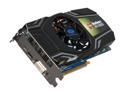
SAPPHIRE Radeon HD 5830 1GB GDDR5 PCI Express 2.1 x16 CrossFireX Support Graphics Card 100297L
Pros: - Great performance (Unigine's OilRush mostly 50+ FPS at 1920x1080 at full detail, minus AA) - Plenty of memory - Not obscenely large - Modern connectivity (1ea HDMI, DVI, Mini DP) - Thermal sensor
Cons: None
Overall Review: Bought this card based on the price at the time vs its average placement among graphics cards benchmarked by Phoronix. Not all manufacturers choose to build their cards with a temperature sensor; I'm glad Sapphire did. The fan makes no noticeable noise over other fans in my case, which I don't think are particularly loud. It works and behaves well with both the Gallium3D and Catalyst Linux drivers.
11/19/2011See more detail
Great form, lightweight, incredible sound
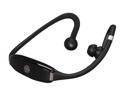
Motorola Behind-the-Neck Bluetooth Stereo Headset Black Bulk (S9-HD)
Pros: - Simple, elegant construction - Lightweight - Incredible sound - Easy operation
Cons: - Poor range - Retention of pairing information seems inconsistent - Can become somewhat uncomfortable if wearing them while sedentary - Rechargeable battery is not replaceable
Overall Review: When looking for wireless solutions, I found many bluetooth headsets that, while I'm sure worked fine still had a relatively long cord connected to a battery pack! I was excited to come across these, which are a really great solution. They sound *incredible* (note I'm not an audiophile) and when you're active, they're so compact and lightweight you hardly notice them. The over-the-ear portion can become a little uncomfortable if you are sitting down relatively inactive for long periods. The range is a little disappointing at times: I find if I have it in my pants pocket, the audio frequently drops out. A shirt pocket, or placed on a desk nearby works fine though. The non-replaceable battery sounds like a deal-breaker, but consider how long most conventional wired earbuds last before breaking or the connector wearing out. I find the battery lasts about 6hrs. It has controls for Prev, Next, Play/Pause, and Vol Up/Down/Accept call. Personally I would say the Pros outweigh the Cons.
11/19/2011See more detail
Fantastic performance
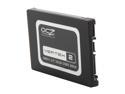
OCZ Vertex 2 2.5" 55GB SATA II MLC Internal Solid State Drive (SSD) OCZSSD2-2VTXE60G
Pros: - Max performance is as advertised (approx 285MB/sec)
Cons: None
Overall Review: An SSD like this really does make all the difference in the world. On a modern computer, for general, everyday usage (read: bootup, application startup, software installation, etc), you will not notice a difference from any other hardware upgrade such as RAM or processor like you will with this. It really does make most mechanical hard drives seem slow, frustratingly so at times. The cost vs capacity is nowhere close to mechanical drives, but that continues to improve. The performance of some newer SSDs rival some older computers' RAM performance, and will likely surpass it soon. Interfaces to which these drives connect to have already become and may continue to be the new bottleneck for awhile as the flash technology evolves.
11/19/2011See more detail