

Your Browsing History


Alan R.
Joined on 12/31/01
0
0
product reviews
- 39
It's a pretty good mythtv box.
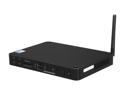
Foxconn nT435H-0h0w-B-A-NA Intel NM10 Black Mini / Booksize Barebone System
Pros: Small, low power usage (13-17 watts) pretty well built, lots of USB ports, wired and wireless NICs, quiet, reasonably stable, inexpensive. Delivers enough video performance to run as a mythtv client up to 720p through the wireless NIC. Best of all, (from the product page on foxconnchannel.com) "Small and exquisite shape brings you the enjoyment of the beauty , whilst enabling you enjoy the life with speed and share worldwide splendidness, is the best choice of being placed at home or office."
Cons: NIC is only 100MB, not 1GB, USB ports are 2.0, not 3.0, Atom 435D doesn't speedstep, card reader goes through USB. Atom and Intel 3150 doesn't have enough power to render 1080P, it's close but a fast-moving sports event will cause the picture and sound to stutter. The HDMI port is locked down to 1366x768 BUT the VGA port will happily go to 1920x1080 or 1920x1200. I was unable to get sound through the HDMI connection.
Overall Review: The whole thing is really quite remarkable, I paid $115, 4G of memory was $20, and I had an old laptop drive, a full computer, with wireless, able to run a modern OS well, web browsing, e-mail, basic computer stuff is more than capable on this little dude; all in 13-17 watts of power consumption. Really quite amazing but not as amazing as what's on the Foxconnchannel.com page: "2.5 cm thin, 0.6 liters by volume, and the beautiful appearance of Nettop brings unlimited possibilities to your life and business activities. Attached wall-hanging shelves or footstand makes it possible for you to put this machine anywhere you want, rendering you a wonderful taste of life whether it is within or beyond your sight." And "In addition to the built-in high quality speaker without external devices, to live a wonderful life, quality acoustics with fiber interface is an indispensable part in making you enjoy life through SPDIF audio output."
3/11/2012See more detail
Good and not so good

Zmodo CM-I11123BK Wireless WiFi IR Pan Tilt Network Camera
Pros: Excellent night vision, wide range of motion, best if mounted on the ceiling or down low, very configurable. Works with non-IE browsers.
Cons: Instruction are in engrish, and don't contain necessary information such as the default IP address and port of the device. Active X controls don't work (at least with IE9), no way to set frame rate, doesn't work on a slow network connection, such as my DSL connection. Included software doesn't work and packaging is convoluted.
Overall Review: What the manual should have included: Default IP address: 192.168.1.99, port 99. From there it's not hard to configure.
8/11/2011See more detail
Very powerful CPU surprisingly powerful GPU (Linux review)
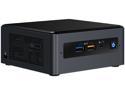
Intel NUC (Next Unit of Computing) BOXNUC8i5BEH1 Black Mini / Booksize Barebone System
Pros: Tiny, low power, remarkable storage capability, dual channel memory capability, huge bang for the buck, size and power.
Cons: Gallium not available yet but this is likely to be resolved in the near future.
Overall Review: Wow, there is a lot of "other" when it comes to this device, it is an 8000 series Intel processor which packs a heck of a lot of power. This i5-8259 is as fast or faster (CPU) than an i7-4790K Devils Canyon processor except its TDP is 28W vs 125 for the 4970K. The processor is clocked at 2.3Ghz but if it's not at TDP it ramps up to 3.6Ghz and four cores/eight threads is pretty impressive. Once the processor starts getting a little toasty it clocks down a bit but for 28 watts it's an impressive processor. The GPU is the unsung hero of this unit. It's an Iris Pro 655 with 128MB of onboard RAM which may not sound impressive but it can run 14.1 in the Unigine benchmark at 1920x1200 at high quality settings with 2xAA. As a comparison the Raven Ridge 2400g comes in at 19.3 at the same settings. This is all very impressive for a unit that is about the same size as the base of an Atari 2600 joystick. Storage capability is a huge win for this little unit, it comes with a M2 slot AND a 2.5" drive. My configuration is a 250GB WD blue M2 and a Seagate 2TB spinning drive. Speaking of storage, DDR4 2400 is pretty inexpensive so I went with 16GB which came in below $100(US). Power consumption is another high/low point for this unit. At idle with the spinning drive stopped power consumption according to my kill-o-watt was four watts although it would run up to 64 watts doing a kernel compile with all cores involved. 2D capability appears to be good but not perfect. I attempted to play back a 4K Matroska encoded video and there were noticeable dropouts in the playback however this may have been due to VLC under Linux or results from the original rip of the video. 8K and 4K videos performed flawlessly on a 4K Dell monitor from "The YouTube". Finally, stability-wise it's been utterly perfect. No crashes, no GPU hangs no issues whatever, it's just handled everything I've thrown at it, it will slow the CPU if the TDP is exceeded but that is rare. The cooling fan is audible under load but "under load"usually means it's compiling a big program or its playing a big game. Speaking of games, the following are definitely playable on this little box: Crysis, Crysis (wine 4.0), Saints Row(3,4) Steam, Alien Isolation (Steam) and even Doom 2016 (using the Vulkan Renderer and Proton) . I've looked at NUCs for years and I bought a cheap HP laptop with an 8000 series i5 earlier but this 8259 processor really takes the cake and in this form factor and price from Newegg is something I just couldn't say no to. Toss in a 250GB M2 drive and 16GB of DDR 2400, it still comes in under $500 which is a steal considering . . . everything. It's just a dandy, powerful, low power computer which will do whatever you need as long as your GPU requirements aren't too stringent. All results were generated running Mageia 7 (cauldron).
2/12/2019See more detail
Very good Linux computer.
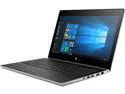
HP Laptop ProBook 430 G5 (3BB80UP#ABA) Intel Core i5 8th Gen 8250U (1.60 GHz) 8 GB Memory 128 GB SSD Intel UHD Graphics 620 13.3" Windows 10 Pro Education 64-Bit
Pros: Works in legacy mode, after a bit of effort, m2 and HD bay, backlit keyboard, good keyboard, good touch pad, sleep button, relatively light, surprisingly fast, easy to update bios, sensors work with temperatures.
Cons: Display could be better, turning off secure boot annoying, system comes with a single 8GB memory stick so dual channel is disabled until a second stick is purchased.
Overall Review: All I wanted was a cheap small, light computer, and this one seemed to fill the bill, it came with an SSD, three and a half pounds and could be put into legacy or UEFI mode. What I didn't expect was how fast the 8250 processor is, the backlit keyboard, the standard laptop drive bay in addition to the M2 bay. As mentioned above, to turn off secure boot, the BIOS requires setting a BIOS password, but there's nothing in the documentation about that quirk. This unit comes with a small M2 drive (128GB) but with the available HD bay it's no longer an issue. I've got my OS and home directory on the M2 and all the rest on a 2TB spinning drive. Unless the spinning disk is accessed, it's spun down keeping the system very quiet. The processor briefly ramps up to 3.4 GHz but slows as temperatures rise, at 70C all cores settle to 2.4 Ghz. All aspects of the machine work fine with a modern distro, I installed Mageia 6 and have not encountered any unknown devices or incompatibilities. The function keys can be set for the F1-F12 functionality or can be set to the auxiliary function (brighten, dim, increase volume, mute turn off backlit keyboard etc.) The sleep button is very handy and the machine readily suspends to ram and wakes up BIOS updates are especially easy, hook up a wired network connection click on "check for updates" in the bios and the system will connect via DHCP and download and install the updates.
7/8/2018See more detail
It's just the best TV tuner for everything but your TV.
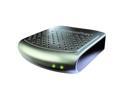
SiliconDust HDHR4-2US HDHomeRun CONNECT 2-Tuner Streaming Media Player for Cord Cutters
Pros: Small, light, inexpensive, fast, convenient, always works, multi-platform, great support.
Cons: Silicondust could provide a little more documentation and hints on some of the cool features available.
Overall Review: I just fired DirecTV, threw away the dish and stuck up an RCA ANT751R antenna. I already had a third generation HDHomerun and was trying to get my antenna working with a Hauppauge 1250 PCIe tuner when I came to the realization: "Why am I screwing around with a stupid card in a power sucking PC when I can just stuff another HDHomerun on my LAN?!?!" Newegg had the most recent one on sale so I jumped on it. I got it and popped it onto my LAN, plugged in my antenna and it worked just like my other one, seamless, simple and perfect. I then went shopping and dropped $0.99 on the Android App for my incredibly awesome $30 Coolpad T-Mobile pay-as-you-go phone. Well I was missing some channels so I contacted [email protected] who got back with me in less than 12 hours. What I didn't know and what I learned from Silicondust support that the new fourth series units not only work like the old ones BUT have more web capabilities. Now I can scan for channels via the web interface which is immediately available on my cheap phone with the $0.99 app. Best of all the new units scan FAST, I've got 59 channels and my HDHomerun will finish an ATSC scan in 50 seconds! Lastly, I found that if I go to http://my.hdhomerun.com from a computer on my LAN with my HDHomerun I can see my unit, the status of my unit and my channels. If I poke on the Channels Lineup, I get a list of the channel numbers and names found AND if I poke the channel number, in Firefox, I get a VLC web page with the TV channel, TV in a browser, with no plugins or silliness. If you've got a second or third generation HDHomerun and love it, consider a fourth generation it's just dazzling how cool the new features are. BTW, despite what others have said, silicondust e-mail support was outstanding and very helpful.
4/25/2016See more detail
Amazing little box
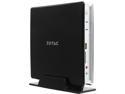
Zotac ZBOX-BI320-U Intel HD Graphics Integrated by CPU Black Mini-PC Barebone System
Pros: Small, quiet, low power consumption, quick for what it is, modern graphics, no OS "tax", audio through HDMI works immediately as does suspend to ram and suspend to disk.
Cons: None.
Overall Review: I bought this system to replace my dreadfully slow 425 Atom and to reduce power consumption. What I got was something that, at idle, drew 8-9 watts of power, 15-16 running Mythtv at 1920x1080 and 25 watts running the Unigine Tropics demo. Compiling a relatively small package like stella takes three mintues 30 seconds; in comparison, my 2.8 GHz Core i7 920 takes about one minute ten seconds. Half the GHz, half the cores and 33 % the speed, all the while only using 15 watts of power; amazing. The Tropics Demo runs, albiet in the single digits frame rates but it runs and renders correctly. My atom would render Google Earth at slideshow rates but this Celeron renders it smoothly and easy to watch. The box is nearly silent, only the disk activity is a little bright but a bit of electric tape can take care of that. Nearly the best $90 I've ever spent on a computer.
11/28/2014See more detail
seller reviews
- 1
Not worthy of Newegg
Shipping was slow, my merchandise was tossed into a box WITHOUT any packing materials and my merchandise had been opened prior to my receiving it. To UPS' credit, they treated my poorly packaged product gently and it was still in working condition. Newegg should NOT front for a business that does NOT live up to the lofty expectatons Newegg's customers expect.
On-time
Delivery
Product
Accuracy
Customer Service
Satisfactory
7/17/2012See more detail