Skip to: |

Newegg.com - A great place to buy computers, computer parts, electronics, software, accessories, and DVDs online. With great prices, fast shipping, and top-rated customer service - once you know, you Newegg.

If you are reading this message, Please click this link to reload this page.(Do not use your browser's "Refresh" button). Please email us if you're running the latest version of your browser and you still see this message.

Newegg.com - Computer Parts, Laptops, Electronics, HDTVs, Digital Cameras and More!

  • | Wish List
  • Help
Home
Home > 
Computer Hardware > 
Networking > 
Wireless Networking > 
Wireless Routers > 
Netgear Inc. > 
Item#: N82E16833122466

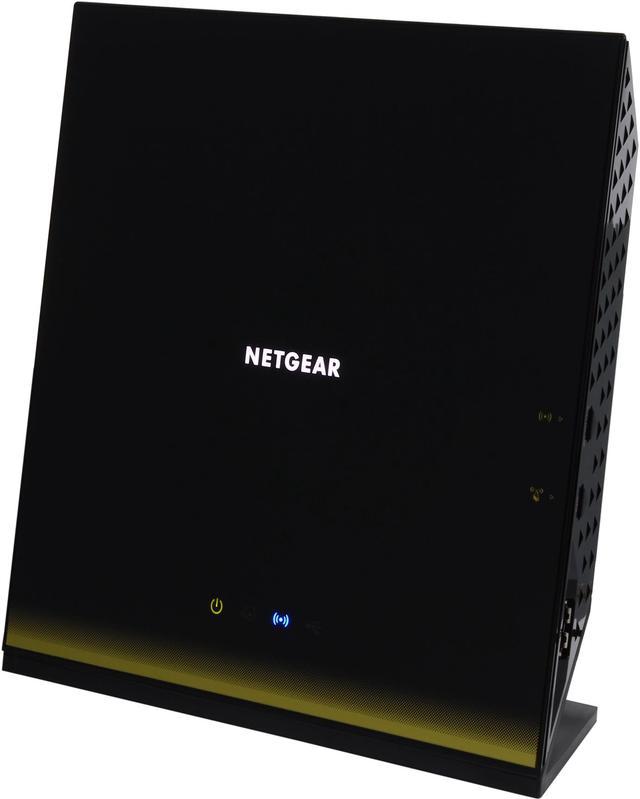
NETGEAR R6300 Wireless AC1750. DD-WRT Open Source support, Dual Band Gigabit Wi-Fi Router IEEE 802.11ac/a/b/g/n

  • Wireless AC 1750 450Mbps + 1300Mbps
  • Gigabit Wired and Wi-Fi Speed
  • DLNA Ready
  • ReadyShare USB Storage Access
  • Simultaneous Dual Band
  • NETGEAR Genie w/ Airprint
  • Window 8 compatible
  • Pin It
  • Email this page
ICON Loading...


Netgear Logo World's Fastest WiFi – Up to 450 + 1300‡Mbps for speeds up to 1750Mbps†


Gigabit WiFi Gigabit WiFi – Next generation WiFi now at gigabit speeds


Gigabit Wired Gigabit Wired – Gigabit Ethernet LAN ports are ideal for HD gaming & video and ultra, high-speed wired networking


Wireless Range

Ultimate Range Ultimate Range – WiFi coverage throughout your home


Reliable Connections

Simultaneous Dual Band Simultaneous Dual Band – Reduces interference for better connections to more WiFi devices


Ease of Use

NETGEAR Genie NETGEAR genie™ – Personal dashboard to monitor, control & repair your home network


CD-Less Installation CD-Less Installation – Easy setup for iPads, PC, MAC computers, smartphones & tablets without a cd


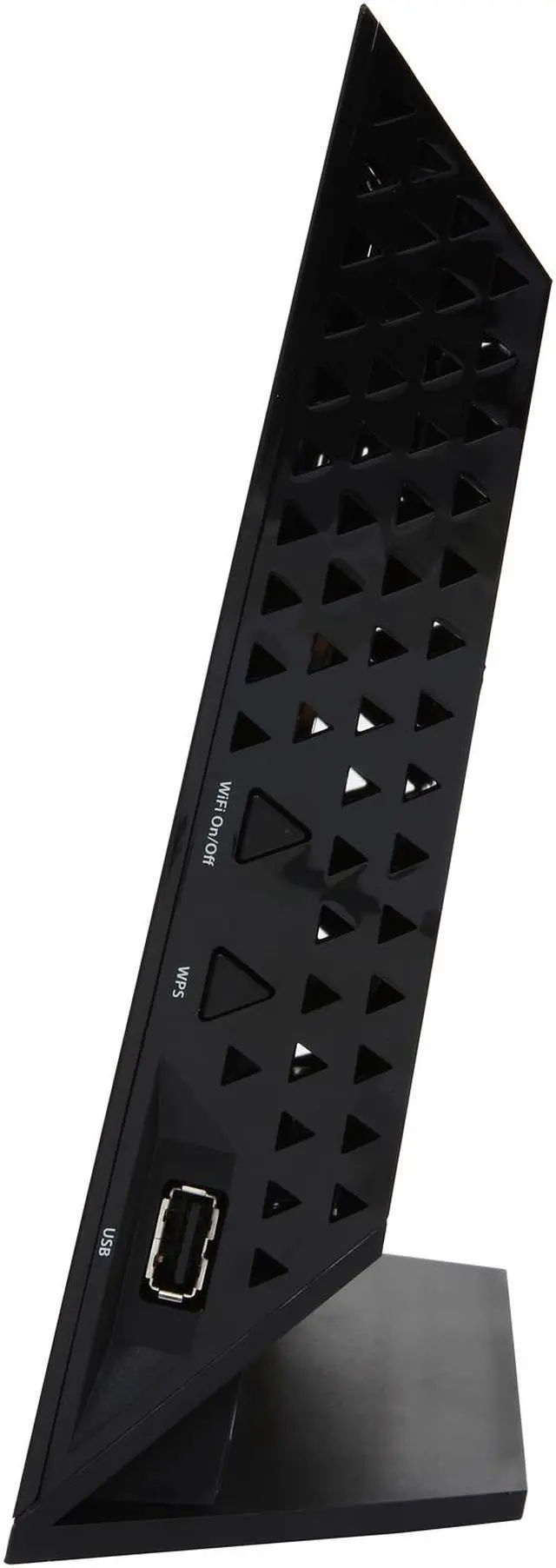
Push N Connect Push ‘N’ Connect – Secure push button WiFi connections using WiFi Protected Setup (WPS)


Wifi and Power On/Off Wifi & Power On/Off – Convenient power savings


Sharing

DLNA Media Server DLNA Media Server – Find and play your media on DLNA TVs and game consoles


ReadySHARE USB ReadySHARE® USB – Wirelessly access and share USB hard drives


ReadySHARE printer ReadySHARE® printer – Wirelessly access and share a USB printer


R6300_box

Security

Live Parental Controls Live Parental Controls – Centralized and easy-to-use website filtering for all devices connected to the Internet via the router


Guest Network Access Guest Network Access – Separate and secure WiFi access for guests using your home network


Choose the Wireless Router that fits your needs

 
Model # WNDR3400 WNDR3700 WNDR3800 WNDR4000 WNDR4500 R6200 R6300
  N600 WiFi Dual Band Router N600 WiFi Dual Band Gigabit Router N600 WiFi Dual Band Gigabit Router – Premium Edition N750 WiFi Dual Band Gigabit Router N900 WiFi Dual Band Gigabit Router R6200 WiFi Dual Band Router R6300 WiFi Dual Band Router
Performance              
Combined WiFi Speed N600 N600 N600 N750 N900 1200 1750
WiFi Range good good good better best ultimate ultimate
WiFi Transmit Power To Maximize Range Good Better Better Best Best Ultimate Ultimate
No. of USB Ports 1 1 1 1 2 1 2
Ethernet Ports – 4 LAN + 1 WAN 10/100 Ethernet Gigabit Ethernet Gigabit Ethernet Gigabit Ethernet Gigabit Ethernet Gigabit Ethernet Gigabit Ethernet
USB Storage Access Speed Better Best Best Best Best Ultimate Ultimate
Features              
Live Parental Control yes yes yes yes yes yes yes
Broadband Usage Meter yes yes yes yes yes yes yes
Guest Networks yes yes yes yes yes yes yes
DLNA Media Streaming   yes yes yes yes yes yes
Easy Install With Smartphones/Tablet     yes yes yes yes yes
Premium Features              
Genie – Dashboard Control yes yes yes yes yes yes yes
ReadySHARE Printer     yes   yes yes yes
Dedicated Video Mode     yes        
ReadySHARE Cloud     yes        
ClearChannel Selector     yes        
Time Machine Compatible     yes        
TIVO Extended Storage     yes        


WNDR4500

NETGEAR Genie

  • Easily manage, monitor & repair your network
  • For PC, Mac®, iPhone®, iPad®, & Android™ devices
  • Airprint – Print from any printer directly from your iPad/iPhone
  • My Media – Find media files in your networks and play them on any DLNA media player from your mobile app

Genie_Dashboard

NetworkMap


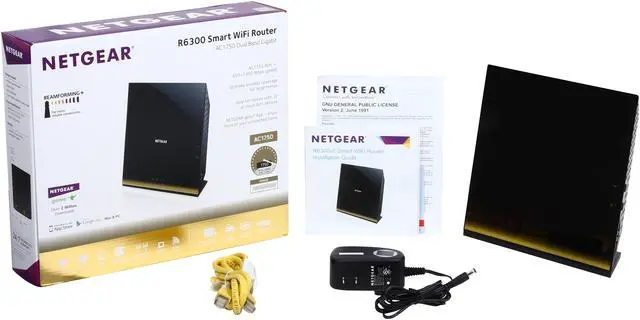
Package Contents

  • R6300 WiFi Router
  • Ethernet cable
  • Quick install guide
  • Power adapter, localized to country of sale

System Requirements

  • Microsoft® Windows 7, Vista®, XP®, 2000, Mac OS®,UNIX®, or Linux®
  • Microsoft® Internet Explorer® 5.0, Firefox® 2.0, Safari® 1.4, or Google Chrome™ 11.0 browsers or higher
  • Use laptop with 3x3 450 Mbps adapter like Centrino® 6300/5300, or 3x3 802.11ac adapter for maximum performance

†Maximum wireless signal rate derived from draft IEEE 802.11ac specifications, and final IEEE 802.11ac specifications may be different. Actual data throughput and wireless coverage will vary. Network conditions and environmental factors, including volume of network traffic, building materials and construction, and network overhead, lower actual data throughput rate and wireless coverage. NETGEAR makes no express or implied representations or warranties about this product's compatibility with any future standards. 802.11ac 1300 Mbps is approximately 3x faster than 802.11n 450 Mbps.

‡Up to 1300 Mbps wireless speeds achieved when connecting to other 802.11ac 1300 Mbps devices.


Learn more about the Netgear Inc. R6300-100NAS

Model

Brand
NETGEAR
Model
R6300-100NAS

Spec

Standards
IEEE 802.11ac, IEEE 802.11a/b/g/n
Security
Wi-Fi Protected Access (WPA/WPA2-PSK)
Double firewall protection (SPI and NAT firewall)
Denial-of-service (DoS) attack prevention
WPA/WPA2
WPA2
Ports
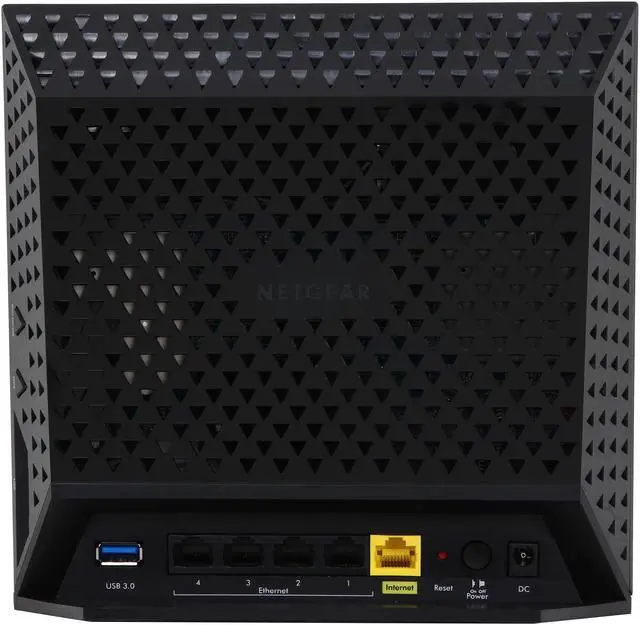
1 x 10/100/1000M WAN; 4 x 10/100/1000M LAN
Wireless Data Rates
Up to 1300+450Mbps
Frequency Band
2.4GHz/5GHz
Antenna
Internal Antenna
Interface
2 x USB 2.0
Wireless Adapter included
No
System Requirements
Microsoft Windows 7, Vista, XP, 2000, Mac OS, UNIX, or Linux
Microsoft Internet Explorer 5.0, Firefox 2.0, Safari 1.4, or Google Chrome 11.0 browsers or higher
Use laptop with 3x3 450 Mbps adapter like Centrino 6300/5300, or 3x3 802.11ac adapter for maximum performance
Dimensions
8.07" x 10.04" x 3.03"
Weight
1.44 lbs.

Features

Features
Wi-Fi Boost with high-powered radio amplifiers

Memory: 128 MB Flash and 128 MB RAM

Advanced Quality of Service (QoS)

IPv6 Support (Internet Protocol Version 6)

NETGEAR genie App-Personal dashboard to monitor, control & repair your home network

Push 'N' Connect using Wi-Fi Protected Setup (WPS)

Perfect for current & future WiFi devices.

Window 8 compatible

Packaging

Package Contents
R6300 Wi-Fi Router
Ethernet cable
Quick install guide
Power adapter, localized to country of sale

Quick Info

Warranty

  • Limited Warranty period (parts): 1 year
  • Limited Warranty period (labor): 1 year


Customer Reviews of the Netgear Inc. R6300-100NAS

Do you own this product? Write a Review

Filter Results

Go
  • Shaun
  • 5/15/2013 9:48:38 PM
  • Tech Level: High
  • Ownership: 1 month to 1 year

2 out of 5 eggsGood speed, lousy reliability

Pros: Fast connection over 2.4Ghz and 5Ghz

Cons: In the 6 months I have owned this router, I have had to reflash the firmware over a dozen times. If it loses power for any reason at all, even turning the power button off on the unit, you are almost guaranteed to have to reflash the firmware to get it working again. This means reconfiguring the router every single time.

Manufacturer Response:

Hi Shaun,

We apologize that your R6300 has been giving you trouble and would like to offer our assistance. Please contact us at newegg@netgear.com with a copy and paste of your review and any other useful information that you can add-- anything that will speed things up on our end.

We want to get this issue resolved right away, so please get back to us at a time that suits you best.

Regards,

NETGEAR Team

Did you find this review helpful? Yes No

  • ski-bum
  • 5/5/2013 10:47:33 AM
  • Tech Level: High
  • Ownership: 1 week to 1 month
  • Verified Owner

5 out of 5 eggsBest router I've ever owned

Pros: Super easy to set up. Using on a wireless desktop with the A6200 adpt. and it connects at 866Mbps. We we're coming from an old Dlink "G" router and only got 56Mbps. The difference is amazing. You would think the new R6300 is wired to the upstairs desktop.
The wired connections, (two other desktops and a PS3 are also noticeable faster.
The range is also twice as good as before. I can now walk around the neighborhood and stay connected to the Wi-Fi connection.

Cons: You'll also need the A6200 Adapter to get the full 5G speed or you'll just connect to the 2.4G connection.

Other Thoughts: I have to question all the negative reviews you see below here. What is this, the competition posting. All they need to do is purchase one then give a bad review. Notice many didn't even leave a name. I had no problems at all with this router and it was much cheaper than the others.

0 out of 1 people found this review helpful. Did you? Yes No

  • Brand Hall
  • 4/23/2013 12:21:56 PM
  • Tech Level: High
  • Ownership: 1 month to 1 year
  • Verified Owner

4 out of 5 eggsA Needed Upgrade

Pros: Gigabit Wireless AC
Simple, intuitive administration console.

Cons: Not quite as easy to perform advanced configuration as the D-Link firmware I have used in the past.

Other Thoughts: My current router, a D-Link DGL-4500, had finally given up the ghost and needed to be replaced. I had known for several months that I would need to find a replacement. I finally decided to purchase the Netgear R6300. There were only two other routers I was considering and the Netgear won me over with features and firmware upgrades. I can say that I am happy with this router. The admin console is simple to navigate and offers all the functionality you will need. I still like the layout of the D-Link console as it is much more intuitive and complex configuration seems easier. The D-Link was a dual band (single band broadcast) draft-n router where the new R6300 supports broadcast of both 2.4GHz and 5GHz simultaneously. The power and range have increased one and a half to two times. This alone makes the R6300 worth the cost of other routers on the market. The AC band is a future-proofing benefit for those who know what's coming. Apple and Android, as well as many computer manufacturers, are planning to integrate AC into their upcoming products. Gigabit WiFi guarantees that my media streaming will not suffer as I share my digital library across all the devices in the house.

Did you find this review helpful? Yes No

  • Karter
  • 4/21/2013 2:35:12 PM
  • Tech Level: Somewhat High
  • Ownership: 1 week to 1 month
  • Verified Owner

5 out of 5 eggsAmazing - a step-by-step guide on our setup

Pros: I have the Netgear R6300 and the Netgear A6200 WiFi Adapter
Comcast is our ISP, and our home network combines,
6 wired windows 7 units,
1 wifi windows 7 machine with (the old netgear Wireless n300 adapter card),
1 wifi windows 8 Acer tablet, dual screen (45" Samsung HDTV as second monitor), with the Netgear A6200 Adapter

the wired LAN gives us data transfer speeds of up 120MBps PC to PC
the Netgear A6200 (connects at a consistent 866Mbps) and data transfers up to 35-50MBps
the old wifi (connects at the 300Mbps) and data transfers reflect it 11-12MBps

Note:
the R6300 router is locate on our main floor, and the wireless units are in our basement, strangely enough,
the A6300 adapter dropped to 577mbps when I moved in another area of the house, which made the signal go through 2 brick walls and 2 other walls, at

about 40 ft.

it is a sweet combo, things can run pretty much straight out of the box,
however, on close inspection some of the router options needed changing, while it appeared everything, worked fine, some websites with live webcams

would not show, but normal videos, etc, continued to function.

We didn't install the Netgear Genies on the machines, though you could, we just installed the drivers, and let windows handle the rest.


here are the router options we changed to make it all work

to get max a/c rate for the A6200 adapter you need to
1) use the WPA2-PSK[AES] settings

Setup > Wireless Setup > select WPA2-PSK[AES]
set mode : Up to 1300 Mbps

2) you need to insure WMM is enabled

Setup>Qos Setup> check the Enable WMM (WiFi multimedia) settings and Apply

3) not essential, but may increase through put rate a little
set RIP direction and version

Setup > LAN Setup >
RIP Direction [BOTH]
RIP Version [RIP_M2]

4) when connecting you need to make sure to connect to the 5GHz a/n/ac Network


router settings I changed

1) to ensure live webcams feeds worked, we had to disable a 2.4GHz setting

Advanced Setup > Wireless Settings > uncheck Enable 20/40Hz Coexistence

though they warn against it, they also state with it checked your 2.4GHz speed could be hindered

--------------

Hope this wasn't too wordy, good luck

Cons: none I can think of,
other than Netgear doesn't have a 1300 Mbps adapter yet

3 out of 3 people found this review helpful. Did you? Yes No

  • N/A
  • 4/19/2013 9:25:53 PM
  • Tech Level: Average
  • Ownership: less than 1 day
  • Verified Owner

1 out of 5 eggsDOA

Pros: NONE

Cons: DOA

Other Thoughts: This was DOA with blinking power light. Getting RMA replacement, hopefully I will get a working unit.

Manufacturer Response:

Hi Anonymous,

Thanks for letting us know the status -- we apologize that you had this issue, and are glad you have a replacement on the way. Can you tell us the serial number of the unit that was sent back, if you still have it available, as well as the case number you were given by support?

Please email us with any info you have at newegg@netgear.com.

Regards,

NETGEAR Team

0 out of 2 people found this review helpful. Did you? Yes No

  • N/A
  • 4/16/2013 6:18:37 AM
  • Tech Level: Somewhat High
  • Ownership: 1 month to 1 year

1 out of 5 eggsBad Bad Router!!

Pros: Nice looking, good connections, and GENIE software is great.

Cons: Router has major engineering flaw with the firmware getting corrupt for no obvious reason. Had it 1 month, call Tech Support, after 1 hr online managed to flash new firmware. Had blinking power light. Within 4 months, happened again but this time out of 90-day warranty so wanted to charge me $170 to go through process of flashing firmware. I trashed router and bought the ASUS RT-AC66R. Have been a happy camper ever since.

NETGEAR has a major problem with this router and it should be taken off the market. Don't waste your money nor time. Pay attention to all these numerous bad reviews!

Other Thoughts: ASUS works great but wish it had a GENIE equivalent software app......

Manufacturer Response:

Hi Anonymous,

We can't apologize enough for the trouble you went through, and want to help as soon as we can. You should never have been asked to pay for fixing this problem. If you still have the R6300, we'd like to arrange a warranty replacement to get sent out to you at no charge. Please contact us at newegg@netgear.com with as much info as you can, including your support case number, and we'll be in touch.

Regards,

NETGEAR Team

Did you find this review helpful? Yes No

  • N/A
  • 4/10/2013 6:54:19 PM
  • Tech Level: Somewhat High
  • Ownership: less than 1 day
  • Verified Owner

1 out of 5 eggsWouldn't buy again

Pros: The shipping from Newegg was fast. Can comment on product. Item did not work.

Cons: Item did not work.

Other Thoughts: Received the router and connected it to the modem and computer as per instructions. Turned it on and all I got was a flashing green on/off light. Reset router and modem several times and still had the same results. Finally called Netgear tech line. The guy I got to help was nice but I could barely understand what he was saying. After a bunch of questions and recycling the modem and the router a bunch of times he finally concluded that the firmware was corrupt. To make a long story shorter, after an hour on the phone he still couldn't get the firmware to load to the router. I finally gave up, packed up the router and sent it back to Newegg.

This doesn't seem to be an isolated case. So buyer beware!

Manufacturer Response:

Hi Anonymous,

Thanks for your review. It sounds like your unit did have corrupted firmware, and we apologize that the support technician was unable to help. If the restore procedure didn't work for you, we are happy to arrange a quick replacement -- although it sounds like you have already returned the router to Newegg.

We assure you that the R6300 will give you great performance and that the issue you saw has been experienced by only a very small percentage of R6300 owners, and is usually quickly resolved with the restore procedure.

Please feel free to contact us directly at newegg@netgear.com with any feedback or questions you have -- we hope to earn your business in the future, and are here to help!

Regards,

NETGEAR Team

0 out of 1 people found this review helpful. Did you? Yes No

  • TBaltimore
  • 4/4/2013 3:25:49 PM
  • Tech Level: High
  • Ownership: 1 month to 1 year
  • Verified Owner

3 out of 5 eggsGood router, died after 6 months though

Pros: Good router with good features, including USB connections for data or printers. The configuration software has plenty of settings for configuration, and is easy to navigate.

Cons: It's expensive, and few devices take advantage of it's best features. USB connection is USB 2.0, instead of 3.0. Died after 6 months of use and have to RMA it.

Other Thoughts: This worked better for us than the Linksys dual band routers, but still died after 6 months.

Manufacturer Response:

Hi TBaltimore,

We're very sorry for the trouble you had and that you had to RMA the R6300; it does sound like it was working very well for you prior to that! Have you received the replacement yet? Please get in touch with us at newegg@netgear.com and let us know if the replacement is working well for you.

Regards,

NETGEAR Team

Did you find this review helpful? Yes No

  • Sam Shah
  • 4/1/2013 9:37:40 AM
  • Tech Level: Somewhat High
  • Ownership: 1 month to 1 year

1 out of 5 eggsR6300 Router is a Waste of Money

Pros: I was a netgear dedicated customer for a long time. I had several Net Gear router in the past. All lasted for quite a long time. Based on the reviews and I had selected R6300 router which definitely Good look and attractive display. The router did have a great range and better speed when it was working.

Cons: Router died after six month. Firmware upgrade is not a easy fix. Net gear support in the past was excellent. However, Now The worst part is Tech Support. The router has two USB port, one did not work. Firmware getting messed up all the time. Router is dead.

Other Thoughts: Net gear tech support is more interested in selling the extended contract, then, providing assistance. When you pay high price for the router, at least, Net Gear provide the courtesy, to at least listen what we have to say. The router is dead. In the past, Net Gear had provided me excellent Tech support even for refurbish router. This one is dead

Manufacturer Response:

Hi Sam,

We believe we've already gotten in touch with you via another site and have received your email (which we are currently following up on -- support will be working with you to get a replacement.)

If you still have questions, please feel free to get in touch with us via newegg@netgear.com.

Regards,

NETGEAR Team

Did you find this review helpful? Yes No

  • jcgarp
  • 3/30/2013 10:44:07 PM
  • Tech Level: Average
  • Ownership: 1 month to 1 year
  • Verified Owner

3 out of 5 eggsIt work fine for 37 days and then....

Pros: Fast, Easy to Setup, Nice Software

Cons: Brand Reliability, Expensive, Warranty

Other Thoughts: Started to blink green for no reason. Contacted Netgear a bit slow but efficient. Support indicated that the firmware was corrupted and we try to flash it. The software was upgraded but the darn thing kept on blinking. Apparently the hardware was damaged. It was in warranty but warranty did not include 16.95 for shipping! I had it for 30 something days!. Thank goodness, Newegg had extended warranty with no shipping cost. I ask for a replacement but I must say I am not convinced. 4 years back I bought a router from Netgear and was fried a few days after the warranty expired. I bought a Belkin N at is still working, in fact it is replacing the Netgear ac until the new one arrive. I will update on the replacement.

Manufacturer Response:

Hi jcgarp,

Thanks for your review -- we appreciate the feedback and also your patience so far in working with us. Please get in touch with us if you have any questions, and to update on the status of the replacement. We hope everything works out well for you.

You can reach us at newegg@netgear.com.

Regards,

NETGEAR Team

Did you find this review helpful? Yes No

Compare Offers from All Sellers

Seller Name & Rating Offer Details  
ICON Loading...
Are you an E-Blast Insider? Subscribe Newegg e-Blast

Buzz

epic black monolith

5 out of 5 eggs
Sadly I do not have an ac card to test the ac with but my N range improved greatly from my previous router(wrt-600n), ...
— luminous 6/7/2012

The Bleeding Edge.

5 out of 5 eggs
This is one of the few 802.11ac routers out there. If you're not up to speed with 802.11ac see OTHER THOUGHTS.

This ...
— 1/4/2013


PayPal
Shop without retyping payment details. Secure shopping made faster.
Check out with PayPal.

Financing


Home
Home > 
Computer Hardware > 
Networking > 
Wireless Networking > 
Wireless Routers > 
Netgear Inc. > 
Item#: N82E16833122466
LOADING... LOADING...
Shop by Region: United States | Canada | China
Follow us:   RSS Feeds Youtube
VeriSign Reliability Seal1This site protected by Trustwave's Trusted Commerce program Inc500
Policy & Agreement | Privacy Policy  © 2000-2013 Newegg Inc.  All rights reserved.
If the Adobe Reader does not appear when you click on a link for a PDF file, you can download Adobe Reader from the Adobe web site. nassau