Skip to: |

Newegg.com - A great place to buy computers, computer parts, electronics, software, accessories, and DVDs online. With great prices, fast shipping, and top-rated customer service - once you know, you Newegg.

If you are reading this message, Please click this link to reload this page.(Do not use your browser's "Refresh" button). Please email us if you're running the latest version of your browser and you still see this message.

Newegg.com - Computer Parts, Laptops, Electronics, HDTVs, Digital Cameras and More!

  • | Wish List
  • Help
Home
Home > 
Computer Hardware > 
Computer Accessories > 
Card Readers > 
NMEDIAPC > 
Item#: N82E16820132016

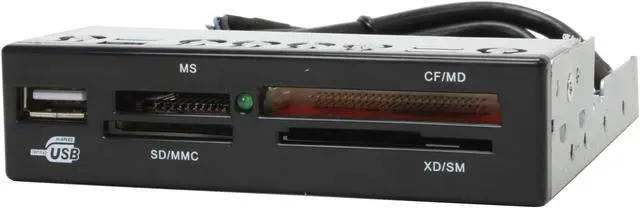
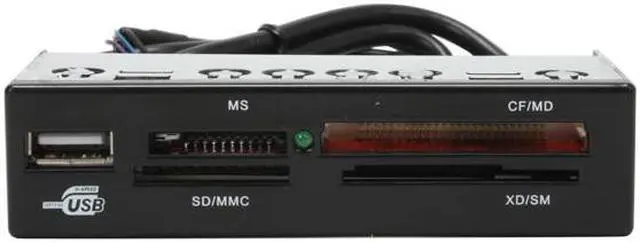
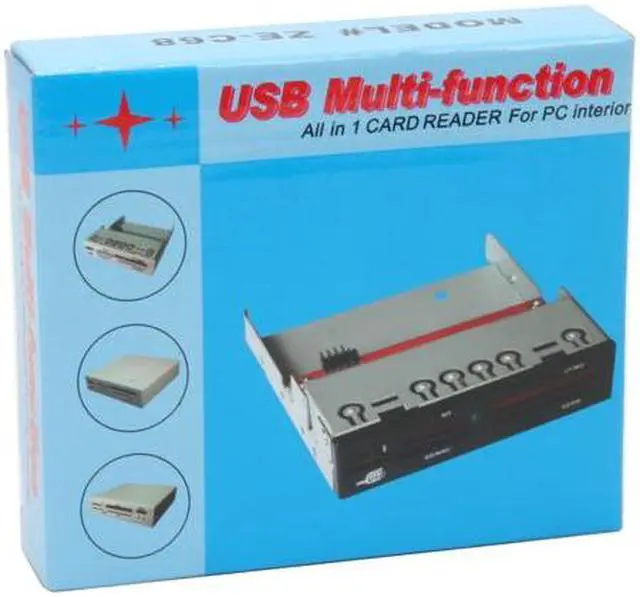
nMEDIAPC ZE-C68 All-in-one USB 2.0 Card Reader w/ USB Port

  • All-in-one
  • USB 2.0
  • Slots 4
  • Internal
  • Pin It
  • Email this page
ICON Loading...

Learn more about the NMEDIAPC ZE-C68

Model

Brand
nMEDIAPC
Model
ZE-C68

Spec

Type
All-in-one
Slots
4
Installation Type
Internal
Interface
USB 2.0
Compatibility
Reader and Writer Support :
Compact Flash Card: CF-I/CF-II/Extreme CF/Extreme III CF/Ultra II CF/HS CF/XS CF/CF Pro/CF Elite Pro/CF Pro II
Memory Stick Card: MS/MS PRO/MS MagicGate/MS MagicGate PRO/MS MagicGate DUO/MS MagicGate PRO DIO/Extreme MS PRO/Extreme III MS PRO/Ultra II MS PRO/HS MS MagicGate PRO/HS MS Pro/MS Select
Secure Digital Card: SD/Extreme SD/Extreme III SD/Ultra II SD/SD Pro/SD Elite Pro/HS SD/Ultra Speed SD/SD-Ultra-X/HS Mini SD
Multi Media Card: MMC 1/MMC 2/MMC 4.0
Smart Media Card: SM/SM ROM/XD
IBM MicroDrive/Hitachi MicroDrive/MagicStor
TransFlash Memory

Need Adapter: MS Duo/MS Magic Gate Pro Duo/MS Magic Gate Duo/MS Pro Duo/RS MMC/HS MS Pro Duo/MS Rom/HS MS Magic Gate Pro Duo/HS RS MMC/DV-RS MMC/RS MMC 4.0/T-Flash/Mini SD
Support - Compact Flash
Yes
Support - Memory Stick
Yes
Support - MMC
Yes
Support - SD
Yes
Support - SmartMedia
Yes
Support - xD
Yes

Features

Features
Transfer rate of Hi-Speed USB 2.0 interface
Internal design fitting into 3.5" drive bay to save the desktop space.
Supports Hot-Swapping and Plug and Play function.
USB Bus powered; no external power required.
Supports Mass Storage Class Drive
Support Win 98/2000/XP/Vista, Mac OS V9.2 or higher
Driverless

Quick Info


Customer Reviews of the NMEDIAPC ZE-C68

Do you own this product? Write a Review

Filter Results

Go
  • N/A
  • 3/29/2013 12:56:55 PM
  • Tech Level: Somewhat High
  • Ownership: 1 day to 1 week
  • Verified Owner

5 out of 5 eggsFits a Need

Pros: Works as advertised. I liked that it gave me a USB 2.0 port on the front to compliment my cases dual USB 3.0 front ports. UBS 3.0 ports have been reported to, on occasion, not play well with some older USB devices.

Cons: Not really a con given the price, but it does not come with a 3.5 to 5.25 inch bay bracket.

Other Thoughts: This reader works well if your case has only a single USB 3.0 header on your motherboard that you want to use for your cases own USB 3.0 front ports. The USB 3.0 multi card readers that I have seen, only operate in USB 3.0 mode on the reader's UBS port, while the card ports still only work in USB 2.0 mode.
So, why waste a USB 3.0 header on your motherboard if you don't need to, for a multi-card reader (unless you don't have other USB 3.0 ports on the front of your case..

Did you find this review helpful? Yes No

  • rotinaj
  • 2/24/2013 2:53:18 PM
  • Tech Level: Somewhat High
  • Ownership: 1 month to 1 year
  • Verified Owner

4 out of 5 eggsDusty after no use!

Pros: Fast detection, bonus USB slot, and fits in a 2.5" drive.

Cons: 1. As everyone else has been saying: I need to put SD card upside down!

2. The card reader became dusty after two months of no-use; thus, unreadable. Here's my story: I inserted my SD card, PC asked me to format card before use (like card was brand new or something). This was strange because I knew I had information on the card. I took out card, and a a thick layer of dust covered the gold connectors. I had to blow the dust off the card and out of the device for everything to work. All in all, I would recommend preparing a can of air duster -- or heave a deep breath!

Other Thoughts: Excellent device, but I would prefer two USB ports in the front instead of one. In addition, please make them USB 3.0, which is backwards compatible with usb 2.0 and usb 1.1!

Did you find this review helpful? Yes No

  • N/A
  • 1/30/2013 9:11:58 PM
  • Tech Level: High
  • Ownership: 1 week to 1 month
  • Verified Owner

4 out of 5 eggsEasy to install, works as expected

Pros: Easy to install, low price card reader. Pretty simple device, hard to say much more. One more USB port on the front of my box now, but the card readers are the real perk,

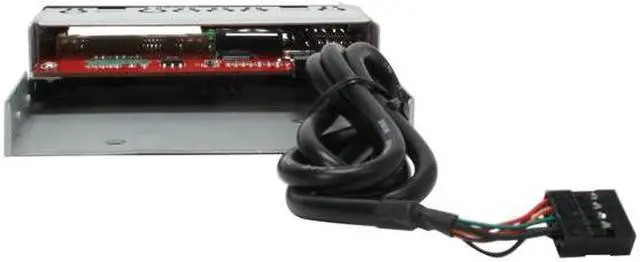
Cons: No real cons. The cable is a little short, fit in my mid-tower no prob, but if you were trying to put this on the top of a full tower, you might have an issue with the cord.

Other Thoughts: Recommended.

Did you find this review helpful? Yes No

  • martyelzz3
  • 1/19/2013 10:30:46 AM
  • Tech Level: High
  • Ownership: 1 day to 1 week
  • Verified Owner

4 out of 5 eggsHad to modify to fit

Pros: Once I was able to install, they worked well.

Cons: I had to cut off about ½ an inch from the back so they would fit in SFF dells. Also, they could also use a screw hole on both sides of the front so the right side could be held down also instead of just one side. There is ½ inch of excess metal that could be eliminated & save the manufacturer a bit of money.

Other Thoughts: This was the 2nd brand of card reader I purchased at least I was able to modify these. Trying to upload a picture instead of a video. Red dot is where I had to drill for a screw hole & also shows where excess metal needs cut off. well so much for loading a picture.

Did you find this review helpful? Yes No

  • jeffpriz
  • 1/16/2013 11:41:57 AM
  • Tech Level: Somewhat High
  • Ownership: 1 day to 1 week
  • Verified Owner

5 out of 5 eggsGood card reader

Pros: Nice looking card-reader, works as expected, no issues in Windows 8

Cons: none

Other Thoughts: Placed it inside a Bytecc 3.5" to 5.25" drive bay adapter, to get it into my NZXT Phantom.

Inserting SD cards confused me the first time, as you have to insert them upside-down... I tried to insert it right-way up and it wouldn't insert, but slides in nicely when upside-down.

Windows 8 found it and handles it perfectly.

Did you find this review helpful? Yes No

  • N/A
  • 1/6/2013 7:03:56 AM
  • Tech Level: High
  • Ownership: 1 day to 1 week
  • Verified Owner

5 out of 5 eggsperfect

Pros: It works!
It does what its supposed to.
Plenty of card formats
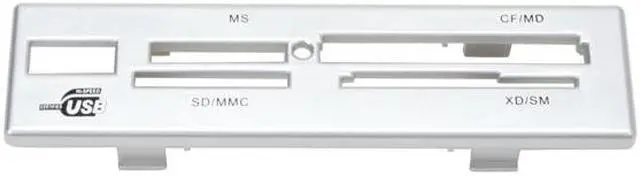
Optional silver face plate for easier visibility

Cons: none

Other Thoughts: Got an external USB card reader with a DSLR combo and my desktop would recognize it when I inserted a card, but as soon as I started transferring pics from the SD card to my local HDD, the card would disappear from Windows and reconnect. After troubleshooting for an hour, I came to the conclusion my motherboard just didn't like the card reader, after trying multiple driver setups and it working on other computers.

So, I ordered this, slapped it into my case, and it works like a charm. Zero complaints, transfer speeds seem normal. I really like the optional silver face plate since my desktop sits under my desk where its very dark and this makes me be able to see the slots to insert the card very easily.

Not sure what makes some of these worth $50 unless its got USB 3.0. Stick in the $15 range and save a few bucks.

Some specs, relevant to compatibility anyway
ASRock H77m motherboard
Intel i5 3450 (Ivy bridge, 3rd gen)
G.Skill 1600mhz memory
Windows 7 Home Premium

Did you find this review helpful? Yes No

  • Ugly_Ivan
  • 12/28/2012 2:52:34 PM
  • Tech Level: High
  • Ownership: 1 week to 1 month
  • Verified Owner

5 out of 5 eggsExactly as expected

Pros: Fit perfectly in the 3.5" exterior slot of a new Rosewill LINE GLOW ATX Mid-Tower case
Great support for different memory types and pass-thru USB 2.0 connector for thumb drives, etc.
No foolish logo, no bright lights

Cons: None

Other Thoughts: The small LED light on the front works when you'd expect it to work, and doesn't stay lit when nothing is in use.

Plugged right in to a USB 2.0 header port on the ASRock Z77 Extreme4 motherboard, easy win!

Will buy again. Really well designed product. Good job!

0 out of 1 people found this review helpful. Did you? Yes No

  • Bodhicat
  • 12/21/2012 12:22:43 PM
  • Tech Level: Somewhat High
  • Ownership: 1 week to 1 month
  • Verified Owner

4 out of 5 eggsWorth the Price

Pros: Solid build quality, good fit, no goofy logo, easy install

Cons: None so far

Other Thoughts: I bought this to finish off a low-dollar PC build that utilizes a Rosewill FBM-01 Mini-ATX case purchased for $20 on Black Friday. I had originally bought a different card reader for a few dollars less from another vendor, but that item was made of brittle plastic and arrived damaged (and didn't fit properly anyway), showing once again that the very cheapest item is not always the best deal. I was very relieved when the nMedia card reader arrived to find that it had a metal chassis and appeared very well-made. Installation took all of three minutes and really improved the look of the PC. Cards go in and out with precision - and no bent pins - and the thing just works as it should. I'll probably buy another for my next build. NewEgg people, take note: I would consider buying the Rosewill-branded card reader, but it's got that awful swirly-swashy Rosewill logo on it - appropriate for an 1890's hair tonic but not for computer equipment. This one has no manufacturer's logo on it at all, goofy or otherwise, making it look that much better.

2 out of 3 people found this review helpful. Did you? Yes No

  • shn
  • 11/29/2012 8:51:58 PM
  • Tech Level: High
  • Ownership: less than 1 day
  • Verified Owner

5 out of 5 eggsVersatile for Small Form Factor

Pros: I was able to take it apart and flip the components so it would fit into small form factor PC's. This is the only company and product that takes this into consideration, not to mention that everything works. Readyboost worked with SDHC card and ProStick simultaneously.

Cons: Nada

Other Thoughts: This is the best product to replace a floppy drive.

1 out of 1 people found this review helpful. Did you? Yes No

  • N/A
  • 11/15/2012 7:35:29 PM
  • Tech Level: Somewhat High
  • Ownership: less than 1 day
  • Verified Owner

4 out of 5 eggsRight product for the right price

Pros: It fits flush with the front of my case, it installed easily, it reads SD cards and flash drives well and recognizes the devices immediately. The additional USB port on the front is a nice bonus.

Cons: Doesn't come with a proper manual. I didn't realize that SD cards have to be inserted upside down until I read a review.

Other Thoughts: This device is a replacement for another media card reader.

0 out of 1 people found this review helpful. Did you? Yes No

ICON Loading...
Are you an E-Blast Insider? Subscribe Newegg e-Blast

Buzz

A++ Works Natively in ALL OS'

5 out of 5 eggs
-Unbeatable Price!
-Works natively in ALL OS'. Tried it in openSuse, Ubuntu, Gentoo, and Vista 64 Ultimate. (also ...
— the.root 9/5/2007

Well..it works good.. BUT.....

4 out of 5 eggs
Many complaints on the lower priced card reader/writers. this one got some decent reviews. So figured give it A go.
(read ...
— Chuck R. 11/5/2011


PayPal
Shop without retyping payment details. Secure shopping made faster.
Check out with PayPal.

Financing


Home
Home > 
Computer Hardware > 
Computer Accessories > 
Card Readers > 
NMEDIAPC > 
Item#: N82E16820132016
LOADING... LOADING...
Shop by Region: United States | Canada | China
Follow us:   RSS Feeds Youtube
VeriSign Reliability Seal1This site protected by Trustwave's Trusted Commerce program Inc500
Policy & Agreement | Privacy Policy  © 2000-2013 Newegg Inc.  All rights reserved.
If the Adobe Reader does not appear when you click on a link for a PDF file, you can download Adobe Reader from the Adobe web site. nassau