Skip to: |

Newegg.com - A great place to buy computers, computer parts, electronics, software, accessories, and DVDs online. With great prices, fast shipping, and top-rated customer service - once you know, you Newegg.

If you are reading this message, Please click this link to reload this page.(Do not use your browser's "Refresh" button). Please email us if you're running the latest version of your browser and you still see this message.

Newegg.com - Computer Parts, Laptops, Electronics, HDTVs, Digital Cameras and More!

  • | Wish List
  • Help
Home
Home > 
Computer Hardware > 
Input Devices > 
Keyboards > 
Microsoft > 
Item#: N82E16823109148

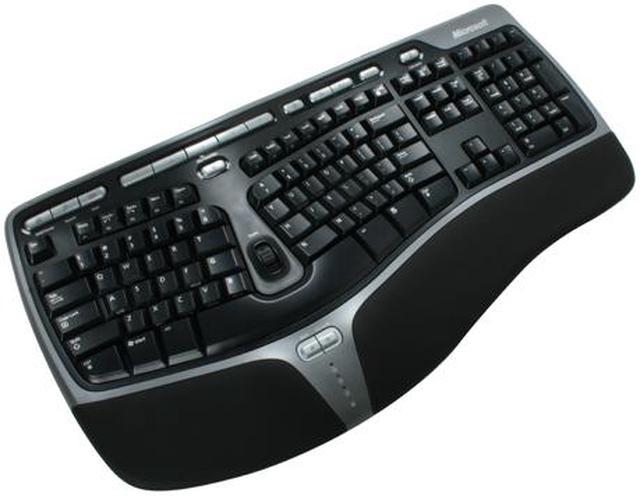
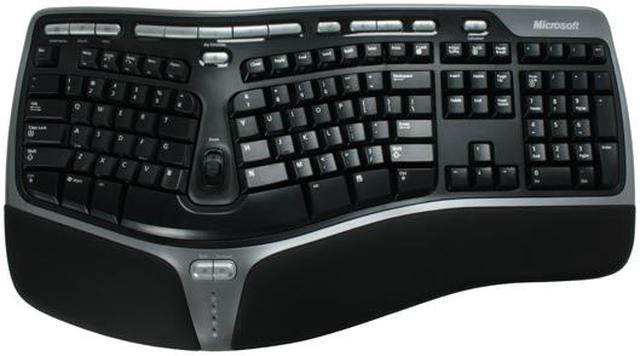
Microsoft Natural Ergonomic Keyboard 4000

  • 107 Normal Keys
  • 17 Function Keys
  • USB Wired
  • Pin It
  • Email this page
ICON Loading...

It also comes equipped with an optional palm lift for a seven-degree reverse slope and a cushioned wrist rest that encourages better arm and wrist alignment. Assign your favorite document, page, folder, or image to anyone of the five My Favorites Keys for easy one-button access later. The Zoom Slider lets you easily zoom in/out of your documents, pages, or images. It's conveniently located at the center of the keyboard for easy access. The forward and backward keys ease your web-page navigation and eliminate the need to move your hands from the keyboard to navigate.

The Natural 4000 comes with a 7 mm tall soft-cushion wrist rest that offers better comfort and greater support while you work. Its advanced design reduces fatigue caused to a user from hours of tiring computer usage. Make your days at the keyboard easier, whether you're working or gaming!


Learn more about Natural 4000

Model

Brand
Microsoft
Name
Natural 4000
Model
B2M-00012

Keyboard Connection Type

Keyboard Interface
USB

Keyboard SPEC

Design Style
Ergonomic
Palm Rest
Integrated
Normal Keys
107
Function Keys
17
Keyboard Color
Black
Windows Vista
Certified for Windows Vista

Type

Type
Wired

Mouse Included

Mouse Included
No

Features

Features
Feel the comfort of the Gull Wing design, the best way to understand the comfort is to experience it yourself.
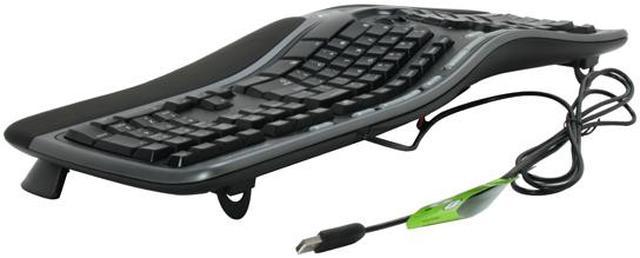
Snap in the optional palm lift to experience the seven-degree reversed slope.
As you type, rest your wrists on the supportive, integrated palm rest. The palm rest makes typing for long intervals more comfortable.
Open a spreadsheet and move the Zoom Slider up and down to zoom in and out.
Save the spreadsheet and then assign it to a My Favorites Key by pressing and holding one of the five keys.
Close out of the spreadsheet, and then press the My Favorites Key you assigned it to, to quickly access it again.
Open your Web browser and click around on a few pages. Use the Back and Forward keys to navigate pages without ever having to remove your hands from the keyboard.

Packaging

Package Contents
Natural 4000 Keyboard
User Manual
Driver Disk

Quick Info

Warranty

  • Limited Warranty period (parts): 3 years
  • Limited Warranty period (labor): 3 years


Customer Reviews of Natural 4000

Do you own this product? Write a Review

Filter Results

Go
  • matt
  • 5/19/2013 6:35:25 PM
  • Tech Level: Average
  • Ownership: 1 week to 1 month

5 out of 5 eggsLOVE LOVE LOVE LOVE this keyboard

Pros: VERY comfortbale. if your someone who likes your keyboard slanted or you cant seem to be in that "sweet" spot GET THIS BABY. Ive had this for 2 weeks now and its very comfortable.

Cons: Its not mechanical

Other Thoughts: I game with it and wanted a blackwidow mechanical, but it didnt look very comfortable. It just has distracting lights. This keyboard is the last one im getting (until it wears out) its so friggin awesome

Did you find this review helpful? Yes No

  • El Gringo
  • 5/19/2013 6:03:23 PM
  • Tech Level: Somewhat High
  • Ownership: 1 day to 1 week
  • Verified Owner

5 out of 5 eggsAwesome Ergonomics

Pros: Solid Construction
Lots of Buttons to Control Everything from Music to Videos to Editing
Has a software where you can create customized buttons with customized macros
Very comfortable hand-rest
Comes with an optional Palm Lift Rest that leaves the keyboard at a 7 degree reverse slope for a most comfortable typing and PC Gaming experience (a must have for me!!!!)

Cons: None I can think for what is advertised it is a great keyboard

Other Thoughts: The optional palm lift that raises the front hand rest makes this keyboard awesome in so many ways. Now when I play PC Games my wrist is raised up and my fingers go down to touch the keys and now I don't get carpal tunnel pain and it has made playing PC Games so much more fun it really has. The keyboard has a real solid feel to it now. Also now when I type the keys really some to fall into place and I can completely look at the screen without having to look down at the keys anymore. I highly recommend this keyboard to people who spend hours in front of the keyboard everyday who gets pain on the top middle part of their hand. I will always use this keyboard now that I've used the optional palm lift bar. I am so glad I bought this.

Did you find this review helpful? Yes No

  • zav
  • 5/10/2013 7:53:38 AM
  • Tech Level: Somewhat High
  • Ownership: more than 1 year

2 out of 5 eggsgone thru 3 of these

Pros: really nice ergonomic keyboard, so difficult to not use ergonomic once you get used to it.

Cons: i've been using these for over 5 years, if you spill liquid on the keyboard, expect keys like 'b' and entire portions of the keyboard to stop working.
First one I had go bad, some water got on it, but it wasn't until a week later it stopped working- it had rusted a little on the connectors. this keyboard seems super sensitive to spills. another I had lasted 9months before the keys stopped working. and another had the keys stop working right away after spilling soda on it.

Other Thoughts: wish there were more options, i find this one as the only one that i like with split keys, palm pads, and overall nice layout.

0 out of 1 people found this review helpful. Did you? Yes No

  • Nick Z
  • 5/9/2013 9:22:10 AM
  • Tech Level: High
  • Ownership: more than 1 year

1 out of 5 eggsNot many quality options in the ergonomic KB market, sadly

Pros: - A fairly nice design aesthetically with the black and silver color scheme

- It maintains technical function for a long time under regular daily usage.

Cons: - The paint/sticker lettering falls off the more heavily used keys over time.

- B and M keys are just black now, letter sticker is completely gone (I've had this one a bit over a year now, the previous one about the same time, same issues)

- V, D, E, G sticker lettering are partially eroded

- The rubber feet on the bottom always fall off way too easy. This happened with the last one I had. You can try to push them back on, but just moving the keyboard around a bit will end up with them being "rubbed" out of position.

Other Thoughts: This is an industry-wide fault though for a lot of vendors, as Razer keypad peripherals suffer this same problem. I had the same sticker-lettering erosion on my Razer Nostromo, and I'd bet they're made at the same factory, foxconn, with the same standards, I know MS uses foxconn. Maybe they need to call the people at foxconn and tell them to use something a bit more high-quality.

As for the rubber feet issue, it's the same as the lettering issue. Invest more in making a quality product. Use better adhesives between the rubber and the plastic.

These are really just questions of quality and investing more in the products you put out. I'd rather pay $60 for a higher quality version of this keyboard and when people come to my house they aren't looking at something that has random black keys and lettering half-eroded, and slips around on my glass desk because 3 of the rubber feet rubbed off.

Sure, I could go get super glues, experiment with ones that would fox this issue. I shouldn't have to do these things though.

In my opinion, the ergonomic keyboard market is ripe for a competitor to make a higher quality option. This particular keyboard has dominated this segment only because of the lack of other options.

My next purchase won't be another one of these. If they don't have a superior ergonomic keyboard out by then that isn't plagued with these cheap production issues, I'll just look toward the more pricey customizable options where you put the keys wherever you want them.

Because I'd rather spend $100 or 200 or even 300 and have something that is really enjoyable for 3-5 years of daily use, than something that is $40 and makes me consciously realize what a piece of junk it is.

0 out of 1 people found this review helpful. Did you? Yes No

  • FireFlash
  • 5/8/2013 2:18:01 PM
  • Tech Level: Somewhat High
  • Ownership: more than 1 year
  • Verified Owner

4 out of 5 eggsGood keyboard, a little quirky

Pros: - Very nice ergonomic design.
- USB wire is long enough to reach from the tower to where I actually work.
- Sufficient tactile response from keys.

Cons: As with other keyboards of this type, I had a little issue with the space bar. Checking into it, it appears that whomever assembled this one used a little too much lubricant for the space bar's sway bar, which after some use, traveled down to the actual contact points, causing the space bar to always be "on." I was able to clean the contacts and other affected areas with a q-tip and some alcohol. All good now.

Other Thoughts: - The tactile feedback from the keys is less than what one might get with other keyboards, but after a short (less than a week) period of adjustment, it feels nice.
- Extra buttons (media, favorites, etc) are nice, but not all needed.
- Number pad is not ergonomic, but the extra wrist padding helps alleviate any strain from there. Only someone who uses the numpad a LOT would find this a true drawback.
- If you need to clean/fix yours, make sure you watch one of the tutorials on how to open the keyboard. There's a LOT of screws, and some are hidden.
- This is the second keyboard of this type that I've bought. The first one was completely reliable for years, until /someone/ spilled their drink on it. :)

1 out of 1 people found this review helpful. Did you? Yes No

  • Spencer
  • 5/1/2013 6:27:54 PM
  • Tech Level: High
  • Ownership: more than 1 year

5 out of 5 eggsLove This Keyboard!!!

Pros: Comfort, Style, Ergonomical, Customizable, Many Extras Features and Functionality.

Cons: None.

Other Thoughts: I have had this keyboard a LONG time and have used it in multiple environments. It's ergonomic and comfortable, has many additional customizable buttons, and is stylish on top of everything else.

Did you find this review helpful? Yes No

  • N/A
  • 4/25/2013 2:56:31 PM
  • Tech Level: High
  • Ownership: 1 month to 1 year
  • Verified Owner

2 out of 5 eggsTen Key Pad is Not Ergonomic

Pros: Comfortable and quiet for regular typing.

Cons: Terrible decimal point key on the number pad. Physically large and takes up a lot of space. Not so good for smaller hands.

Other Thoughts: I work in the financial services sector and find myself using the ten-key pad often. The shape of the decimal point key on the ten-key pad is atrocious. The key shape is sloped downward towards the wrist rest. The obnoxious result is the finger I use for that key almost always slips off. Since I use the decimal point incessantly, it is seriously annoying. This is my third model of MS natural keyboard and this is a step backward. I would get rid of it, except I paid too much for it.

1 out of 1 people found this review helpful. Did you? Yes No

  • balamt
  • 4/23/2013 12:14:40 PM
  • Tech Level: High
  • Ownership: more than 1 year
  • Verified Owner

5 out of 5 eggsGood keyboard

Pros: We have a couple dozen of these. No complaints. Keys feel good. Would recommend

Cons: None as/of yet.

Did you find this review helpful? Yes No

  • This product SUCKs
  • 4/19/2013 4:26:56 PM
  • Tech Level: High
  • Ownership: 1 month to 1 year
  • Verified Owner

2 out of 5 eggsPlease do not purchase

Pros: Nice design, great for hands.

Cons: Numbers have to be press twice to work, letters keys are slowly going out. Wish I never purchase this product. Now looking for another product. Keyboard was on sale, now I see why. Poor product.

Did you find this review helpful? Yes No

  • keepingitreal
  • 4/15/2013 11:20:42 AM
  • Tech Level: Somewhat High
  • Ownership: 1 week to 1 month
  • Verified Owner

4 out of 5 eggsVery helpfull

Pros: -Excellent build
-Will improve your typing
-very comfortable
-got it on sale, $25

Cons: Like others have said, the spacebar, which keeps it from getting 5stars. You will hit that thing a lot and very hard before it feels like its finally second nature, but to those heavy pressers, or people wh owill use it a lot, it won't be as bad.

Did you find this review helpful? Yes No

ICON Loading...
Are you an E-Blast Insider? Subscribe Newegg e-Blast

Buzz

Very nice

5 out of 5 eggs
This keyboard is sweet. I had the MS ergo keyboard from way back when, when there were no extra buttons at the top. I thought ...
— Dragon83 12/1/2005

Best keyboard ever

5 out of 5 eggs
This is by far the best keyboard I have ever used. I have a bit of carpal tunnel, and have used a split keyboard for years. ...
— Goodeye 10/19/2006


PayPal
Shop without retyping payment details. Secure shopping made faster.
Check out with PayPal.

Financing


Home
Home > 
Computer Hardware > 
Input Devices > 
Keyboards > 
Microsoft > 
Item#: N82E16823109148
LOADING... LOADING...
Shop by Region: United States | Canada | China
Follow us:   RSS Feeds Youtube
VeriSign Reliability Seal1This site protected by Trustwave's Trusted Commerce program Inc500
Policy & Agreement | Privacy Policy  © 2000-2013 Newegg Inc.  All rights reserved.
If the Adobe Reader does not appear when you click on a link for a PDF file, you can download Adobe Reader from the Adobe web site. nassau