Special Offers
-
No interest for up to 12 months. Plus, New Preferred Account Customers: Save $20 off $100.
Subject to credit approval. Details
-
No Payments for up to 6 months. Minimum purchase required.
Subject to credit approval. Details
Similar Items
Not the product you're looking for? We can make some suggestions to help you decide on a product that fits your needs.
view similar products
-
Manufacturer Contact Info
Return Policies
This item is covered by Newegg.com's Standard Return Policy.
- Return for refund within: 30 days
- Return for replacement within: 30 days
- Restocking Fee: Yes
|
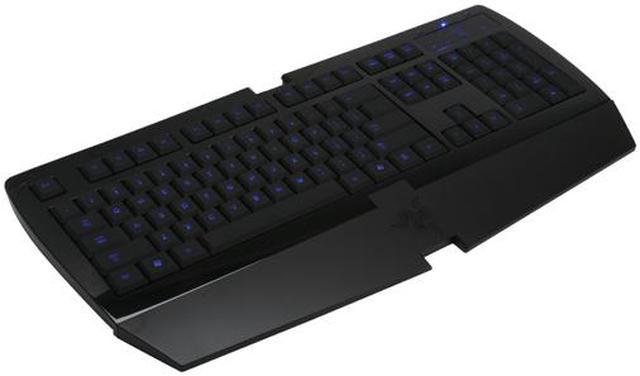
The Razer Lycosa gaming keyboard helps you keep a step ahead of your opponents! Everything about this keyboard is designed for premium gaming performance, from its grippy key surface to the backlit keys and WASD cluster lighting. The slim keycap keyboard is armed with Hyperesponse technology, so you can fire as rapidly as you like; Lycosa won't let you down in the heat of battle!
The keys are fully programmable and offer macro support, so you can assign your most oft-used commands single-keystroke execution. Switch among 10 software profiles on the fly, so you've always got the optimal configuration for the moment. A blue backlit media control TouchPanel gives you quick, easy control of your multimedia experience, too. No matter how fast the action gets, the Razer Lycosa gives you the edge you need to dominate the competition!
-
- 5
-

- 52%
- 4
-

- 17%
- 3
-

- 10%
- 2
-

- 10%
- 1
-

- 11%
| Product Rating: |
   
|
| Total Reviews: |
224 |
wait just one second
- Pros: looks really nice, feels really nice probably perfect for wasd players that never use the other side of the keyboard.
- Cons: if you're not a WASD player, BE AWARE you cannot use any combination of 2 arrow keys, and kp_0 (kp_ins) at the same time. for me this means i cant straif forward while crouched...... this is not a gaming keyboard, its a WASD player specific gaming keyboard, and its certainly not worth this much when 10$ boards work LIKE KEYBOARDS ARE SUPOSED TO WORK.
- Other Thoughts: useless to me so i must return it.
also, read on the razer site about this thing. it has assorted problems running out all over the place
when i asked razer support about this issue, they told me that my 8 year old logitech elite keyboard had "expanded antighosting" and thats why i never had this issue before. i can only assume this means they have some limited antighosting technology, and they are still advertising it like its important, when infact its not even as good as from my experience at least the vast majority of the cheap boards
-
Manufacturer Response:The Lycosa does have anti-ghosting technology on the WASD gaming cluster. The vast majority of all standard keyboards do not have anti-ghosting on these keys and the vast majority do not have anti-ghosting on the arrow keys and other keys mentioned. Trying holding down w, s, a and d on a typical keyboard and then try it on the Lycosa. You will see that the Lycosa can handle the action and a typical keyboard will not. If you want full anti-ghosting keyboard take a look at the Razer Tarantula.
Very Nice for FPS Gaming.
- Pros: This keyboard is very nice, it almost has the feeling of a laptop keyboard yet the spacing of the keys are as a normal keyboard. Everything is where is should be. The keys are nicely lit when the LED's are on. The touch keys are really nice. I love the fact that it has a headphone and mic jack on it.
- Cons: None really. Although i know sooner or later after use it might start to come apart.
- Other Thoughts: Take this advice from a pro player. This is as good as you can get as a keyboard for how small it is and how good of a quality it is. I will do another review a month from now.
| Model | RZ03-00180100-R3U1 |
| Keyboard Interface | USB |
| Design Style | Standard |
| Keyboard Color | Black |
| Type | Wired |
-
- 5
-

- 52%
- 4
-

- 17%
- 3
-

- 10%
- 2
-

- 10%
- 1
-

- 11%
| Product Rating: |
   
|
| Total Reviews: |
224 |
Stylish and clumsy don't mesh well
- Pros: Like many other popular alternatives, it has illumination of some sort; in this case quite linear. It's Razer therefore it is shiny, and ten years ago I might have bought it with stickers amongst the accessories--the only thing missing is a lollipop, but it keys quite well for general typing.
- Cons: Gaming with this is a pain, the lye of the keys are too low with no concave for said 'ergomatic accuracy'. The minimalistic design betrays itself when compared with the rhythmic response of say a Saitek Cyborg--all the bells and whistles are included, along with a sickening amount of illumination choices. I've found that in hectic moments of gaming I'll often slip off one of the lycosa's keys, usually causing a series of mistakes. The sleekness is a double edged sword: some gamers like it, others may have even worse experiences than me; the completely flaccid media keys are one of the largest touchpadfails of this generation of gaming perips. But hey, you get stickers.
- Other Thoughts: I think they should include carpal tunnel wrist bands instead of stickers and registration information for the contents. We are all doomed.
- Pros: -Keys are a perfect profile and resistance once you get used to them
-Rubberized keys feel good -Backlight is great -Completely blank when off, also a cool setting -Well designed without looking over-the-top
- Cons: Never use the USB port or headphone jack, I guess...
- Other Thoughts: Had this keyboard since it came out, and I have been more happy with it than any other computer-related purchase. It has a clean, professional design that fits with any setup and is more comfortable and accurate than the apple keyboard. I used to be a big fan of Logitech's keyboard offerings, but since I bought this I couldn't possibly own any other keyboard. Macro and function key buttons don't interest me in the slightest, so I was not upset that this is not burdened by them. I prefer to use this keyboard with the wrist rest off.
Decent Keyboard
- Pros: Low keystroke. Back lit keys for low light use. Multimedia touch panel easy to use, responsive. Macro software. Ability to disable Windows-key when gaming.
- Cons: Expensive, not worth the money for what I got. Not an especially great "gaming" keyboard. Has a mind of its own (see other thoughts).
- Other Thoughts: Decent keyboard for gaming in low light conditions. I've seen better. This board shines (pun intended) best in 2D environments, i.e., web surfing, chat, word processing, adobe, etc. As a side note, I haven't had a problem with ghosting yet, keys respond the way I want them to.
What has stumped me is that the keyboard gets into fits where it will incessantly start WMP over and over as I try to close it. Just yesterday, the keyboard started Modern Warfare 2 all by itself somehow. This keyboard replaced my Ideazon Zboard, in which I never had these issues. As soon as I started using this keyboard, programs like to start by themselves. In that case, I have to unplug the keyboard and plug it back in to stop the weirdness.
| Model |
| Brand |
RAZER |
| Model |
Lycosa |
| Keyboard Connection Type |
| Keyboard Interface |
USB |
| Keyboard SPEC |
| Design Style |
Standard |
| Palm Rest |
Detachable |
| Normal Keys |
104 |
| Keyboard Color |
Black |
| Type |
| Type |
Wired |
| Mouse Included |
| Mouse Included |
No |
| Features |
| Features |
Keytop with non-slip rubber finish
Backlight illumination with WASD cluster lighting option
Fully-programmable keys with macro capability
Gaming cluster with anti-ghosting capability
Slim keycap structure with Hyperesponse technology
TouchPanel easy access media keys
Gaming mode option for deactivation of the Windows key
10 customizable software profiles with on-the-fly switching
1000Hz Ultrapolling / 1ms response time
Earphone-out and microphone-in jacks
Detachable wrist rest
Compatible with all popular PC Game (such as world of warcraft, counterstrike, left 4 dead, mirror's edge) |
| Packaging |
| Package Contents |
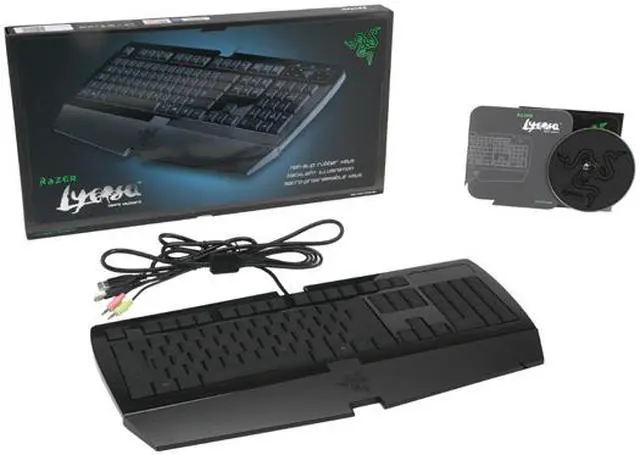
Keyboard, keyboard cord, Driver Disc |
Introduction
The Razer Lycosa gaming keyboard helps you keep a step ahead of your opponents! Everything about this keyboard is designed for premium gaming performance, from its grippy key surface to the backlit keys and WASD cluster lighting. The slim keycap keyboard is armed with Hyperesponse technology, so you can fire as rapidly as you like; Lycosa won't let you down in the heat of battle!
The keys are fully programmable and offer macro support, so you can assign your most oft-used commands single-keystroke execution. Switch among 10 software profiles on the fly, so you've always got the optimal configuration for the moment. A blue backlit media control TouchPanel gives you quick, easy control of your multimedia experience, too. No matter how fast the action gets, the Razer Lycosa gives you the edge you need to dominate the competition!
Highlights
 |
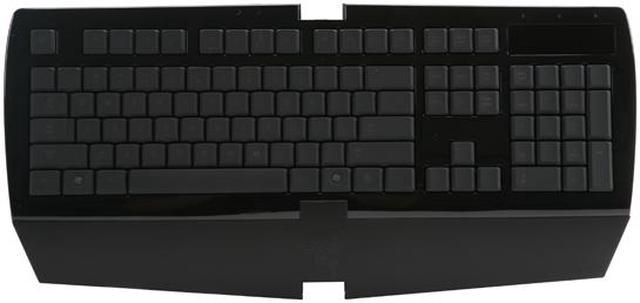
Ergonomic, Slim Keyboard Coated with a non-slip rubber finish, the ergonomic keyboard with a detachable wrist rest provides a natural resting position and added support for your hands and wrists for the ultimate comfort. The slim keycap structure with Hyperesponse technology provides better key response and a satisfying tactile feedback for optimum gameplay.
|
 |
Touchpanel Media Keys The RAZER Lycosa features touch-sensitive media controls so you can adjust the volume, play or pause music, skip tracks - all at a simple touch of a button.
|
 |
Backlight Illumination These illuminated key caps offer incredible visibility in both daylight and dark conditions. The backlighting makes even pitch-dark operation available possible without additional illumination. Three backlight modes are provided: off, on (all keys) and WASD cluster to suit different lighting needs.
|
 |
Customizable Keys and Profiles The RAZER Lycosa features fully-programmable keys with macro capability to enable instantaneous, multiple commands with a single keystroke. You can store up to 10 profiles for different applications or games and swap between them on-the-fly.
|
 |
Gaming Mode Gaming mode disables both Windows keys to prevent accidental activation of the Windows Start function so your game won't be interrupted.
|
 |
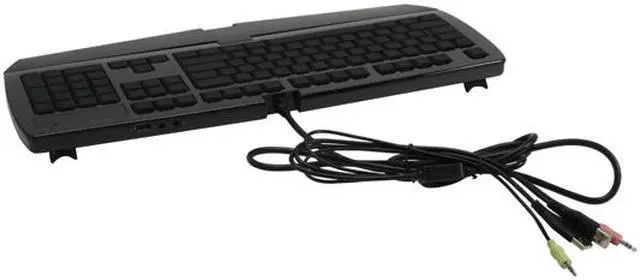
Built-in USB-Hub and Audio Ports The RAZER Lycosa features a built-in USB hub and MIC and headphone sockets for added connectivity.
|
Quick Specs
| Brand | RAZER |
| Design Style | Standard |
| Keyboard Color | Black |
| Normal Keys | 104 |
| Keyboard Interface | USB |
| Palm Rest | Detachable |
|