If you are visually impaired and are having difficulty navigating this site, please call our Customer Support line via our toll free number (800) 390-1119.

Newegg.com - A great place to buy computers, computer parts, electronics, software, accessories, and DVDs online. With great prices, fast shipping, and top-rated customer service - once you know, you Newegg.

If you are reading this message, Please click this link to reload this page.(Do not use your browser's "Refresh" button). Please email us if you're running the latest version of your browser and you still see this message.

Newegg.com - Computers, Computer Parts and Electronics

My Account

MyNeweggReviewsHelp & Info  
topNavRowBottom  
Home
Home. > 
Computer Hardware0_. > 
Input Devices1_. > 
Keyboards2_. > 
Logitech3_. > 
Item#:N82E16823126179
Logitech

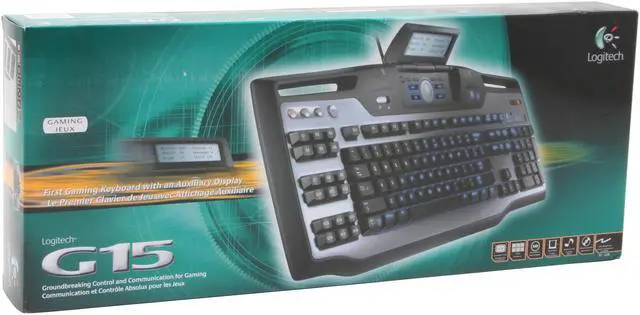
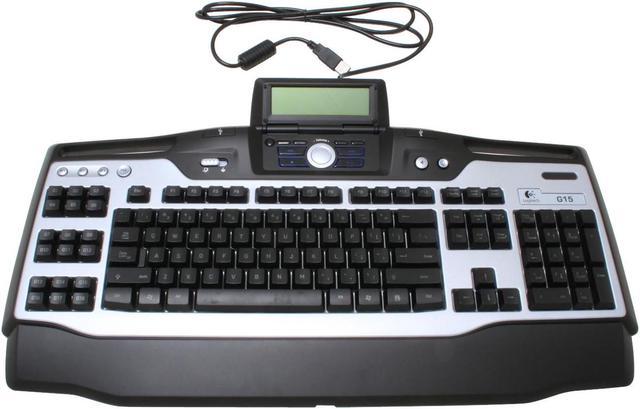
Logitech G15 2-Tone 104 Normal Keys 34 Function Keys USB Wired Standard Keyboard - Retail

newegg
Logitech 2-Tone Wired Keyboard - Retail
Image Viewer

Logitech 2-Tone Wired Keyboard - Retail Logitech 2-Tone Wired Keyboard - Retail Logitech 2-Tone Wired Keyboard - Retail Logitech 2-Tone Wired Keyboard - Retail Logitech 2-Tone Wired Keyboard - Retail
Currently Unavailable What's this?
Print This Page

Shop Similar Products

Similar Items

Not the product you're looking for? We can make some suggestions to help you decide on a product that fits your needs.
view similar products

Manufacturer InfoReturn Policies

Manufacturer Warranty

Beyond any applicable Newegg return policy, this item is warranted independently by the product's Manufacturer. Below is a summary provided for convenience only and may not be accurate or current. Use this link for full details.

  • Manufacturer Limited Warranty period (parts): 1 year
  • Manufacturer Limited Warranty period (labor): 0 day

Manufacturer Contact Info

Return Policies

This item is covered by Newegg.com's Standard Return Policy.

  • Return for refund within: 30 days
  • Return for replacement within: 30 days
  • Restocking Fee: Yes
OverviewCustomer ReviewSpecificationsProduct Tour
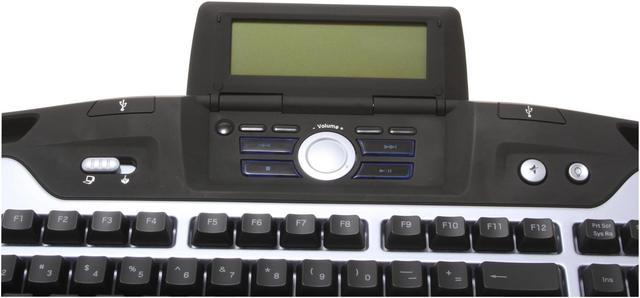
Imagine a full-featured weapons system for any game, right at your fingertips. The Logitech G15 gaming keyboard provides 18 programmable keys you can assign to any macro function within a game. In addition, you have a separate GamePanel LCD screen on the keyboard for critical in-game information, making this a killer choice for the dedicated player. Additionally, it allows you to set timers for keeping track of game events on the LCD.

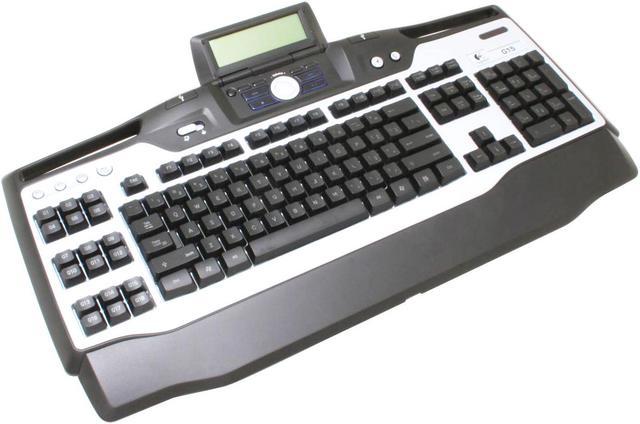
The eighteen "G Keys" have three shift states each that enable you to create 54 possible custom macros for each game. Additionally, the Macro Record button provides you with the option of making on-the-fly additions to your key programming set. The G15 features a switch that turns off the 'Windows' key and helps in preventing the accidental endings of your game even if you hit the button.

Three different levels of lighting can help you play comfortably in low-lit area, or even an otherwise dark room. Even controlling audio and video playback is easy, because the keyboard provides convenient media keys for playback. You can simply route the mouse, headset, or other cables using convenient channels under the keyboard, eliminating clutter and potential for accidents with drinks.

Review Summary (read more reviews)

5
newegg
77%
4
newegg
16%
3
newegg
4%
2
newegg
2%
1
newegg
1%
Product Rating:
Total Reviews: 874

Sturdy, innovative, classy, uncertain about applet support

white Reviewed By: Weaselsmasher on 3/21/2006
Rating + 5
Tech Level Tech Level: high - Ownership: 1 month to 1 year
Pros: This keyboard is a good example of what happens when a designer starts with a potential customer's needs, instead of "what's cool this week". Gamers will find the extra 18 keys to be very useful and the ability to disable the Windows keys during gaming is a godsend.

The LCD is the main innovation here. The idea is that plugins for various games will be written to display additional in-game information for quick reference. However, this will largely require support from the game authors to make the data available to the applet. Logitech includes a software development kit (SDK) to help you write your own applets (fo C programmers), and someone has written a Python wrapper for the SDK to let you write for the LCD in Python. Where do you get all this?


Other nice touches: two nonpowered USB ports (for your mouse), classy "non-blingbling" appearance, and quiet keys with a good feel. The blue backlight is pleasant and the keycaps are legible, backlit or not.
Cons: This keyboard is LARGE. Make sure you have the desktop real estate for it.

There have been reports of premature wear on the keycaps, though I have not seen any evidence of this on -MY- G15. Either this is due to a bad batch that slipped through QA, or the keycaps don't stand up to rough use (i.e. sweaty hands and long fingernails in an intense gaming session). This issue isn't fully settled yet, though the various forums I attend report that Logitech will replace your keyboard if you run into this problem.

The USB hub is not powered. This is not an issue unless you intend to recharge your iPod through the keyboard USB ports (you can recharge a Shuffle, but not a Nano via the Nano's USB cable).

Applet support is still largely in the "utility" category: reporting CPU temperatures, RAM utilization, email notification, etc. Game author cooperation will be needed.
Other Thoughts: This is a premium keyboard at a premium price. The macro keys are easy to program, and an editor/manager is also included (it will automatically detect which application/game is in the foreground and load your macros for that specific game). It's also reasonably classy in appearance (I don't go in for the garish "bling bling" style that is so common these days).

Ultimately, it's applet support which will determine this keyboard's success. Logitech needs to send a few of these keyboards to every major game development company to evangelize their product, and needs to operate a clearing-house to "bless" applets as non-malevolent (think about it... this is a device DESIGNED to record keystrokes).

If it all works out, though, this could be a very useful addition to a gamer's arsenal.
71 out of 72 people found this review helpful. Did you? Yes No

Crazy Good...

white Reviewed By: Crash on 12/29/2005
Rating + 5
Tech Level Tech Level: somewhat high - Ownership: 1 day to 1 week
Pros: G-Keys: G-keys are just great for MMOs or for everyday users. I don't play any MMOs, but I do use them a lot for shortcuts (I have them mapped for programs, file folders, etc). G-Keys coupled w/ the quick macro record and on-LCD instructions make recording new macros on the fly a piece of cake.
Backlit Keys: Night-gamers such as myself find this feature handy. Makes it very easy to find the hotkey your trying to look for.
"Gaming Mode": A switch turns off the use of the Windows key, which has been a hindrance to gamers for a long time now.
USB: Two USB ports are on the top of the keyboard for low power consumption devices.
LCD/Programs: The LCD comes stock with a Performance (CPU/RAM) Meter, Clock, and Media Display. Although these features are nice I guess they are limiting the true potential of the LCD. Don't get fooled by the pictures on sites and such that the LCD will display ammo count and life and such for all games.
Cons: USB: The USB ports although handy are only USB 1.1 and are obviously unpowered (who wants to plug a keyboard into a wall outlet??). Because of the already juicy power consumption of the keyboard (It really doesn't take all that much power, but in relation to a normal keyboard it chugs juice) there isn't much juice left for those 2 ports to use. About the only use for them is a mouse.
LCD: There isn't much support for the LCD although thanks to open source community and Logitech supplying the LCD SDK there will hopefully be many more apps soon.
Misc: It has everything a gamer could want, besides a cupholder :P
Other Thoughts: Even though the LCD doesn't have many apps out of the box there are a few good places out there that support this LCD. I've heard that a prog called LCDHype can output to the G15 LCD, but since I haven't tried it don't take my word for it. However, there is a program called LCDStudio that works spectacularly with the display. It requires a license to use, but the license is free... all you gotta do is hop on the site at www.lcdstudio.com and get yourself one. I currently have mine displaying a screen saver picture, CPU and RAM stats, HD space, date, time, and network statistics and it does it seamlessly.

I wasn't able to get my keyboard from NewEgg because I had to use my Bxxt Bxy :-( gift cards. But either way, NewEgg rocks!!!!!!!
56 out of 57 people found this review helpful. Did you? Yes No

Quick Specs (view all30)

Model967599-0403
Keyboard InterfaceUSB
Design StyleStandard
Keyboard Color2-Tone
TypeWired

Review Summary (read all 874 Reviews)

5
newegg
77%
4
newegg
16%
3
newegg
4%
2
newegg
2%
1
newegg
1%
Product Rating:
Total Reviews: 874

Good Keyboard

white Reviewed By: Wesleysnipez on 5/15/2008
Rating + 5
Tech Level Tech Level: high - Ownership: more than 1 year
Pros: I love this keyboard a lot. Used it in many of games. The back lighting on this keyboard is good. I heard others had problem with keys losing it paint but it hasn't happened to mine yet. Never had problem with it yet.
Cons: Only thing I hate about this keyboard it can get dirty easy. Other then that I have no beef with it.
Other Thoughts: I got keyboard when first came out and had problems finding one. But if knew about Newegg back then I would had ordered it from you guys. Because I have order many stuff from you and had no problems with the orders. Just as wrote this I be ordering from you again in near future.
Did you find this review helpful? Yes No

Great keyboard

white Reviewed By: Angryhob0z on 4/30/2008
Rating + 5
Tech Level Tech Level: average - Ownership: more than 1 year
Pros: Great layout, plenty of extra keys for your various needs. Media buttons are nice, the display is great, still going strong after a year of heavy use. Keys have not worn out. The windows key shutoff switch is VERY nice for gaming!
Cons: The board appears to be lit up by a small number of LED's or a few clusters of LED's. After a year, 2 LED's or clusters of them are starting to wear out. Sporadic erratic flickering of the LED's are the only thing I've had go wrong with this keyboard in the 14 months I've owned it. The 2 LED's (clusters) that are wearing down are the ones that light up the ESC key down, and from the left end of the main key cluster in to the "3-W-S-X-ALT" keys, and the "0-p-;-.-WINDOW" keys to the right end of the main key cluster.
Other Thoughts: I was leery when I purchased this keyboard because every review I read said the keys wore off after only a few months of use. This was not the case with my keyboard, I've had this for over 14 months and none of the keys are wearing off yet. I also read in a review some time ago that the keyboard didn't work in BIOS, this was not the case with mine. I have an ASUS P5B-E Deluxe MOBO and this keyboard DOES work in the bios. The only other aspect of the keyboard that bugs me is that fact that there aren't very many applets for the LCD. But this shouldn't deter you from buying this keyboard! Especially if you are a code monkey!
1 out of 2 people found this review helpful. Did you? Yes No

Loving it

white Reviewed By: Six on 4/21/2008
Rating + 5
Tech Level Tech Level: high - Ownership: more than 1 year
This user purchased this item from Newegg
Pros: They fixed the Key Wearing issue, Simple enough to use for beginners and advanced enough for those who want more. illuminated keys nice when the lights go out for better gaming
Cons: Not as many apps support LCD as there could be. The Updates advertise many games being "Supported" which merely means that the macro's will work in game, doesn't always detect games and support doesn't mean LCD app is included ( :( No Crysis)
Other Thoughts: Logitech gets another one right!
1 out of 1 people found this review helpful. Did you? Yes No
Model
Brand Logitech
Model G15
Keyboard Connection Type
Keyboard Interface USB
Keyboard SPEC
Design Style Standard
Palm Rest Detachable
Normal Keys 104
Function Keys 34
Keyboard Color Silver/Black
Windows Vista Works with Windows Vista
Type
Type Wired
Mouse Included
Mouse Included No
OS / System Requirement
System Requirement 1 USB Port; CD-ROM Drive
Features
Features View game stats. Use the GamePanel LCD to view game stats, create new macros, and keep track of important system information without leaving the game. The LCD panel closes completely for transport and storage.
Play in the dark. Illuminated characters are easily visible in both bright- and low-light conditions, with three levels of backlighting for late-night gaming sessions.
Create and save macros with a press of a button. 18 fully programmable “G Keys” have three shift states each, for 54 possible custom macros per game
Eliminate cable hassles! Intelligently route mouse, headset, or other cables using convenient channels under the keyboard.
Record custom key sequences. Make on-the-fly additions to your key programming set with Macro Record button.
Watch and listen. Convenient media keys for easy management of audio and video playback.
Packaging
Package Contents Logitech G15 Gaming Keyboard
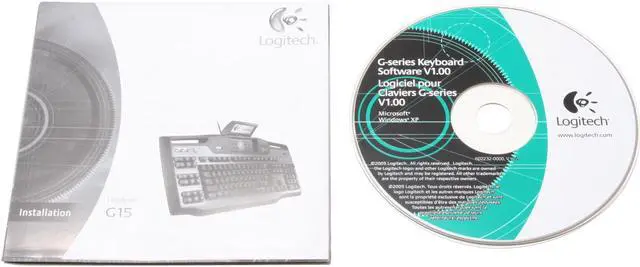
Installation CD with GamePanel software
User Guide
Manufacturer Warranty
Parts 1 year limited

Introduction

Imagine a full-featured weapons system for any game, right at your fingertips. The Logitech G15 gaming keyboard provides 18 programmable keys you can assign to any macro function within a game. In addition, you have a separate GamePanel LCD screen on the keyboard for critical in-game information, making this a killer choice for the dedicated player. Additionally, it allows you to set timers for keeping track of game events on the LCD.

The eighteen "G Keys" have three shift states each that enable you to create 54 possible custom macros for each game. Additionally, the Macro Record button provides you with the option of making on-the-fly additions to your key programming set. The G15 features a switch that turns off the 'Windows' key and helps in preventing the accidental endings of your game even if you hit the button.

Three different levels of lighting can help you play comfortably in low-lit area, or even an otherwise dark room. Even controlling audio and video playback is easy, because the keyboard provides convenient media keys for playback. You can simply route the mouse, headset, or other cables using convenient channels under the keyboard, eliminating clutter and potential for accidents with drinks.
Quick Specs

BrandLogitech
Design StyleStandard
Keyboard Color2-Tone
TypeWired
Keyboard InterfaceUSB
Normal Keys104
Palm RestDetachable
Home
Home. > 
Computer Hardware0_. > 
Input Devices1_. > 
Keyboards2_. > 
Logitech3_. > 
Item#:N82E16823126179
NeweggBusiness
For Business Needs
EggXpert.com
Newegg Community
|NeweggMall.com
Shop Multiple Retailers
Shop by Region: United States | Canada | China
VeriSignReseller RatingsReliability Seal1This site protected by Trustwave's Trusted Commerce programInc500
Policy & Agreement | Privacy Policy | NeweggBusiness | Newegg Canada  © 2000-2010 Newegg Inc.  All rights reserved.
If the Adobe Reader does not appear when you click on a link for a PDF file, you can download Adobe Reader from the Adobe web site. nassau