Skip to: |

Newegg.com - A great place to buy computers, computer parts, electronics, software, accessories, and DVDs online. With great prices, fast shipping, and top-rated customer service - once you know, you Newegg.

If you are reading this message, Please click this link to reload this page.(Do not use your browser's "Refresh" button). Please email us if you're running the latest version of your browser and you still see this message.

Newegg.com - Computer Parts, Laptops, Electronics, HDTVs, Digital Cameras and More!

  • | Wish List
  • Help
Search all
Search
Home
Home > 
Gaming > 
PC Games & Accessories > 
PC Game Controllers > 
Logitech > 
Item#: N82E16826104629

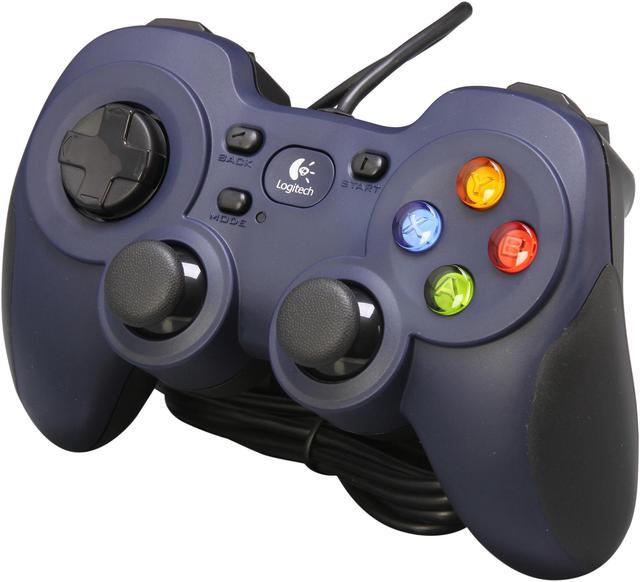
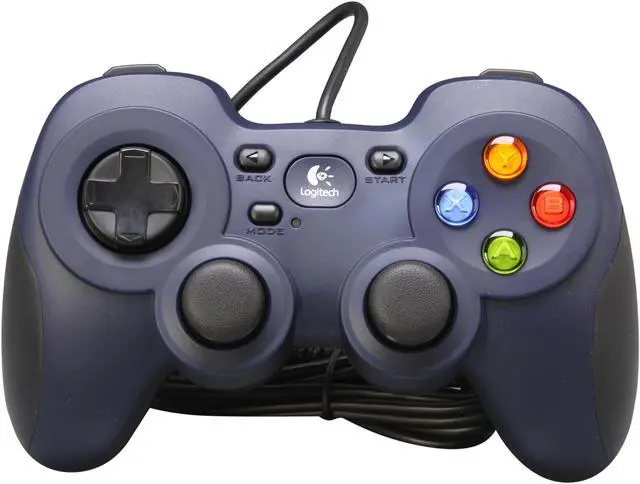
Logitech F310 Gamepad with broad game support and customizable buttons

Refurbished newegg

  • Broad game support-works with popular new titles and old favorites
  • Customizable with Profiler software(requires software installation)
  • 10 programmable buttons, 8-way programmable D-pad
  • Simple plu
  • Pin It
  • Email this page
ICON Loading...

Console-style control for your PC games

Experience the console-style gaming you crave on your PC with the Gamepad F310. Easy to use with familiar shape and layout, it allows you to plays games right out of box without relearning new gamepad settings. With broad game support, you can play any kind of games such as sports, action and shooter.. Programmable controls allow for a more custom experience, while its floating D-pad enables quick response. Just plug it in and get ready to play the way you like: to win.
 

  • newegg Broad Game Support From old standbys to today’s biggest titles, the Logitech Gamepad F310 is easy to set up and use with your favorite games.
  • newegg Profiler software For games without native gamepad support, you can customize your experience with fully programmable controls that can emulate keyboard and mouse inputs.
  • newegg Familiar button layout You control the action. A familiar shape and button layout gets you in the game faster without having to relearn new gamepad settings.
  • newegg Floating D-pad The D-pad rests on four switches—instead of a single pivot point—making it responsive to quick changes in direction.
  • newegg Comfort grip You can play longer with less effort.
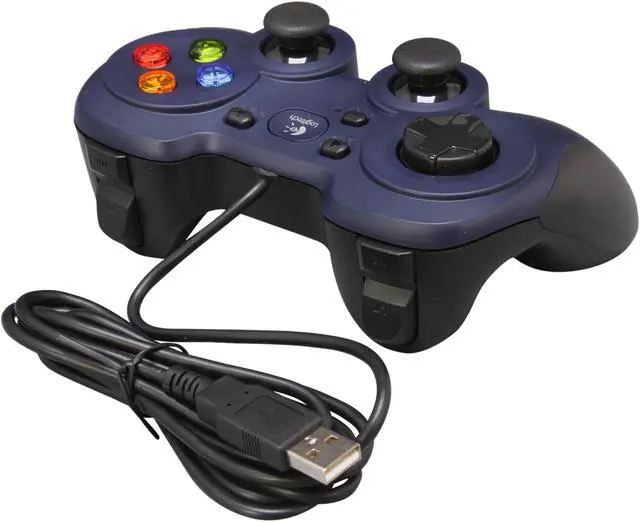
  • newegg Go the distance With six feet of cable, you can lean back and play a comfortable distance from your PC monitor.

Learn more about the Logitech F310

Model

Brand
Logitech
Model
F310

Features

Features
Broad game support-works with popular new titles and old favorites
Customizable with Profiler software(requires software installation)
10 programmable buttons, 8-way programmable D-pad
Simple plug-and-play USB connection-works with Windows XP, Vista and 7

Packaging

Package Contents
Gamepad
User documentation

Manufacturer Warranty

Parts
90 days limited
Labor
90 days limited

Quick Info

Warranty

  • Limited Warranty period (parts): 90 days
  • Limited Warranty period (labor): 90 days


Customer Reviews of the Logitech F310

Do you own this product? Write a Review

Filter Results

Go
  • Vale
  • 6/4/2013 6:48:41 PM
  • Tech Level: Somewhat High
  • Ownership: less than 1 day
  • Verified Owner

1 out of 5 eggsDoA

Pros: If it works, it's solid controller

Cons: Apparently, mine came on DoA. I thought I could fix it, which is stupid of me, and try to open and recombine things. now I can't get it replaced.

Other Thoughts: Well, this is the first time I got defective refurbish product that newegg sells. So yeah, guess this is a karma coming back for being a cheapo.

Did you find this review helpful? Yes No

  • Birdsht
  • 5/29/2013 9:03:31 PM
  • Tech Level: High
  • Ownership: 1 week to 1 month

5 out of 5 eggsCompletely Satisfied

Pros: Works as expected. Profiler software works great for games that need help mapping. I read some pretty poor reviews and after trying precision car racing games like Grid 2 among other games, mine is flawless. I would buy again

Cons: No obvious issues or flaws. Software can be a bit tough but it has alot of options and capabilities

Did you find this review helpful? Yes No

  • N/A
  • 5/27/2013 9:20:18 AM
  • Tech Level: Somewhat Low
  • Ownership: more than 1 year
  • Verified Owner

5 out of 5 eggsNo Problems

Pros: Very durable and reliable. I got this on sale and it really is so much more fun to play certain games on this controller than on a keyboard.

Cons: Sometimes when I press one of the back right buttons I hear a spring sound but it continues to work just fine.

Other Thoughts: Just a simple, dependable controller. Fits comfortably in your hands. Easy installation and comes with a 'profiler' application for customizing your buttons. For the money, well worth it.

Did you find this review helpful? Yes No

  • Bluelol
  • 5/26/2013 1:57:38 PM
  • Tech Level: Somewhat High
  • Ownership: 1 week to 1 month
  • Verified Owner

5 out of 5 eggsGreat for less than 15 bucks!

Pros: -The controller is very comfortable
-Controller is very familiar in format
-Easy to understand
-Works as gamepad in games that allow gamepads - X mode only
-Works as keyboard/mouse, and you are free to assign each button a command - D mode only
-Very affordable! got it for a little over 10 dollars.
-Nice color, feel, etc.
-Xbox/PS hybrid layout is very unique and practical.

Cons: -Refurbished, has a few scuffs on the paint. You can tell it was used.
-Non-analog joysticks - Forget about playing racing games on these
-Left joystick button a little hard, so running in most games is gonna be a little harder than usual
-No drives, manual, or anything that came with it.

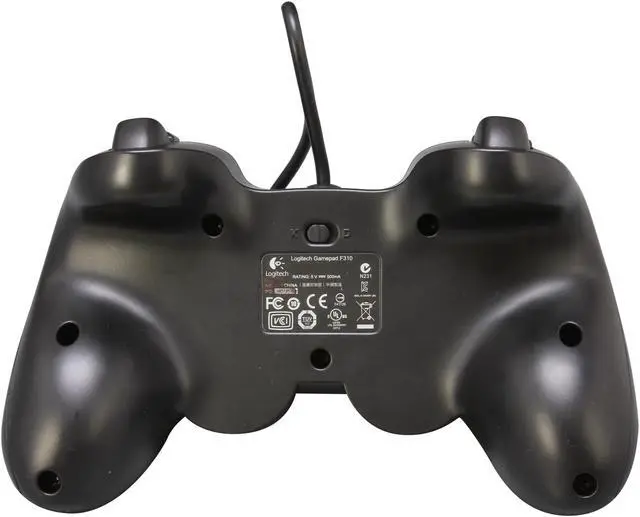
Other Thoughts: If you are having trouble understanding how the controller works, or you think it isn't working, it is because THE SWITCH ON THE BACK is probably on D MODE. D mode is only for input as keyboard/mouse and you'd need either the Logitech Gaming Software, or Pinnacle Controller Software. Go ahead and switch it to X MODE and that will be direct input. Games will recognize it as a gamepad, and you will be able to assign commands ingame.

The MODE button, is to switch the +Pad and left joystick around. Leave it off and the pad will be the pad, and the joystick the joystick. If it's on, they will switch functions.

Did you find this review helpful? Yes No

  • N/A
  • 5/24/2013 12:59:02 PM
  • Tech Level: Somewhat High
  • Ownership: 1 day to 1 week
  • Verified Owner

4 out of 5 eggs

Pros: It works perfectly fine and it was 1/2 the price cause being refurbished.

Cons: The gaming profile which was set up for mass effect didn't work. It caused the game to constantly spin right and at first I thought it was a broken joystick. I checked though and the analog stick works fine in other programs so it's a gaming profile which needs to be fixed I think

Did you find this review helpful? Yes No

  • JMAN9295
  • 5/19/2013 5:16:10 AM
  • Tech Level: Average
  • Ownership: 1 day to 1 week
  • Verified Owner

3 out of 5 eggsFlimsy

Pros: It was cheap and it works.

Cons: It is cheap. No rumble motors. The triggers are too tight, you need to put an unnecessary amount of pressure on them to push them down. Without instructions (since it is refurbished) it took about 30 minutes to figure out that the little switch hidden on the back needed to be moved from "D" to "X" to make it work. There should only be one setting. I have no idea what "D" mode it, but "X" mode makes it work with the Xbox 360 controller drivers for Windows. The Xbox 360 controller is so much better. This one is like a Playstation controller which hasn't changed in like 20 years. Nobody uses the d-pad as the primary, everyone uses the left joystick and Xbox cleverly put it on top.

Other Thoughts: I usually prefer Logitech over other brands since most of the Logitech items I have purchased in the past were better than similar items made by different brands such as keyboards, mice, speakers and headphones. This particular game pad is not very good and not worth the price. It feels like a cheap Chinese knockoff, which I have made the mistake of buying in the past. Even at the refurbished price of $12, I think it is better to just spend another $10 and buy an Xbox 360 controller. The Playstation style controller is not comfortable and this Logitech makes it even worse with the hard triggers. The Xbox 360 controller was designed to fit in your hand perfectly and not put your thumbs and fingers in any awkward positions no matter what combination of buttons you are pressing. The Logitech Playstation controller is more likely to give you carpel tunnel than the 360.

Did you find this review helpful? Yes No

  • N/A
  • 5/18/2013 3:48:50 AM
  • Tech Level: Somewhat High
  • Ownership: 1 week to 1 month
  • Verified Owner

5 out of 5 eggsNewEgg Rulez

Pros: The f310 is great, we all know that. But kudos to NewEgg for
once again beating the larceny out of those slimy patent trolls.
NewEgg is my kind of company. Sempre Fidelis

Cons: Nope.

2 out of 2 people found this review helpful. Did you? Yes No

  • N/A
  • 5/17/2013 2:14:11 PM
  • Tech Level: Somewhat High
  • Ownership: less than 1 day
  • Verified Owner

2 out of 5 eggsJoystick deadzone

Pros: Refurb looks and feels like new.

Cons: Joystick deadzones are large. I read about it and hoped it wouldn't be a problem for me. However, I can move my joystick about halfway to the edge without getting a response. I think it's a bit too much even for games like DMC.

Did you find this review helpful? Yes No

  • N/A
  • 5/17/2013 11:31:13 AM
  • Tech Level: Average
  • Ownership: 1 day to 1 week
  • Verified Owner

1 out of 5 eggsDisappointed

Pros: The drivers installed properly right away and it was ready to use, but then it didn't work properly.

Cons: The controller was broken when I received it. The right trigger and joystick did not work at all and the left joystick was permanently stuck in the forward position. They clearly did not do anything to "refurbish" this controller and I got stuck with it.

Other Thoughts: Unfortunately I could not get a refund, I could only return it for a replacement. Then I found out I would have to pay for shipping to send this one back. I did not want to pay to send it back and risk getting another broken controller so I am going to eat the money I spent on it. Just buy a new controller and don't risk getting stuck with a broken one.

Did you find this review helpful? Yes No

  • FiendKing04
  • 5/15/2013 4:31:01 PM
  • Tech Level: High
  • Ownership: less than 1 day
  • Verified Owner

5 out of 5 eggsFantastic product; very highly recommended!

Pros: My brother has two of these wired ones plus a wireless and they all work great, so I figured I'd get one as well; plugged it in, and it immediately turned on (after the drivers installed of course). Played several games with it and no issues. Definitely worth every penny!

Cons: None that I can think of!

Other Thoughts: I already have a Logitech keyboard/mouse combo, so it only made sense to get a Logitech gamepad. We love you Newegg and Logitech!

Did you find this review helpful? Yes No

ICON Loading...

Protect Your Investment!

Are you an E-Blast Insider? Subscribe Newegg e-Blast

Buzz

A Decent Deal

4 out of 5 eggs
Cheap, Refurbished and it still works okay
— elgordodude 2/4/2012

4 out of 5 eggs
** 12 buttons (not just 10! The L/R sticks can be pushed in) ** a "mode" button to ...
— 12/29/2011


PayPal
Shop without retyping payment details. Secure shopping made faster.
Check out with PayPal.

Financing


Home
Home > 
Gaming > 
PC Games & Accessories > 
PC Game Controllers > 
Logitech > 
Item#: N82E16826104629
LOADING... LOADING...
Shop by Region: United States | Canada | China
VeriSign Click for the BBB Business Review of this Computers - Supplies & Parts in Whittier CAThis site protected by Trustwave's Trusted Commerce program Inc500
Policy & Agreement | Privacy Policy  © 2000-2013 Newegg Inc.  All rights reserved.
If the Adobe Reader does not appear when you click on a link for a PDF file, you can download Adobe Reader from the Adobe web site. nassau