If you are visually impaired and are having difficulty navigating this site, please call our Customer Support line via our toll free number (800) 390-1119.

Newegg.com - A great place to buy computers, computer parts, electronics, software, accessories, and DVDs online. With great prices, fast shipping, and top-rated customer service - once you know, you Newegg.

If you are reading this message, Please click this link to reload this page.(Do not use your browser's "Refresh" button). Please email us if you're running the latest version of your browser and you still see this message.

Newegg.com - Computers, Computer Parts and Electronics

My Account

MyNeweggReviewsHelp & Info  
topNavRowBottom  
Home
Home. > 
Computer Hardware0_. > 
Input Devices1_. > 
Mice2_. > 
Microsoft3_. > 
Item#:N82E16826105074
Microsoft

Microsoft SideWinder Mouse - Retail

newegg
Microsoft SideWinder Mouse - Retail
Image Viewer

Microsoft SideWinder Mouse - Retail Microsoft SideWinder Mouse - Retail Microsoft SideWinder Mouse - Retail Microsoft SideWinder Mouse - Retail
360 View

$64.99

$7.56 Std. Shipping*
Add item to Cart
Add item to Wish List
Email This Page
Print This Page
Price Alert


Extended Warranty Available

expand for details

* Std. Shipping is not available to AK, HI and PR.

Special Offers

NPA

No interest for up to 12 months. Minimum purchase required.
Subject to credit approval. Details


BML

No Payments for up to 6 months.  Minimum purchase required.
Subject to credit approval. Details

Similar Items

Not the product you're looking for? We can make some suggestions to help you decide on a product that fits your needs.
view similar products

Combos & EssentialsManufacturer InfoReturn Policies

Manufacturer Warranty

Beyond any applicable Newegg return policy, this item is warranted independently by the product's Manufacturer. Below is a summary provided for convenience only and may not be accurate or current. Use this link for full details.

  • Manufacturer Limited Warranty period (parts): 1 year
  • Manufacturer Limited Warranty period (labor): 1 year

Manufacturer Contact Info

Return Policies

This item is covered by Newegg.com's Standard Return Policy.

  • Return for refund within: 30 days
  • Return for replacement within: 30 days
  • Restocking Fee: Yes
OverviewCustomer ReviewSpecificationsProduct Tour
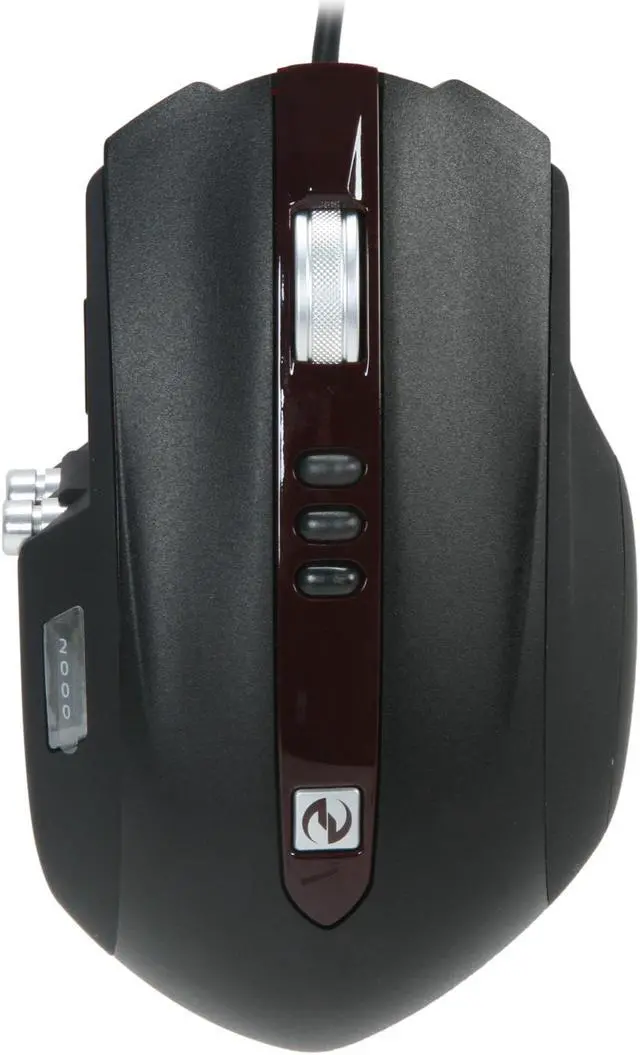
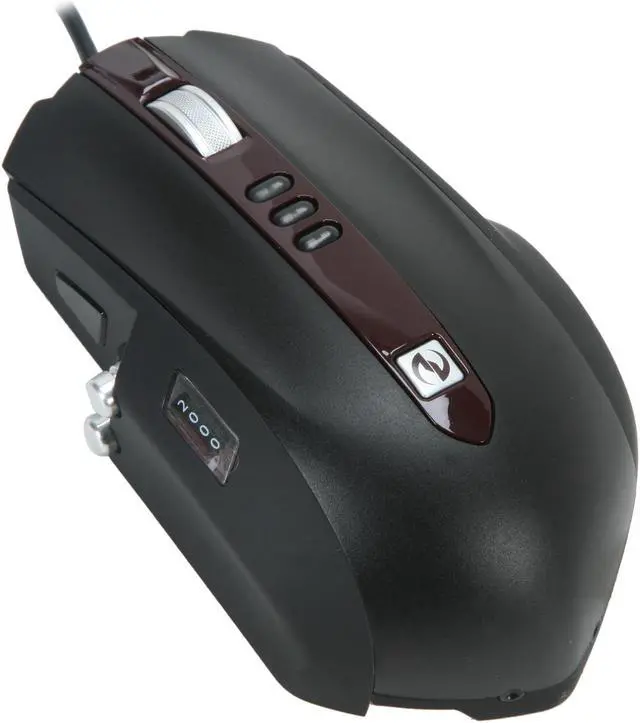
The Microsoft SideWinder mouse features three buttons to switch between 400, 800 and 2000dpi. The image processing is 7080 frames per second, max acceleration at 20 G, max speed at 45 inches per second. Its buttons qualifies 9 million clicks which mean that as your gaming skills growing for years, this piece of weapon will still be there.

Elevate your skills with a revolutionary mouse designed to provide you with unprecedented performance, handling, and adaptability. Customize your mouse with every game you play using advanced software and adjustable accessories. Use the first ever LCD display on a gaming mouse for macro recording and DPI settings to reduce on-screen interference during game play.

Review Summary (read more reviews, write a review)

5
newegg
59%
4
newegg
20%
3
newegg
9%
2
newegg
9%
1
newegg
3%
Product Rating:
Total Reviews: 143

Outstanding Mouse!

white Reviewed By: Ideal Paradigm on 11/2/2007
Rating + 5
Tech Level Tech Level: average - Ownership: 1 month to 1 year
This user purchased this item from Newegg
Pros: This mouse is great and innovative. Microsoft's new approach to having side buttons vertically aligned rather than horizontally aligned along the side of the mouse for the thumb is great. Depressing the side thumb buttons is extremely simple and it is quite noticeable, the thumb buttons click like the left and right buttons. The way the mouse is shaped overall is perfect for the way I game, I play games like Quake 4 and Counter-Strike: Source, and my right ring finger has perfect comfortable placement on the mouse. I think the mouse has a great aesthetic look to it compared to its competition the Logitech G9.
Cons: I can't really think of any cons unless you use macros excessively. I don't use macros, so the macro button placement isn't a big deal for me, I don't find it a problem though. If you're REALLY addicted to DPI, then maybe it's not high enough for you, however, I would have to say that most pro gamers don't use above 2000 DPI, which is the maximum for this mouse, so I don't think it's a problem, I've been gaming competitively for about 7 years in leagues like CAL and I use 1600 DPI on my mouse. I would have to say if you really are addicted to DPI and it's the number that sells the mouse (though other factors of the mouse should play their part as well) then you should go with the Logitech G9 (3200 DPI) or the Razer Lachesis (4000 DPI). I could see this mouse being a problem, because others have stated before that the mouse is too big, but I don't find that a problem, and I don't have large hands.
Other Thoughts: I don't know how other people are having problems about this mouse. My hand is not that large, and I don't have a problem with it, I would say that my hand is about medium size, and I think my hand fits the mouse perfectly. I like to cup my hand a little higher than normal (mice like the Razer Diamondback are a little too thin for me in terms of how much mouse there is between the desk and your hand vertically). I think the mouse is perfect for hand placement if you like to curl your hand. The left and right clicks are even more solid than the Intellimouse series, which is a big plus. The tip of my thumb can reach both of the side buttons without having to stretch, so it's fine to me. The weight system is great, I'm currently using 10 grams right now. I think the mouse is quite sturdy, and a good buy, it came down to either the Logitech G9 or the Microsoft Sidewinder, I went to my local Electronics store and I tried both of them out and I was sold for the Microsoft Sidewinder.
6 out of 6 people found this review helpful. Did you? Yes No

Pretty nice

white Reviewed By: systmdfect on 10/15/2007
Rating + 5
Tech Level Tech Level: high - Ownership: 1 week to 1 month
Pros: Very form fitting. 2000 dpi. Scroll wheel feel nice, not as loose ase my mx518 was. Thumb buttons are in a great position. I've accidentaly hit them many times, but because of how they are situated they only activate if you want it to. Adjustable weights and adjustable feet. It really does look cool, kinda evil too...
Cons: Built in macro button on a mouse? I guess I don't have any games that would take advantage of that.
Other Thoughts: The leds are red. Could be a con or a pro depending on your preferences.
4 out of 4 people found this review helpful. Did you? Yes No

Quick Specs (view all30)

ModelHKA-00001
TypeWired
InterfaceUSB
Hand OrientationRight Hand
Scrolling Capability1 x Wheel

Review Summary (read all 143 Reviews, write a review)

5
newegg
59%
4
newegg
20%
3
newegg
9%
2
newegg
9%
1
newegg
3%
Product Rating:
Total Reviews: 143

It's Ok

white Reviewed By: jallious on 1/26/2010
Rating + 4
Tech Level Tech Level: somewhat high - Ownership: 1 month to 1 year
This user purchased this item from Newegg
Pros: It's pretty, and glows red. Has multiple DPI settings right on the mouse for sniper excellency. Sturdy mouse wheel.
Cons: The side buttons are in good places, but occasionally they'll have a macro I don't remember putting in, and my mouse will start ghosting, like typing things on the computer and opening files. Sort of annoying. It seems somehow dated. Probably from the material it's made out of. I checked out the 'Wire Holder' it comes with and love the material on that. I wish the mouse was made out of that instead.
Did you find this review helpful? Yes No

Worth the price

white Reviewed By: on 1/14/2010
Rating + 5
Tech Level Tech Level: high - Ownership: less than 1 day
This user purchased this item from Newegg
Pros: Side buttons aren't too sensitive like other mice that I have used. It is very comfortable and the weight of the mouse can be changed. The mouse slides nicely, and the DPI switching is awesome. Cant wait to use this for gaming tonight.
Cons: It took me a bit to figure where my preferred DPI setting was...I ended up turning it to max and then switching the mouse movement speed, works just the way I like it now.
Other Thoughts: UPS Was fast...Arrived one day early! :D

It was worth the price, though I am a hardcore gamer and I am willing to pay much extra for slightly better products.
Did you find this review helpful? Yes No

awesome mouse

white Reviewed By: on 12/31/2009
Rating + 5
Tech Level Tech Level: high - Ownership: 1 week to 1 month
Pros: great feel to it, the cord holder is a huge help in managing the pull from the cord, and the mouse glides great with teflon feet.
Cons: software included is old but it does take you to the new download.
Did you find this review helpful? Yes No
Model
Brand Microsoft
Model SideWinder
Type Wired
Spec
Interface USB
Hand Orientation Right Hand
Scrolling Capability 1 x Wheel
Color Black
Maximum dpi 2000 dpi
OS / System Requirement
Operating System Supported Windows Vista or Windows XP
System Requirement 1 USB Port; CD-ROM Drive
Features
Features Shape Designed for Handling
The unique shape and button positions are engineered for fast, comfortable, precise gaming action.

On-the-Fly DPI Switching
Three buttons instantly switch between DPI 400, 800, and 2000 - or you can customize settings using special software.

First-Ever LCD Display on a Mouse
DPI settings and macro recording icons are displayed on the mouse to reduce on-screen interference.

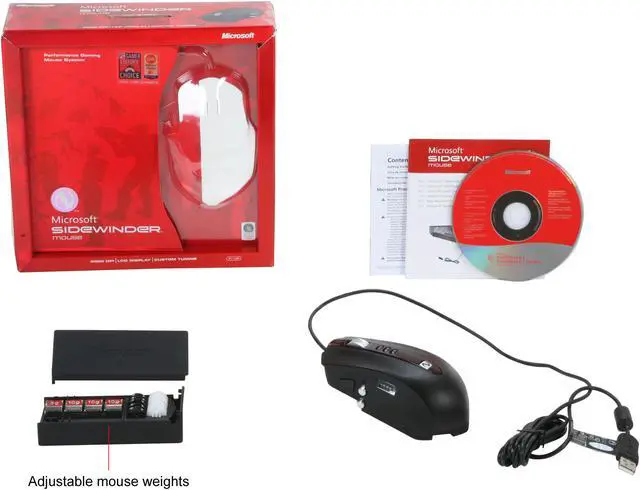
Cable Anchor + Accessories Storage Box
Enjoy wired performance with the feel of wireless, easily adjust your cable configuration, and conveniently stow away your accessories.

Quick Launch Button
One-touch takes you to Games Explorer in Windows Vista. Easily access your games on your PC.

Device Stage
Quickly and easily access common tasks, including product information, registration, settings and more for popular devices such as cell phones, cameras, printers, and mouse, keyboard and webcam products.

5 Programmable Main Buttons
Customize your main gaming buttons to your preference.

Advanced Gaming Software
Buttons and switches can be assigned on the fly, you can program macros and profiles, and game settings can be customized for fast action.

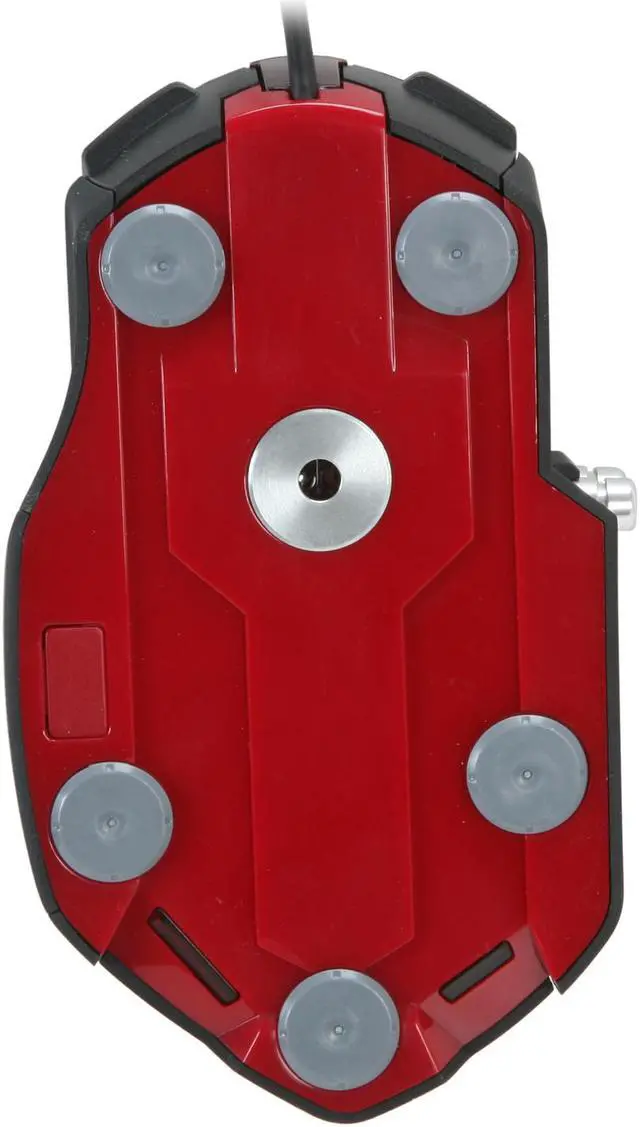
Replaceable Mouse Feet
Choice of three different materials for glide preference.

Wide Metal Scroll Wheel
Better feel and response with detent clicking action.

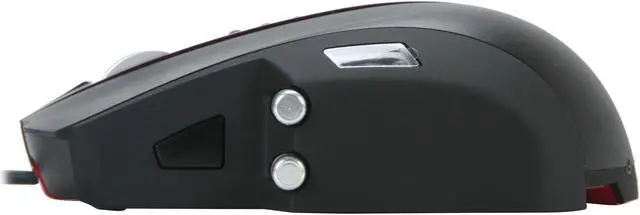
Vertical Metal Side Buttons
The top/bottom design makes locating the side buttons easier and reduces the inadvertent actuation risk.

Adjustable Mouse Weights
Select your preference of mouse weight with the included 4 weights, giving you the choice to adjust your mouse weight anywhere between 5 and 30 grams in 5 gram increments.

RESOLUTION: 2000 dpi
IMAGE PROCESSING: 7080 frames per second
MAX ACCELERATION: 20 G
MAX SPEED: 45 inches per second
USB REPORTING: 500 Hz
GLIDE: 3 sets of different mouse feet (for glide preference)
BUTTONS (Left/Right): 9 million clicks
Manufacturer Warranty
Parts 1 year limited
Labor 1 year limited

Introduction

The Microsoft SideWinder mouse features three buttons to switch between 400, 800 and 2000dpi. The image processing is 7080 frames per second, max acceleration at 20 G, max speed at 45 inches per second. Its buttons qualifies 9 million clicks which mean that as your gaming skills growing for years, this piece of weapon will still be there.

Elevate your skills with a revolutionary mouse designed to provide you with unprecedented performance, handling, and adaptability. Customize your mouse with every game you play using advanced software and adjustable accessories. Use the first ever LCD display on a gaming mouse for macro recording and DPI settings to reduce on-screen interference during game play.

Highlights

newegg Ergonomics
The Microsoft SideWinder's comfortable shape offers superb handling and control while the wide metallic scroll wheel offers better response with detent clicking action.
newegg Custom Tuning
The SideWinder features three DPI switching buttons supporting Macro recording by using the included software, so you can customize settings with every game you play.
newegg LCD Display on a Mouse
The Microsoft SideWinder equips a LCD to display DPI settings and macro recording icons, reducing on-screen interference.
newegg Cable Anchor + Accessories Storage Box
You can easily adjust your cable configuration and conveniently stow away your accessories to enjoy wired performance with the feel of wireless.
newegg Quick Launch Button
The Microsoft SideWinder features a Quick-Launch button that provides one-touch access to Microsoft PC Gaming features in Vista/7 or the IntelliPoint mouse software in XP.

Quick Specs

BrandMicrosoft
ColorBlack
Hand OrientationRight Hand
InterfaceUSB
Maximum dpi2000 dpi
Scrolling Capability1 x Wheel
System Requirement1 USB Port; CD-ROM Drive
TypeWired
Home
Home. > 
Computer Hardware0_. > 
Input Devices1_. > 
Mice2_. > 
Microsoft3_. > 
Item#:N82E16826105074
NeweggBusiness
For Business Needs
EggXpert.com
Newegg Community
|NeweggMall.com
Shop Multiple Retailers
Shop by Region: United States | Canada | China
VeriSignReseller RatingsReliability Seal1This site protected by Trustwave's Trusted Commerce programInc500
Policy & Agreement | Privacy Policy | NeweggBusiness | Newegg Canada  © 2000-2010 Newegg Inc.  All rights reserved.
If the Adobe Reader does not appear when you click on a link for a PDF file, you can download Adobe Reader from the Adobe web site. nassau