Skip to: |

Newegg.com - A great place to buy computers, computer parts, electronics, software, accessories, and DVDs online. With great prices, fast shipping, and top-rated customer service - once you know, you Newegg.

If you are reading this message, Please click this link to reload this page.(Do not use your browser's "Refresh" button). Please email us if you're running the latest version of your browser and you still see this message.

Newegg.com - Computer Parts, Laptops, Electronics, HDTVs, Digital Cameras and More!

  • | Wish List
  • Help
Home
Home > 
Computer Hardware > 
Input Devices > 
Mice > 
fUnc > 
Item#: N82E16826247001

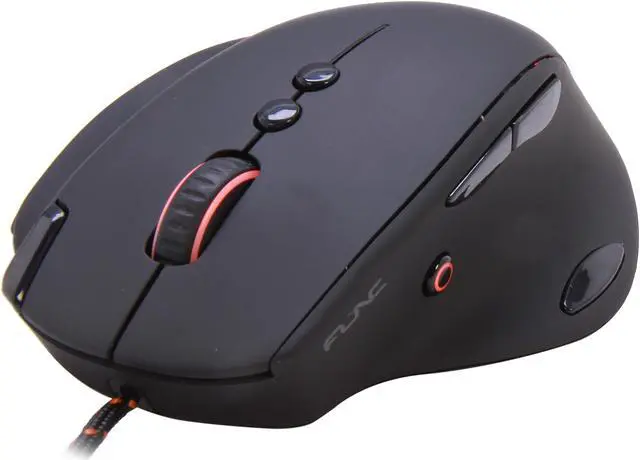
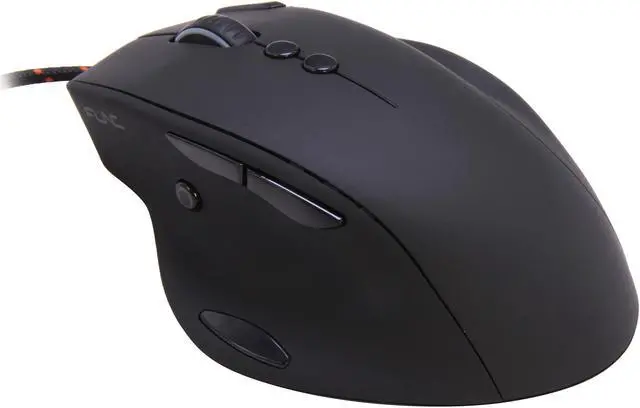
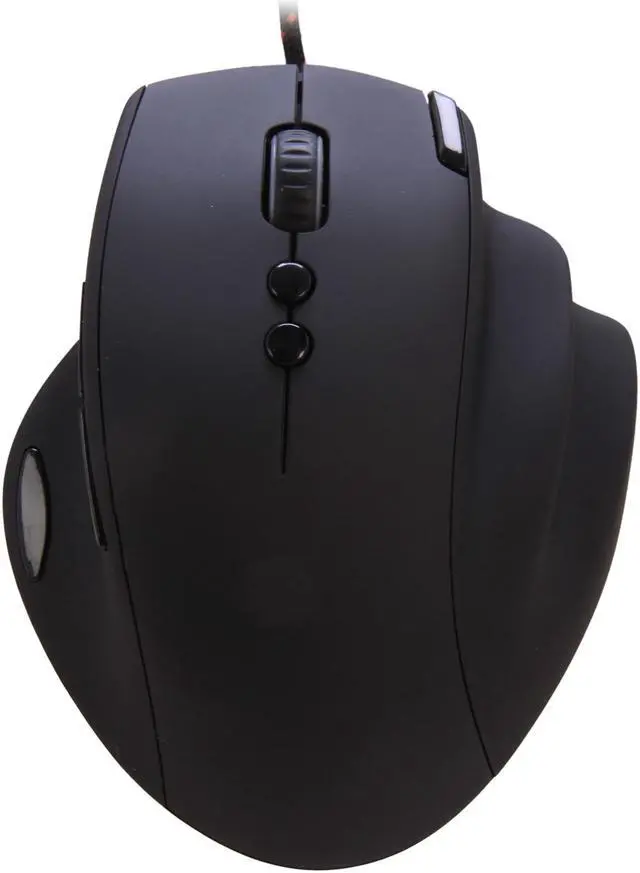
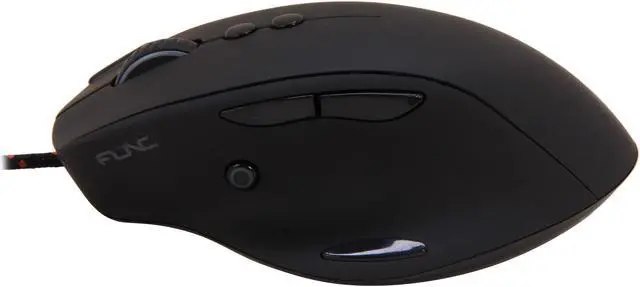
Func MS 3 Black 5040 dpi Gaming Mouse

  • 1 x Wheel
  • USB Wired
  • 5040 dpi
  • Pin It
  • Email this page
ICON Loading...


Func MS-3 stands out from the crowd with its unique, performance driven line-up of interesting features. The unprecedented possibilities of customization and extensive macro settings allow it to fit any game style. The ergonomic design is the result of many development hours and studies of the human hand in order to give you the solid grip that never takes your eyes of the screen. All buttons are carefully been placed to minimize the reaction time.

  • newegg Ergonomically designed Grip Intelligence The MS-3 is ergonomically designed to minimize hand strain and stress in order to allow you to keep your eyes focused on the screen and not on your grip.
  • newegg Built to last with only the best components available This mouse is built to last with only high-end components.
  • newegg Customizable LED-light system with profile indication Apply any of the 16.8 million colors individually or simply turn the LEDs off. The LED system can be used as a profile indicator or simply to match up your mouse with other peripherals on your desk.
  • newegg Unique T+4 thumbzone button placement for more accurate gameplay When you find yourself in a critical play movement, the importance of easily accessible buttons and an optimized Thumbzone is crucial to avoid miss-clicks.
  • newegg Advanced macro editor records up to 20 actions live The macro editor handles real time recordings and is able to save up to 10 commands in one macro and a total of 60 macros, and is reachable from any profile.

Learn more about the fUnc FUNC-MS-3-1ST

Model

Brand
FUNC
Model
FUNC-MS-3-1ST
Type
Wired

Spec

Interface
USB
Scrolling Capability
1 x Wheel
Color
Black
Maximum dpi
5040 dpi

OS / System Requirement

Operating System Supported
Windows 2000 / XP / Vista / 7
System Requirement
Available USB port
10MB free space on hard drive

Features

Features
Keep your comfy grip; allows you to keep focused on the screen

Optimal "in-range" button placements for more accurate gameplay

Switch instantly to a another dpi holding down the Instant aim button

Carry your settings with you thanks to onboard memory, storing up to 3 profiles

Advanced macro editor records up to 20 actions live

Adjust your mouse exactly to your gameplay style

Customizable LED-light system with profile indication

Built to last with only the best components available

Plug n play, no need for installations

Technical Specifications:
MCU/Processor: WT6513
Switches: OMRON
Sensor: Avago UGS 9500
Memory: Onboard, 16KB
Resolution: 90-5040DPI
Frames per second: 12 000
Tracking speed: 5.1m/sec (150ips)
Max Acceleration: 30g
Image processing: 10.6 megapixels/sec
Report rate: Adjustable, up to 1000Hz
Lift-off distance: Adjustable
Upgradable firmware: Yes
Connection: USB. Goldplated

Packaging

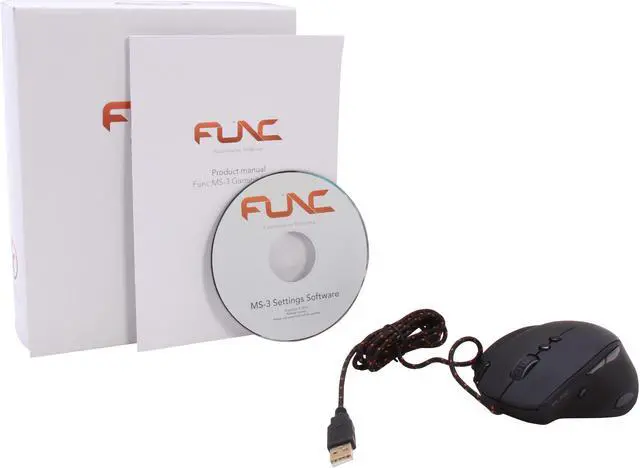
Package Contents
Func MS-3 Gaming Mouse
Settings Software CD
Quick installation guide

Quick Info

Warranty

  • Limited Warranty period (parts): 2 years
  • Limited Warranty period (labor): 2 years


Customer Reviews of the fUnc FUNC-MS-3-1ST

Do you own this product? Write a Review

Filter Results

Go
  • N/A
  • 5/21/2013 9:59:36 AM
  • Tech Level: Somewhat High
  • Ownership: 1 day to 1 week
  • Verified Owner

5 out of 5 eggsBuy This!!!

Pros: This mouse is incredibly ergonomic and comfortable to use. I'm a huge PC gamer and this mouse has been absolutely the best mouse I have ever used. The grooves for the ring and pinky fingers are great. I never have to worry about my pinky dragging on the mouse pad and cramping up. This was one of my most crucial factors in determining which mouse to buy. If you have large or wide hands, you will not regret purchasing this mouse. I've tried dozens of the best, and this one stands tall above the rest and I will be watching FUNC very closely in the months and years to come.

Cons: None to report as of yet. Will update if I find any.

Other Thoughts: BUY NOW!!

Did you find this review helpful? Yes No

  • N/A
  • 5/18/2013 10:57:13 AM
  • Tech Level: High
  • Ownership: 1 day to 1 week
  • Verified Owner

4 out of 5 eggsGreat mouse

Pros: Love this mouse so far. I have large hands and this mouse is the most comfortable mouse I have ever used.

Plenty of buttons and they all have a nice clicky press to them.

Overall pretty solid build quality for this mouse.

Cons: The only reason I docked an egg is because the drivers/software appear to be buggy on windows 8. The mouse was working fine when I plugged it in, but when I installed the Func software my computer would no longer detect the mouse on any usb port I plugged it into.

I uninstalled the software and it works fine now. Not really a deal-breaker, I rarely use the software for mice anyway but it was annoying.

Other Thoughts: Great mouse, just beware if you are running windows 8 that you may not be able to use the software to make macros/control the mouse LED.

Did you find this review helpful? Yes No

  • TheAntiMartyr
  • 4/26/2013 11:23:43 PM
  • Tech Level: Somewhat High
  • Ownership: 1 day to 1 week

5 out of 5 eggsErgolicious!

Pros: Size. Finger placement. Button placement. Feel. Easy glide. Scroll wheel. 10 buttons. Software is excellent. Who is FUNC and why am I just now experiencing this awesome mouse? This is the most comfortable mouse I've ever owned. I'm 6'4" and have large, palm a basketball off the dribble hands. I replaced my Razer Death Adder with this mouse. I bought it at my local mom and pop PC shop. It was a demo that the rep had left for them to try out. They could see how excited I was once I got my hand on it and they were nice enough to sell me the demo. I got so tired of my hand hurting after hours of play with my Death Adder. I used a finger tip grip on the Death Adder out of necessity. With the FUNC, I can put my whole hand on this thing! No fingers dragging the mouse pad! No more scrunched up hand! The tracking on this mouse is smooth and accurate. The software is a breeze to use and EVERY button on the mouse is fully customizable! No more DPI or profile buttons that cannot be user assigned! If you are looking for a comfortable palm grip mouse with easy to access, fully customizable buttons...this is the one.

Cons: None. Pay no attention to the claw grip people who give this mouse a two egg review. They should not subtract eggs due to their inability to visually recognize this as a palm grip mouse. I mean, c'mon. Really? ITS SHAPED LIKE A HAND!

Other Thoughts: If your are like me and have struggled for years to find a mouse that is comfortable for extended use gaming sessions...you owe it to yourself to give the FUNC a try!

Did you find this review helpful? Yes No

  • PoLaRiS*
  • 4/25/2013 7:13:11 PM
  • Tech Level: Average
  • Ownership: 1 day to 1 week
  • Verified Owner

5 out of 5 eggsAwesome Product w/ tolerable flaws.

Pros: - Great feel & Fluid Motion
- Easy to use Software
- Great Button Placements
- Button Customization

Every button can be customized to a set of media functions, Windows commands, or a button on your keyboard. I've never encountered a mouse that will allow you to change every button on it, even the quick +/- DPI. Which makes it amazing for both FPS/MMO Play. I don't have calculator on the side of my mouse when trying to play an FPS & there is no confusion of buttons based on their good button placement.

Cons: - Weights for a little more customization.
- DPI settings don't change colors to your current theme
- Bottom Thumb button requires a lot of force to use. May just need to work it in order to make it easier.

Other Thoughts: I am a big peripheral fan, Mice I've recently owned are Logitech G500, Logitech G9x, & Corsair M60. I'm a fan of Func now & will keep an eye on any future products they release.

Did you find this review helpful? Yes No

  • Mike B
  • 4/17/2013 10:10:59 PM
  • Tech Level: High
  • Ownership: 1 day to 1 week
  • Verified Owner

5 out of 5 eggsIn keeping with fUnc tradition...

Pros: Very fluid movement on my 10-year old fUnc Archetype mousepad. Yeah, the pad is the oldest component on my desk and it will last another ten years or longerfor sure. The MS 3 is lighter than my G9 and my MS gaming mouse, but it is so smooooooothe. For once my pinkie doesn't drag on the mousepad. It feels strange to have it off the surface. I love the aim button. This mouse certainly fits the bill. Well-made, well-endowed, well done, fUnc. Again.

Cons: A weight option would be nice, but why quibble when the quality is as good as this.

Did you find this review helpful? Yes No

  • mikeyp73game
  • 4/3/2013 3:05:59 PM
  • Tech Level: Somewhat High
  • Ownership: 1 week to 1 month
  • Verified Owner

1 out of 5 eggsGreat mouse (when it worked)

Pros: Very comfortable. Easy to use software. Responsive and accommodating for extended play use.

Cons: Terrible customer service!!!

Other Thoughts: I loved this mouse for about a month. Then it developed a short in the cord so it stopped working. I contacted support and they responded with the obligatory "make sure it's plugged in" tier 1 type of automated response. Once I responded with confirmation that I had tried these steps the following day I was then asked for my date of purchase, reseller name, and what country it was purchased in.

That was now EIGHT days ago after providing them with my information. I have heard nothing from them since that time and am still awaiting contact with a resolution. I have even since then opened 2 additional support tickets that have also gone unacknowledged. My product is registered and as I think anyone can understand, very upset at the lack of communication. How is it okay to treat customers like this.

I've never written a review before and i think it is sad that it has to be a negative one.

1 out of 1 people found this review helpful. Did you? Yes No

  • jro
  • 3/30/2013 10:54:03 AM
  • Tech Level: Somewhat High
  • Ownership: 1 week to 1 month
  • Verified Owner

4 out of 5 eggsalmost perfect

Pros: -awesome build quality
-comfortable
-love the sniper button
-great software* (see negatives)
-grip options/hand placement not as limited as expected
-great button placement

i was really worried that the shape of this mouse would dictate only 1 form of hand placement. i found that to totally not be true. i use a semi-claw grip with this mouse; the grooves for the ring and pinky finger make it especially easy to pick this mouse up.

i currently own the steelseries sensai, rat 7, rat 9, corsair m60, corsair m90, and the razer imperator. the func is by far the best. but it's not just the best because of it's design, it's the software that really separates it from all the others.

i've never really had much of an issue with the feel or button placement with any mice. it always seems that it's the software that makes or breaks a mouse. how a mouse feels is very subjective. i'd say the steelseries with it's ambidextrous design was most difficult to get used to, i was constantly hitting the buttons on the right side of the mouse. also on BOTH rat mice, the thumb scroll wheel stopped working after about a month. the corsair mice were very comfortable, as was the razer. but every single mouse had a frustrating software experience. whether it was overly complex, or too much of a resource hog, i grew frustrated time and time again with the software on each mouse i purchased.

surprisingly, the func has the most simple software out of all the other options. it is by far the most stable and easy to use. it also barely uses any resources. it also allows you to map windows commands (windows button - alt - tab for instance, the rat software also allows for this). the steelseries software wouldn't allow the mapping of windows commands because the command would be launched and the mapping wouldn't register. the other issue i had with the steelseries engine, was that it was a resource hog. while mapping can be saved to the mouse and the software not running, i had issues with certain games registering the mouse commands. the corsair software was just confusing in general, while the rat software was pretty good. razer's software is. . . . well it's just a bit overkill.

don't be fooled by the very simplistic look of the func's software; it does exactly what it's supposed to do, and it does it better than any other mouse software i've used. there is ONE negative though about it....

Cons: -weight distribution
-software sometimes unstable

so this mouse is a bit heavy, which i normally like. however, the weight is not distributed evenly, and it is quite a bit more back-heavy. so when lifting the mouse, the mouse has a sort of airplane-taking-off form, and sometimes this causes me to lose my grip.

like all the software i've used for every mouse, the func's software too can be a bit unstable. it's not very often, but i've had a few times where the mouse clicks don't register and i'm unable to quit/relaunch the software and have to restart my computer. this can be a bit frustrating but definitely not a deal-breaker. it's still the best most stable mouse software i've used.

Other Thoughts: i was really worried that the shape of this mouse would be difficult to handle and maneuver. but the added finger grooves make this mouse one of the most maneuverable mice i've ever used. the build quality is top notch, and the software is a breeze to use. if func can fix the stability of the software and maybe make the weight distribution a bit more even, i'd say they would have the perfect mouse. as is, it's still the best mouse i've ever used.

Did you find this review helpful? Yes No

  • Gebs
  • 3/23/2013 1:08:14 PM
  • Tech Level: High
  • Ownership: 1 week to 1 month
  • Verified Owner

5 out of 5 eggsNear Perfect Mouse

Pros: This is easily the most comfortable mouse I've ever used. The rubberized grip all over, the button placement, actuation force needed for the buttons all feel like they were designed specifically for me. I'm average size (6 ft, 175 lbs) and my hands fit this mouse perfectly.

Cons: The bottom-most button on the right side requires a bit too much force and shouldn't be used for anything requiring precision as you'll probably end up moving the mouse a little as you push it. You also can't change the colors of the DPI setting LED, it's always orange.

Other Thoughts: I went to this mouse from a Razer Diamondback 3G and the difference is night and day. While the Razer wasn't bad by any means, the MS-3 just blows it out of the water on every level. I use this with an XTRAC PADS RIPPER mouse pad and couldn't be happier.

Did you find this review helpful? Yes No

  • Mythblaze
  • 3/20/2013 7:19:58 AM
  • Tech Level: High
  • Ownership: 1 day to 1 week
  • Verified Owner

3 out of 5 eggsGreat product, however...

Pros: The mouse is built very well. Very comfortable for palm user. Software has worked as it should for me.

Cons: The only issue with my MS-3 is that the button labeled 5 in the manual has started to stick and become non responsive. This started on my third day with the mouse. Sending it back for another.

Other Thoughts: It is a headache having to rma a new product.

Did you find this review helpful? Yes No

  • N/A
  • 3/18/2013 7:22:47 AM
  • Tech Level: Somewhat High
  • Ownership: 1 week to 1 month
  • Verified Owner

5 out of 5 eggsAlmost Perfect (for me)

Pros: -Ergonomics: enormously comfortable for a palm grip style, and surprisingly wonderful for a hybrid grip.
-Button Quality: solid switches and (almost) every button actuates without needing an awkward amount of force
-Button Placement: The extra button on the right is in a perfect position and sized well, as are the thumb buttons. The precision aim button in particular is perfect placed as to require little effort and thus minimal interference with performance
-Precision Aim: better positioned and actuated more easily than similar buttons on either R.A.T. or Corsair mice.
-Pads: 4, spaced well, slide smooth as silk
-Weight: surprisingly light for a larger ergonomic mouse.
-Texture: rubberized material feels great all around. comfy
-Software: almost everything you could want. nice macro support.
-DPI: very high if you need it
-Decent extended warranty if you register

Cons: -extra thumb button requires more force to actuate than I would prefer
-no frictionless/free-scroll mouse wheel option
-DPI indicator lights can't change color

Other Thoughts: With the exceptions above, this is exactly how I would design a custom mouse for myself. Beautiful. I'll update this review if I ever start having issues.

Did you find this review helpful? Yes No

ICON Loading...
Are you an E-Blast Insider? Subscribe Newegg e-Blast

Buzz

Great mouse (when it worked)

1 out of 5 eggs
Terrible customer service!!!
— mikeyp73game 4/3/2013

Just got it, feels great so far!

5 out of 5 eggs
Big - I bought this mouse because I'm tired of small mice. I previously had the MadCatz Cyborg R.A.T. 7 and Zowie EC2 ...
— Nick 2/15/2013


PayPal
Shop without retyping payment details. Secure shopping made faster.
Check out with PayPal.

Financing


Home
Home > 
Computer Hardware > 
Input Devices > 
Mice > 
fUnc > 
Item#: N82E16826247001
LOADING... LOADING...
Shop by Region: United States | Canada | China
Follow us:   RSS Feeds Youtube
VeriSign Reliability Seal1This site protected by Trustwave's Trusted Commerce program Inc500
Policy & Agreement | Privacy Policy  © 2000-2013 Newegg Inc.  All rights reserved.
If the Adobe Reader does not appear when you click on a link for a PDF file, you can download Adobe Reader from the Adobe web site. nassau